
Opt Out Guides
Information.com Opt Out Guide
Before You Opt Out of Information.com, Check Your Exposure
Privacy Writer
A. J. MercerAva J. Mercer
Updated
Read
5 min
Before You Opt Out of Information.com, Check Your Exposure
Information.com is a people search site that can make a person easier to find online. That can raise privacy concerns because a listing may show names, addresses, and phone numbers. The service compiles details from public records, commercial sources, and other publicly available materials in a database, then displays personal information. For some people, that can increase doxxing, harassment, or stalking concerns.
How to opt out of Information.com
Open the official page, enter your email, verify the link, find the correct listing, and finish the form. This path is the main way to suppress a listing, and the site says updates usually take 5–7 days. The opt-out process is meant to help remove your info from public search results.
Checklist:
- Open the privacy page
- Search for your record
- Submit the opt-out form
- Complete the CAPTCHA
- Save the confirmation message
- Set a reminder to re-opt out
Find out if your private details were exposed
Information.com – Quick Facts
| Parameter | Value |
| Domain | information.com |
| Data Types | contacts, addresses, phone numbers, social links, court items, and identity clues |
| Opt-out Methods | web form, support form, or mail |
| Identity Verification | confirmation link by message |
| Typical Response Time | 5–7 days |
| Re-listing Risk | medium |
Information.com is a data broker and free people-finder directory that aggregates listings from public records and commercial sources. Data on Information.com is compiled into a searchable listing or report, which can make details easier to find in Google and other search results. Some entries may also reflect marketing source updates.
Common data you may find:
- Names and known aliases
- Email addresses
- Current and past locations
- Relatives or household links
- Social media links
- Court, lien, or lawsuit entries
- Criminal records or arrest details
- Marital status or marriage details
- Other contact details
Step-by-Step Guide
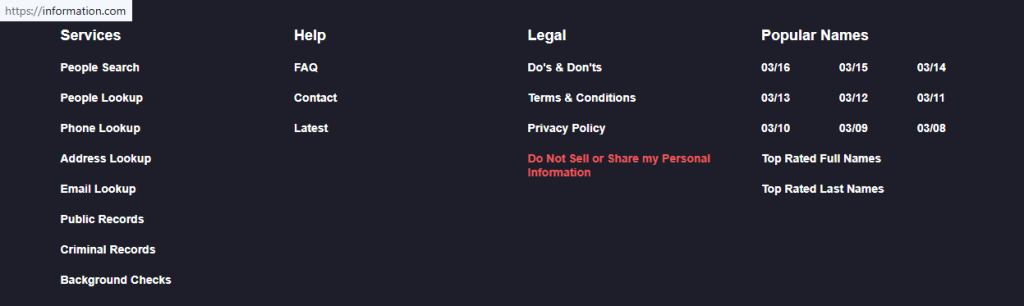
Open the privacy page
Open the official page and use the Do Not Sell or Share My Personal Information footer link. That area starts the Information.com opt-out flow. If you save images for your file, blur anything sensitive. Tip: Load the site in another browser if a button fails, and keep notes in order to remove the right listing first.
Search for your record
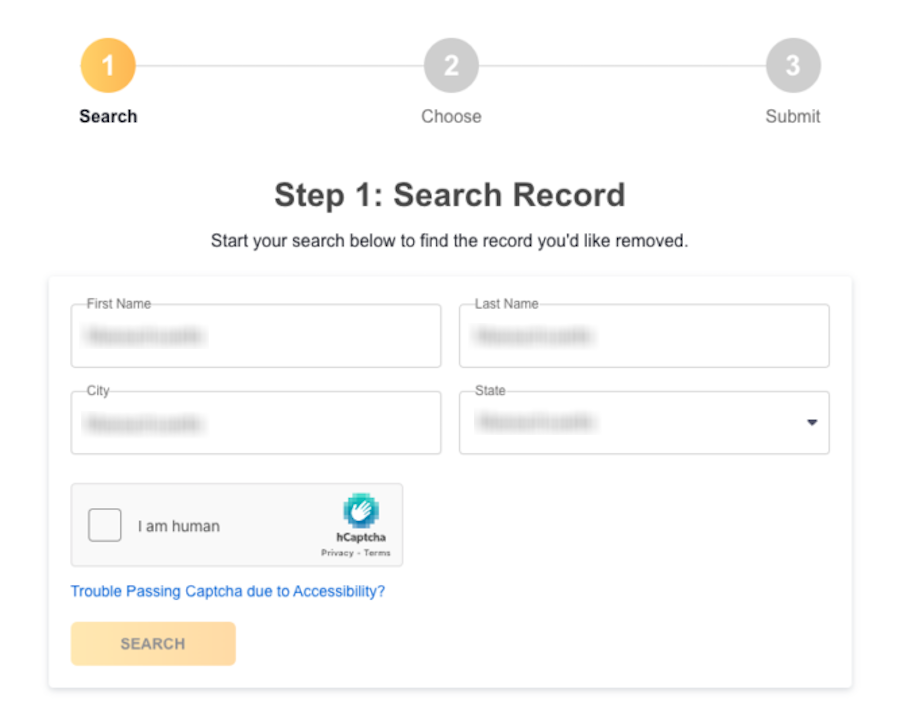
After verification, use the search fields to locate the correct record. Check the name, city, and matching details carefully so you pick the right profile. Tip: If nothing appears, try an older city or a shorter version of the name before you move on, and review each match for accuracy.
Submit your request
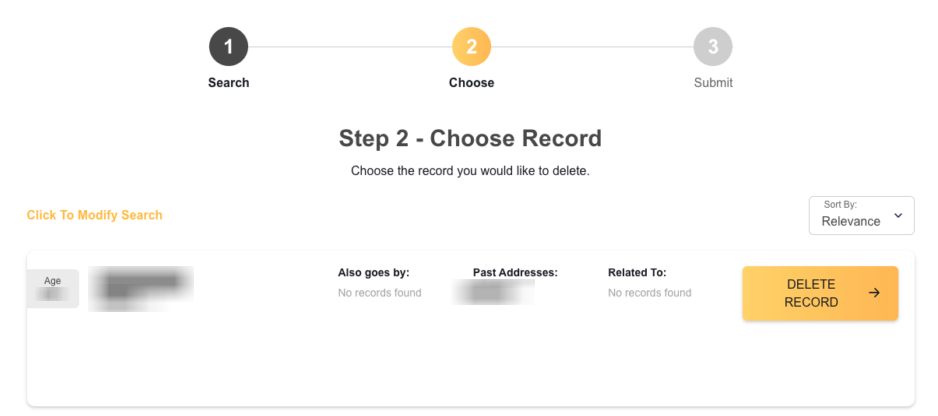
Choose the matching listing and use the on-screen control once. A CAPTCHA may appear before the page accepts it. Tip: Review the details before you continue so you do not target the wrong entry. Use the button that lets you remove your profile from public view.
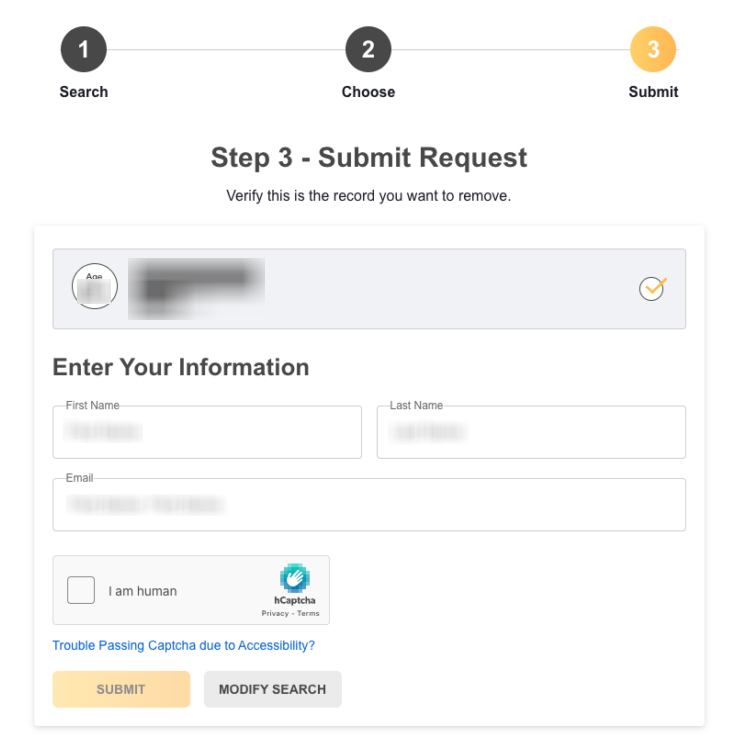
Confirm deletion
Open the confirmation message. Click the link to finish the process. Save that message so you can track timing later. Tip: Check Spam or Promotions first, then contact support. Send the message via the online form only once.
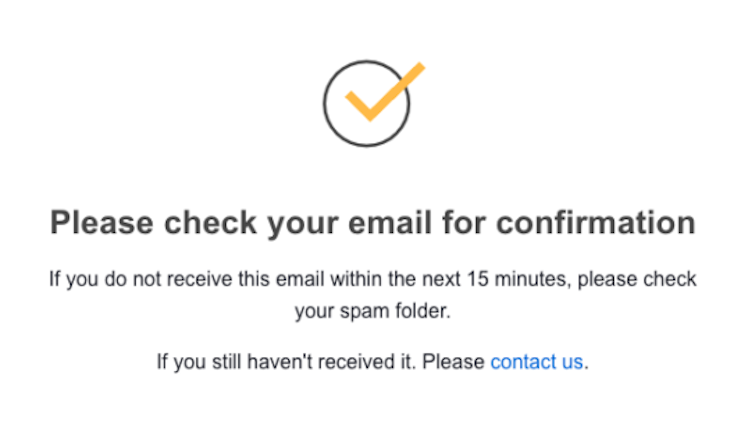
Track confirmation & timeline
Most updates appear within 5–7 days after confirmation. Watch for an on-page notice or an email update, then check the site again. Tip: If the listing still appears after a week, keep the notice and set a reminder for a fresh review later, or use an information removal service if you prefer outside help.
Timelines, Verification & What to Expect
Most changes are posted within 5–7 days after confirmation. A notice may arrive by message or appear on the final screen. If nothing changes after 7 days, contact Information.com directly. Use the support page or call 1-800-915-0696. Keep the confirmation for your file and note the status. Consider automating follow-up checks with a calendar reminder every few months.
Edge Cases & Troubleshooting
- No access to the original inbox or phone: use a current inbox if the form allows it. You can also leave a message via support and explain the issue.
- “Record not found”: try alternate spellings, older locations, or nearby cities to locate the same entry.
- CAPTCHA or submission errors: refresh the page, clear blockers, or try another browser.
- Verification code not arriving: check Spam and wait a few minutes. Then, send an email once.
- Form rejects the action by region (EU/UK/CA): use the support form and ask which route applies.
- Account deletion vs. listing suppression confusion: how to cancel Information.com is separate from public listing suppression.
- Re-submitting after a failed attempt: wait briefly, then retry once.
- For sites like Information.com, compare opt-out pages on similar services and plan data broker removal one site at a time.
Will my data reappear?
A listing may return when data brokers like Information.com and its partners or resellers update the same details. To protect your identity and reduce exposure, keep confirmation emails and set a reminder every 3–6 months. That makes it easier to act fast, preserve proof, and recheck related broker pages if the same listing comes back. Regular follow-up can also help safeguard against repeat listing issues.
Manual vs Assisted Removal
Manual:
Pros
- direct control over each step;
- useful for one listing;
- easy to keep your own notes.
Cons
- more time per site;
- repeat checks are manual;
- tracking can be harder across many listings.
Assisted:
Pros
- faster across many broker pages;
- helpful for tracking and recurring checks;
- good for wider coverage.
Cons
- usually costs money;
- some steps still need your approval;
- coverage varies by provider.
We remove your data for you - faster, verified, trackable.
Discover Which Sites Share Your Private Details—Instantly and Free.
FAQ
Information.com is a data broker platform that publishes consumer listings and reports.
Open the official page, enter your email, verify the link, find the matching listing, and fill out the form.
Look on the main website for the opt-out link.
The site says most updates appear in about 5–7 days.
A page can return when data brokers or reseller feeds add the same details again.
Try older locations, alternate spellings, or nearby cities, then search again.
No. Public listing suppression is separate from having a paid subscription.
Account deletion affects your login, while listing suppression affects the public entry.
Anyone with a failed form, a missing verification message, or a repeat issue should use support.
Check after one week, then every 3–6 months in case the listing returns.
It helps show the action is legitimate and prevents malicious changes.
Use each official tool separately, because one form will not cover every broker page.

Posted by Ava J. Mercer
More People Search Removal Guides
- 411.com Opt Out Guide
- Absolute People Search Opt Out Guide
- Advanced People Search Opt Out Guide
- AnyWho Opt Out Guide
- BeenVerified Opt Out Guide
- CheckPeople Opt Out Guide
- CheckSecrets Opt Out Guide
- CocoFinder Opt Out Guide
- ContactOut Opt Out Guide
- DOBsearch Opt Out Guide
- FamilyTreeNow Opt Out Guide
- FastBackgroundCheck Opt Out Guide
- Find People Fast Opt Out Guide
- FindPeopleSearch Opt Out Guide
- FreePeopleDirectory: Opt Out Guide
- FreePeopleSearch Opt Out Guide
- GladIKnow Opt Out Guide
- GoLookUp Opt Out Guide
- IDCrawl Opt Out Guide
- Information.com Opt Out Guide
- Inforver Opt Out Guide
- Instant Checkmate Opt Out Guide
- InstantPeopleFinder Opt Out Guide
- Kiwi Searches Opt Out Guide
- MyLife Opt Out Guide
- Nuwber Opt Out Guide
- OfficialUSA Opt Out Guide
- PeekYou Opt Out Guide
- PeopleByName Opt Out Guide
- PeopleFinder Opt Out Guide
- PeopleFinders Opt Out Guide
- PeopleLooker Opt Out Guide
- PeopleLookup Opt Out Guide
- PeopleSearch Opt Out Guide
- PeopleSearchNow Opt Out Guide
- PeopleSmart Opt Out Guide
- PeopleWhiz Opt Out Guide
- PersonSearchers Opt Out Guide
- Persopo Opt Out Guide
- PrivateEye Opt Out Guide
- PrivateRecords Opt Out Guide
- Public Data Check Opt Out Guide
- Public Data USA Opt Out Guide
- Public Records 360 Opt Out Guide
- PublicRecordsNow Opt Out Guide
- Quick People Trace Opt Out Guide
- Radaris Opt Out Guide
- RealPeopleSearch Opt Out Guide
- SearchPeopleFREE Opt Out Guide
- SearchUSAPeople Opt Out Guide
- Semcasting Opt Out Guide
- Social Catfish Opt Out Guide
- Spokeo Opt Out Guide
- ThatsThem Opt Out Guide
- TruePeopleSearch Opt Out Guide
- TruthFinder Opt Out Guide
- UnMask Opt Out Guide
- US Search Opt Out Guide
- USA People Search Opt Out Guide
- USATrace Opt Out Guide
- Veripages Opt Out Guide
- Whitepages Opt Out Guide
- Wyty Opt Out Guide
- ZabaSearch Opt Out Guide


