
Opt Out Guides
Wyty Opt Out Guide
Before You Opt Out of Wyty, Check Your Exposure
Privacy Writer
A. J. MercerAva J. Mercer
Updated
Read
5 min
Before You Opt Out of Wyty, Check Your Exposure
This website can reveal your name, address, and other contact information. It may increase exposure and create online privacy concerns, especially when personal information is bought and sold or reused for marketing. Wyty generally compiles data from public and commercial sources and displays them in searchable results. Taking a few minutes to opt out and remove your info helps protect your digital footprint and makes your sensitive information less visible.
How to opt out of Wyty
Use the Wyty opt form to opt out of wyty.com and remove your information from wyty.com. Open the official form on the website, enter the identifiers shown, then submit and confirm via a code or link. It usually takes about 7–14 days after the form is received.
Checklist:
- Open the official opt-out form
- Enter identifiers (name/email/phone)
- Complete verification
- Confirm via code/link
- Save the confirmation email
- Set a reminder to re-opt-out
Find out if your private details were exposed
Wyty – Quick Facts
| Parameter | Value |
| Domain | wyty.com |
| Data Types | personal information, contact data, and possible social identifiers |
| Opt-out Methods | web form/email/phone |
| Identity Verification | on-page code and confirmation email |
| Typical Response Time | about 7–14 days |
| Re-listing Risk | medium |
Wyty is a data broker and a people search site that compiles information gathered from selected public records and other sources and makes it searchable. Some pages describe it as a leading people search solution.
Common data you may find:
- Names and known aliases
- Current and past addresses
- Emails
- Phone or other identifiers
- Relatives or household links
- Social media profiles
- City and state location signals
- Possible property or court references
- Search result snippets with extra private data
Step-by-Step Guide
Open the official opt-out form
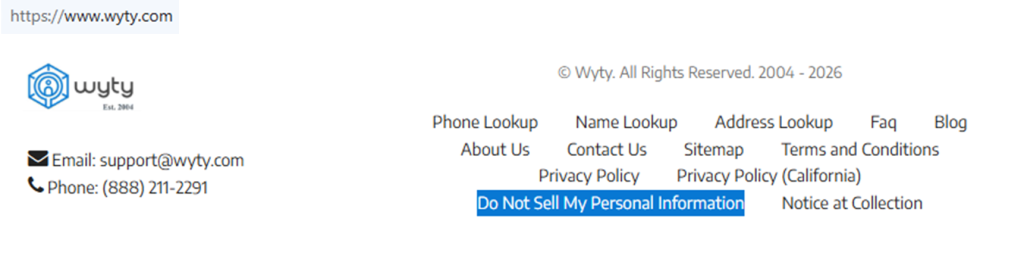
Go to the website and scroll to the bottom of the page to see “Do Not Sell My Personal Information.” Click it to open the form page. Confirm you’re on the correct site. Check the URL bar for wyty.com and a lock icon. If you take screenshots, redact names and any personal information first. Tip: If the page stalls, try another browser, disable strict blockers for this site, or use a private window.
Submit your identifiers (name/email/phone + CAPTCHA)
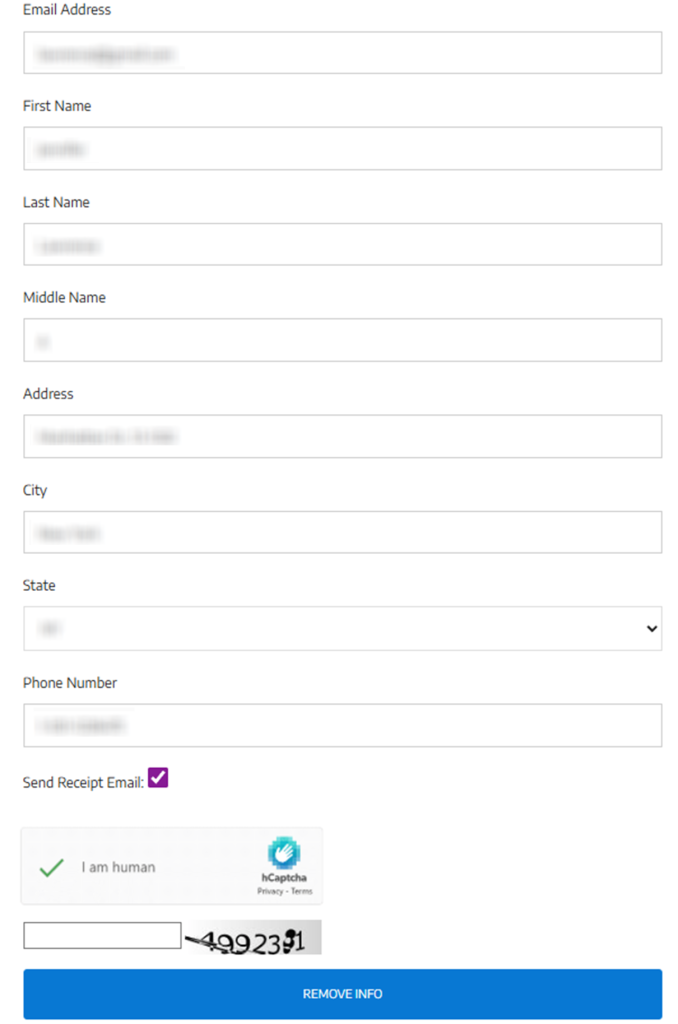
Fill in the name fields and any location fields that match your data. Use an email address you can access for confirmation. Choose the receipt option if it appears, so you have proof later. Complete the verification challenge and the on-screen code step, then click the final button labeled “Remove Info.” Before you save any screenshot, blur every field that contains personal information and any unique codes. Tip: Small spelling differences can block a match and delay deletion.
Verify via code or link (email/SMS)
Watch for a confirmation email or an on-page follow-up step after submission. Open the message and confirm by entering the code or opening the confirmation URL shown. If nothing arrives, check Spam/Promotions and search for “receipt.” If confirmation is by text message, verify from the same device you used. For screenshots, hide headers, timestamps, and any personal information. Tip: Wait a few minutes, refresh once, and avoid repeated rapid submissions.

Confirm deletion / Do-Not-Sell request
After verification, save the confirmation email or the success message and note the date and URL. Keep this proof in case you need to remove your personal information again later or to show what you already entered. This same flow can also help you opt out of data sale/sharing as described on the form page. Add a short note about what you entered so you can repeat it. Tip: Keep one folder for confirmations from each data broker and avoid forwarding them broadly for privacy.
Track confirmation & timeline
The form page says the data should be removed in about 7–14 days after the form is received. Keep the receipt, and re-check the record after the window using the same search method you used originally. If it still appears, use the same form once more. Alternatively, use the support contact data on the site with the URL and your confirmation date. Tip: Set a calendar reminder to re-check this site every few months so you can take control of your personal data quickly if it returns.
Timelines, Verification & What to Expect
You’ll usually see an on-page confirmation right after you submit. You may also receive a receipt email if you selected that option. The form page notes that data is removed from the directory in about 7–14 days from receipt of your submission, so re-check after that window. Verification can include an on-page code plus an email step. Keep access to the inbox you used and save the receipt. If you see no confirmation, wait a few minutes. Then, retry once and check Spam/Promotions. If nothing changes after 14 days, use the support contact method shown on the form page. Include the URL and your confirmation date.
Edge Cases & Troubleshooting
- No access to the original email/phone: use the contact options on the form page and ask for an alternate verification path.
- “Record not found:” try another spelling, add a city/state, or search again later if the database is refreshed.
- Submission errors: refresh, clear cache, and retry once; aggressive blockers can interfere.
- Confirmation not arriving: check Spam/Promotions, then retry once with the receipt option.
- Region blocks (EU/UK/CA): use the contact options on the site and ask what opt-out options apply.
- Account vs listing confusion: end the subscription in your account area, but use the form for data removal.
- Re-submitting after failure: change one field at a time so you can identify the issue.
- If data looks outdated: keep a redacted screenshot for support and security review.
Will my data reappear?
Data can reappear when aggregator feeds refresh, when resellers republish the same record, or when information from data broker sites is pulled into a new profile. That can bring information from Wyty back into circulation even after removal, affecting your online presence. Re-listing risk is often medium for sites like Wyty, data brokers like other people-search tools, and data broker sites like large aggregators. To reduce recurrence, keep confirmation emails, set a 3–6 month reminder, and re-submit quickly if you see the record again. Also, check related removals next, because a single source can repopulate the same profile over time.
Manual vs Assisted Removal
Manual:
Pros
- more control of your online actions, control of your online choices, and you can choose exactly what personal information to remove.
Cons
- time investment and repeated monitoring across each site.
Assisted:
Pros
- one platform can automate recurring checks, speed up verification follow-ups, and offer a dashboard across major data broker websites.
Cons
- cost, and you still need to confirm identifiers.
We remove your data for you - faster, verified, trackable.
Discover Which Sites Share Your Private Details—Instantly and Free.
FAQ
Use the official form, enter identifiers that match your data, complete verification, and confirm. Save the confirmation email and re-check after the stated window. If nothing changes, try once more and include the URL when you contact support.
The form page explains that the email is used to send a confirmation only. Use an inbox you can access so you can verify and store the receipt for follow-up. Some people use a separate inbox to reduce unwanted mail. This can also lower privacy risk if the address is shared elsewhere.
Check Spam/Promotions and search for “receipt.” If you still don’t see anything, resubmit once and keep a screenshot of the final confirmation screen (redacted). If it keeps failing, contact support with the URL.
Re-check every 3–6 months because data can be republished after updates. If the same record appears again, repeat the same steps and keep the newest confirmation.
Start with the highest-traffic listings, keep your confirmations, and work through related removals. If you prefer less manual work, an assisted option can track many data broker submissions and notify you when data returns.
It supports name and location searches and may show contact and location details. If you look for personal information you don’t want visible, use the form and keep the confirmation.
It’s in the “Do Not Sell My Personal Information” footer item and opens a page with a form on wyty.com. Complete it and confirm using the code and email step shown.
The form page states that listings are removed in approximately 7–14 days from receipt of your submission. Save the confirmation email and re-check after that window.
Open the form, enter identifiers, verify, and save the confirmation. If you see a second record later, repeat the same steps and keep both confirmations.
If you have a subscription, sign in and use your account page’s cancellation option or contact support by email/phone. This is separate from removing a public listing.
Contact support if you still see the record after 14 days, if verification fails repeatedly, or if you can’t access the inbox needed to confirm. Include the listing URL and the date you entered.

Posted by Ava J. Mercer
More People Search Removal Guides
- 411.com Opt Out Guide
- Absolute People Search Opt Out Guide
- Advanced People Search Opt Out Guide
- AnyWho Opt Out Guide
- BeenVerified Opt Out Guide
- CheckPeople Opt Out Guide
- CheckSecrets Opt Out Guide
- CocoFinder Opt Out Guide
- ContactOut Opt Out Guide
- DOBsearch Opt Out Guide
- FamilyTreeNow Opt Out Guide
- FastBackgroundCheck Opt Out Guide
- Find People Fast Opt Out Guide
- FindPeopleSearch Opt Out Guide
- FreePeopleDirectory: Opt Out Guide
- FreePeopleSearch Opt Out Guide
- GladIKnow Opt Out Guide
- GoLookUp Opt Out Guide
- IDCrawl Opt Out Guide
- Information.com Opt Out Guide
- Inforver Opt Out Guide
- Instant Checkmate Opt Out Guide
- InstantPeopleFinder Opt Out Guide
- Kiwi Searches Opt Out Guide
- MyLife Opt Out Guide
- Nuwber Opt Out Guide
- OfficialUSA Opt Out Guide
- PeekYou Opt Out Guide
- PeopleByName Opt Out Guide
- PeopleFinder Opt Out Guide
- PeopleFinders Opt Out Guide
- PeopleLooker Opt Out Guide
- PeopleLookup Opt Out Guide
- PeopleSearch Opt Out Guide
- PeopleSearchNow Opt Out Guide
- PeopleSmart Opt Out Guide
- PeopleWhiz Opt Out Guide
- PersonSearchers Opt Out Guide
- Persopo Opt Out Guide
- PrivateEye Opt Out Guide
- PrivateRecords Opt Out Guide
- Public Data Check Opt Out Guide
- Public Data USA Opt Out Guide
- Public Records 360 Opt Out Guide
- PublicRecordsNow Opt Out Guide
- Quick People Trace Opt Out Guide
- Radaris Opt Out Guide
- RealPeopleSearch Opt Out Guide
- SearchPeopleFREE Opt Out Guide
- SearchUSAPeople Opt Out Guide
- Semcasting Opt Out Guide
- Social Catfish Opt Out Guide
- Spokeo Opt Out Guide
- ThatsThem Opt Out Guide
- TruePeopleSearch Opt Out Guide
- TruthFinder Opt Out Guide
- UnMask Opt Out Guide
- US Search Opt Out Guide
- USA People Search Opt Out Guide
- USATrace Opt Out Guide
- Veripages Opt Out Guide
- Whitepages Opt Out Guide
- Wyty Opt Out Guide
- ZabaSearch Opt Out Guide


