
Opt Out Guides
US Search Opt Out Guide
Before You Opt Out of US Search, Check Your Exposure
Privacy Writer
A. J. MercerAva J. Mercer
Updated
Read
5 min
Before You Opt Out of US Search, Check Your Exposure
US Search can post personal information, such as a legal name, address, and phone number, which raises privacy risk and real exposure. The company organizes info from public records and commercial sources, then shows entries, lookup pages, and background check materials that may include publicly available information and detailed reports.
How to opt out of US Search
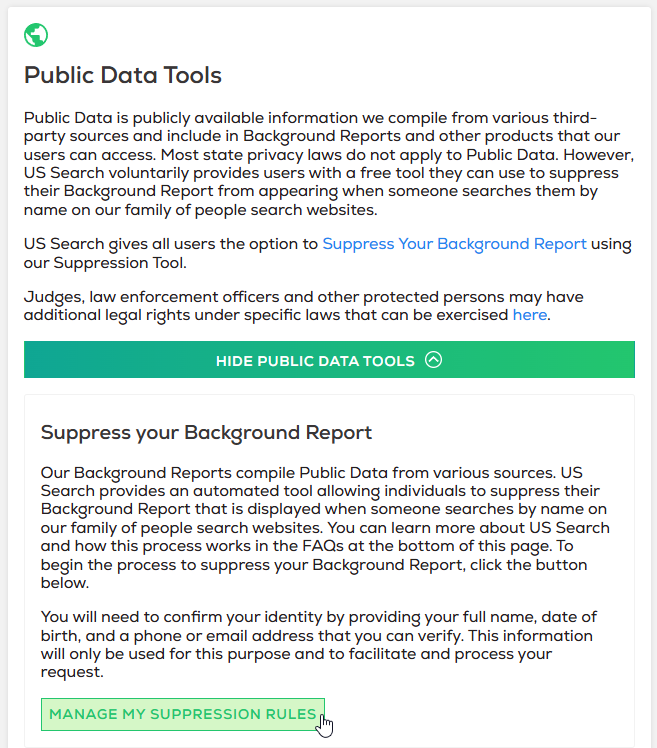
Use the official privacy page. Open the suppression center, enter your email address, and use the link sent to your inbox. Next, submit your identifiers and send the change to complete the opt-out process. The form is quick, while final removal often takes 3–10 business days.
Checklist:
- Open the privacy page
- Locate the opt-out form
- Verify your email
- Submit your identifiers
- Save the confirmation message
- Set a reminder to review later
Find out if your private details were exposed
US Search – Quick Facts
| Parameter | Value |
| Domain | ussearch.com |
| Data Types | contact details, street history, email address data, household links, and possible court records |
| Opt-out Methods | website form/email/mail |
| Identity Check | message URL and, in some cases, phone number or email match |
| Typical Response Time | 3–10 business days |
| Re-listing Risk | medium |
US Search is a people directory service in the PeopleConnect family. The tool collects user data and manages the display of background reports on affiliated sites. US Search compiles data from public records and commercial sources.
Common data you may find:
- Legal names
- Current and past addresses
- Phone numbers
- Email addresses
- Relatives and household links
- Age range or birth year
- Court records
- Criminal records
- Social profile links
- Property-related public records
Step-by-Step Guide
Open the suppression center
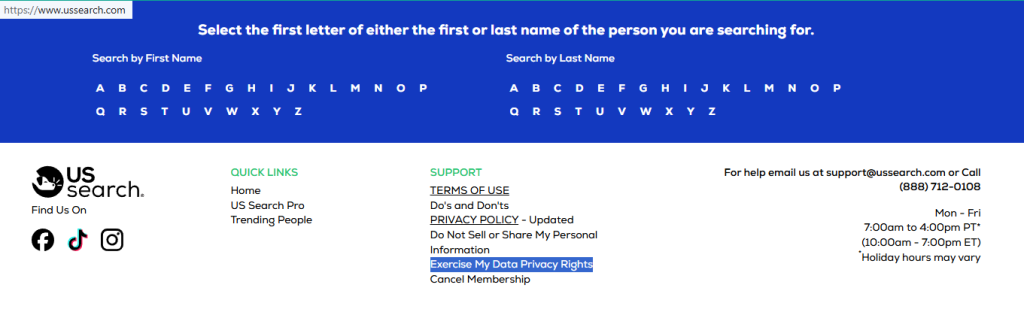
Open the website footer path and click the policy route that leads to data management (next to the Do Not Sell or Share My Personal Information button).
Verify your email
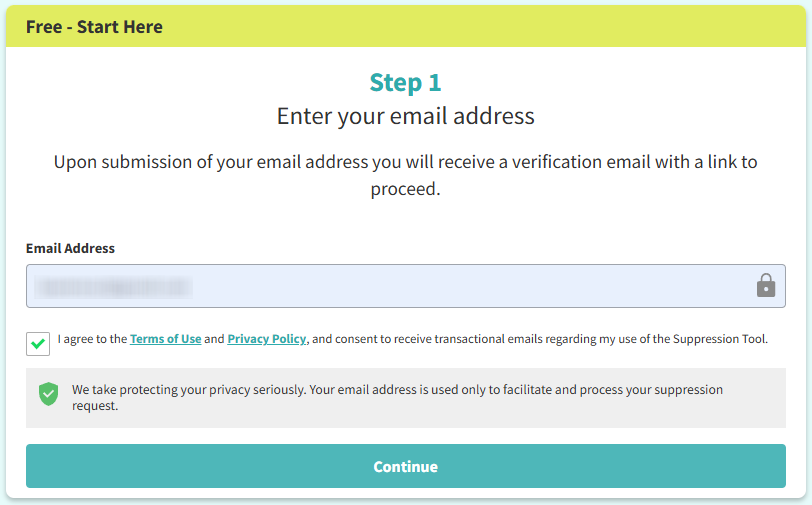
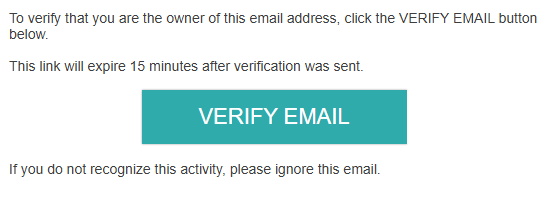
Enter your email address, check the box for the terms, and click continue. If you save a screen image, blur sensitive data first. Go to your mailbox and open the confirming message. Use the secure URL in that message to confirm access. If it does not appear, review Spam or Promotions before you send again.

Submit your identifiers
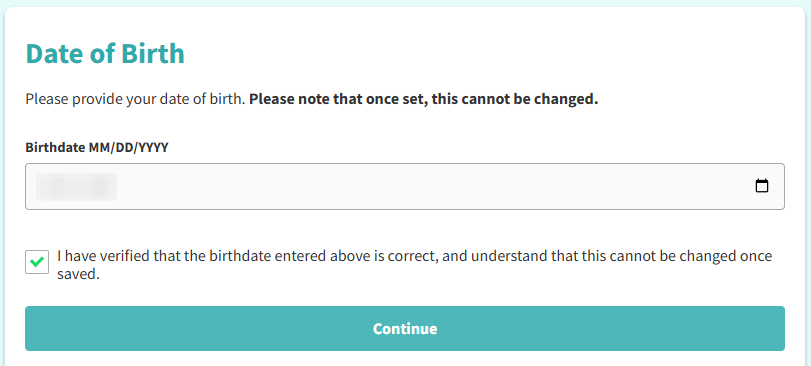
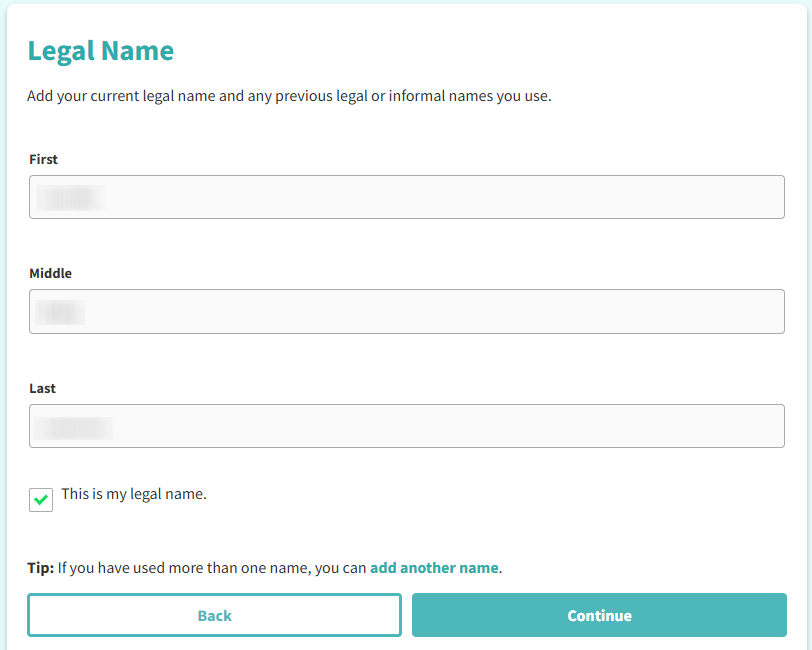
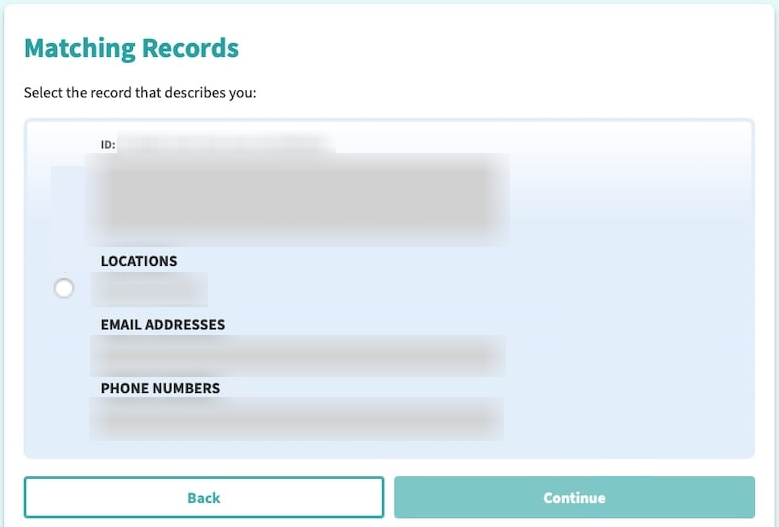
After you confirm access, enter the requested information, such as birthdate or another matching field, so the tool can find your entry. Review the search results, select the right one, and submit only the data the form needs.
Confirm deletion
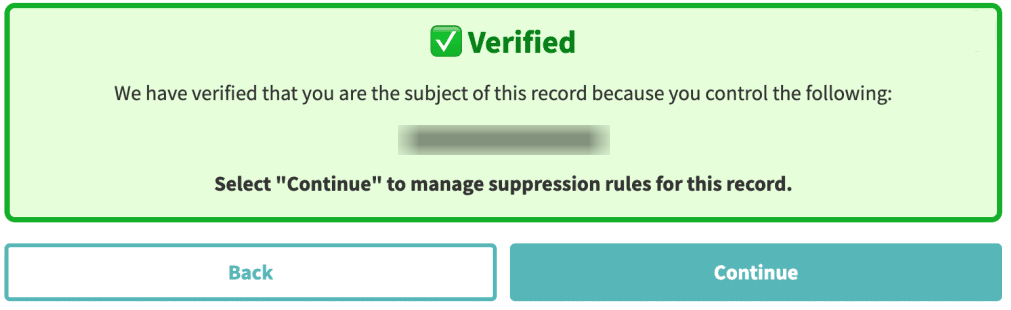
On the control screen, press Continue to save it. If you also want to remove your data tied to account use, use the privacy center deletion path because listing control and account deletion are different.
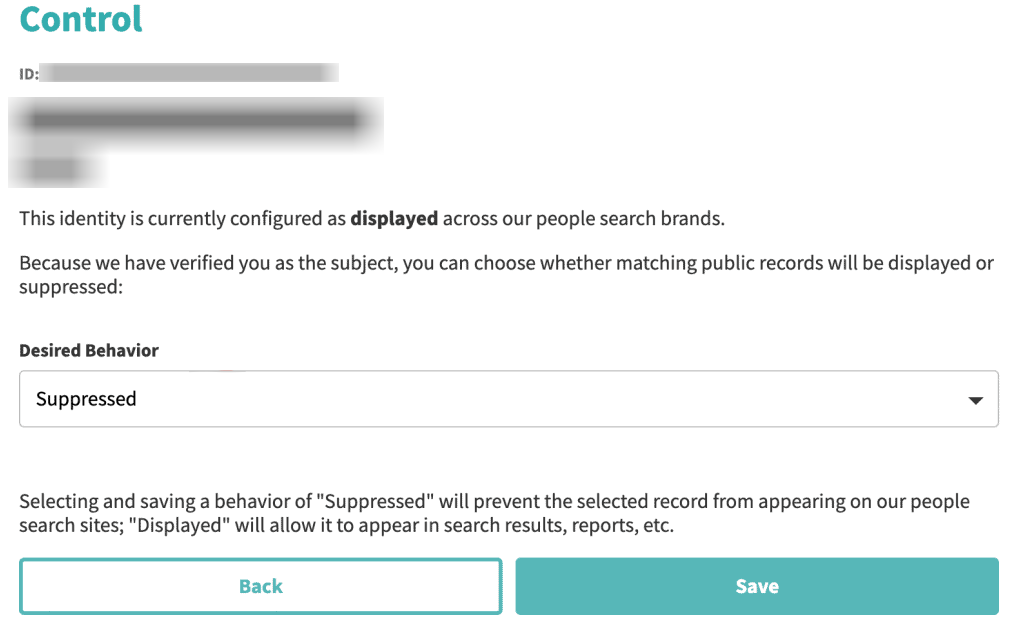
Track confirmation & timeline
After you send the form, save the on-screen note and any message for your files. Review the entry again after a few days, then review later because data broker sites may refresh from new public records and partner feeds.
Timelines, Verification & What to Expect
Most removals here take about 3–10 business days after you complete the form and finish confirming. A note may appear on the screen right away, and another message may arrive later. If nothing changes after 10 business days, use the official contact path, include the date you submit, and send one more request. Keep the message and one URL for follow-up so you can verify what happened and when.
Edge Cases & Troubleshooting
- No access to the original email/phone: use another listed email address or number if the tool offers that choice, or use the contact option and explain the mismatch.
- “Record not found”: try another street or a different identity detail, then review an affiliated listing if one appears elsewhere.
- CAPTCHA or submission errors: reload the screen, turn off blockers for the site, and send once more from a clean browser session.
- Verification code not arriving: review Spam and Promotions, then ask for a new code and verify the same email entry again.
- Form rejects the submission by region (EU/UK/CA): use the route shown for your region, or send a message if the form will not continue.
- Account deletion vs. listing removal confusion: the first controls entry display, while the second applies to account-related personal data or private data.
- Re-submitting after a failed attempt: wait for the first code window to end, then submit one more time and save the latest note.
Will my data reappear?
It can. People-search sites and other data brokers may refresh entries from public records, partner feeds, and reseller sources. That means a record you suppress today may return later as a new entry. To take control and protect your privacy, keep every confirmation message, note the date, and set a 3–6 month reminder to review again. If a listing returns, remove your data quickly and compare the new detail with your saved copy. Related removals can also help reduce repeat exposure across data broker sites.
Manual vs Assisted Removal
Manual:
Pros
- free;
- more control;
- good for one site.
Cons
- more time;
- you verify each form;
- you need to repeat reviews.
Assisted:
Pros
- faster across many data broker sites;
- one dashboard for tracking;
- recurring reviews can help.
Cons
- usually paid;
- some steps still need your verification;
- coverage varies.
We remove your data for you - faster, verified, trackable.
Discover Which Sites Share Your Private Details—Instantly and Free.
FAQ
USSearch is a lookup brand that displays available online entries. It ensures access to public records and personal details drawn from online sources.
Use the official website flow, enter your email, confirm the message URL, select the right entry, and submit the change.
Try another identity detail or a different affiliated listing. A visible entry does not always appear in the first match screen.
It usually goes to your inbox. Review Spam and Promotions, then use one new confirming attempt if nothing arrives.
Review after a few days, then every 3–6 months. That helps protect your privacy and reduce exposure if a record returns.
Sign in again, select the same entry, and press Continue once more. If it still fails, use the official contact route.
The form takes only minutes, but the listing update often takes 3–10 business days.
The person tied to the listing should usually send it and finish verification, or an authorized agent, where the law allows.
Listing control changes entry display. Canceling your subscription is a separate privacy action for account or form-related data.
It helps match the form to the correct record and lowers the chance of changing someone else’s entry by mistake.
Use the official contact path after the stated window passes, include your saved note, and send one more removal request if needed.

Posted by Ava J. Mercer
More People Search Removal Guides
- 411.com Opt Out Guide
- Absolute People Search Opt Out Guide
- Advanced People Search Opt Out Guide
- AnyWho Opt Out Guide
- BeenVerified Opt Out Guide
- CheckPeople Opt Out Guide
- CheckSecrets Opt Out Guide
- CocoFinder Opt Out Guide
- ContactOut Opt Out Guide
- DOBsearch Opt Out Guide
- FamilyTreeNow Opt Out Guide
- FastBackgroundCheck Opt Out Guide
- Find People Fast Opt Out Guide
- FindPeopleSearch Opt Out Guide
- FreePeopleDirectory: Opt Out Guide
- FreePeopleSearch Opt Out Guide
- GladIKnow Opt Out Guide
- GoLookUp Opt Out Guide
- IDCrawl Opt Out Guide
- Information.com Opt Out Guide
- Inforver Opt Out Guide
- Instant Checkmate Opt Out Guide
- InstantPeopleFinder Opt Out Guide
- Kiwi Searches Opt Out Guide
- MyLife Opt Out Guide
- Nuwber Opt Out Guide
- OfficialUSA Opt Out Guide
- PeekYou Opt Out Guide
- PeopleByName Opt Out Guide
- PeopleFinder Opt Out Guide
- PeopleFinders Opt Out Guide
- PeopleLooker Opt Out Guide
- PeopleLookup Opt Out Guide
- PeopleSearch Opt Out Guide
- PeopleSearchNow Opt Out Guide
- PeopleSmart Opt Out Guide
- PeopleWhiz Opt Out Guide
- PersonSearchers Opt Out Guide
- Persopo Opt Out Guide
- PrivateEye Opt Out Guide
- PrivateRecords Opt Out Guide
- Public Data Check Opt Out Guide
- Public Data USA Opt Out Guide
- Public Records 360 Opt Out Guide
- PublicRecordsNow Opt Out Guide
- Quick People Trace Opt Out Guide
- Radaris Opt Out Guide
- RealPeopleSearch Opt Out Guide
- SearchPeopleFREE Opt Out Guide
- SearchUSAPeople Opt Out Guide
- Semcasting Opt Out Guide
- Social Catfish Opt Out Guide
- Spokeo Opt Out Guide
- ThatsThem Opt Out Guide
- TruePeopleSearch Opt Out Guide
- TruthFinder Opt Out Guide
- UnMask Opt Out Guide
- US Search Opt Out Guide
- USA People Search Opt Out Guide
- USATrace Opt Out Guide
- Veripages Opt Out Guide
- Whitepages Opt Out Guide
- Wyty Opt Out Guide
- ZabaSearch Opt Out Guide


