
Opt Out Guides
BeenVerified Opt Out Guide
Before You Opt Out of BeenVerified, Check Your Exposure
Privacy Writer
A. J. MercerAva J. Mercer
Updated
Read
5 min
Before You Opt Out of BeenVerified, Check Your Exposure
If your name, address, and phone number show up online, it can raise privacy risks and unwanted contact. BeenVerified typically displays profiles compiled from public records and other online sources. The website includes details that may connect you to relatives, past locations, and other listings. Feel free to consult a data broker opt out list to manage your information.
How to opt out of BeenVerified
Use the official BeenVerified opt-out page, locate your record, then submit an opt-out request and confirm by link or code. Many requests finish in 1–3 days. These step-by-step instructions help you opt out of BeenVerified and keep proof.
Checklist:
- Open the privacy page
- Search for your record and proceed
- Submit your email
- Confirm deletion
- Save the confirmation email
- Set a reminder to re-opt-out
Find out if your private details were exposed
BeenVerified – Quick Facts
| Parameter | Value |
| Domain | beenverified.com |
| Data Types | contacts, addresses, and other personal data |
| Opt-out Methods | web form/email/mail |
| Identity Verification | link via email |
| Typical Response Time | 1–3 days |
| Re-listing Risk | medium |
BeenVerified is a data broker. It’s a legitimate people search product. BeenVerified is a people search site used for consumer lookups. It utilizes public and commercial sources.
Common data you may find:
- Names and known aliases
- Phone numbers
- Emails and contact handles
- Current and past addresses
- Age range or year of birth (if shown)
- Relatives or household links
- Property records (if shown)
- Court filings (if shown)
Step-by-Step Guide
Open the privacy page
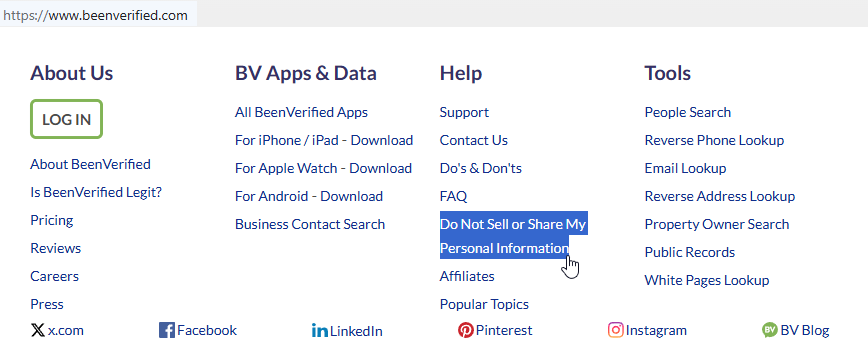
To begin the procedure, go to the BeenVerified homepage and use the link in the footer labeled “Do Not Sell or Share My Personal Information.” Then, open the opt-out page. Look for a simple search box and a button that starts the flow. Tip: If you save screenshots, blur identifiers and remove your personal information before sharing.
Search for your record and proceed
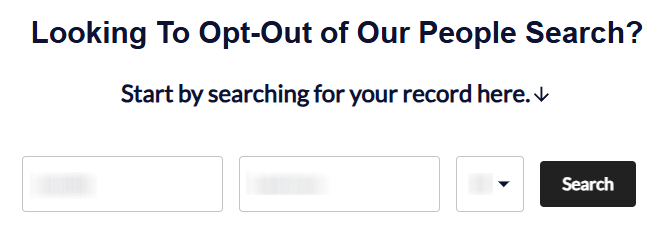
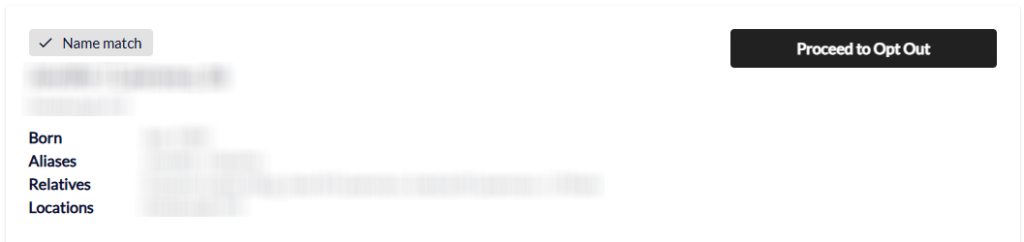
On the opt-out page, search for your name and state. Locate the right listing in the BeenVerified database. Review the results and compare the age range, city, and known relatives. When you find the closest match, click “Proceed to Opt Out.” This is one of the simple steps to remove your info from the search results. Tip: If you see multiple close matches, pick the one with the most accurate location history.
Submit your email and complete CAPTCHA verification
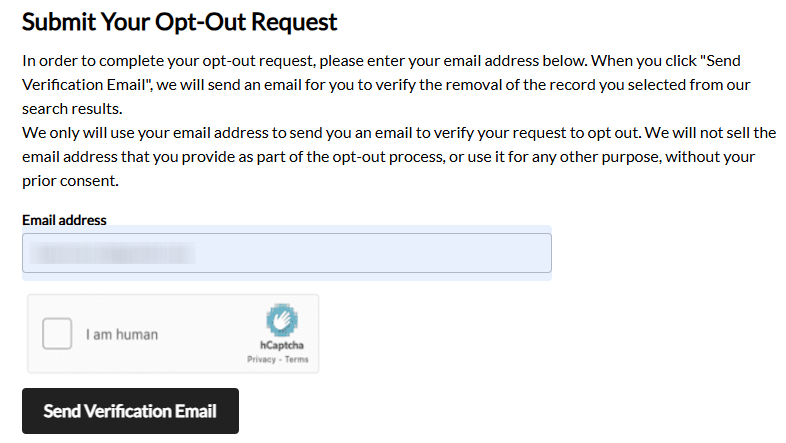
Reach the opt-out form. Enter your email address and complete the CAPTCHA. You can provide an email address you control or a disposable email address. If the page shows a checkbox, tick it only after you read it. Next, fill out an opt-out form, then click the “Send Verification Email” button. Tip: If CAPTCHA fails, reload once and try again before changing devices.
Confirm deletion
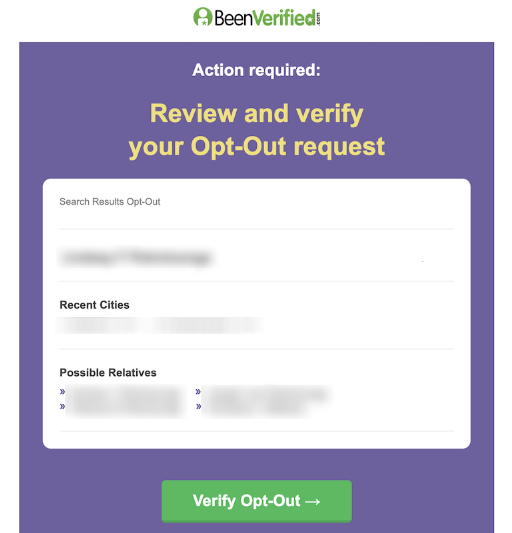
Next, you should receive a verification email from BeenVerified. Open it and verify opt-out to confirm deletion. Tip: Check your email inbox before you request an opt-out again. You may be redirected to a confirmation page.
Track confirmation & timeline
You’ll receive a final confirmation email. Save it as proof that you were able to remove your data from BeenVerified. Write down the date you confirmed. Tip: Store your proof in a folder so it’s easy to find later.
Timelines, Verification & What to Expect
Most BeenVerified opt-out request updates arrive within 1–3 days. A follow-up message will indicate that your opt-out request is in progress. If nothing changes after 3 days, check your email. Then, contact BeenVerified and resubmit. If you still do not get a response, use the site’s help options and try again after a short wait.
Edge Cases & Troubleshooting
- No access to the original inbox: use a different address. However, keep notes so you can repeat opt-outs later.
- “Record not found”: broaden your search and try again later.
- CAPTCHA errors: reload the page, clear cache, and try a different browser.
- Link expired: repeat the confirmation step from the email and try again once.
- Region issues (EU/UK/CA): some forms may block access; use available privacy contact options.
- Account vs listing confusion: remove yourself from BeenVerified listings without deleting a BeenVerified account.
- Subscription help: if you need to cancel, follow the account “Cancel My Account” flow.
- Do-not-sell wording: you can opt out of BeenVerified by using the “Do Not Sell/Share” flow via the footer link.
Will my data reappear?
Listings can reappear when data broker sites refresh from partner feeds, aggregators, resellers, or new crawls across online sources. The re-listing risk is usually medium. Keep your proof emails, set a 3–6 month reminder for opt-outs, and monitor and remove repeats to improve your online presence and protect your privacy. If a record returns, repeat the same steps quickly and save your new confirmation.
Manual vs Assisted Removal
Manual:
Pros
- more control over removal data;
- works well for a small number of opt-outs;
- no third-party access to your accounts.
Cons
- more time to repeat remove actions and track opt-outs across data broker sites;
- easy to miss a listing unless you re-check;
- you may need to go through the opt-out process again.
Assisted:
Pros
- faster submissions across many services;
- central tracking and recurring checks;
- better control over repeated verification steps.
Cons
- ongoing cost;
- less hands-on control.
We remove your data for you - faster, verified, trackable.
Discover Which Sites Share Your Private Details—Instantly and Free.
FAQ
They are needed for an identity check. Use only the minimum fields. If you’re unsure, stop and double-check you selected the correct listing before you confirm.
Wait a few minutes and check Spam. Then, try the send step once more. If it still fails, refresh the page and try another browser. Repeat the same steps carefully.
Some data brokers refresh their databases from new feeds. Therefore, re-listing can happen. Save your proof and re-check every few months, especially after a move. If it returns, repeat the same removal flow and keep the new confirmation for your records.
Try spelling variations, broaden the location, or try again later. Some profiles show up under old cities, nicknames, or different age ranges. If you have a common name, checking nearby states or past locations can help.
A confirmation step helps prevent mistaken removals and gives you a way to track outcomes. It also helps ensure the request is tied to a reachable inbox so you can keep proof and follow up if the listing returns.
The BeenVerified website is a consumer people search service that compiles records from public and commercial sources and shows them in reports. Some people use it for self-checks. Others utilize it to look up contact details or identity clues.
Listings are typically compiled from public sources. The exact fields can vary by person and location. Two records may not look the same, even for similar names.
It’s usually a 1–3–day window after confirmation. However, some removals can take longer. Keep your proof and re-check after a few days. Avoid submitting multiple times on the same day unless the link expires.
Listing removal affects search visibility, while subscriptions affect billing and logins. You can request listing removal without keeping a paid plan, but you may still need to use the email confirmation step to finish.
Re-check every 3–6 months. Repeat quickly if a listing returns. It’s also smart to re-check after moving, changing phone numbers, or switching primary emails. New records can appear.

Posted by Ava J. Mercer
More People Search Removal Guides
- 411.com Opt Out Guide
- Absolute People Search Opt Out Guide
- Advanced People Search Opt Out Guide
- AnyWho Opt Out Guide
- BeenVerified Opt Out Guide
- CheckPeople Opt Out Guide
- CheckSecrets Opt Out Guide
- CocoFinder Opt Out Guide
- ContactOut Opt Out Guide
- DOBsearch Opt Out Guide
- FamilyTreeNow Opt Out Guide
- FastBackgroundCheck Opt Out Guide
- Find People Fast Opt Out Guide
- FindPeopleSearch Opt Out Guide
- FreePeopleDirectory: Opt Out Guide
- FreePeopleSearch Opt Out Guide
- GladIKnow Opt Out Guide
- GoLookUp Opt Out Guide
- IDCrawl Opt Out Guide
- Information.com Opt Out Guide
- Inforver Opt Out Guide
- Instant Checkmate Opt Out Guide
- InstantPeopleFinder Opt Out Guide
- Kiwi Searches Opt Out Guide
- MyLife Opt Out Guide
- Nuwber Opt Out Guide
- OfficialUSA Opt Out Guide
- PeekYou Opt Out Guide
- PeopleByName Opt Out Guide
- PeopleFinder Opt Out Guide
- PeopleFinders Opt Out Guide
- PeopleLooker Opt Out Guide
- PeopleLookup Opt Out Guide
- PeopleSearch Opt Out Guide
- PeopleSearchNow Opt Out Guide
- PeopleSmart Opt Out Guide
- PeopleWhiz Opt Out Guide
- PersonSearchers Opt Out Guide
- Persopo Opt Out Guide
- PrivateEye Opt Out Guide
- PrivateRecords Opt Out Guide
- Public Data Check Opt Out Guide
- Public Data USA Opt Out Guide
- Public Records 360 Opt Out Guide
- PublicRecordsNow Opt Out Guide
- Quick People Trace Opt Out Guide
- Radaris Opt Out Guide
- RealPeopleSearch Opt Out Guide
- SearchPeopleFREE Opt Out Guide
- SearchUSAPeople Opt Out Guide
- Semcasting Opt Out Guide
- Social Catfish Opt Out Guide
- Spokeo Opt Out Guide
- ThatsThem Opt Out Guide
- TruePeopleSearch Opt Out Guide
- TruthFinder Opt Out Guide
- UnMask Opt Out Guide
- US Search Opt Out Guide
- USA People Search Opt Out Guide
- USATrace Opt Out Guide
- Veripages Opt Out Guide
- Whitepages Opt Out Guide
- Wyty Opt Out Guide
- ZabaSearch Opt Out Guide


