
Opt Out Guides
Persopo Opt Out Guide
Before You Opt Out of Persopo, Check Your Exposure
Privacy Writer
A. J. MercerAva J. Mercer
Updated
Read
5 min
Before You Opt Out of Persopo, Check Your Exposure
Persopo is a people search site that may display your name, address, and contact information, which can affect online privacy. It typically compiles data summaries from public and commercial sources. The website presents them in a searchable database, sometimes linking to family members and marriage records.
How to opt out of Persopo
Go to the Persopo website, find your record, then send an opt-out request to support @persopo.com and confirm any code or link you receive; it often takes 10–20 business days.
Checklist:
- Open the Persopo website
- Find your record
- Copy the preview text
- Submit once and save the confirmation message
- Click the code/link
- Set a reminder to re-opt-out
Find out if your private details were exposed
Persopo – Quick Facts
| Parameter | Value |
| Domain | persopo.com |
| Data Types | personal data, personal details, contact information, addresses |
| Opt-out Methods | email /regular mail |
| Identity Verification | code via SMS or confirmation message |
| Typical Response Time | 10–20 days |
| Re-listing Risk | medium |
Persopo is a data broker that aggregates and displays personal information from public and commercial sources for people search. Public directories commonly reference its policy pages, but those pages may not load in all environments, so use the on-site footer links when possible.
Common data you may find:
- Full name and known aliases
- Current and past address history
- Email addresses
- Social media profiles
- Close relatives
- Marriage and divorce records
- Arrest records
- Criminal records
Step-by-Step Guide
Search for your record
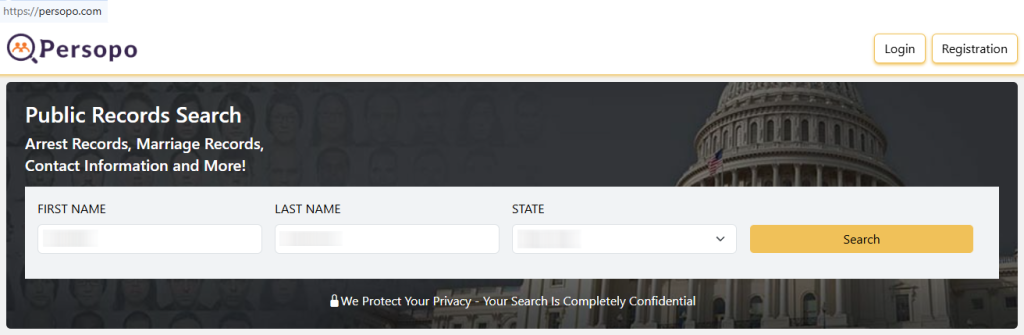
Use the homepage search and locate the search button. Enter your full name, city, and state, then review results and open only the preview first to match key details (like a prior city or age range). Avoid opening multiple pages if you can confirm from the preview. If you take screenshots, blur personal information before saving or sharing. Tip: If your name is common, try a nearby city or a past town to narrow results.

Open the Privacy Policy page
Scroll to the footer and navigate to the Privacy Policy page to confirm the current instructions for unlisting and what identifiers are required. Look for a help/contact line and any notes about acceptable formats, including listing in text format expectations. If you keep evidence, store only redacted images and avoid capturing full contact fields.


Send your request by email/mail
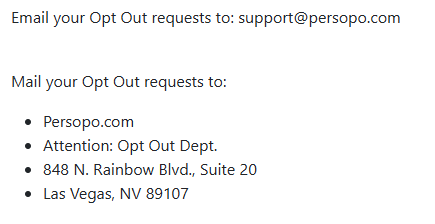
After you locate the correct data, copy the preview into a note. Use the subject line “Opt-Out Request” and write one message asking to remove your personal information, attaching only the necessary text and the minimum identifiers. If a code or link arrives, confirm it and keep the confirmation email for your files. If you must use regular mail, send the same text and keep a dated receipt. Tip: Check Spam if nothing arrives within a few minutes.
Confirm deletion
Re-check search results and confirm the profile is successfully removed, then keep the proof. If it still shows after the stated window, follow up one time with the same copied text and reference the earlier confirmation. Avoid attaching additional documents unless the user support team explicitly asks. Tip: If you shared extra detail, reply once. Ask them to remove your personal information from their internal notes.
Track confirmation & timeline
Keep a simple log: date sent, confirmation email, and one redacted screenshot. Track the same record after the stated window and note any change. If it reappears, repeat the same query promptly. Tip: Consistent recordkeeping makes follow-ups easier and helps you monitor exposure without redoing every step from scratch.
Timelines, Verification & What to Expect
Most outcomes fall within 10–20 days, and confirmation may appear on the page or as a reply after you click a verification link. Process with Persopo: keep your message short, keep copies, and avoid sending more than needed. If you see no update after day 20, resend once with the same copied text and keep the conversation in one thread. If that fails, switch to the postal option described above. You can consider the entry successfully removed only after you confirm the profile no longer appears in results.
Edge Cases & Troubleshooting
- No access to the original address/phone: explain the change, include the copied text, and ask what alternate verification they accept.
- “Record not found”: try name variants or an old address, then search again.
- CAPTCHA or submission errors: refresh, try another browser, or retry later.
- Verification code not arriving: check Spam, then retry once.
- Form rejects the opt-out request by region (EU/UK/CA): use the support route and ask for the correct privacy path.
- Account deletion vs. public profile confusion: cancel billing separately; public suppression is different.
- If you see older guides referencing email protected, treat it as legacy and rely on current footer links instead.
Will my data reappear?
Reappearance can happen when a broker feed refreshes a directory or when partner sources update. Like Persopo, many sites republish overlapping public data, so treat the risk as medium: keep confirmations, set a 3–6 month reminder to monitor, and re-submit quickly if you see the listing again. This can reduce nuisance contact and limit misuse like scams or blackmail, and it may also reduce identity theft risk. safeguard.
Manual vs Assisted Removal
Manual:
Pros
- Control and lower cost;
- easier to automate reminders and a periodic scan.
Cons
- Repeat follow-ups and tracking work;
- you must manage confirmations yourself.
Assisted:
Pros
- Speed, verification help, and a tracking dashboard;
- recurring checks across many data broker sites.
Cons
- Less direct control over each step.
We remove your data for you - faster, verified, trackable.
Discover Which Sites Share Your Private Details—Instantly and Free.
FAQ
Resend once with the same copied text, keep proof, and re-check after the stated window.
Redact names, phones, and other personal details before saving or sharing images, and keep the file local.
Re-listing can happen after database refreshes; keep proof and re-submit quickly.
It means you paste the visible preview text instead of sending an image or a link.
Redact names, phones, and other personal details before saving or sharing images, and keep the file local.
Re-listing can happen after database refreshes; keep proof and re-submit quickly.
It means you paste the visible preview text instead of sending an image or a link.
If you are a relative, explain the relationship and ask what verification they need for an authorized request, then keep it minimal.
Start on the official pages referenced for this site; if they do not load, use the support inbox and include the copied preview text.
Many guides cite 10–20 business days, but timing varies.
Unsubscribe from any paid account separately, then handle public suppression as its own opt-out process.
Try again later or use the support inbox; keep the same copied text so the data is easy to match.
Monitor every 3–6 months and resubmit if you see the data again.

Posted by Ava J. Mercer
More People Search Removal Guides
- 411.com Opt Out Guide
- Absolute People Search Opt Out Guide
- Advanced People Search Opt Out Guide
- AnyWho Opt Out Guide
- BeenVerified Opt Out Guide
- CheckPeople Opt Out Guide
- CheckSecrets Opt Out Guide
- CocoFinder Opt Out Guide
- ContactOut Opt Out Guide
- DOBsearch Opt Out Guide
- FamilyTreeNow Opt Out Guide
- FastBackgroundCheck Opt Out Guide
- Find People Fast Opt Out Guide
- FindPeopleSearch Opt Out Guide
- FreePeopleDirectory: Opt Out Guide
- FreePeopleSearch Opt Out Guide
- GladIKnow Opt Out Guide
- GoLookUp Opt Out Guide
- IDCrawl Opt Out Guide
- Information.com Opt Out Guide
- Inforver Opt Out Guide
- Instant Checkmate Opt Out Guide
- InstantPeopleFinder Opt Out Guide
- Kiwi Searches Opt Out Guide
- MyLife Opt Out Guide
- Nuwber Opt Out Guide
- OfficialUSA Opt Out Guide
- PeekYou Opt Out Guide
- PeopleByName Opt Out Guide
- PeopleFinder Opt Out Guide
- PeopleFinders Opt Out Guide
- PeopleLooker Opt Out Guide
- PeopleLookup Opt Out Guide
- PeopleSearch Opt Out Guide
- PeopleSearchNow Opt Out Guide
- PeopleSmart Opt Out Guide
- PeopleWhiz Opt Out Guide
- PersonSearchers Opt Out Guide
- Persopo Opt Out Guide
- PrivateEye Opt Out Guide
- PrivateRecords Opt Out Guide
- Public Data Check Opt Out Guide
- Public Data USA Opt Out Guide
- Public Records 360 Opt Out Guide
- PublicRecordsNow Opt Out Guide
- Quick People Trace Opt Out Guide
- Radaris Opt Out Guide
- RealPeopleSearch Opt Out Guide
- SearchPeopleFREE Opt Out Guide
- SearchUSAPeople Opt Out Guide
- Semcasting Opt Out Guide
- Social Catfish Opt Out Guide
- Spokeo Opt Out Guide
- ThatsThem Opt Out Guide
- TruePeopleSearch Opt Out Guide
- TruthFinder Opt Out Guide
- UnMask Opt Out Guide
- US Search Opt Out Guide
- USA People Search Opt Out Guide
- USATrace Opt Out Guide
- Veripages Opt Out Guide
- Whitepages Opt Out Guide
- Wyty Opt Out Guide
- ZabaSearch Opt Out Guide


