
Opt Out Guides
PeopleByName Opt Out Guide
Before You Opt Out of PeopleByName, Check Your Exposure
Privacy Writer
A. J. MercerAva J. Mercer
Updated
Read
5 min
Before You Opt Out of PeopleByName, Check Your Exposure
PeopleByName can make it easier for strangers to connect your name, address, and phone number, which can create a privacy risk and unwanted contact. The site generally functions like a people search directory and may display details gathered from online sources such as public records and other third-party data.
How to opt out of PeopleByName
Go to the official page on peoplebyname.com, submit the form with your identifiers (usually your name plus a record ID), complete verification, then confirm via any on-screen notice or confirmation message; timelines vary, but it usually takes 3–14 days for search results to update. This can help you take control of your data and remove your information without creating an account.
Checklist:
- Search for your record
- Copy your ID
- Enter identifiers (name/email/record ID)
- Complete verification
- Confirm via code/link
- Save the confirmation email
- Set a reminder to re-opt-out
Find out if your private details were exposed
PeopleByName – Quick Facts
| Parameter | Value |
| Domain | peoplebyname.com |
| Data Types | contact information, addresses, possible social identifiers, household links |
| Opt-out Methods | web form/email |
| Identity Verification | On-page verification plus on-page confirmation or confirmation email |
| Typical Response Time | 3–14 days |
| Re-listing Risk | medium |
PeopleByName is a lookup site that aggregates consumer-facing listings and displays personal information in a database-style interface. Like other people search services, it collects data from various sources and presents it to consumers, which increases unwanted exposure online. Safeguard your privacy by following the removal process below.
Common data you may find:
- Names and known aliases
- Phone numbers
- Email addresses
- Current and past addresses
- Age range or year of birth (if available)
- Relatives or household links
- Property and real-estate records
- Court or lien entries (if available)
- US and Canada coverage notes
- Voter registrations (public records)
Step-by-Step Guide
Open the people directory
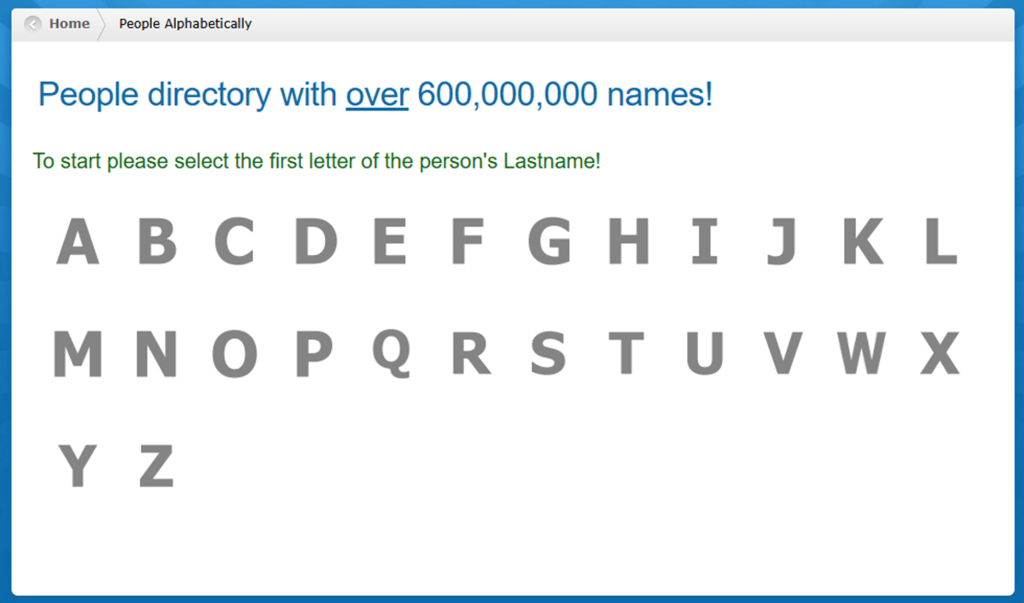
Start at the homepage. Then, scroll to the bottom of the page. Find the directory link. Click it to open the browsing interface. From there, you can use a last-name index or basic people search to locate your listing. If you plan to capture a screenshot for documentation, blur any personal info before saving or sharing it. If you land on a search and reverse phone lookup flow, you can still proceed. Just focus on getting to your profile page, where a record identifier is shown.

Find and copy your record
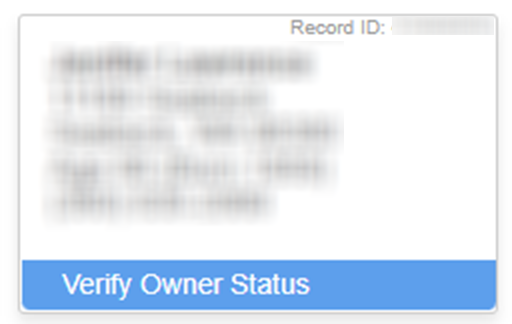
Open your listing detail page and locate the record ID (sometimes shown near the top or corner of the profile). Compare the displayed location and phone number to check it’s the right match before continuing. Copy the record exactly as shown, and also note the page URL in case the support asks for it. If you save proof for your own tracking, redact identifiers (like address and phone) before storing screenshots. If multiple similar profiles appear, repeat the lookup until you find the one that matches your details.
Submit your identifiers
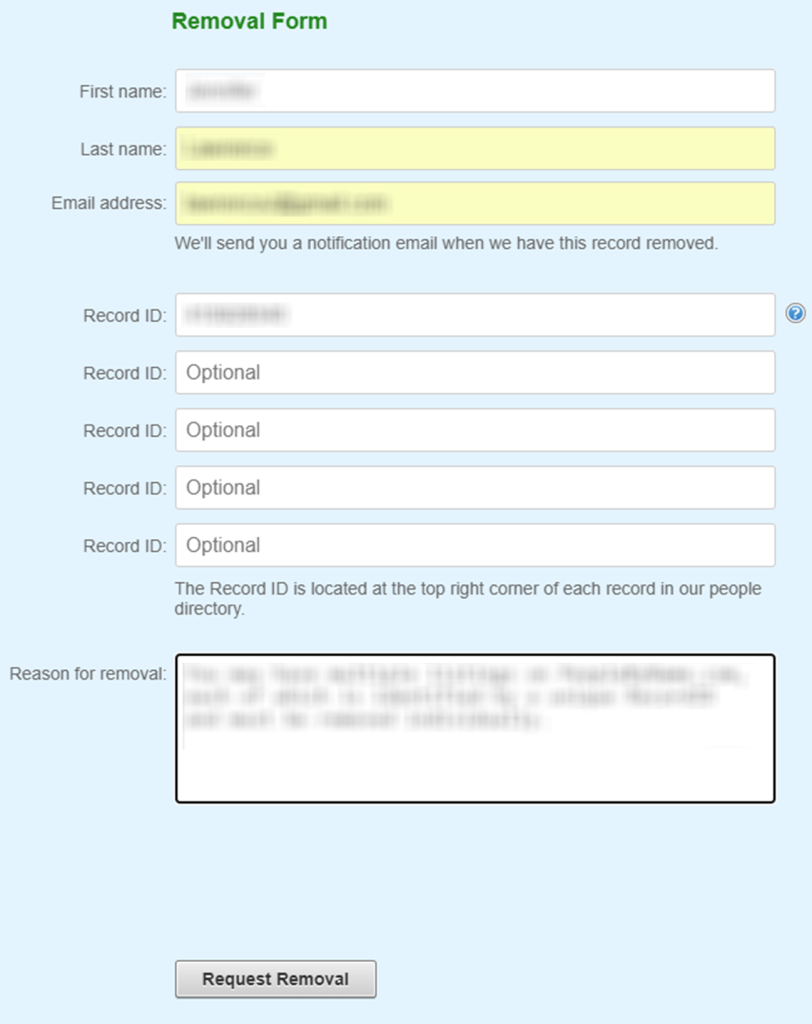
Go to the removal form and enter the required fields, which commonly include your full name, email address, record ID, and a short reason for removal (you can write “privacy” as the reason for removal). Complete the CAPTCHA checkbox and submit the request removal button. If the form asks for an ID, provide only what is necessary. Take a redacted screenshot of the confirmation screen for your records.

Confirm deletion
Look for an on-page confirmation. Check your inbox for any follow-up message that asks you to confirm via a link or code. If you don’t see it, check Spam or Promotions. Keep that confirmation message and avoid sharing it publicly because it may contain identifiers. Once confirmed, this should remove your profile and reduce visibility in search results over time.

Track confirmation & timeline
Save the confirmation email along with the record and the date you submitted. Re-check search results after the typical window. If the listing is still visible after 14 days, repeat the form once. Then, contact customer support with your details and the confirmation you saved. Keep your records organized so you can act quickly if the listing can reappear.
Timelines, Verification & What to Expect
After you submit a query, updates typically show up within 3–14 days, depending on how frequently the database refreshes and how verification is handled. Confirmation may appear immediately on the site (an on-page message) and/or arrive by email, sometimes requiring you to click a confirmation link. If you don’t receive anything, check Spam, then resubmit once using the same record ID. If there’s still no confirmation after the upper end of the window, send a brief follow-up request to support @ peoplebyname.com. Terms like FCRA (Fair Credit Reporting Act) may appear on people search sites as general disclaimers about consumer reporting use.
Edge Cases & Troubleshooting
- No access to the original email/phone: submit again with a new email and include the listing URL plus record so they can match the profile.
- “Record not found”: re-run the lookup using name variants and prior locations. The listing may have moved or merged.
- CAPTCHA or submission errors: try a different browser, disable script blockers, and retry once after clearing cookies.
- Verification code not arriving: wait 15–30 minutes, check Spam, then resubmit a single time.
- Form rejects the request by region (EU/UK/CA): use the site’s contact option and ask for the correct procedure for your region (state privacy rules vary).
- Account deletion vs. public listing removal confusion: canceling an account is different from removing a public listing; focus on the listing removal form first.
- Re-submitting after a failed attempt: change only one field (like email) and keep the record identical to avoid mismatches.
- Rights wording: if you reference the California Consumer Privacy Act, you can also mention CCPA without making legal claims.
Will my data reappear?
This happens when data broker sites refresh their database, receive new feeds from aggregators, or ingest information from other resellers. That doesn’t mean your prior removal failed. It often means the same data was reintroduced from online sources or third parties. If you notice information showing up across sites like PeopleByName, prioritize the biggest exposure points first (name + address + phone). Then, work outward to similar databases to reduce recurrence.
Manual vs Assisted Removal
Manual:
Pros
- Direct control;
- no sharing beyond what’s required;
- can target personal information from PeopleByName precisely;
- can opt out of PeopleByName on your schedule.
Cons
- Time investment;
- repeated monitoring;
- must track each query and record yourself.
Assisted:
Pros
- Can automate monitoring;
- centralized tracking dashboard;
- recurring checks;
- structured data broker removal workflows (a removal service can help coordinate multiple sites).
Cons
- Requires sharing some personal data for matching;
- may still require confirmations;
- ongoing cost;
- you still should verify outcomes.
We remove your data for you - faster, verified, trackable.
Discover Which Sites Share Your Private Details—Instantly and Free.
FAQ
Use the site’s removal form to opt out of peoplebyname.com: find your listing, copy the record, submit your details, complete verification, and save the confirmation. If you don’t see an email, check Spam and resubmit once.
Updates can take several days, and caches can keep old pages visible. Wait the typical window, then re-check the database and your listing URL. If nothing changes after 14 days, resubmit once and contact support with your record and submission date.
Open your profile page and look for a record ID near the header or corner of the listing. Confirm it matches your details first. Copy it exactly, since the form can rely on it to match the correct profile.
First, check Spam/Promotions and wait at least 15–30 minutes. If nothing arrives, submit again once with the same identifiers. If you still get no response, contact customer support and include the listing URL for faster matching.
Re-listings can happen after database refreshes. Keep your confirmation message, repeat the opt-out form, and consider tracking related data broker sites so the same information isn’t reintroduced through another source.
It often shows names, addresses, household links, and phone number details, plus other public records fields that vary by profile. The exact fields depend on what’s publicly available and what the site has aggregated.
Use a practical 3–14–day window, then re-check search results and the listing URL. If nothing changes, resubmit once and follow up with support.
Listing removal targets public profile visibility, while account deletion relates to a user login/subscription. If you only want a listing hidden, focus on the removal form first; cancel is separate from suppressing a public listing.
If the web form errors out, send a brief message with your listing URL to the site’s published contact channel. Keep your message short and include the reason and the identifiers needed to match the profile.
Opting out can reduce exposure on one site, but marketing contact can come from many sources. Limit new sharing, review app permissions, and repeat removals on other data broker sites to reduce new re-aggregation.
You can opt out like any other user. You may also reference California-specific rights frameworks, such as CCPA. Keep it simple: identify the listing, provide the record, and request deletion/suppression.

Posted by Ava J. Mercer
More People Search Removal Guides
- 411.com Opt Out Guide
- Absolute People Search Opt Out Guide
- Advanced People Search Opt Out Guide
- AnyWho Opt Out Guide
- BeenVerified Opt Out Guide
- CheckPeople Opt Out Guide
- CheckSecrets Opt Out Guide
- CocoFinder Opt Out Guide
- ContactOut Opt Out Guide
- DOBsearch Opt Out Guide
- FamilyTreeNow Opt Out Guide
- FastBackgroundCheck Opt Out Guide
- Find People Fast Opt Out Guide
- FindPeopleSearch Opt Out Guide
- FreePeopleDirectory: Opt Out Guide
- FreePeopleSearch Opt Out Guide
- GladIKnow Opt Out Guide
- GoLookUp Opt Out Guide
- IDCrawl Opt Out Guide
- Information.com Opt Out Guide
- Inforver Opt Out Guide
- Instant Checkmate Opt Out Guide
- InstantPeopleFinder Opt Out Guide
- Kiwi Searches Opt Out Guide
- MyLife Opt Out Guide
- Nuwber Opt Out Guide
- OfficialUSA Opt Out Guide
- PeekYou Opt Out Guide
- PeopleByName Opt Out Guide
- PeopleFinder Opt Out Guide
- PeopleFinders Opt Out Guide
- PeopleLooker Opt Out Guide
- PeopleLookup Opt Out Guide
- PeopleSearch Opt Out Guide
- PeopleSearchNow Opt Out Guide
- PeopleSmart Opt Out Guide
- PeopleWhiz Opt Out Guide
- PersonSearchers Opt Out Guide
- Persopo Opt Out Guide
- PrivateEye Opt Out Guide
- PrivateRecords Opt Out Guide
- Public Data Check Opt Out Guide
- Public Data USA Opt Out Guide
- Public Records 360 Opt Out Guide
- PublicRecordsNow Opt Out Guide
- Quick People Trace Opt Out Guide
- Radaris Opt Out Guide
- RealPeopleSearch Opt Out Guide
- SearchPeopleFREE Opt Out Guide
- SearchUSAPeople Opt Out Guide
- Semcasting Opt Out Guide
- Social Catfish Opt Out Guide
- Spokeo Opt Out Guide
- ThatsThem Opt Out Guide
- TruePeopleSearch Opt Out Guide
- TruthFinder Opt Out Guide
- UnMask Opt Out Guide
- US Search Opt Out Guide
- USA People Search Opt Out Guide
- USATrace Opt Out Guide
- Veripages Opt Out Guide
- Whitepages Opt Out Guide
- Wyty Opt Out Guide
- ZabaSearch Opt Out Guide


