
Opt Out Guides
IDCrawl Opt Out Guide
Before You Opt Out of IDCrawl, Check Your Exposure
Privacy Writer
A. J. MercerAva J. Mercer
Updated
Read
5 min
Before You Opt Out of IDCrawl, Check Your Exposure
IDCrawl is a people-search site that may show a name, address, phone, profile pages, and other public info. That can affect privacy because the information is easy to see in one place on the Internet. IDCrawl pulls details from public sources and similar records, so removing a page can help limit the exposure of your personal data and other identifying information.
How to opt out of IDCrawl
Open the official form. Add your email, paste the profile URL, finish the CAPTCHA, and use the message sent to your inbox. This is the main way to send a removal request.
Checklist:
- Search for your record
- Copy the profile URL
- Open the privacy page
- Enter your identifiers
- Complete the CAPTCHA
- Save the confirmation message
- Set a reminder to re-opt-out
Find out if your private details were exposed
IDCrawl – Quick Facts
| Parameter | Value |
| Domain | idcrawl.com |
| Data Types | contacts, addresses, and possible social identifiers |
| Opt-out Methods | web form, support email |
| Identity Verification | confirmation by message |
| Typical Response Time | several days to a few weeks |
| Re-listing Risk | medium |
IDCrawl is a free people-search service that collects public info into one profile. It may display contact details, address history, social pages, and other records. The site offers a form for a removal request and a privacy path for broader rights issues.
Common data you may review:
- Names and aliases
- Phone numbers
- Email addresses
- Current and past addresses
- Usernames
- Social media profiles
- Relative or household connections
Step-by-Step Guide
Search for your record and copy the profile URL
Go to IDCrawl and use the lookup bar. Enter your name and state of residence. Check the visible details so you pick the right page, then copy the full URL. If you keep a screenshot for review, blur personal details first. Tip: Save each URL in a note if more than one result matches.
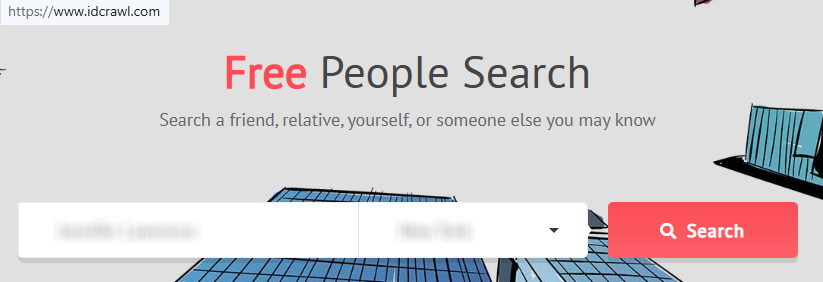

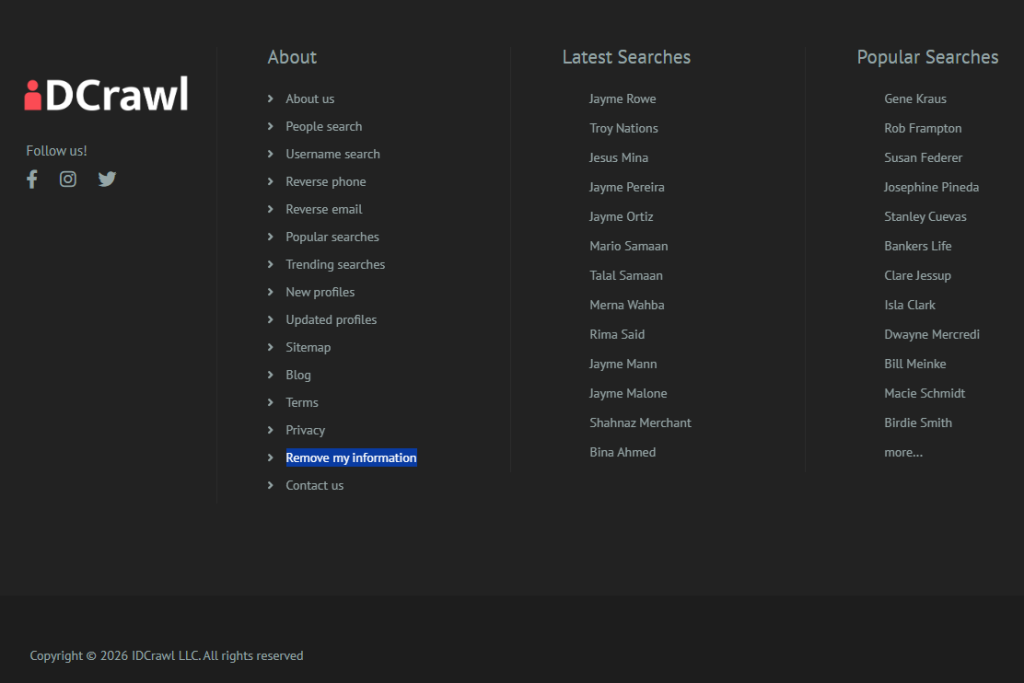
Open the privacy page
Open the IDCrawl rights page or the Remove My Information page. You should see fields for contact details and the profile URL. Keep both pages open so you can paste the correct URL. Tip: The footer often has the fastest link.
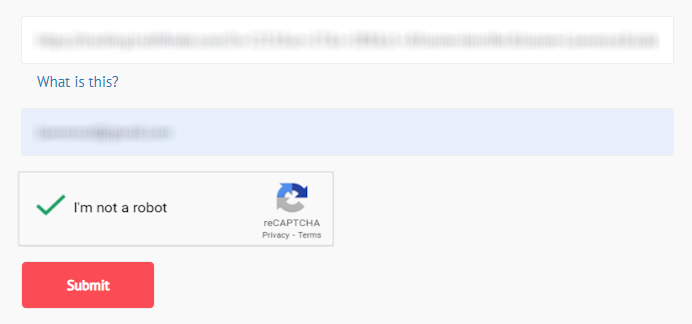
Submit your identifiers and paste the URL
Enter your contact details, paste the exact URL, complete the CAPTCHA, and submit the form. Check for typos before you continue. If you save proof for review, hide personal details first. Tip: Wait for the on-page note before closing the tab.
Confirm deletion
Check your inbox for a message from IDCrawl and open the confirmation link to finish the process. Also, check Spam if nothing appears soon. Tip: Add the sender to your safe list.

Track confirmation & timeline
Save the message and note the date. Check the profile URL again after several days. Run another check later. Tip: Set a reminder so you can repeat the process if the page stays live or returns.
Timelines, Verification & What to Expect
After you send the form, IDCrawl usually sends a confirmation message with a link you must open. You may also see a short on-page note. A practical window is several days to a few weeks. If nothing arrives after 7–10 days, check Spam and confirm the details you entered. Try once more or contact support. No service can guarantee a result. Thus, keep the confirmation for later review.
Edge Cases & Troubleshooting
- No access to the original email/phone: Use a current contact you control. If support asks for more, share only what is needed.
- Record not found: Try variations of your name, old address details, usernames, reverse phone, or reverse email tools on the site.
- CAPTCHA or submission errors: Refresh the page, try another browser, and paste the URL again.
- Verification code not arriving: Check Spam, then confirm you entered the right contact details and try once more.
- Form rejects the request by region (EU/UK/CA): Use the privacy path or support contact for a broader rights issue.
- Account deletion vs. public listing removal confusion: The form is for a public page, not always for account settings.
- Re-submitting after a failed attempt: Fix the contact details or URL, then send one clean retry.
Will my data reappear?
It can. A data broker may refresh a page from public sources, partner feeds, or resellers, so a record can return. To reduce repeat exposure, save each confirmation, keep the profile URL, and check the site every 3–6 months. If the same page returns, act quickly and send a new request. You can also automate your own follow-up with a calendar reminder so you review related broker pages and act automatically when needed.
Manual vs Assisted Removal
Manual:
Pros
- free for one site at a time;
- more control over each step;
- easy to track each confirmation.
Cons
- takes more time across many broker pages;
- you must track each URL and support message;
- repeat checks are still needed.
Assisted:
Pros
- faster across many broker pages;
- central dashboard for tracking;
- can monitor repeat pages.
Cons
- usually not free;
- some steps may still need user identity checks;
- coverage can vary by service.
We remove your data for you - faster, verified, trackable.
Discover Which Sites Share Your Private Details—Instantly and Free.
FAQ
IDCrawl is a people-search service that puts public-facing info into one profile. It may show a name, address, phone, and other identifiers.
Use the official IDCrawl form. Add your contact details, paste the profile URL, complete the CAPTCHA, and open the confirmation link.
It is on the Remove My Information page. The rights page also points users to it.
Search for your listing and copy the profile URL. Open the form, send your contact details and URL, then finish verification from your inbox.
Check Spam and any typos in the contact details you entered. If needed, try the form one more time.
A practical timeline is several days to a few weeks, depending on the queue and verification.
Try a different search with old address details, usernames, reverse phone, or reverse email tools.
If you mean a public page, use the form rather than looking for an account cancel button.
Account settings and page deletion are not always the same. To remove a public page, use the form tied to that URL.
Yes. Use the rights path if your issue is broader than one page.
Records can return. Set a 3–6 month reminder, keep the confirmation, and act again if needed.

Posted by Ava J. Mercer
More People Search Removal Guides
- 411.com Opt Out Guide
- Absolute People Search Opt Out Guide
- Advanced People Search Opt Out Guide
- AnyWho Opt Out Guide
- BeenVerified Opt Out Guide
- CheckPeople Opt Out Guide
- CheckSecrets Opt Out Guide
- CocoFinder Opt Out Guide
- ContactOut Opt Out Guide
- DOBsearch Opt Out Guide
- FamilyTreeNow Opt Out Guide
- FastBackgroundCheck Opt Out Guide
- Find People Fast Opt Out Guide
- FindPeopleSearch Opt Out Guide
- FreePeopleDirectory: Opt Out Guide
- FreePeopleSearch Opt Out Guide
- GladIKnow Opt Out Guide
- GoLookUp Opt Out Guide
- IDCrawl Opt Out Guide
- Information.com Opt Out Guide
- Inforver Opt Out Guide
- Instant Checkmate Opt Out Guide
- InstantPeopleFinder Opt Out Guide
- Kiwi Searches Opt Out Guide
- MyLife Opt Out Guide
- Nuwber Opt Out Guide
- OfficialUSA Opt Out Guide
- PeekYou Opt Out Guide
- PeopleByName Opt Out Guide
- PeopleFinder Opt Out Guide
- PeopleFinders Opt Out Guide
- PeopleLooker Opt Out Guide
- PeopleLookup Opt Out Guide
- PeopleSearch Opt Out Guide
- PeopleSearchNow Opt Out Guide
- PeopleSmart Opt Out Guide
- PeopleWhiz Opt Out Guide
- PersonSearchers Opt Out Guide
- Persopo Opt Out Guide
- PrivateEye Opt Out Guide
- PrivateRecords Opt Out Guide
- Public Data Check Opt Out Guide
- Public Data USA Opt Out Guide
- Public Records 360 Opt Out Guide
- PublicRecordsNow Opt Out Guide
- Quick People Trace Opt Out Guide
- Radaris Opt Out Guide
- RealPeopleSearch Opt Out Guide
- SearchPeopleFREE Opt Out Guide
- SearchUSAPeople Opt Out Guide
- Semcasting Opt Out Guide
- Social Catfish Opt Out Guide
- Spokeo Opt Out Guide
- ThatsThem Opt Out Guide
- TruePeopleSearch Opt Out Guide
- TruthFinder Opt Out Guide
- UnMask Opt Out Guide
- US Search Opt Out Guide
- USA People Search Opt Out Guide
- USATrace Opt Out Guide
- Veripages Opt Out Guide
- Whitepages Opt Out Guide
- Wyty Opt Out Guide
- ZabaSearch Opt Out Guide


