
Opt Out Guides
RealPeopleSearch Opt Out Guide
Before You Opt Out of RealPeopleSearch, Check Your Exposure
Privacy Writer
A. J. MercerAva J. Mercer
Updated
Read
5 min
Before You Opt Out of RealPeopleSearch, Check Your Exposure
A people search page can show personal information like a name, address, and phone number, which can raise privacy risks and unwanted contact. The policy describes collecting info from visitors and also info from third-party sources such as public databases and other publicly available sources, sometimes without your consent.
How to opt out of RealPeopleSearch
Go to the official Remove My Info page and submit the request using the linked page, including your email address, phone number, and the profile URL you want suppressed; you’ll usually see confirmation on the page, and processing is typically within 48 hours.
Checklist:
- Open the official opt-out form
- Enter identifiers (email/name/phone)
- Complete CAPTCHA/verification
- Confirm via code/link
- Save the confirmation message
- Set a reminder to re-send
Find out if your private details were exposed
RealPeopleSearch – Quick Facts
| Parameter | Value |
| Domain | realpeoplesearch.com |
| Data Types | contact information, addresses, possible social identifiers |
| Opt-out Methods | web page |
| Identity Verification | confirmation page |
| Typical Response Time | within 48 hours |
| Reposting Risk | medium |
This people finder directory aggregates info about people into a searchable database and can include search and reverse phone lookup features, drawing from public records and other sources it can use. It also notes sharing with marketing partners and that no measure can promise security. Separately, many sites use an ad model or sales outreach, which can affect users.
Common info you may find:
- Names and aliases
- Current and past contact details (history)
- Relatives (including a relative connection)
- Property references
- Social media profiles
- Business info
Step-by-Step Guide
Open the official opt-out form
Search for your info and copy the URL. Scroll to the website footer and click on the “Remove My Info” button to reach the request page. Open the linked page in the same browser. Avoid posting screenshots publicly – blur personal information first. Tip: If you don’t see the footer option right away, go to the bottom and try again.
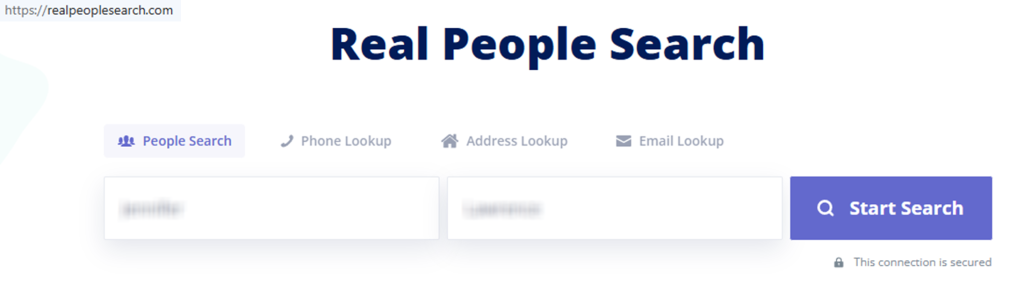

Submit your identifiers (email/phone + CAPTCHA)
Provide the identifiers requested in the fields, including your first and last name, email address, the profile URL, and complete any CAPTCHA. Review for accuracy, then send once. If you’re sending for someone else, have written authorization ready if support asks. Tip: Keep only one tab open to avoid submission errors.
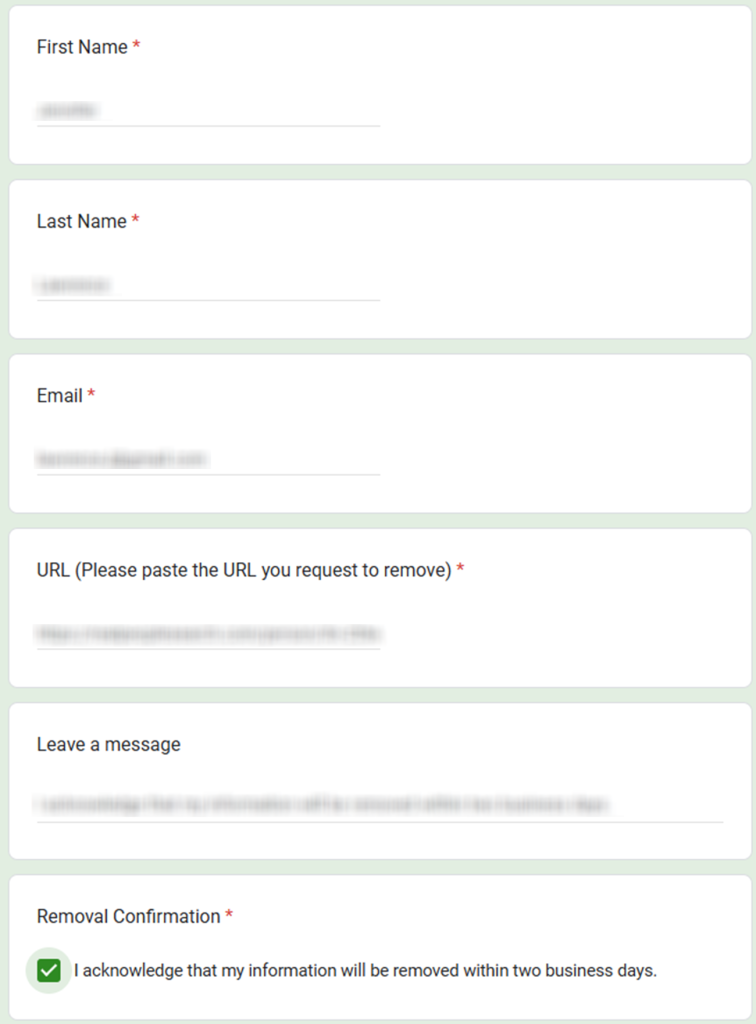
Verify via code or link (email/SMS)
After submission, follow any verification prompt shown on the page. If you’re sent a code or URL, confirm promptly. Tip: Check Spam if the confirmation message is delayed, and redact codes in any screenshots.
Confirm deletion / Do-Not-Sell request
Look for a success notice confirming suppression of the public profile. If you want additional choices, read the policy language about sharing information in response to searches submitted on the Site. Tip: Save a dated note so you can re-check later without repeating work.
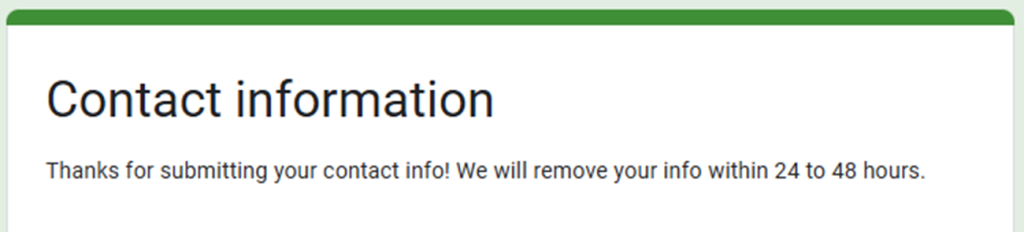
Track confirmation & timeline
The request page says processing happens within 48 hours after the request is received, so re-check after two days using a fresh browser session. If you still see the same result, use the support option on that page and send it again. Tip: Ensure your browser cache is cleared before you search. If you don’t see any changes, wait another day before retrying.
Timelines, Verification & What to Expect
Expect confirmation on the page right after you send, and then a change in what appears when you run the same search again. The request page says the index is updated within 48 hours once they receive your request. If nothing changes after 3 days, send one more time with the same URL and keep a private screenshot, but redact personal details.
Edge Cases & Troubleshooting
- No access to the original inbox: use the page URL and ask support for an alternate verification path.
- “Info not found”: expand your search by state and try common name variations.
- CAPTCHA errors: refresh the page, then try again from a different device.
- Verification code not arriving: check Spam, wait 30 minutes, then try once more.
- Region blocks (EU/UK/CA): use the policy page and ask what options apply.
- Subscription vs profile confusion: a paid account is separate from public profile suppression.
- Subscription help: if you need to cancel, use the support channel.
Will my data reappear?
Information on Google can return when data brokers and people search sites refresh from public sources, partner feeds, and information from data broker sites. That’s why no process can guarantee permanent deletion. Set a 3–6 month reminder, keep confirmations, and repeat the request quickly if the same profile shows up again.
Manual vs Assisted Removal
Manual:
Pros
- More control over each search and follow-up;
- easier to document each result for your files;
- helps you get comprehensive visibility into what is shown.
Cons
- Can be extensive across many sites;
- requires repeat checks and careful tracking;
- time cost is high.
Assisted:
Pros
- Faster coverage across many brokers (often via a removal service);
- tracking dashboard with a single report;
- recurring scans that can improve consistency.
Cons
- Subscription cost and less hands-on control;
- you still review matches for correctness.
Find out if your private details were exposed
FAQ
Start with the website where the caller likely found your relevant information, then repeat on other people search sites. Scam scripts and impersonation threats reference public page details, so re-check your search results every few months.
The request page says you can send on someone else’s behalf, but you may need written authorization. Save what you sent and follow the timing steps above.
The policy says the service can collect from public directories and other open-source info, so you can appear without signing up. A request usually suppresses the public profile rather than changing the underlying source.
Re-posting can happen when upstream sources refresh or when other data brokers post the same data again. Keep confirmations and re-check on a schedule.
If you have many listings, an assisted option can reduce time and help with tracking; if your exposure is small, manual requests may be enough, but you’ll need repeat checks.
Use the website footer “Remove My Info” option and follow the instructions to send the request.
The request page says it is handled within 48 hours once the request is received.
Yes. If you have multiple profiles, send separately for each page URL and track each outcome over time.
Sources differ by jurisdiction and may attach public data to a person’s name, including marriage entries. If you see a mismatch, save the result and request suppression.
The website includes a disclaimer about not being a consumer reporting agency for employment, tenant screening, insurance, or consumer credit uses; treat results as informational only.
The public pages do not clearly list an API; for business use, use the support channel to ask what is available.
Use the request page and send the page URL that shows the workplace data. If the match is wrong, include a short note explaining what’s inaccurate, then re-check after the stated timeline.

Posted by Ava J. Mercer
More People Search Removal Guides
- 411.com Opt Out Guide
- Absolute People Search Opt Out Guide
- Advanced People Search Opt Out Guide
- AnyWho Opt Out Guide
- BeenVerified Opt Out Guide
- CheckPeople Opt Out Guide
- CheckSecrets Opt Out Guide
- CocoFinder Opt Out Guide
- ContactOut Opt Out Guide
- DOBsearch Opt Out Guide
- FamilyTreeNow Opt Out Guide
- FastBackgroundCheck Opt Out Guide
- Find People Fast Opt Out Guide
- FindPeopleSearch Opt Out Guide
- FreePeopleDirectory: Opt Out Guide
- FreePeopleSearch Opt Out Guide
- GladIKnow Opt Out Guide
- GoLookUp Opt Out Guide
- IDCrawl Opt Out Guide
- Information.com Opt Out Guide
- Inforver Opt Out Guide
- Instant Checkmate Opt Out Guide
- InstantPeopleFinder Opt Out Guide
- Kiwi Searches Opt Out Guide
- MyLife Opt Out Guide
- Nuwber Opt Out Guide
- OfficialUSA Opt Out Guide
- PeekYou Opt Out Guide
- PeopleByName Opt Out Guide
- PeopleFinder Opt Out Guide
- PeopleFinders Opt Out Guide
- PeopleLooker Opt Out Guide
- PeopleLookup Opt Out Guide
- PeopleSearch Opt Out Guide
- PeopleSearchNow Opt Out Guide
- PeopleSmart Opt Out Guide
- PeopleWhiz Opt Out Guide
- PersonSearchers Opt Out Guide
- Persopo Opt Out Guide
- PrivateEye Opt Out Guide
- PrivateRecords Opt Out Guide
- Public Data Check Opt Out Guide
- Public Data USA Opt Out Guide
- Public Records 360 Opt Out Guide
- PublicRecordsNow Opt Out Guide
- Quick People Trace Opt Out Guide
- Radaris Opt Out Guide
- RealPeopleSearch Opt Out Guide
- SearchPeopleFREE Opt Out Guide
- SearchUSAPeople Opt Out Guide
- Semcasting Opt Out Guide
- Social Catfish Opt Out Guide
- Spokeo Opt Out Guide
- ThatsThem Opt Out Guide
- TruePeopleSearch Opt Out Guide
- TruthFinder Opt Out Guide
- UnMask Opt Out Guide
- US Search Opt Out Guide
- USA People Search Opt Out Guide
- USATrace Opt Out Guide
- Veripages Opt Out Guide
- Whitepages Opt Out Guide
- Wyty Opt Out Guide
- ZabaSearch Opt Out Guide


