
Opt Out Guides
InstantPeopleFinder Opt Out Guide
InstantPeopleFinder has no standalone opt-out form – removal runs entirely through the PeopleConnect/Intelius suppression workflow, which means your data may still appear in reverse phone search even after a successful name-based removal.
Before You Opt Out of InstantPeopleFinder, Check Your Exposure
Privacy Writer
A. J. MercerAva J. Mercer
Updated
Read
5 min
Before You Opt Out of InstantPeopleFinder, Check Your Exposure
How to opt out of InstantPeopleFinder
Open the PeopleConnect Suppression Center, enter your email, and finish the opt-out flow from the message you receive.
Checklist:
- Open the PeopleConnect Suppression Center
- Verify your email
- Submit the required identifiers
- Match the correct profile
- Suppress the profile
- Check both name search and reverse phone search
- Save the confirmation message
- Follow up if the listing is still visible after several days
Find out if your private details were exposed
InstantPeopleFinder – Common data you may find
TK
Travis Kettner
Publicly accessible to anyone
- Address ******
- Phone +1******
- Relatives ******
- Past Addr. 3 Records
- Email sh****.com
- Court 2 Records
-
High risk
Current & past addresses
Home address, move history
-
High risk
Phone numbers
Mobile, landline, caller ID
-
High risk
Relatives & household
Family, co-residents
-
Medium risk
Email addresses
Current and past accounts
-
Low risk
Social profile links
Connected accounts
15,4M Americans were victims of identity fraud last year. Here’s how scammers use this data:
- Open credit cards
- Take over bank accounts
- File fake tax returns
- SIM swap your phone
- Apply for loans
- Target your family
Quick Facts
| Broker Type | Consumer people-search site tied to PeopleConnect/Intelius |
| Main Domain | instantpeoplefinder.com |
| Active Opt-Out Route | PeopleConnect/Intelius suppression workflow |
| Data Types | Names, aliases, current and past addresses, phone numbers, emails, relatives, neighbors, social profiles, court/criminal-record-style details, property or asset details |
| Data Sources | Public records, federal/state/local sources, third-party data providers, county courthouse records, census bureaus, and other public information sources |
| Verification | Email verification; legal name and date of birth may be required; at least one confirmed contact point may be needed |
| Real-World Timing | Official claim: 72 hours User-reported average: 3-7 days Worst-case (third-party estimates): up to 4 weeks |
| Known Issue | Suppression may not remove exposure through reverse phone lookup |
| Region Notes | PeopleConnect states that its site is intended for U.S. residents |
Step-by-Step Guide
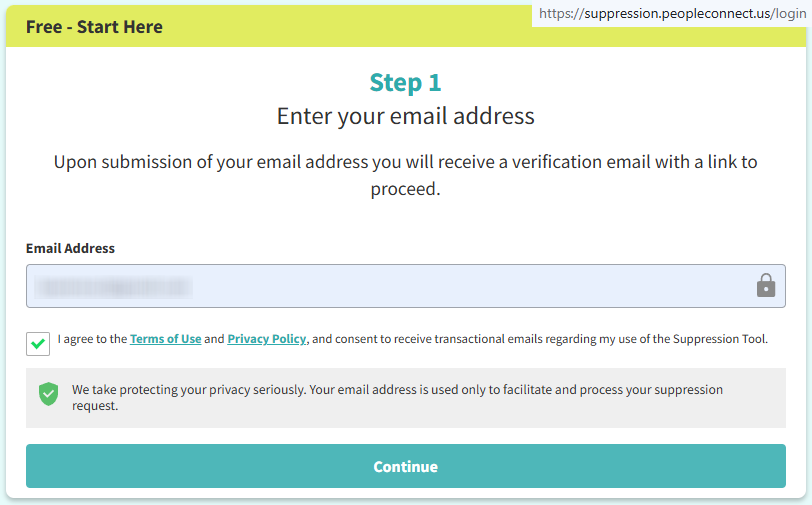
Open the PeopleConnect or Intelius suppression path
Use the PeopleConnect suppression workflow or the Intelius opt-out route. InstantPeopleFinder does not appear to offer a separate, reliable, standalone removal path, so the practical option is to use the connected PeopleConnect/Intelius system. It relies on public records, federal, state, and local sources, third-party data providers, county courthouse records, census bureaus, and other public information sources.
Before you begin, search for your profile and save the exact listing details. If you take screenshots, blur sensitive information before storing or sharing them.
Verify your email
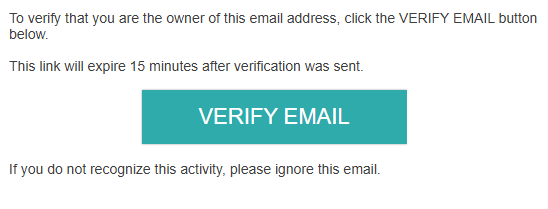
The workflow requires email verification. Open the message from the suppression tool and follow the link or confirmation step. Keep the message because it may help later if the profile remains visible or support asks for proof of the request.

Submit your identifiers
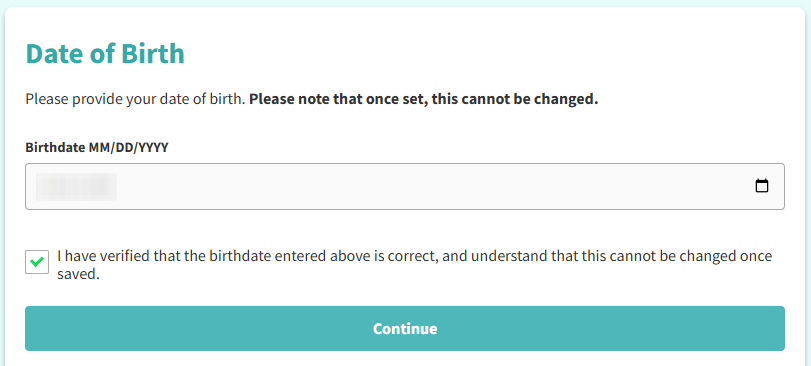
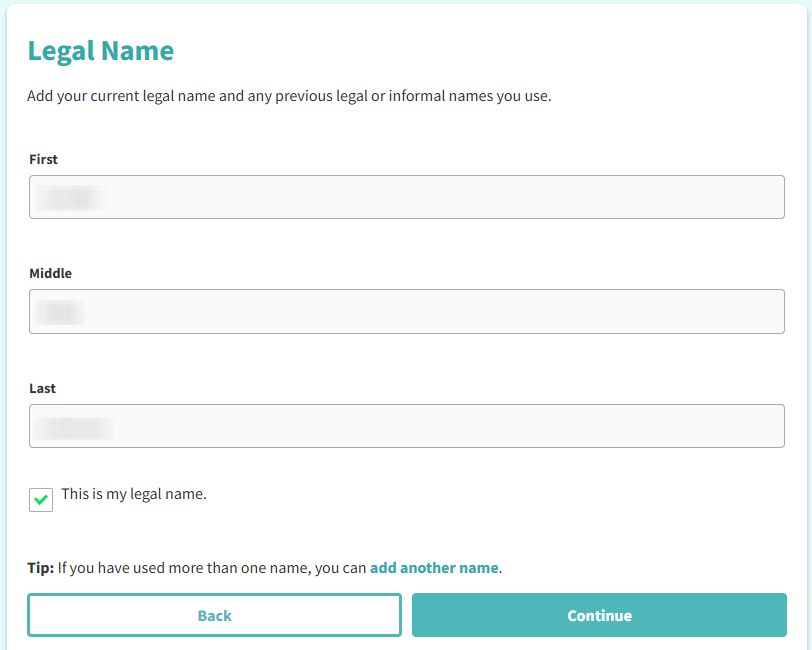
The PeopleConnect/Intelius workflow may ask for your legal name, date of birth, and at least one confirmed contact point, such as an email address or phone number. Use only the details necessary to match the correct profile. The purpose of this step is to identify the listing that should be suppressed.
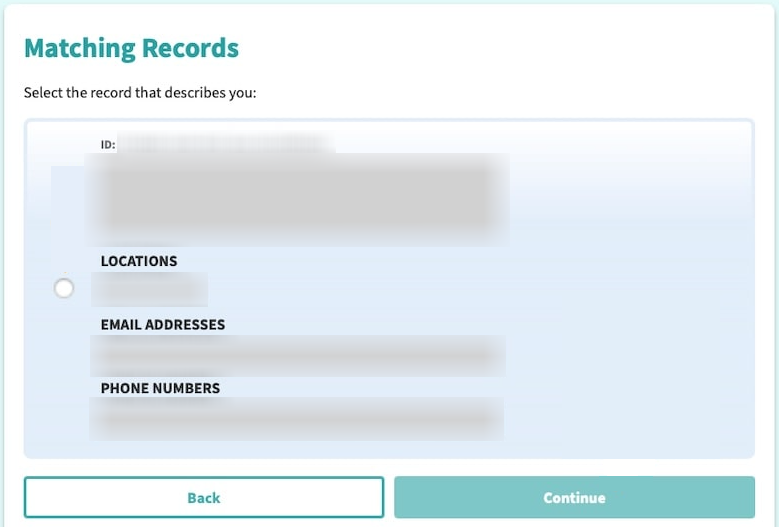
Match the correct profile
Review the matching results carefully. InstantPeopleFinder-related data may include old addresses, relatives, neighbors, phone numbers, and public-record details, so make sure the selected profile is actually yours before submitting the suppression request.
If multiple profiles appear, handle each relevant match separately. A single suppression request may not cover every duplicate or related profile.
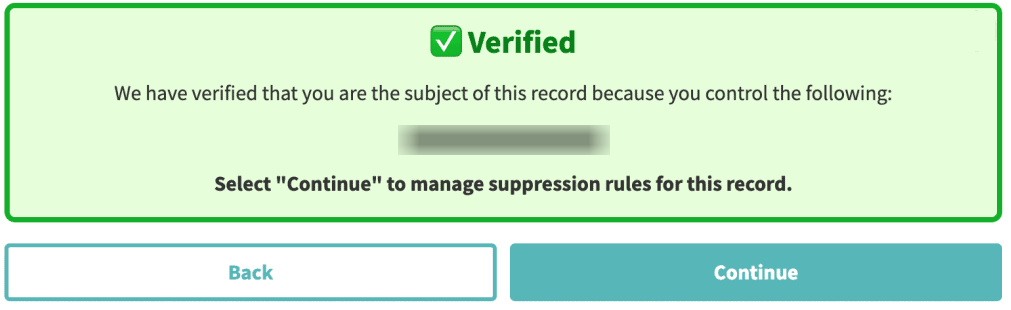
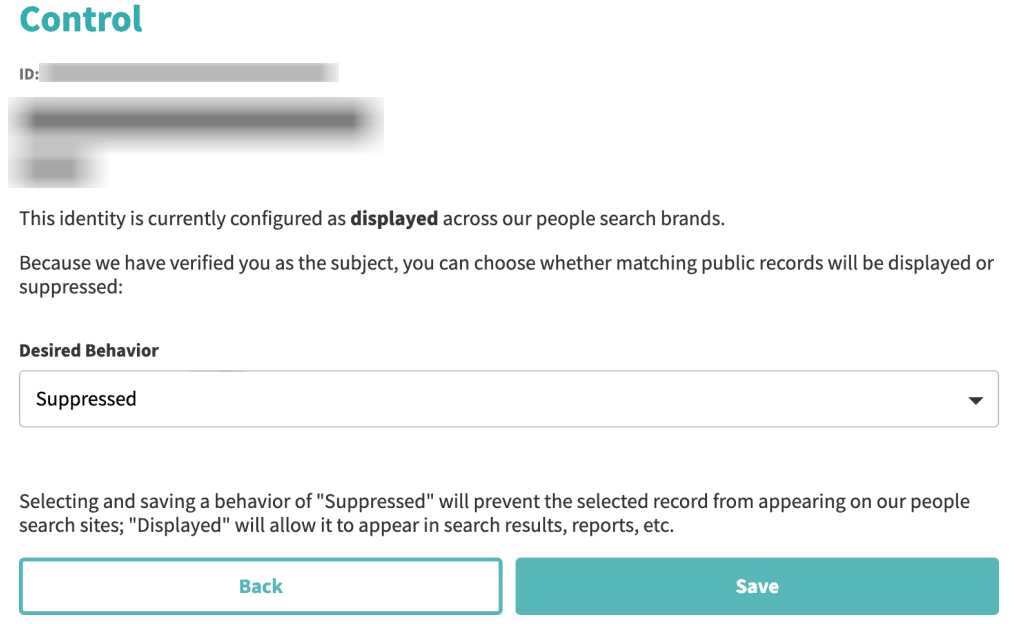
Suppress your data
Submit the final suppression request after selecting the correct profile. Save the confirmation message, final screen, or any request reference you receive.
Check name search and reverse phone search
Do not stop after checking only your name. Users have reported cases where suppression removed a person from name search, but reverse phone lookup still showed addresses and related information. After the waiting period, check both name-based and phone-based results.
Track confirmation & timeline
Older opt-out instructions mention removal within about 72 hours. User reports show that Intelius-related responses can take several days. Some third-party removal estimates allow up to 4 weeks. A practical approach is to check after 72 hours, follow up after several days if the profile is still visible, and continue monitoring until the listing is gone.
Timelines, Verification & What to Expect
Official pages require one contact check and may ask for another confirmed contact point before a request is handled. Allow 3-7 days, then follow up once with support if nothing changes.
Edge Cases & Troubleshooting
Try another contact detail in the tool, or send a privacy request to PeopleConnect support.
Reload the page, turn off blockers, and try again in a fresh session.
Check Spam, resend once, and look for a link instead of a code.
Deleting user details is not the same as hiding a public profile.
Send one more request with the same details. Keep the new confirmation note.
Search your phone number separately after the opt-out request. If the reverse phone result still exposes addresses or relatives, submit a separate suppression request for that matching profile and include the phone-based result when contacting support.
Do not assume the data is gone. Save the public listing URL, screenshot the visible profile, and contact PeopleConnect privacy/support with the exact details. Removal and customer-service problems have been reported in the connected Intelius/PeopleConnect ecosystem.
PeopleConnect states that its site is intended for U.S. residents. If the public suppression tool is unavailable or unsuitable for your region, use the privacy contact route and include the listing details.
Users have raised this concern for public data removal workflows. The process may require email verification, legal name, date of birth, and at least one confirmed contact point. Provide only what is needed to match the profile and keep a copy of the request.
This matches the types of data associated with the PeopleConnect/Intelius ecosystem: current and past addresses, relatives, neighbors, and other associated people. When matching the profile, check the old address history carefully so you do not miss a duplicate listing.
Will my data reappear?
There is no confirmed fixed InstantPeopleFinder re-listing cycle, such as every three months. However, data can remain visible through another search path, especially reverse phone lookup, even after suppression by name. The main privacy risk is profile linking. A search result can connect your name, phone number, old address, relatives, neighbors, and public-record details in one place. Suppression may remove a profile from name search. A reverse phone lookup still exposes address information. The PeopleConnect suppression tool sometimes returns no matching result even when a profile is publicly visible.
For that reason, check more than one search route after removal. Search your name, old address, and phone number. If the same information appears again or remains visible in another profile, submit another suppression request and keep each confirmation message.
Manual removal works. But only for today.
Opting out manually is possible – but it never ends. Data brokers re-list your information regularly, so removing yourself from one site today just means doing it again in a few months.
| MANUAL | ||
|---|---|---|
| Time for US Search removal | 2 minutes | ~15 minutes |
| Sites covered | 262+ sites | 1 site |
| When data reappears | Auto re-removed | ~15 minutes |
| Total time per year | 0 hours | 2-5 hours |
| Monitoring for new listings | Continuous | You do it yourself |
| Cost | from $16.50/month | Free |
How Clearnym works
We handle the entire removal and monitoring process so you don’t have to track spreadsheets or repeat opt-outs every quarter.
-
WEEK 1-2
We submit
Opt-out requests submitted
We submit removal requests to all covered data broker sites immediately after you sign up. You receive a confirmation within 24 hours.
-
UP TO 3 MONTHS
We remove
Removals in progress
Each site processes requests at its own pace. Most removals complete within 7–14 days; some sites take up to 3 months. We track every status and follow up automatically.
-
ONGOING
We monitor
From day one
We scan all covered sites every 30 days throughout your subscription — not just after removal. When your data reappears, we submit a new removal request automatically.
We remove your data for you - faster, verified, trackable.
Discover Which Sites Share Your Private Details—Instantly and Free.
FAQ
Suppression may remove your information from name search, while reverse phone lookup still exposes address details. Check your phone number separately after the request. If the phone-based result is still live, submit a separate suppression request for that match and include the phone result when contacting support.
The suppression tool may fail to return a matching result even when a related profile is visible. Save the public listing URL, the exact search terms, and screenshots. Then contact PeopleConnect privacy/support instead of relying only on the failed search result.
The workflow may require email verification, legal name, date of birth, and at least one confirmed contact point. Use only the information needed to identify the correct profile. Save the confirmation so you do not have to repeat the same process unnecessarily.
Yes, several-day delays have been reported in the connected Intelius workflow. Older instructions mention up to 72 hours, while some third-party removal estimates allow up to 4 weeks. Check after 72 hours, follow up after several days if the listing remains visible, and keep monitoring until the profile is gone.
Review old addresses and household links carefully because they may help identify the correct record. If duplicate profiles appear, suppress each relevant match instead of assuming one request covers all versions. After removal, check your name, phone number, and old address to confirm the same data is not still visible elsewhere in the same workflow.

Posted by Ava J. Mercer
More People Search Removal Guides
- 411.com Opt Out Guide
- Absolute People Search Opt Out Guide
- Advanced People Search Opt Out Guide
- AnyWho Opt Out Guide
- BeenVerified Opt Out Guide
- CheckPeople Opt Out Guide
- CheckSecrets Opt Out Guide
- CocoFinder Opt Out Guide
- ContactOut Opt Out Guide
- DOBsearch Opt Out Guide
- FamilyTreeNow Opt Out Guide
- FastBackgroundCheck Opt Out Guide
- Find People Fast Opt Out Guide
- FindPeopleSearch Opt Out Guide
- FreePeopleDirectory: Opt Out Guide
- FreePeopleSearch Opt Out Guide
- GladIKnow Opt Out Guide
- GoLookUp Opt Out Guide
- IDCrawl Opt Out Guide
- Information.com Opt Out Guide
- Inforver Opt Out Guide
- Instant Checkmate Opt Out Guide
- InstantPeopleFinder Opt Out Guide
- Kiwi Searches Opt Out Guide
- MyLife Opt Out Guide
- Nuwber Opt Out Guide
- OfficialUSA Opt Out Guide
- PeekYou Opt Out Guide
- PeopleByName Opt Out Guide
- PeopleFinder Opt Out Guide
- PeopleFinders Opt Out Guide
- PeopleLooker Opt Out Guide
- PeopleLookup Opt Out Guide
- PeopleSearch Opt Out Guide
- PeopleSearchNow Opt Out Guide
- PeopleSmart Opt Out Guide
- PeopleWhiz Opt Out Guide
- PersonSearchers Opt Out Guide
- Persopo Opt Out Guide
- PrivateEye Opt Out Guide
- PrivateRecords Opt Out Guide
- Public Data Check Opt Out Guide
- Public Data USA Opt Out Guide
- Public Records 360 Opt Out Guide
- PublicRecordsNow Opt Out Guide
- Quick People Trace Opt Out Guide
- Radaris Opt Out Guide
- RealPeopleSearch Opt Out Guide
- SearchPeopleFREE Opt Out Guide
- SearchUSAPeople Opt Out Guide
- Semcasting Opt Out Guide
- Social Catfish Opt Out Guide
- Spokeo Opt Out Guide
- ThatsThem Opt Out Guide
- TruePeopleSearch Opt Out Guide
- TruthFinder Opt Out Guide
- UnMask Opt Out Guide
- US Search Opt Out Guide
- USA People Search Opt Out Guide
- USATrace Opt Out Guide
- Veripages Opt Out Guide
- Whitepages Opt Out Guide
- Wyty Opt Out Guide
- ZabaSearch Opt Out Guide


