
Opt Out Guides
Public Data USA Opt Out Guide
Before You Opt Out of Public Data USA, Check Your Exposure
Privacy Writer
A. J. MercerAva J. Mercer
Updated
Read
5 min
Before You Opt Out of Public Data USA, Check Your Exposure
People-search listings can expose your name, address, and phone number, which can raise online privacy risk and unwanted contact. PublicDataUSA typically shows data by organizing records from public and commercial sources into a searchable listing.
How to opt out of PublicDataUSA
Go to the PublicDataUSA page, follow the steps, enter a contact method, and confirm via a code/link; it often completes in 3–10 days after verification.
Checklist:
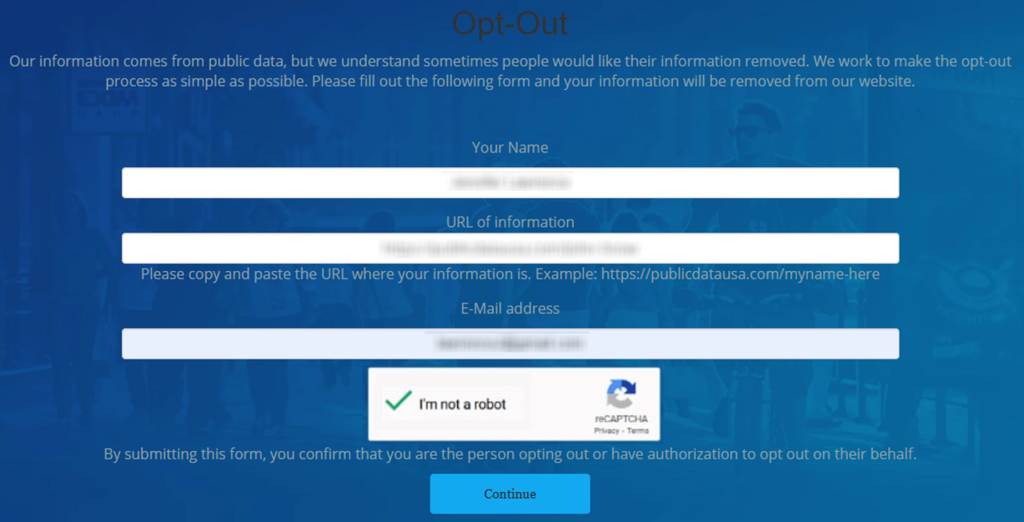
- Open the official opt-out form
- Enter your first and last name
- Copy the URL and paste it
- Complete the CAPTCHA
- Set a reminder to opt out
Find out if your private details were exposed
PublicDataUSA – Quick Facts
| Parameter | Value |
| Domain | publicdatausa.com |
| Data Types | contact information, property records, campaign contributions, business registration |
| Opt-out Methods | web form |
| Identity Verification | confirmation email |
| Typical Response Time | 3–10 days |
| Re-listing Risk | medium |
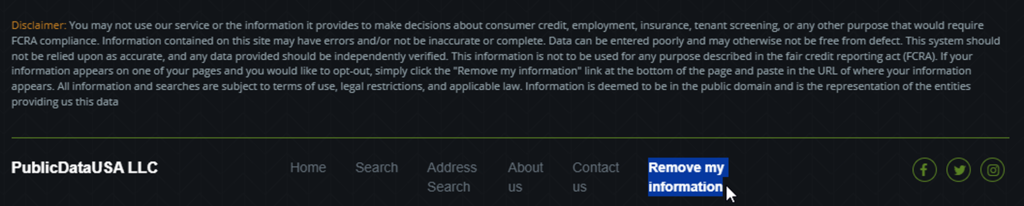
The site says a listing footer can include a “Remove my information” link and that submitting the form means you are the person opting out or authorized. This explains information from PublicDataUSA and how personal data may be used to confirm a request.
Common data you may find:
- Names and aliases
- Relative links
- Property records
- Campaign contributions
- Business registration details
Step-by-Step Guide
Search for your record
First, go to the webpage with the listing that matches you and copy the URL of your profile. After that, scroll to the footer, and click “Remove my information.” This opens the page used to start a request. Keep screenshots minimal and blur personal information. Tip: If you see more than one listing, open each listing in a new tab.
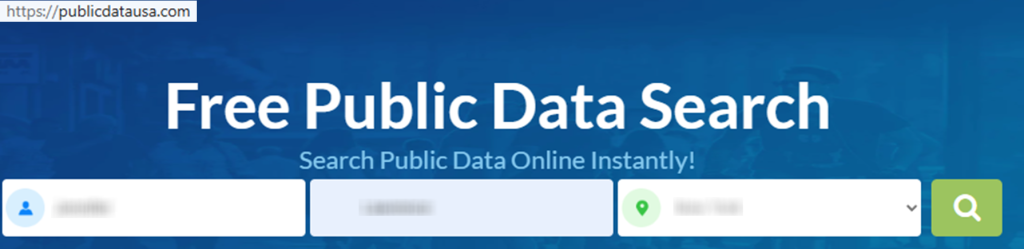
Submit your identifiers (email/phone + CAPTCHA)
On the form, enter your name. Use the name fields as requested: enter your first and last name. Add an email for confirmation and paste the URL of your profile. Click “Continue.” Tip: Redact personally identifiable information associated with your email in any screenshot.
Verify via code or link (email/SMS)
Watch for a verification message. Follow the instructions promptly and save the message for your records. Tip: Check Spam folders and match the confirmation to the correct listing; avoid sharing information associated with your email.
Confirm deletion / Do-Not-Sell request
Once verified, look for an on-page success notice confirming deletion. If you also see a Do-Not-Sell choice, select it. Keep notes, but blur personal details in any saved image. Tip: If a submission fails, refresh once and try again.

Track confirmation & timeline
Keep the confirmation screen and any follow-up email. If the listing is still visible after the stated window, resubmit once using the same listing link. Tip: Automate a reminder for 3–6 months so you can check again and remove your info quickly if a listing returns.
Timelines, Verification & What to Expect
You may see on-page confirmation right away and then receive a follow-up message for verification. Many requests finish in about 3–10 days, but timing can vary. If nothing changes after 10 days, send the form once more using the same listing link and contact PublicDataUSA directly through the site’s contact option. If you are trying to cancel a separate subscription with premium features or paid plans, use that billing page. Listing removal is a different flow.
Edge Cases & Troubleshooting
- No access to the original email: use a current inbox and explain that you are making a removal request for the listing.
- “Record not found”: open the exact listing first, then try the form again.
- CAPTCHA errors: wait briefly and try again later.
- Verification message not arriving: check Spam, then try once more.
- Region limits (EU/UK/CA): some people-finder services may not process every request the same way; use the contact option.
- Account vs listing confusion: cancel billing separately from listing removal.
- Mixed results across sites: your listing might still appear on other people-search sites; see Related removals.
- Quick wording: ask support to remove your personal and remove your information, and include the listing link.
Will my data reappear?
Listings can return when aggregators refresh indexes or partner feeds update, and information from data broker sites can be republished after routine crawls. This is why data removal can feel ongoing even after a successful removal. Re-listing risk is medium across people-search databases, especially when similar entries exist on other data broker sites and people-search sites. To reduce recurrence, keep confirmation emails, set a 3–6 month reminder to keep your information private.
Manual vs Assisted Removal
Manual:
Pros
- More control;
- you can remove your data one listing at a time.
Cons
- Doing it manually takes time, and you must repeat opt-out requests and monitoring across people search sites.
Assisted:
Pros
- A removal service can automate follow-ups and recurring checks.
Cons
- You share basic personal details automatically and may still need occasional verification steps.
We remove your data for you - faster, verified, trackable.
Discover Which Sites Share Your Private Details—Instantly and Free.
FAQ
Use an email you control for verification only, and follow the on-page steps. Save the confirmation message so you can follow up if needed.
Many sites use a confirmation message to verify you are authorized and to keep a record of what you submitted.
Go to the PublicDataUSA page, open your listing, use the footer removal link, and follow the form prompts; then verify via email/SMS. opt out of publicdatausa.com
If you have authorization, use that person’s listing link, enter the required identifiers, and complete verification. Keep notes of what you submitted.
Check the Related removals list and prioritize the most visible listings first. Keep confirmations so you can track what you have already handled.
Start with the Related removals list, then use each site’s official form and keep confirmation emails for follow-up.
Provide the identifiers the form asks for, then complete verification and save the confirmation message.
If nothing changes after the stated window, try the form once more, then contact support.
Refresh cycles and mirrored entries can cause re-listing. Keep confirmations and re-check every 3–6 months.
A data broker collects and displays consumer records; plan a data broker opt-out checklist if you are working across many services.
Use “removal” for listing suppression and use account cancellation separately when relevant.

Posted by Ava J. Mercer
More People Search Removal Guides
- 411.com Opt Out Guide
- Absolute People Search Opt Out Guide
- Advanced People Search Opt Out Guide
- AnyWho Opt Out Guide
- BeenVerified Opt Out Guide
- CheckPeople Opt Out Guide
- CheckSecrets Opt Out Guide
- CocoFinder Opt Out Guide
- ContactOut Opt Out Guide
- DOBsearch Opt Out Guide
- FamilyTreeNow Opt Out Guide
- FastBackgroundCheck Opt Out Guide
- Find People Fast Opt Out Guide
- FindPeopleSearch Opt Out Guide
- FreePeopleDirectory: Opt Out Guide
- FreePeopleSearch Opt Out Guide
- GladIKnow Opt Out Guide
- GoLookUp Opt Out Guide
- IDCrawl Opt Out Guide
- Information.com Opt Out Guide
- Inforver Opt Out Guide
- Instant Checkmate Opt Out Guide
- InstantPeopleFinder Opt Out Guide
- Kiwi Searches Opt Out Guide
- MyLife Opt Out Guide
- Nuwber Opt Out Guide
- OfficialUSA Opt Out Guide
- PeekYou Opt Out Guide
- PeopleByName Opt Out Guide
- PeopleFinder Opt Out Guide
- PeopleFinders Opt Out Guide
- PeopleLooker Opt Out Guide
- PeopleLookup Opt Out Guide
- PeopleSearch Opt Out Guide
- PeopleSearchNow Opt Out Guide
- PeopleSmart Opt Out Guide
- PeopleWhiz Opt Out Guide
- PersonSearchers Opt Out Guide
- Persopo Opt Out Guide
- PrivateEye Opt Out Guide
- PrivateRecords Opt Out Guide
- Public Data Check Opt Out Guide
- Public Data USA Opt Out Guide
- Public Records 360 Opt Out Guide
- PublicRecordsNow Opt Out Guide
- Quick People Trace Opt Out Guide
- Radaris Opt Out Guide
- RealPeopleSearch Opt Out Guide
- SearchPeopleFREE Opt Out Guide
- SearchUSAPeople Opt Out Guide
- Semcasting Opt Out Guide
- Social Catfish Opt Out Guide
- Spokeo Opt Out Guide
- ThatsThem Opt Out Guide
- TruePeopleSearch Opt Out Guide
- TruthFinder Opt Out Guide
- UnMask Opt Out Guide
- US Search Opt Out Guide
- USA People Search Opt Out Guide
- USATrace Opt Out Guide
- Veripages Opt Out Guide
- Whitepages Opt Out Guide
- Wyty Opt Out Guide
- ZabaSearch Opt Out Guide


