
Opt Out Guides
OkCaller Opt Out Guide
Before You Opt Out of OkCaller, Check Your Exposure
Privacy Writer
A. J. MercerAva J. Mercer
Updated
Read
5 min
Before You Opt Out of OkCaller, Check Your Exposure
OkCaller is an online directory that can show phone numbers and addresses, as well as other contact information, which can affect online privacy and security and raise the risk of a scam and identity theft. OkCaller offers lookups that compile records from public sources and commercial sources, then present them in a simple caller ID view.
How to opt out of OkCaller
Use the OkCaller website (okcaller.com), open the official opt-out page, submit your email addresses and phone number, and confirm via a code or link; it usually takes 3–10 days. If you want to opt, save proof and set a reminder.
Checklist:
- Open the official opt-out form
- Enter identifiers (email/phone)
- Complete CAPTCHA/verification
- Confirm via code/link
- Save the confirmation email
- Set a reminder to re-opt-out
Find out if your private details were exposed
OkCaller – Quick Facts
| Parameter | Value |
| Domain | okcaller.com |
| Data Types | contacts, addresses, possible social identifiers |
| Opt-out Methods | web form/email/mail |
| Identity Verification | code via email/SMS or confirmation email |
| Typical Response Time | 3–10 days |
| Re-listing Risk | medium |
OkCaller provides a people-finder database; the service also surfaces personal data and personally identifiable information from data brokers. These listings can be indexed by people search sites, so they may show up beyond one directory. OkCaller opt steps are similar across online directories.
Common data you may find:
- Names (and known aliases)
- Phone number history
- Email addresses
- Current and past addresses
- Relatives/household links
- Property records (if available)
- Court records (if available)
Step-by-Step Guide
Log in to your account
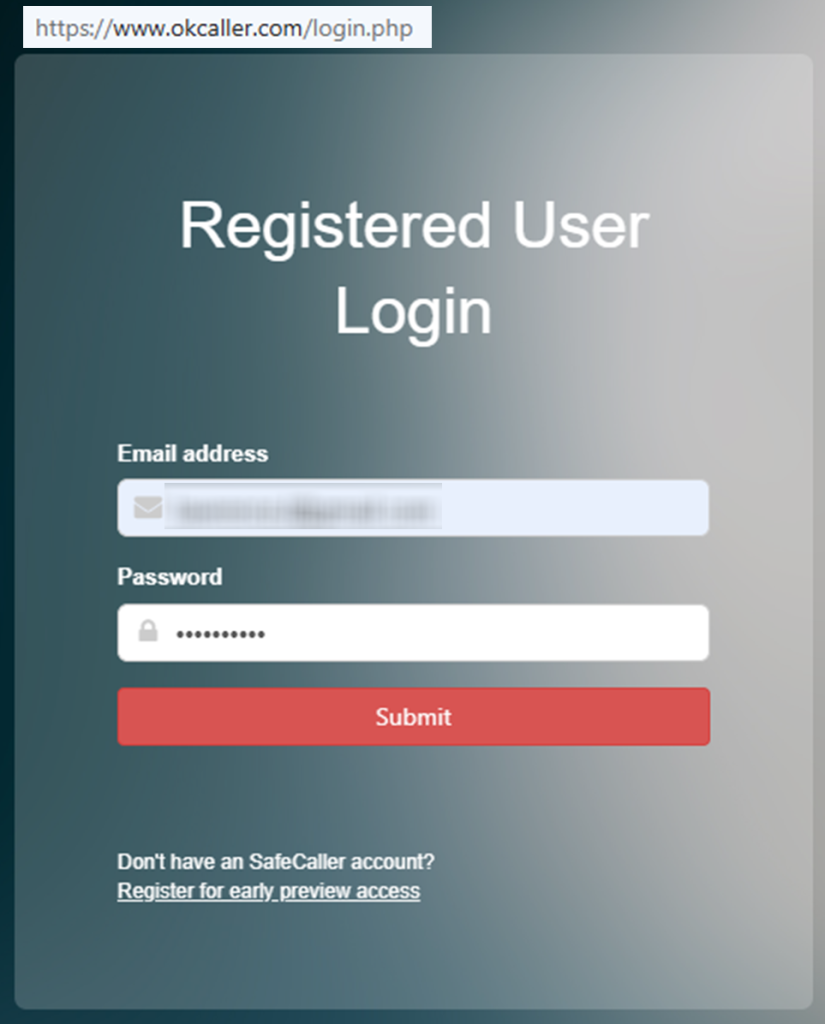
To proceed with OkCaller manually, start on the login screen. Sign in with a disposable email and a strong password. If you do not have an account. Avoid reusing a work inbox and utilize minimal personal information. After you sign in, open the dashboard page and use the left-menu navigation to find your profile tools. Before you capture any screenshot, blur or redact personal info and private data. Tip: If you do not see the reset email, check Spam or Promotions and try again after a few minutes.
Enter your phone number
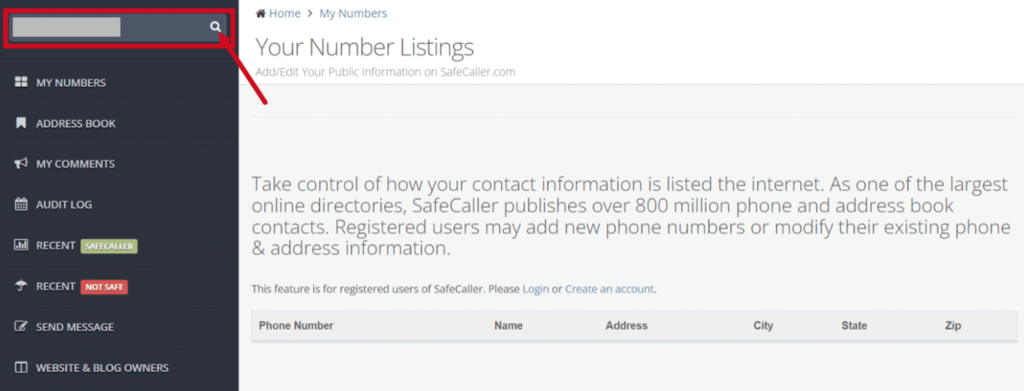
Find the Search field. Enter your phone number and click the search icon. If you see multiple results, page through until you find the right listing and use the next page if needed. Open the matching record and review the visible fields carefully. For screenshots, hide the number and any address line, and do not show your full email on screen. Tip: Try a past number or a different format (with or without spaces) if the first search does not return results.
Select Opt-out/Unlist
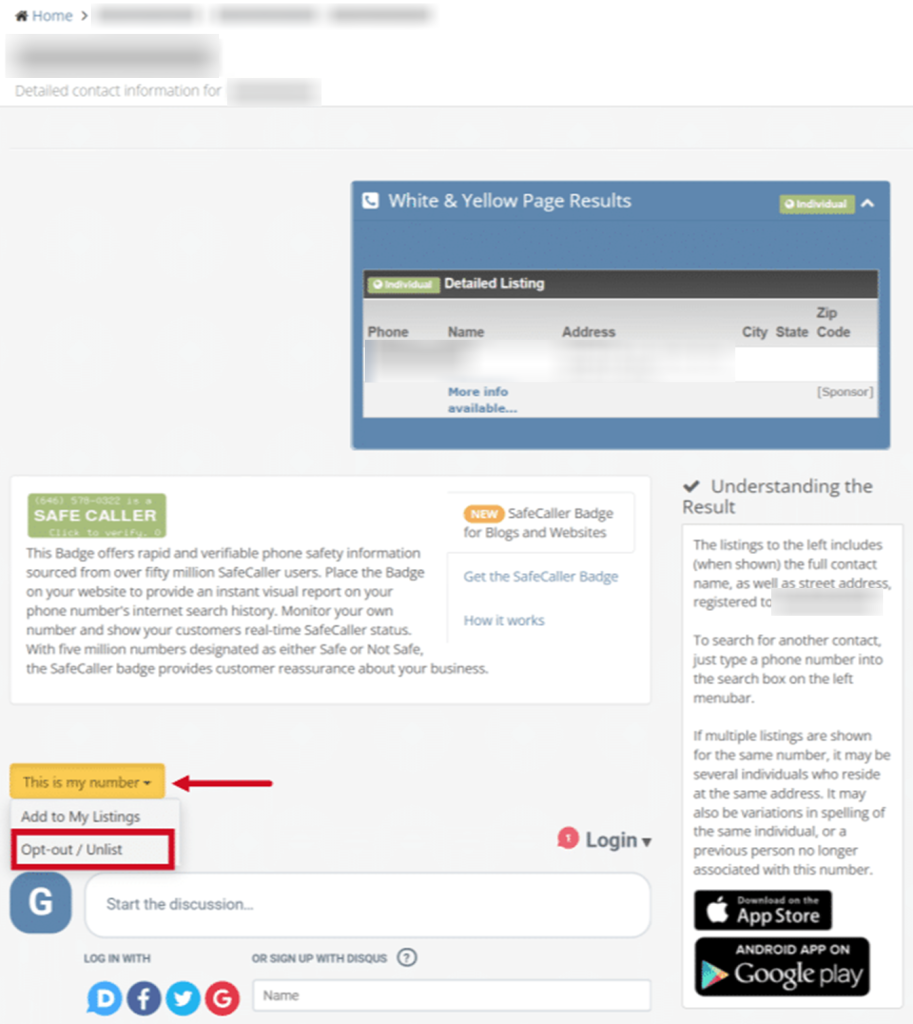
Open the listing and scroll down to the “This is My Number” area, then select Opt-out/Unlist to remove your information. This step may change your caller number status to unlisted and stop your number from showing in the main listing view. For screenshots, redact anything that identifies you, including nearby UI breadcrumbs or account names. Tip: Reload the page or switch browsers if the button does not appear. Also, avoid autofill.
Confirm deletion
Complete the verification prompt. You may receive a code by email or a call that asks you to enter the PIN. Follow the on-screen steps until you see a success message. Tip: If the code does not arrive, wait a bit, check Spam, and try resending once; repeated rapid attempts can trigger errors or timeouts.

Track confirmation & timeline
Save the confirmation page and any email receipt, then check again after 3–10 days to confirm your listing is no longer visible. If the record still appears, resubmit once and keep the receipt. Tip: If you want to automate follow-ups across data broker sites, use a data removal service that tracks changes and reminders.
Timelines, Verification & What to Expect
Most requests are processed in 3–10 days. Confirmation may show on the page right away. It may also arrive by email (check Spam and Promotions folders). If you get no response after 10 days, use the contact link on the site. If you want to remove a second listing, repeat the same steps.
Edge Cases & Troubleshooting
- No access to the original email/phone: use a disposable email to create access. Then, follow the listing flow to remove your information without using a primary inbox.
- “Record not found”: try different formatting or prior numbers; some people-search services only show results after sign-in.
- CAPTCHA or submission errors: clear cookies, turn off extensions, and retry later.
- Verification code not arriving: wait, check Spam, and resend once.
- Form rejects the request by region (EU/UK/CA): look for options linked in privacy policies and submit a general request for data privacy.
- Account deletion vs. public listing removal confusion: closing an account will not always remove your info from a public listing; follow the unlist steps.
- Re-submitting after a failed attempt: capture the error, then try again once.
Will my data reappear?
Re-listing can happen when aggregators refresh multiple data feeds, resellers repost entries, or other data broker websites update profiles; the risk is medium for data brokers and people listings. Reduce recurrence: protect your personal information by keeping receipts, setting a 3–6 month reminder to opt out and safeguard, and reviewing your online activities and digital footprint for exposure across sites like OkCaller.
Manual vs Assisted Removal
Manual:
Pros
- More control and one clear way to remove what you share;
- you can manage repeats without paying for services like a subscription.
Cons
- Repeating opt-out steps across multiple data brokers and databases takes time;
- you must monitor re-listing and repeat requests.
Assisted:
Pros
- A data removal service can track progress in one tracking panel;
- a data removal service can handle one data deletion check over time.
Cons
- Cost,
- and you still need to review what is sent;
- some companies use a removal service like a vendor and may request extra verification.
We remove your data for you - faster, verified, trackable.
Discover Which Sites Share Your Private Details—Instantly and Free.
FAQ
Follow the in-site steps in this removal guide, not pop-ups. Log in, find your listing, and unlist it; then keep the confirmation email and re-check in 3–10 days.
Caching and indexing can lag behind. Wait 3–10 days, then repeat the request once and keep your receipt as proof.
Search your own listing inside the site, open the result, and use the “This is My Number” button to hide it.
Create a new account with a new email, then follow the same unlist flow on the listing page. Keep the receipt for follow-up.
Set a reminder every 3–6 months and re-submit quickly if the listing reappears across data brokers and people pages.
It usually means the public listing is suppressed from search results, not that every internal copy is erased. Keep proof and re-check later.
Use the in-site unlist button, confirm verification, and save the receipt. If you need broader data removal, use a trusted service.
Look for a “Do Not Sell or Share My Personal Information” link; that right is part of the California Consumer Privacy Act, often shortened to CCPA.
Listings are commonly built from public records and commercial sources, then shown in an online phone directory-style format.
Use account settings if available to close the account after you opt out of okcaller.com; closing the account alone may not erase your listing.
Many people-search services compile information from data brokers and people into profiles. You can submit data removal requests, keep receipts, and re-check.

Posted by Ava J. Mercer
More Phone & Caller ID Lookup Removal Guides
- Addresses.com Opt Out Guide
- AllAreaCodes Opt Out Guide
- AmericaPhoneBook Opt Out Guide
- CallerSmart Opt Out Guide
- Find Who Calls You Opt Out Guide
- NumberGuru Opt Out Guide
- Numberville Opt Out Guide
- NumLookup Opt Out Guide
- OkCaller Opt Out Guide
- PrivateNumberChecker Opt Out Guide
- RevealPhoneOwner Opt Out Guide
- ReversePhoneLookup Opt Out Guide
- SpyDialer Opt Out Guide
- Sync.ME Opt Out Guide
- Telephone Directories Opt Out Guide
- Truecaller Opt Out Guide
- USPhoneBook Opt Out Guide
- YellowBook Opt Out Guide
- Zlookup Opt Out Guide


