
Opt Out Guides
Outbrain Opt Out Guide
Before You Opt Out of Outbrain, Check Your Exposure
Privacy Writer
A. J. MercerAva J. Mercer
Updated
Read
5 min
Before You Opt Out of Outbrain, Check Your Exposure
Outbrain recommendations can create privacy risk if your name, address, or phone number becomes connected to what you read or click. The site generally relies on signals from public pages and commercial sources, then displays recommendations or ads based on online identifiers and browsing activity. Turning off personalization helps limit how Outbrain may process your personal data across partner placements.
How to opt out of Outbrain
Open the official privacy page, go to the Interest Profile, choose “My Data Rights,” and select the opt-out option. If you submit a rights request, processing usually takes 7–30 days.
Checklist:
- Open the official privacy page
- Go to the Interest Profile
- Choose “My Data Rights”
- Select the opt-out option
- Save the confirmation
- Set a reminder to re-opt-out
Find out if your private details were exposed
Outbrain – Quick Facts
| Parameter | Value |
| Domain | outbrain.com (Interest Profile at dsr.outbrain.com) |
| Data Types | online identifiers (UUID), IP address (masked), device/browser info, pages visited, clicks, interest categories |
| Opt-out Methods | Interest Profile toggle/opt out cookie/device settings/industry choice pages |
| Identity Verification | on-page confirmation; some requests may need details to confirm identity |
| Typical Response Time | 7–30 days (varies by request and region) |
| Re-listing Risk | medium |
Outbrain is operating under the Teads brand following the merger of Outbrain and Teads. When you visit a website or application of one partner, Outbrain technology is implemented to serve recommendations; some items are paid for by an advertiser, and the link leads to another page, including a page on the same partner’s site. Find the privacy policy relevant to sensitive information and understand visitors’ privacy expectations.
Common data you may find:
- UUID and other online identifiers
- IP Address (masked)
- Device type, browser type, operating system
- Pages visited and time of visit
- Referring URLs
- Clicks on recommendations
- Nroad location data
- Interest categories and segments
Step-by-Step Guide
Open the privacy policy
Start at the privacy center and open the user privacy policy. It explains Outbrain’s legacy technology and how information can be considered personal data if Outbrain links it to a UUID, including personal data if Outbrain associates it with a user profile. On partner sites, you may see text referencing Outbrain and an AdChoices icon. This helps you know you are interacting with Outbrain. When saving screenshots for your records, blur/redact personal info before sharing.
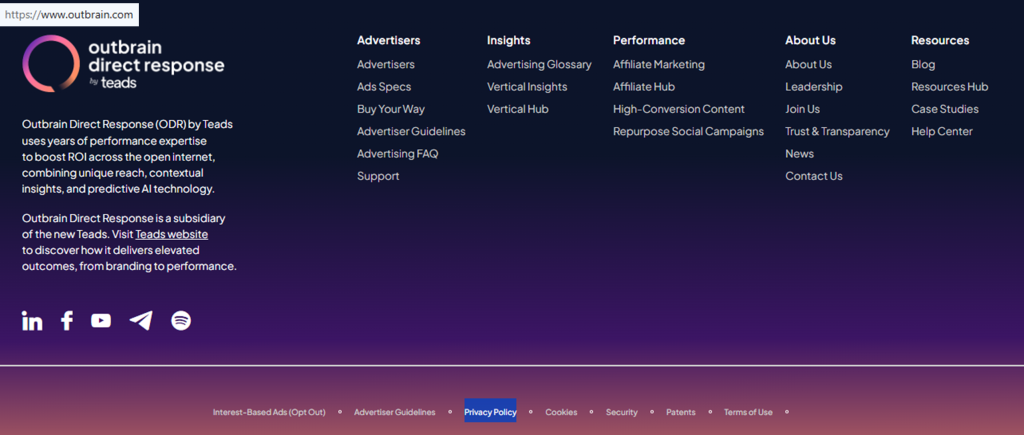

Choose “My Data Rights”
In the Interest Profile, choose “My Data Rights.” The page allows you to exercise your privacy rights, including the right to request access, deletion, or restrictions under state privacy laws. It may reference the United States consumer privacy notice. To access the data Outbrain holds for your browser, use the download feature and store the file securely. If you want to contact Outbrain, use the email listed in the policy and include enough detail to process your personal data request.

Choose the opt-out option
If you click on the AdChoices logo, you’ll be directed to the Teads user policy. Choose the opt-out option you want: opt out of Outbrain personalization, opt out of the sale, or opt out of personalized tracking. You may also opt for a privacy control signal, but you may still see Outbrain. Your request may rely on an opt-out cookie, so if you clear Outbrain cookies, you may need to opt in again. In addition to your request, industry tools may apply to other advertising companies.
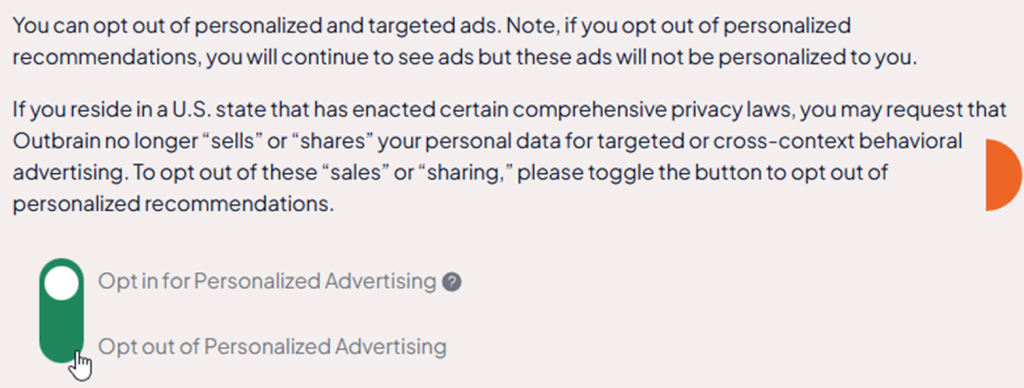
Confirm deletion
To delete, use “Delete My Outbrain Profile” and follow the prompts. This supports your right to request erasure and helps you exercise your privacy rights without posting extra details publicly. After confirmation, you may no longer receive recommendations from Outbrain on that browser/device. If you interact with Outbrain via a destination that is subject to that advertiser’s privacy policies, review the destination’s privacy policies too.
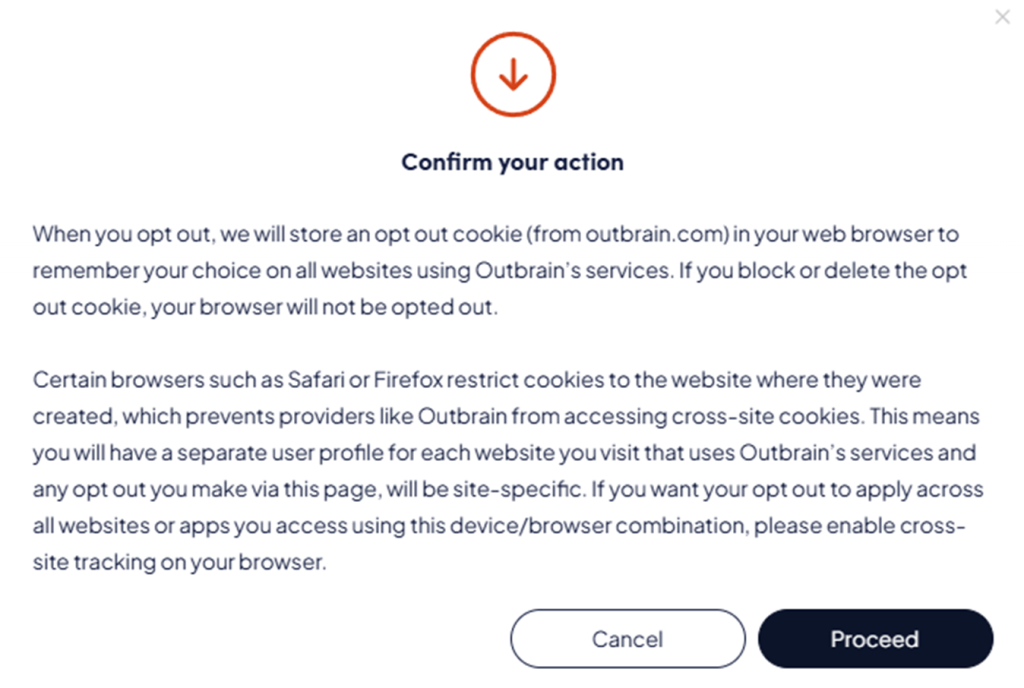
Track confirmation & timeline
Keep a dated record of what you submitted and any confirmation screen or message. Outbrain has in place safeguards for transfers, including the data privacy framework, and will process your personal data under the terms of this privacy policy. If nothing changes after 30 days, contact Outbrain and resubmit once, and keep the latest proof. If you change browsers/devices, repeat the same steps; Outbrain cookie settings can differ per browser/device.
Timelines, Verification & What to Expect
Most settings can apply quickly to the current browser/device. However, rights requests may take 7–30 days, depending on the region and request type. Confirmation usually appears on-page, and some flows may ask for details to verify identity or residency before they process your personal data. If you do not see confirmation, revisit the page where the widget appeared. If there is no response, resubmit once using the same form.
Edge Cases & Troubleshooting
- No access to the original email/phone: use the same browser/device; user interacting with Outbrain on a different browser may not see the same controls.
- “Record not found”: revisit the sites on which the Outbrain widget appeared, then try again.
- CAPTCHA or submission errors: refresh, try another browser, and disable strict blockers for the form only.
- Verification code not arriving: wait, check Spam, then resend once.
- Region limits (EU/UK/CA): some rights flows differ; use the relevant notices and privacy policies.
- Account vs recommendation settings: Outbrain is an ad/recommendation tool, not a public listing service.
- If you clear cookies delivered through the Outbrain tools: need to opt again and save the new confirmation.
- Email marketing: use the unsubscribe link; if needed, cancel by emailing support.
Will my data reappear?
Some settings can reset because the opt-out cookie is browser/device-specific, and clearing cookies delivered through the Outbrain system can undo preferences. Partner sites where the Outbrain widget runs can change over time across websites in the Outbrain network. Certain Outbrain advertisers or publishers can adjust campaigns. Publishers may implement the Outbrain widget differently. To reduce repeats, set a 3–6 month reminder, keep confirmation records, and re-submit quickly if needed.
Manual vs Assisted Removal
Manual:
Pros
- Control, ability to opt once per browser/device, and fewer shared details.
Cons
- Time investment, repeat monitoring, and opting again after the cookie clears.
Assisted:
Pros
- Speed, verification help, tracking dashboard, and recurring checks.
Cons
- You share details with a provider and may pay a fee.
We remove your data for you - faster, verified, trackable.
Discover Which Sites Share Your Private Details—Instantly and Free.
FAQ
It usually indicates a recommendation widget on a publisher page. The AdChoices icon can open settings and show which provider flow applies.
Use the contact details in the user privacy policy and share the site and ad details (no sensitive personal data).
Some posts note that clearing browser cookies can reset choices; re-check the Interest Profile and keep your confirmation records.
On many partner sites, click on the AdChoices logo in the recommendation unit to open the Interest Profile in your browser.
Use the policy email and include enough detail so they can process your personal data request.
Use the Interest Profile to opt out of receiving personalized recommendations in that browser/device, then repeat on other browsers/devices you use.
It can include identifiers, device/browser data, pages on our partner sites you viewed, and interaction signals.
Open the Interest Profile to view interest categories and partner sites where the Outbrain widget is active for that browser/device.
Repeat after clearing cookies, switching browsers/devices, or every 3–6 months as a check.
Opting out changes personalization, while deletion requests erasure of data tied to that browser/device profile.
See the data privacy framework section for how transfers are addressed.

Posted by Ava J. Mercer
More Data Brokers & AdTech Removal Guides
- 33Across Opt Out Guide
- Acxiom Opt Out Guide
- AdDefend Opt Out Guide
- AdElement Opt Out Guide
- AdMarketplace Opt Out Guide
- Adstra Opt Out Guide
- Alesco Data Opt Out Guide
- Allant Group Opt Out Guide
- Anteriad Opt Out Guide
- Appier Opt Out Guide
- Aristotle Opt Out Guide
- Arity Opt Out Guide
- Buyerlink Opt Out Guide
- Complete Mailing Lists Opt Out Guide
- CoreLogic Opt Out Guide
- Data Axle Opt Out Guide
- Epsilon Opt Out Guide
- Exactag Opt Out Guide
- FourLeafData Opt Out Guide
- FullContact Opt Out Guide
- Gemini Opt Out Guide
- Giant Partners Opt Out Guide
- Habu Opt Out Guide
- Kochava Opt Out Guide
- LexisNexis Opt Out Guide
- LiveRamp Opt Out Guide
- Lotame Opt Out Guide
- MediaWallah Opt Out Guide
- Oracle Opt Out Guide
- Outbrain Opt Out Guide
- PacificEast Opt Out Guide
- PeopleConnect Opt Out Guide
- PubMatic Opt Out Guide
- PubWise Opt Out Guide
- Quantcast Opt Out Guide
- Site Impact Opt Out Guide
- Statara Opt Out Guide
- Taboola Opt Out Guide
- VenPath Opt Out Guide
- Verisk Opt Out Guide


