
Opt Out Guides
NJPropertyRecords Opt Out Guide
Before You Opt Out of NJPropertyRecords, Check Your Exposure
Privacy Writer
A. J. MercerAva J. Mercer
Updated
Read
5 min
Before You Opt Out of NJPropertyRecords, Check Your Exposure
If NJPropertyRecords shows your personal information, including address and phone number, it can increase privacy risk by making private information easier to connect to you. This site typically presents data from public and commercial sources, so personal information may appear alongside contact fields and property summaries for NJ.
How to opt out of NJPropertyRecords
Go to the official page, search for the necessary record, submit a request with email/name, then confirm via a code; it usually takes 7–14 days.
Checklist:
- Search for your profile
- Copy the URL
- Enter your identifiers
- Confirm via code
- Save the confirmation message
- Set a reminder to re-opt-out
Find out if your private details were exposed
NJPropertyRecords – Quick Facts
| Parameter | Value |
| Domain | njpropertyrecords.com |
| Data Types | contacts, addresses, possible social identifiers |
| Opt-out Methods | web submission |
| Identity Verification | confirmation email or code |
| Typical Response Time | 7–14 days |
| Re-listing Risk | medium |
NJPropertyRecords is an online directory in New Jersey that aggregates and displays consumer data, generally using public sources plus commercial sources. It may show a comprehensive assessment history by city in the state.
Common data you may see:
- Names and known aliases
- Phone numbers
- Emails
- Current and past addresses
- Age range or year of birth (if available)
- Household or relative links
- Court filings (if shown)
Step-by-Step Guide
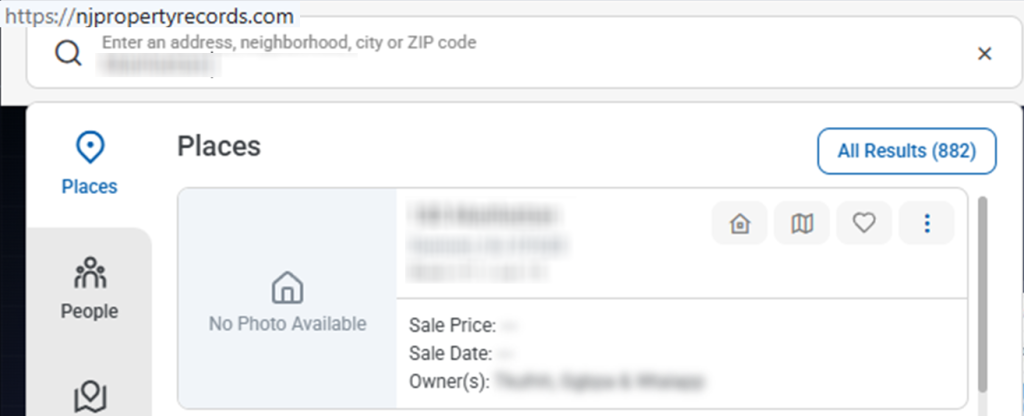
Search for your record
From the NJPropertyRecords homepage, run a lookup and open the correct listing. Review the content, and if you take a screenshot, blur personal information first. Tip: Try alternate spellings to narrow results without sharing extra personal data.
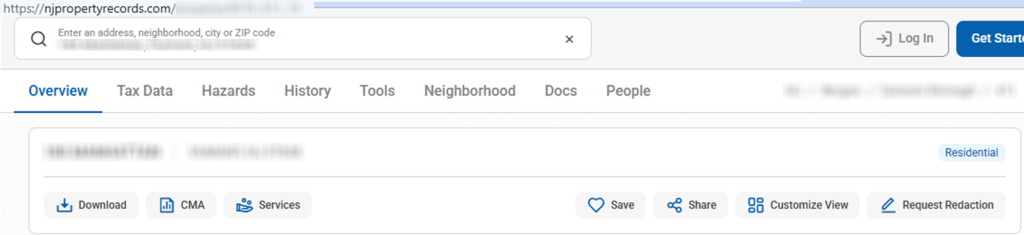
Copy the URL
Copy the full profile URL from the browser bar. Store it in a note. Tip: Keep it handy, even if the view looks outdated.
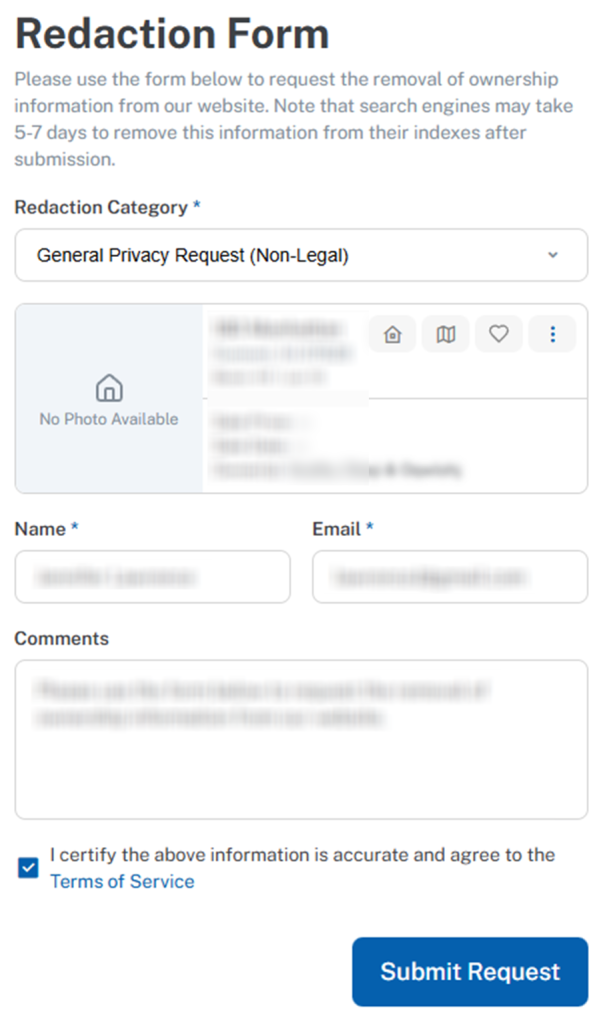
Enter identifiers in the redaction form
Open the “Redact a Property” page in the website’s footer. Fill the required fields in the form. Enter your name exactly as shown. Also, choose the redaction category. Click the submit button, then save any confirmation screen (redact private data). Tip: Check Spam and Promotions for next messages.

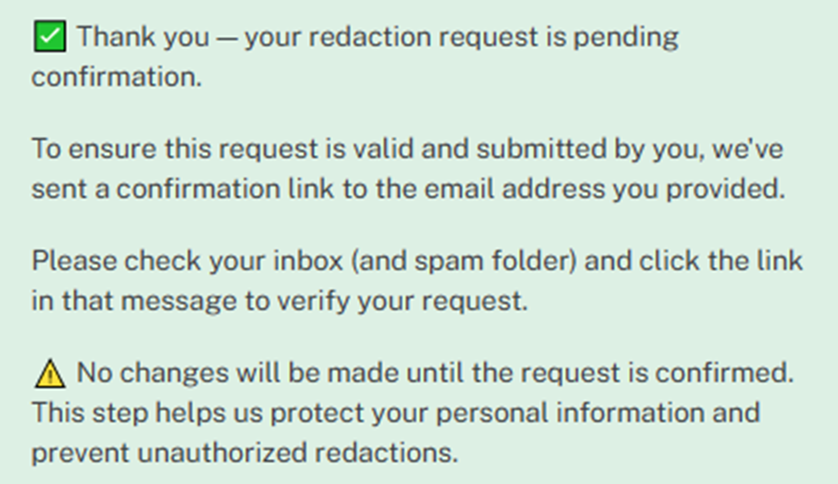
Confirm deletion/Do-Not-Sell request
Complete verification using the code you receive. Alternatively, use the confirmation link if provided. Save the confirmation message for tracking. Redact private data before sharing images. Tip: If you don’t get a message, wait 10 minutes and try once more.
Track confirmation & timeline
Keep the confirmation message and your listing reference. Most requests are processed within 7–14 days. If nothing changes after 14 days, contact support and resubmit once. Tip: Set a 3–6 month reminder to safeguard your private information.
Timelines, Verification & What to Expect
After the submission, you may get an email confirmation or a screen message with a link. Complete verification right away, then allow 7–14 days for processing. If you don’t get any response after 14 days, follow up utilizing the website contact link and try one more submission. Save confirmations so you protect yourself and keep control.
Edge Cases & Troubleshooting
- No access to the original email/phone: submit with a current email and explain the change in one sentence.
- Listing not found: broaden lookup terms and try alternate spellings, then copy the correct reference.
- CAPTCHA or submission errors: refresh and retry in another browser.
- Verification code not arriving: check Spam and wait 10 minutes. Then, resend once from the same link.
- Submission rejected by region (EU/UK/CA): contact support and ask what options are available.
- Account deletion vs. public listing suppression confusion: cancel a paid account separately in settings.
- Re-submitting after a failed attempt: wait a few hours, then resubmit with the same reference and confirmation data.
Will my data reappear?
Listings can return when data brokers like these refresh a database from aggregators, partner feeds, or resellers. To reduce repeat exposure on the internet and improve privacy, keep confirmations, and resubmit promptly; this helps you remove your info again if it comes back. Set a 3–6 month reminder, and consider related deletions on other data broker sites to reduce marketing outreach and broaden the cover.
Manual vs Assisted Removal
Manual:
Pros
- More time investment;
- more choice;
- you can repeat monitoring yourself.
Cons
- You must track confirmations and check listings again.
Assisted:
Pros
- Faster;
- verified workflows;
- a tracking dashboard;
- recurring checks across many service listings.
Cons
- Less hands-on choice;
- you may share limited private details to match results.
We remove your data for you - faster, verified, trackable.
Discover Which Sites Share Your Private Details—Instantly and Free.
FAQ
Submit each listing URL separately and confirm every message by code. Keep the confirmations, then check again after 14 days. Contact support if one listing still shows your data.
Check Spam/Promotions, then resend once from the same link. If it still fails, try another email in the form and contact support for help.
Re-listing can happen when a data broker refreshes sources. Save confirmations and resubmit quickly if you see them again; set a 3–6 month reminder.
Utilize the official entry and follow the steps above, then confirm by code and save the confirmation.
Provide only what is required for the submission (email/phone and listing reference). Avoid extra attachments, and redact any screenshots you keep.
It may display contacts, locations, and background summaries.
After you verify, processing usually takes 7–14 days. Save the confirmation and check again. If nothing changes after 14 days, contact support using the website contact link and try once more.
You will usually receive an email or a screen message. Save that message and the URL you submitted so you can check again if needed.
A good schedule is every 3–6 months, or sooner if you notice a listing return. Keep confirmations and resubmit quickly.
Utilize the support link and include the listing reference. Switching browsers and retrying once can also assist.

Posted by Ava J. Mercer
More Public & Property Records Removal Guides
- BlockShopper Opt Out Guide
- BusinessProfiles Opt Out Guide
- City-Data Opt Out Guide
- ClustrMaps Opt Out Guide
- Florida Residents Directory Opt Out Guide
- Homemetry Opt Out Guide
- Michigan Residents Database Opt Out Guide
- MineralHolders Opt Out Guide
- My Health Record Opt Out Guide
- Neighbor.Report Opt Out Guide
- NeighborWho Opt Out Guide
- NJ Parcels Opt Out Guide
- NJPropertyRecords Opt Out Guide
- North Carolina Resident Database Opt Out Guide
- Ohio Residents Database Opt Out Guide
- OnlineSearches Opt Out Guide
- Rehold Opt Out Guide
- SearchSystems Opt Out Guide
- US Records Opt Out Guide
- VoterRecords Opt Out Guide


