
Opt Out Guides
Michigan Residents Database Opt Out Guide
Before You Opt Out of Michigan Residents Database, Check Your Exposure
Privacy Writer
A. J. MercerAva J. Mercer
Updated
Read
5 min
Before You Opt Out of Michigan Residents Database, Check Your Exposure
Michigan Resident Database can show a resident’s full name, location, and phone in search results, which can increase exposure and unwanted marketing. For a resident, this can affect privacy and security because personal information is easier to connect across pages, raising the risk of fraud or identity theft. The service may gather record details from public records and commercial sources and present them in a database.
How to opt out of Michigan Residents Database
Search for your record and use its URL. Go to the official opt-out page on the database website. Provide your email. Complete the CAPTCHA confirm using the link. Processing usually takes 3–10 days; save proof and repeat the opt-out process if you find your data again.
Checklist:
- Search for your record
- Open the official opt-out form
- Enter your identifiers
- Complete verification
- Confirm via code/link
- Save the confirmation message
- Set a reminder to re-opt out regularly
Find out if your private details were exposed
Michigan Residents Database – Quick Facts
| Parameter | Value |
| Domain | michiganresidentdatabase.com |
| Data Types | Contacts, address history, and public record details |
| Opt-out Methods | Web form/email |
| Identity Verification | Confirmation link and on-page verification |
| Typical Response Time | 3–10 days |
| Re-listing Risk | Medium |
Michigan Residents Database is a people-search database that compiles information from residents and shows it on a person page. Additionally, it can include fields tied to the voter registration database, for example, voter ID number, current voting status, and voting district information.
Common data you may find:
- Full name and known aliases
- Phone numbers
- Emails
- Current and past location history
- Relatives or household links
- Property references (if shown)
- Possible links to other public records (if shown)
Step-by-Step Guide
Search for your record
Open Michigan Resident Database and run one search with your first and last name plus city. Review the list and open the closest match. If more than one entry looks similar, compare the record details (like age range cues and location history) to choose the right entry. Tip: If your name is common, try a second attempt with a nearby city and check the search results carefully.
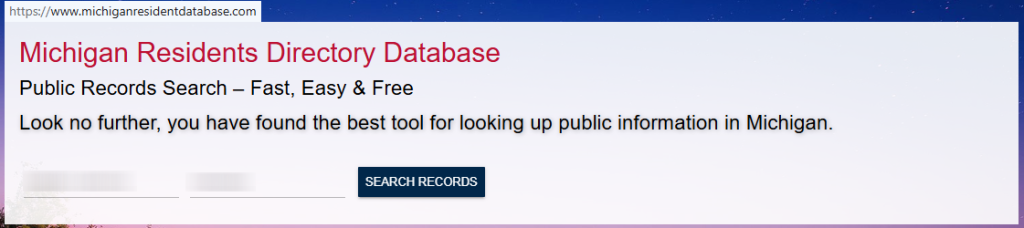
Copy the profile URL
Click the browser bar to highlight the URL. Confirm that it points to the exact page you want removed. Tip: Save the link in a notes app so you can reference it if you need to follow up.

Submit your identifiers
Scroll to the footer and box and click “Opt Out.” Paste the URL, enter your full name, and provide your email. Complete the human check, then click “Submit.” Tip: If you get an error, refresh once and try again; avoid sharing screenshots that show personal information.

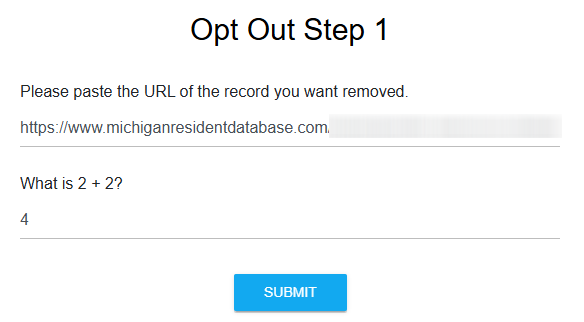
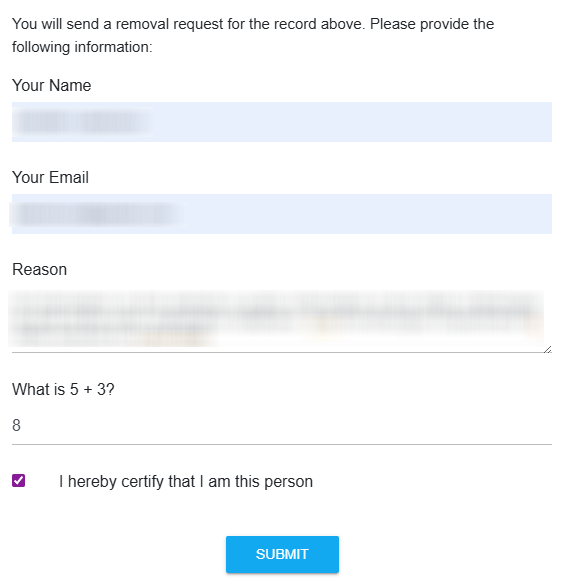
Confirm deletion
Follow the on-screen verification step. Tip: If a confirmation message goes to an unknown folder, search your inbox by sender name and open the latest message; then click the confirmation link to finish.
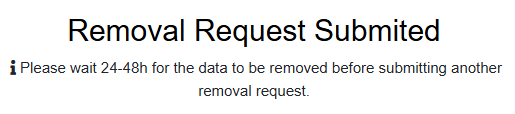
Track confirmation & timeline
Keep the confirmation message and a final on-page message. Check results within 48 hours, then again after 3–10 days, because a listing can reappear. If the entry is still visible, repeat once and contact the support email listed on the Site. Tip: Track dates in a simple log.
Timelines, Verification & What to Expect
Most queries are processed in about 3–10 days. If nothing changes after 10 days, try once more. Keep copies of each request so you can reference them later and support consumer privacy. This is also a practical safeguard for privacy and security. If you created a free account to view details, cancel it separately. That action may not remove the public entry.
Edge Cases & Troubleshooting
- No access to the original email/phone: use a reachable address, explain briefly, and keep copies of what you enter.
- Record not found: broaden your search by city, check spelling, and try an older address.
- CAPTCHA or submission errors: refresh, disable blockers, and try again later.
- Verification code not arriving: check spam and try once more.
- Form rejects the request by region (EU/UK/CA): use the privacy contact method listed on the site.
- Account deletion vs. public entry removal confusion: cancel the account, then complete the opt-out process for the entry.
- Re-submitting after a failed attempt: wait 24 hours, then submit again with the same data.
Will my data reappear?
This happens when aggregators refresh feeds, partners republish, or resellers update directories. To reduce recurrence, keep confirmation messages, set a 3–6 month reminder, and submit a new opt-out quickly if needed. Consider related removals next, and check data brokers like VoterRecords.com and StateRecords.org; if available, you may also opt out of Michigan. I recommend keeping a small log so you can act fast if the same entry returns.
Manual vs Assisted Removal
Manual:
Pros
- More control over what you submit and what you remove;
- clear audit trail for each record; works with free tools.
Cons
- Time to search and monitor; you must repeat the procedure regularly;
- verification steps can slow you down.
Assisted:
Pros
- Faster handling across dozens of data;
- verification and tracking dashboard;
- can automate recurring checks and custom removals.
Cons
- Premium options may cost money;
- paid plans starting vary;
- may require you to sign up for free to begin.
We remove your data for you - faster, verified, trackable.
Discover Which Sites Share Your Private Details—Instantly and Free.
FAQ
Use the footer links and look for “Opt Out.” If it fails to load, try another browser, then run a fresh search and try again.
Information from Michigan Residents Database can be returned when sources refresh. Keep your confirmation email and repeat the opt-out process if needed.
Check spam, search your inbox for the sender, and submit once more. Try again from a different browser if needed.
Many people-report services rely on a link confirmation and a CAPTCHA-style check rather than a government ID. Share only what the form requires.
Use the current contact details you can access, complete the opt-out of the Michigan Residents website, and save your proof. If needed, repeat the procedure later using the same personal data.
A Michigan Resident Database page can include contact details, address history, and other public record fields shown in one display, and some versions may include voting-related fields.
Many deletion queries are processed in about 3–10 days. Save the confirmation message, then review again later to confirm the entry no longer appears.
Start with the official opt-out page. If you need help, use the contact details listed on the site. Include the profile link so support can locate the entry.
Repeat the same steps on each: open the entry, copy the link, submit, and confirm. A data removal service can help automate repetitive tasks.
Look for “Do Not Sell/Share” options and follow the on-page instructions, then keep a copy of your application. This guide covers the standard opt-out path; it is not legal advice.
Anyone who wants ongoing monitoring across a vast directory network may prefer assisted deletion, especially if records come back over time.

Posted by Ava J. Mercer
More Public & Property Records Removal Guides
- BlockShopper Opt Out Guide
- BusinessProfiles Opt Out Guide
- City-Data Opt Out Guide
- ClustrMaps Opt Out Guide
- Florida Residents Directory Opt Out Guide
- Homemetry Opt Out Guide
- Michigan Residents Database Opt Out Guide
- MineralHolders Opt Out Guide
- My Health Record Opt Out Guide
- Neighbor.Report Opt Out Guide
- NeighborWho Opt Out Guide
- NJ Parcels Opt Out Guide
- NJPropertyRecords Opt Out Guide
- North Carolina Resident Database Opt Out Guide
- Ohio Residents Database Opt Out Guide
- OnlineSearches Opt Out Guide
- Rehold Opt Out Guide
- SearchSystems Opt Out Guide
- US Records Opt Out Guide
- VoterRecords Opt Out Guide


