
Opt Out Guides
Neighbor.Report Opt Out Guide
Before You Opt Out of Neighbor.Report, Check Your Exposure
Privacy Writer
A. J. MercerAva J. Mercer
Updated
Read
5 min
Before You Opt Out of Neighbor.Report, Check Your Exposure
Neighbor.Report is a people search platform that can show a name, address, and phone number, which may create privacy and security risks for an individual. The service works like a data broker and may collect personal information and other data from public and commercial sources, then make that content available online.
How to opt out of Neighbor.Report
Use the official form on the website, submit the needed contact information, and complete the final confirmation. This path is the main way to remove your information from Neighbor.Report; processing usually takes 1–14 days.
Checklist:
- Open the privacy page
- Verify your email
- Search for your record
- Proceed to opt out
- Save the confirmation
- Set a reminder to re-opt out
Find out if your private details were exposed
Neighbor.Report – Quick Facts
| Parameter | Value |
| Domain | neighbor.report |
| Data Types | names, contact information, locations, household links |
| Opt-out Methods | web form; email |
| Identity Verification | on-screen confirmation |
| Typical Response Time | 1–14 days |
| Re-listing Risk | medium |
Neighbor.Report is a data broker site that displays personal data in one service. It may collect data from publicly available and commercial sources, then organize it into listing results for neighbors and households.
Common data you may find:
- Full names
- Home addresses
- Emails
- Household links
- Property data
- Age range
Step-by-Step Guide
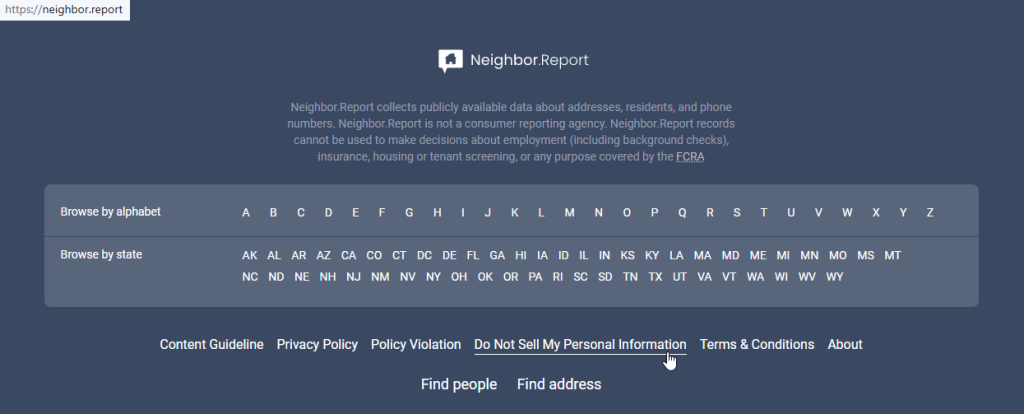
Open the privacy page
Go to the Neighbor.Report website. At the bottom of the page, click the “Do Not Sell” tab. If you save a screenshot, blur personal information first. Copy the listing URL before you move ahead. This helps protect your identity and keeps the request tied to your profile.
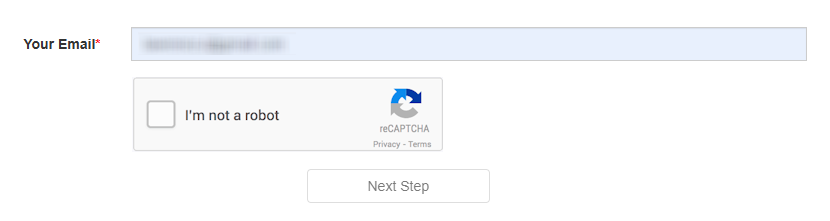
Verify your email
Enter your email. Use the same information throughout the process. Redact sensitive content in any screenshot. A small typo can slow things down, so review the fields once, then click continue. If asked, sign the confirmation prompt.
Search for your record
Use the lookup tool. Fill out the search bar (enter your name, city, and state) and find the listing that matches you. Make sure the address and profile are correct before you submit anything. Then, proceed to opt out and choose the deletion option.


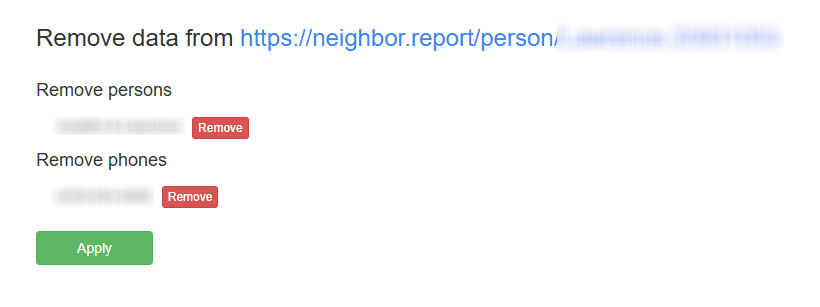
Confirm deletion
Use the button to submit. If the screen asks you to choose one item, select the matching listing and continue. Save the final note for your files.
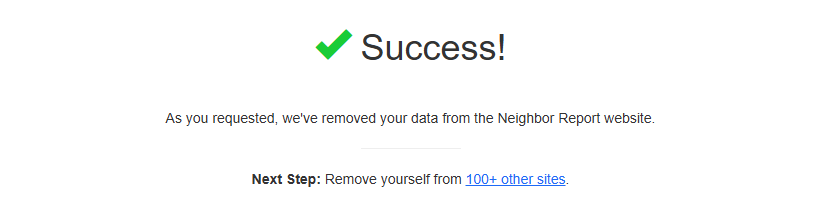
Track confirmation & timeline
Keep the confirmation message, listing URL, and date. Wait through the normal review window, then check once. If nothing changes after that, use the same support path and send one short query again. Save all messages so you can remove your info from the Internet faster later.
Timelines, Verification & What to Expect
Most queries are handled in about 1–14 days. Confirmation usually appears on-screen after submission, and in some cases, a reply may also arrive by email. Save the message and listing URL for your records. If nothing changes after 14 days, use the support route once. Keep it brief and include the same listing reference.
Edge Cases & Troubleshooting
- No access to the original contact method: use a current contact option and explain it briefly.
- “Record not found”: try the lookup again and confirm you opened the correct listing.
- CAPTCHA errors: refresh and try once more.
- No verification message: wait, then try again after a short delay.
- Regional limit: if the site rejects the request, use the support contact and note your location.
- Account deletion confusion: account access is different from public listing removal.
- Failed retry: submit one new query with the same listing.
- Mixed profile: note that more than one individual appears in one result.
Will my data reappear?
It can. Data brokers like this may refresh listings from aggregators, partner feeds, or reseller sources, so a profile can return after a later update. To safeguard yourself, keep every confirmation, set a 3–6 month reminder, and review the site again if needed. This helps protect personal data and supports quick re-submission.
Manual vs Assisted Removal
Manual:
Pros
- full control;
- good for one listing;
- lets you review each step.
Cons
- takes time;
- needs repeat monitoring;
- hard to automate.
Assisted:
Pros
- faster across many listings;
- verification tracking;
- recurring checks.
Cons
- usually paid;
- coverage may differ;
- still needs review.
We remove your data for you - faster, verified, trackable.
Discover Which Sites Share Your Private Details—Instantly and Free.
FAQ
Neighbor.Report is a data broker website.
Open the official opt-out path and submit the listing.
Use the listing request flow shown above.
It is on the official site; click the privacy tab in the footer.
A review may take several days.
Wait 14 days, then send one new request.
Retry once and use support if needed.
Anyone who wants listing suppression.
Most users mean listing removal, not account cancellation. If you need to cancel your subscription, follow the corresponding route.
It helps if you need to remove your info again.

Posted by Ava J. Mercer
More Public & Property Records Removal Guides
- BlockShopper Opt Out Guide
- BusinessProfiles Opt Out Guide
- City-Data Opt Out Guide
- ClustrMaps Opt Out Guide
- Florida Residents Directory Opt Out Guide
- Homemetry Opt Out Guide
- Michigan Residents Database Opt Out Guide
- MineralHolders Opt Out Guide
- My Health Record Opt Out Guide
- Neighbor.Report Opt Out Guide
- NeighborWho Opt Out Guide
- NJ Parcels Opt Out Guide
- NJPropertyRecords Opt Out Guide
- North Carolina Resident Database Opt Out Guide
- Ohio Residents Database Opt Out Guide
- OnlineSearches Opt Out Guide
- Rehold Opt Out Guide
- SearchSystems Opt Out Guide
- US Records Opt Out Guide
- VoterRecords Opt Out Guide


