
Opt Out Guides
Florida Residents Directory Opt Out Guide
Before You Opt Out of Florida Residents Directory, Check Your Exposure
Privacy Writer
A. J. MercerAva J. Mercer
Updated
Read
5 min
Before You Opt Out of Florida Residents Directory, Check Your Exposure
Florida Residents Directory is a people search platform that can display your name, address, and contact details in a public profile, which can reduce privacy and increase unwanted contact. It generally compiles listings from public records and other sources it references, including details tied to a voter registration database that is available online. Take control of your reputation online and protect your identity by submitting opt-out requests.
How to opt out of Florida Residents Directory
Open the official page, locate the listing, and submit a request using your email and the listing URL; you may need to verify via a link or code, and processing often takes 2–7 days.
Checklist:
- Open the official form
- Find your record and copy the URL
- Enter your name and your email address
- Complete the CAPTCHA, then submit the opt-out
- Save the receipt message and set a reminder to repeat
Find out if your private details were exposed
Florida Residents Directory – Quick Facts
| Parameter | Value |
| Domain | floridaresidentsdirectory.com |
| Data Types | contact data and location history (varies by record) |
| Opt-out Methods | web form (opt-out page) |
| Identity Verification | verification step + on-page status |
| Typical Response Time | 2–7 days |
| Re-listing Risk | medium |
This directory acts like a data broker. It aggregates information about people in Florida and displays searchable listings for lookup.
Common data you may find:
- Full name and aliases
- Current and past address
- Relatives or household links
- Property references (if shown)
- Public data links (if shown)
- Net worth (if shown)
Step-by-Step Guide
Open the official opt-out form
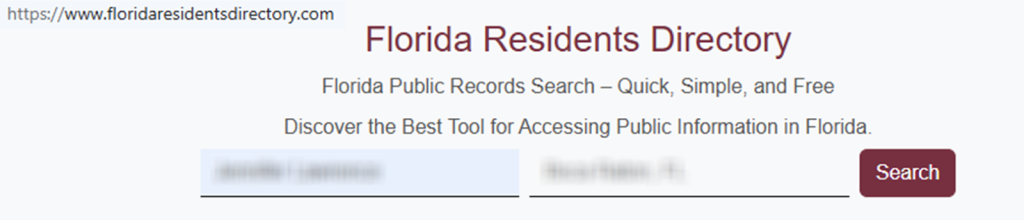
Search for your record and copy its URL. On the website footer, open the privacy link to reach the form page. Read the instruction text and locate the fields for the listing link and your contact details. If you capture screenshots, blur sensitive items like your address or other identifiers. Select the main button that starts the process, then click it once. Tip: If the page fails to load, switch browsers or turn off a VPN.


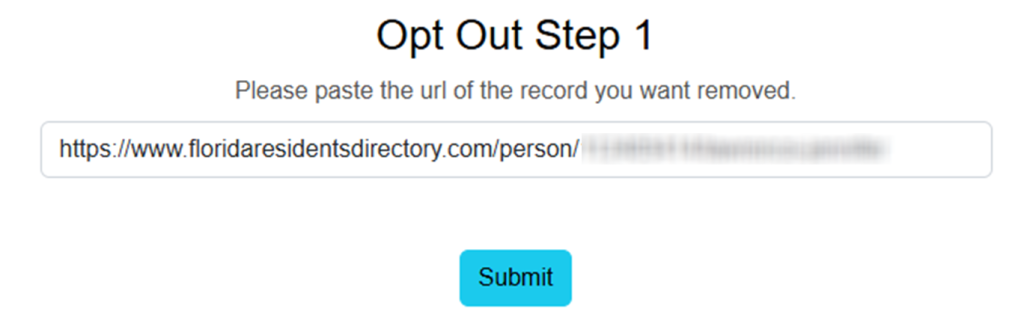
Submit your identifiers (email + CAPTCHA)
Open the listing and verify it matches your profile, then copy the URL from the browser bar. Paste it into the corresponding field, add your email, and include a phone if asked. Solve the captcha challenge and submit the form one time. Tip: Сheck for extra spaces before you send.
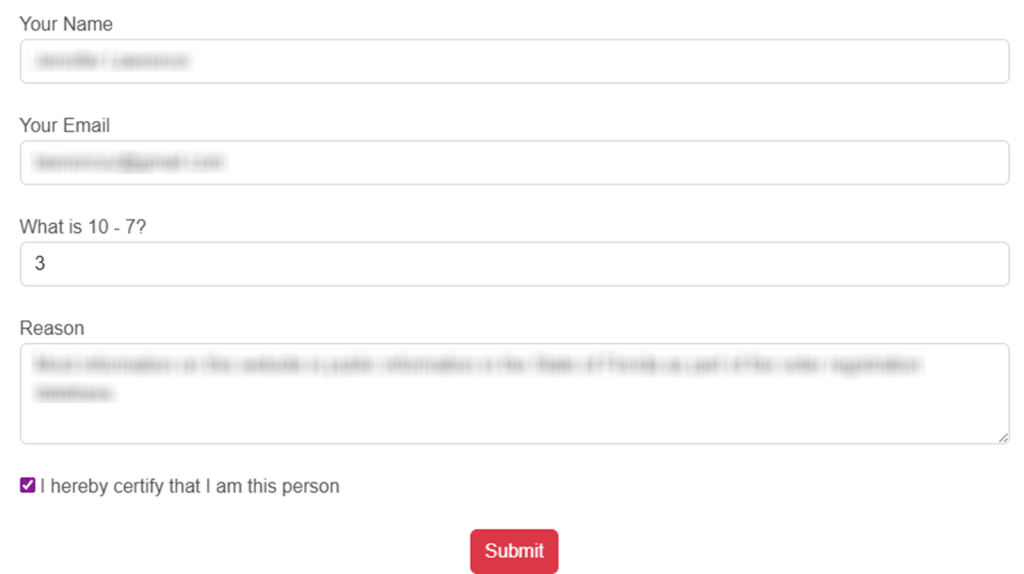
Verify via code or link (email/SMS)
Watch for a verification message sent to you. If you receive a code, enter it on the site; if you receive a link, open it to verify your request. Tip: Сheck Spam and Promotions folders first.
Confirm deletion / Do-Not-Sell request
When verification is complete, you should see a success screen. This is how to remove your information from floridaresidentsdirectory.com while keeping private information out of shared screenshots. If a Do Not Sell/Share option appears, send it in the same session. Tip: Note the date and keep a redacted screenshot for your files.

Track confirmation & timeline
Re-check the listing after 2–7 days. If the page still loads, send one follow-up request and keep the receipt for reference. For repeat monitoring, save the link and set a 3–6 month reminder. Tip: If you see multiple listings, repeat the same steps for each record.
Timelines, Verification & What to Expect
Most data removal submissions are handled within 2–7 days, depending on verification and volume. You may get an on-page status right away and a message later that shows your request was received. If you receive nothing, check Spam, then send the form one more time. If there’s still no response after 7 days, use any contact method shown on the website, keep notes, and try again later. This opt-out guide is practical, but it cannot guarantee outcomes.
Edge Cases & Troubleshooting
- No access to the original email/phone: use the site contact option, or try another inbox while keeping the same profile link.
- “Record not found”: try a broader search, check spelling, and look for duplicate listings.
- Submission errors: refresh, disable VPN, and retry once.
- Verification code not arriving: wait, check Spam, then resend.
- Form rejects the request by region (EU/UK/CA): look for a regional privacy link or use a manual email request.
- Account deletion vs. listing removal confusion: cancel any paid account separately; the public listing still needs a removal request.
- Inaccurate source details: if you plan to vote, update your registration with your county Supervisor of Elections or the Florida Department of State; apply to the Department of State to correct your registration so sources can refresh.
Will my data reappear?
Listings can reappear when upstream sources refresh, partner feeds update, or matching rules create a new record. Re-listing risk is usually medium, so keep receipts, re-check every 3–6 months, and send a new opt-out request quickly if needed. If you see your info in Google results, repeat removals on related sites too, or consider opt-out services for ongoing help.
Manual vs Assisted Removal
Manual:
- Pros: More control over each record; you decide what personal data to share.
- Cons: More time and repeated effort; you must re-check listings yourself.
Assisted:
- Pros: Faster workflow and centralized tracking; ongoing checks across multiple sites.
- Cons: You share some personal data for processing; costs may apply.
We remove your data for you - faster, verified, trackable.
Discover Which Sites Share Your Private Details—Instantly and Free.
FAQ
Users have reported temporary form errors. Try another browser, re-check the link, and send the form once more. If it keeps failing, save a screenshot and try again later.
Open each profile and compare location details before you send. Use the correct URL, then keep the receipt so you can follow up if needed.
Timing varies, but many reports suggest changes can happen within a few days. If it does not update after about a week, send one more request and keep your proof.
Re-listing happens when data sources refresh, or your identity matches a new entry. Keep proof, set a reminder, and repeat the steps if it happens again.
If the issue looks tied to election-related sources, update the source record where possible and then re-check the listing later.
It may show contact details like address history, depending on the search record.
Look for privacy links on the website footer.
Search for old and new listings, then send each relevant link. Save your receipt and follow up if the page returns.
Limit exposed data by opting out where possible, saving proof, and repeating checks every few months. Learn how to remove your info from related sites next.
If nothing changes after 7 days, send once more, then try a different browser or device.
Start with listing removal, then update the source record when possible; this helps sources refresh over time.

Posted by Ava J. Mercer
More Public & Property Records Removal Guides
- BlockShopper Opt Out Guide
- BusinessProfiles Opt Out Guide
- City-Data Opt Out Guide
- ClustrMaps Opt Out Guide
- Florida Residents Directory Opt Out Guide
- Homemetry Opt Out Guide
- Michigan Residents Database Opt Out Guide
- MineralHolders Opt Out Guide
- My Health Record Opt Out Guide
- Neighbor.Report Opt Out Guide
- NeighborWho Opt Out Guide
- NJ Parcels Opt Out Guide
- NJPropertyRecords Opt Out Guide
- North Carolina Resident Database Opt Out Guide
- Ohio Residents Database Opt Out Guide
- OnlineSearches Opt Out Guide
- Rehold Opt Out Guide
- SearchSystems Opt Out Guide
- US Records Opt Out Guide
- VoterRecords Opt Out Guide


