
Opt Out Guides
Homemetry Opt Out Guide
Before You Opt Out of Homemetry, Check Your Exposure
Privacy Writer
A. J. MercerAva J. Mercer
Updated
Read
5 min
Before You Opt Out of Homemetry, Check Your Exposure
Homemetry can show your name, address, and phone numbers in a public record, which may lead to unwanted outreach and less privacy. If you want to remove your information, starting early helps you protect personal data that may be shared publicly. Homemetry states its data is collected from public records and can be connected to a property profile and real estate information.
How to opt out of HomemetryPack:
Use the official homemetry.com site, enter the required details (email/SMS), complete CAPTCHA, then verify with a code or URL. Use 7–14 days as a practical follow-up window and send one more request if needed.
Checklist:
- Open the official opt-out form
- Enter identifiers
- Complete verification
- Confirm via code/URL
- Save the confirmation email
- Set a reminder to opt out again
Find out if your private details were exposed
Homemetry – Quick Facts
| Parameter | Value |
| Domain | homemetry.com |
| Data Types | contacts, addresses, mobile numbers, household links, property details |
| Opt-out Methods | web form |
| Identity Verification | email verification and on-screen receipt |
| Typical Response Time | follow up after 7–14 days |
| Re-listing Risk | medium |
Homemetry is an address-based directory that groups residents and property details into one listing. The platform says its multiple data is collected from public records and shows navigation items like Privacy Policy and Contact.
Common data you may find:
- Names (and aliases)
- Emails
- Current and past addresses
- Household links
- Property details and sale/rent context
- Business names tied to an address
- Neighbor context
Step-by-Step Guide
Open the official opt-out form
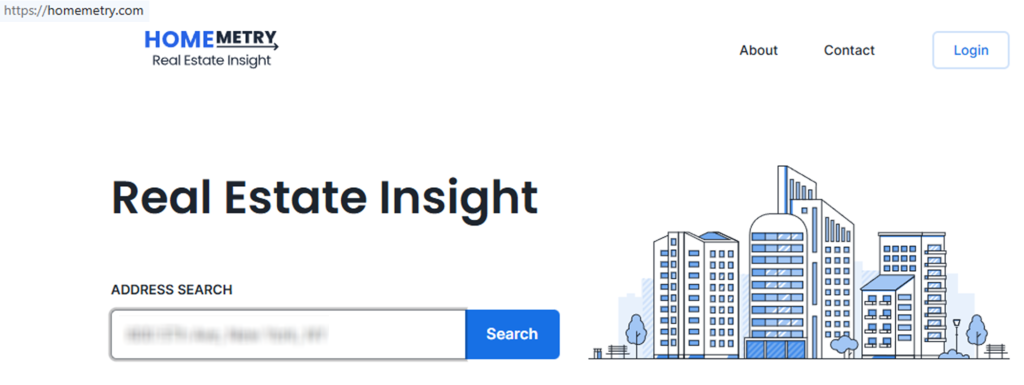
Go to the homemetry.com website and run a search for your street address, then open the listing that matches you. On that page, find “Do Not Sell My Info” and click it. This link starts the Homemetry opt flow for that specific record; it’s also the homemetry.com opt portal for that listing. Tip: If you land on a cached screen, start again from the home lookup box. For any screenshot you take, blur personal information before sharing.


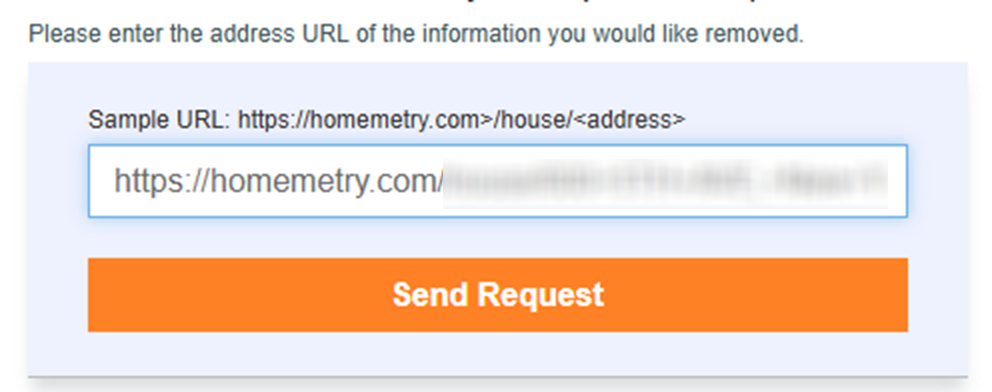
Submit your address URL + CAPTCHA)
In the form, identify the record you want to remove. Enter your full name, your email address, and (if asked) a mobile number. Complete the CAPTCHA, then click the submit button to send the opt-out request. For multiple private data in one listing, this can be a submit multiple situation; keep each request focused on your own personal data. Tip: Use a dedicated inbox so the verification message is easier to find.
Verify via code or link (email/SMS)
After you send the form, the following step is to watch your inbox for a verification message. Open it and do a quick link and click action, or copy the code and enter it back on the website when prompted. Keep the message as proof. Tip: If nothing arrives, look in Spam and then use inbox filters for “Homemetry” before you try again.
Confirm deletion / Do-Not-Sell request
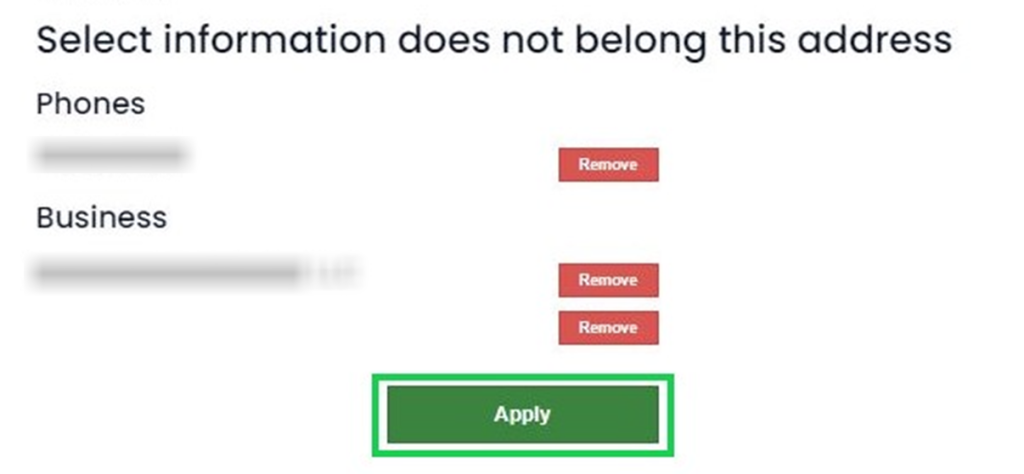
When verification is accepted, you should see an on-screen receipt that your request was received. If the flow lets you choose items, select only the entries that match your identity (your name or your email). Then click the final remove button to finish the take-down action. Tip: Do not upload documents unless the form explicitly asks for ID proof; most flows only need email verification.
Track confirmation & timeline
Save the email and note the date. Revisit the listing after 7–14 days; if the record still shows, repeat the opt-out of homemetry.com flow one time and then use the contact page for help. Tip: Keep a short report (date, URL, outcome) so you can track what you did and avoid duplicate work in the background.
Timelines, Verification & What to Expect
Most opt-out flows send an email quickly, but the listing update can take longer because the site may refresh indexes and info views. Use 7–14 days as a practical follow-up window, then revisit the listing page. If you never get the email, look in Spam, then try one more send attempt with the same email. If there’s still no response after 14 days, use the support form on homemetry.com and reference your record URL. Stay calm: delays happen, and a second attempt often fixes simple issues.
Edge Cases & Troubleshooting
- No access to the original email/phone: use support via the contact form; include the record URL and a new email.
- “Record not found”: run the lookup again, confirm the address format, and open the right listing before you start.
- CAPTCHA or submission errors: refresh, clear cookies for the site, or try another browser.
- Verification code not arriving: wait 10 minutes, look in Spam, then resend once.
- Region limits (EU/UK/CA): if the form blocks you, ask support what privacy options apply in your region.
- Account deletion vs. listing removal: closing a login is not the same as removing a public record.
- Re-trying after failure: you’ll have to submit again with the correct URL; if you see a blocker, you may need to submit a shorter form with only the required fields.
Will my data reappear?
A record can appear again if the site refreshes from its source feeds, updates public records, or rebuilds its index – common patterns in the data broker industry. To reduce repeat exposure, keep your verification email, set a 3–6 month reminder to check, and act quickly if you see the same record return. If you find information from homemetry.com copied to another data broker website, consider removing it there, too, since many data broker services can publish similar entries.
Manual vs Assisted Removal
Manual:
Pros
- More control, clear tracking, and easier to verify each listing.
Cons
- Time investment, repeated monitoring, and you must file each opt-out yourself.
Assisted:
Pros
- Automate follow-ups, faster tracking, centralized status.
Cons
- Cost, less direct control, and it depends on the provider.
We remove your data for you - faster, verified, trackable.
Discover Which Sites Share Your Private Details—Instantly and Free.
FAQ
Use the search box to search by address, open the matching record, and use information from Homemetry to begin listing removal; save the URL for reference.
Some listings include several names in one listing. Use select options to remove only your entries, then finish one email verification per entry.
Refresh the form, try another browser, and avoid VPN switching mid-process; if it still fails, use the support option.
Some users report redirects or blocks; try again later, or use a different browser, then continue from the official URL.
Usually, you only need to send what the form asks for (name and email address), plus code/URL verification; avoid adding extra details beyond what’s already in the record.
This site is a lookup service focused on property and location details that can show resident names and reachability data; it states its data is collected from public records.
The form takes about 5–15 minutes, but changes can take longer; use 7–14 days as a follow-up window, then revisit the listing.
If you have an account, close it in settings if available, but that won’t automatically remove a public record; follow our step-by-step guide above for comprehensive data management.
If the form fails, use the support form to ask for help with a removal request and include the record URL for review.
It can if sources refresh; keep your proof and set reminders to re-check every 3–6 months.

Posted by Ava J. Mercer
More Public & Property Records Removal Guides
- BlockShopper Opt Out Guide
- BusinessProfiles Opt Out Guide
- City-Data Opt Out Guide
- ClustrMaps Opt Out Guide
- Florida Residents Directory Opt Out Guide
- Homemetry Opt Out Guide
- Michigan Residents Database Opt Out Guide
- MineralHolders Opt Out Guide
- My Health Record Opt Out Guide
- Neighbor.Report Opt Out Guide
- NeighborWho Opt Out Guide
- NJ Parcels Opt Out Guide
- NJPropertyRecords Opt Out Guide
- North Carolina Resident Database Opt Out Guide
- Ohio Residents Database Opt Out Guide
- OnlineSearches Opt Out Guide
- Rehold Opt Out Guide
- SearchSystems Opt Out Guide
- US Records Opt Out Guide
- VoterRecords Opt Out Guide


