
Opt Out Guides
SearchQuarry Opt Out Guide
Before You Opt Out of SearchQuarry, Check Your Exposure
Privacy Writer
A. J. MercerAva J. Mercer
Updated
Read
5 min
Before You Opt Out of SearchQuarry, Check Your Exposure
SearchQuarry can surface personal information such as a name, address, and phone number, which may affect privacy when it is easy to find online. It typically organizes public records and commercial sources into pages that may show contact info and background summaries; this step-by-step guide notes what to do.
How to opt out of SearchQuarry
Go to the official Privacy page on the website, enter basic identifiers, and start the procedure; then, validate using a code, usually within 7–14 days.
Checklist:
- Open the official form
- Enter identifiers
- Complete verification
- Save the receipt
- Set a reminder
Find out if your private details were exposed
SearchQuarry – Quick Facts
| Parameter | Value |
| Domain | searchquarry.com |
| Data Types | contact info, addresses, personal data, and public records summaries |
| Opt-out Methods | web form/mail |
| Identity Check | code via email |
| Typical Response Time | 7–14 days |
| Relisting Risk | medium |
This directory is a data broker that collects consumer data from public records and other publicly accessible sources, plus various sources such as commercial datasets. It displays details for individuals in a searchable profile and database, so data from SearchQuarry can be found in one place based on available sources.
Common data you may find:
- Names
- Current and past addresses
- Email addresses
- Relatives or household links
- Vehicle records (where permitted)
- Court records, civil filings, lien, or bankruptcy (if available)
- Professional license references (if available)
- Criminal records notes (if available)
- Arrest entries (if available)
Step-by-Step Guide
Open the official form
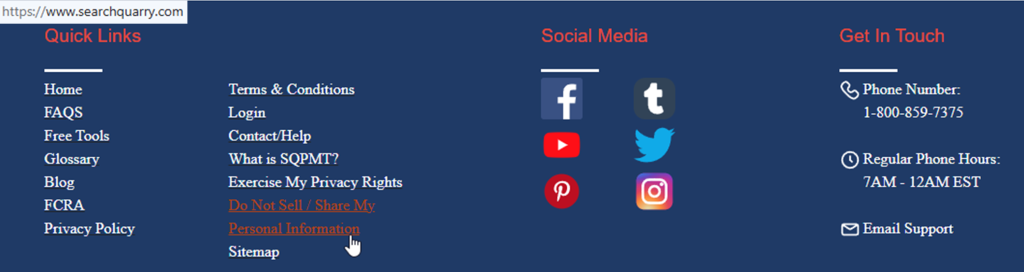
On the website footer, click the “Do Not Sell/Share My Personal Information” link to open the data removal page and locate the record. If you save screenshots, blur any private information, and keep them for your own records only. This step is where you start to remove your information from searchquarry.com.
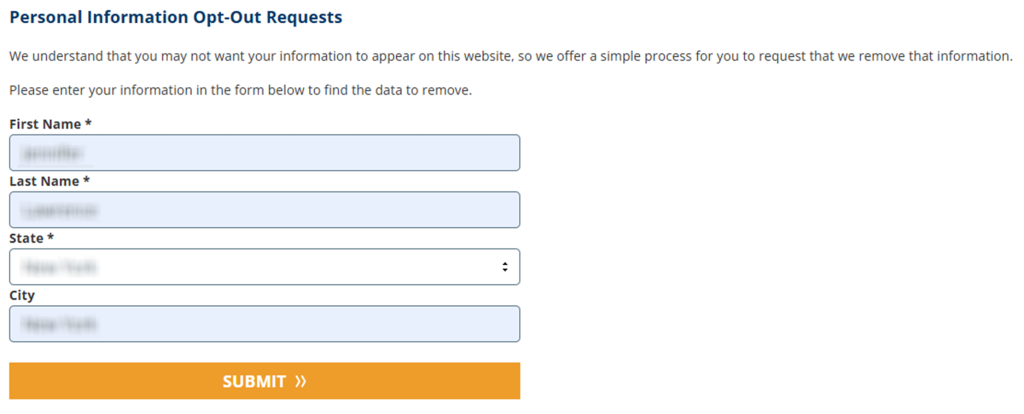
Submit your identifiers (full name/state/city + CAPTCHA)
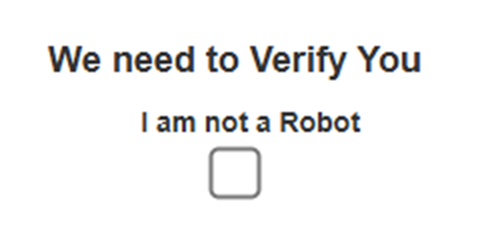
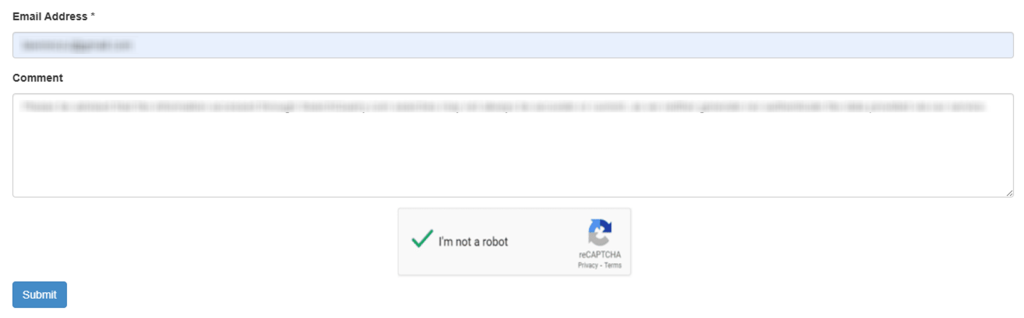
In the form, enter your first name and last name, pick your state and city, and load the search results. Find the matching record, select the checkbox, then click the remove data button. On the next screen, enter your email address, complete the check, add consent, and click submit to remove your personal information.

Verify via code or link (email/SMS)
After you send it, check your inbox. Use the link or code to confirm, then save the message so you can track the timeline.

Confirm deletion/Do-Not-Sell request
After the code step, you should see a page that says information has been removed. Repeat for any other data you want to remove, and keep the on-screen receipt; use delete only after you have saved proof.
Track confirmation & timeline
Write down the date, the page you targeted, and the outcome. If nothing changes after 14 days, use the contact listed in California’s data broker registry and include the page URL plus the date you submitted. For extra safeguard, compile a list of information from data broker sites and check a few major people search sites, since entries can return, so you may need to remove a second record.
Timelines, Verification & What to Expect
You may see an on-page message right away, then you must use the Email code step. Updates usually happen within 7–14 days. If you do not receive a message within 2 days, resubmit once. If there is still no change after 14 days, use the help route and include the page URL and the date you entered.
Edge Cases & Troubleshooting
- No access to the original Email/phone: use a new address and include the page URL so support can match the entry.
- “Record not found”: try nearby cities or alternate spellings, then search again.
- Submission errors: refresh, disable blockers, and try again once.
- Code not arriving: check Spam, wait 15 minutes, then resubmit once.
- Form rejects the form by region (EU/UK/CA): use the contact route and mention rights.
- Account deletion vs. public entry confusion: cancel a paid account to stop billing, but still follow the steps.
- Re-submitting after a failed attempt: wait a few minutes, then redo the form and save the receipt.
Will my data reappear?
Some entries can return when aggregators refresh databases or partner feeds update. To reduce repeats, keep your receipt, set a 3–6 month reminder, and act quickly when you spot a new entry. If you worry about identity theft, watch accounts and reports to support privacy.
Manual vs Assisted Removal
Manual:
Pros
- Full control over each opt-out step;
- no service fees;
- only your time and effort;
- you can choose exactly which data to remove.
Cons
- Time-consuming, especially across multiple sites;
- requires repeat checks because data may reappear;
- easy to miss confirmations or deadlines without reminders.
Assisted:
Pros
- Faster overall process with less hands-on work;
- centralized tracking and status updates;
- ongoing monitoring helps catch re-listings early.
Cons
- Paid service with recurring or upfront costs;
- less direct control over each removal request;
- still depends on third-party site response times.
We remove your data for you - faster, verified, trackable.
Discover Which Sites Share Your Private Details—Instantly and Free.
FAQ
It is a people search page that compiles data from public and commercial sources, so an entry may appear through the matching of names and addresses.
Search using both old and new city/state, then follow the form steps for each matching record and save the receipt.
Use the support contact method mentioned on the site and include the page URL so the team can locate the entry.
You may see an on-page message right away, and the entry typically updates within 7–14 days after the code step.
The form uses it to send a code and look in your inbox.
Keep the receipt, set a reminder, and repeat the process if the page returns.
Use related sites and submit similar requests there to reduce exposure.
Anyone with access to the website can view an entry, so opting out can help reduce exposure of personal information.
Use strong passwords, watch accounts, and consider credit monitoring if needed.
Refresh cycles across databases and partner feeds can republish an entry; check one detail to confirm it is the same match.

Posted by Ava J. Mercer
More Background & Criminal Removal Guides
- AdvancedBackgroundChecks Opt Out Guide
- Affordable Background Checks Opt Out Guide
- ArrestFacts Opt Out Guide
- Background Check Gateway Opt Out Guide
- BackgroundCheckers Opt Out Guide
- BackgroundChecks.com Opt Out Guide
- CyberBackgroundChecks Opt Out Guide
- EasyBackgroundChecks Opt Out Guide
- GovernmentRegistry Opt Out Guide
- GovWarrantSearch Opt Out Guide
- InfoTracer Opt Out Guide
- JailBase Opt Out Guide
- LocatePeople Opt Out Guide
- MugshotLook Opt Out Guide
- Mugshots Opt Out Guide
- National Public Data Opt Out Guide
- Public Information Services Opt Out Guide
- Search Public Records Opt Out Guide
- SearchQuarry Opt Out Guide
- SmartBackgroundChecks Opt Out Guide
- SpyFly Opt Out Guide
- TruthRecord Opt Out Guide


