
Opt Out Guides
Search Public Records Opt Out Guide
Before You Opt Out of Search Public Records, Check Your Exposure
Privacy Writer
A. J. MercerAva J. Mercer
Updated
Read
5 min
Before You Opt Out of Search Public Records, Check Your Exposure
Search Public Records can expose your name, address, and phone number, which can increase privacy risks, unwanted exposure, and identity theft. This people search site typically aggregates public records and other commercial resources into a searchable database and may show location details, relatives, property links, and report previews.
How to opt out of Search Public Records
Open the official opt-out webpage, submit only what it asks for, and confirm using the link provided or code. It usually takes 1–7 days. To opt out of searchpublicrecords.com, follow the same flow and keep the confirmation.
Checklist:
- Open the official opt-out form
- Enter identifiers (name/address/email)
- Complete CAPTCHA/verification
- Confirm via code/link
- Save the confirmation email
- Set the reminder to re-opt-out
Find out if your private details were exposed
Search Public Records – Quick Facts
| Parameter | Value |
| Domain | searchpublicrecords.com |
| Data Types | addresses, possible social identifiers, property records |
| Opt-out Methods | web form/email/mail |
| Identity Verification | code via email/SMS |
| Typical Response Time | 1–7 days (some requests within 24 hours) |
| Re-listing Risk | medium |
Search Public Records is a public record/people search service that compiles information from public resources and displays matches for consumer lookup. Some companies in this space can collect and sell data, so use this information to safeguard your confidence and better understand what information is available about you.
Common data you may find:
- Names (and known aliases)
- Phone numbers
- Emails
- Current and previous location history
- Relatives/household links
- Property and real-estate records
- Social media profiles
- Court or arrest records
- Criminal record references (if shown)
Step-by-Step Guide
Open the official opt-out form
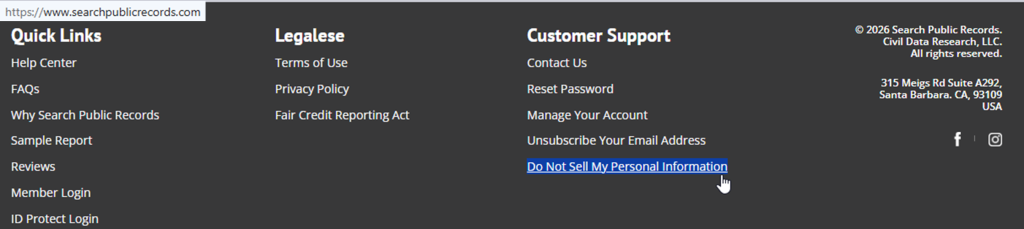
Go to the Search Public Records website and scroll to the bottom of the page to find the “remove me from website” option, or use the Help Center path for privacy rights. Look for a “Get Started” button and a short explanation of the removal process. Avoid third-party lookalike pages. Tip: If you capture proof, blur/redact personal details before saving or sharing any screenshots.
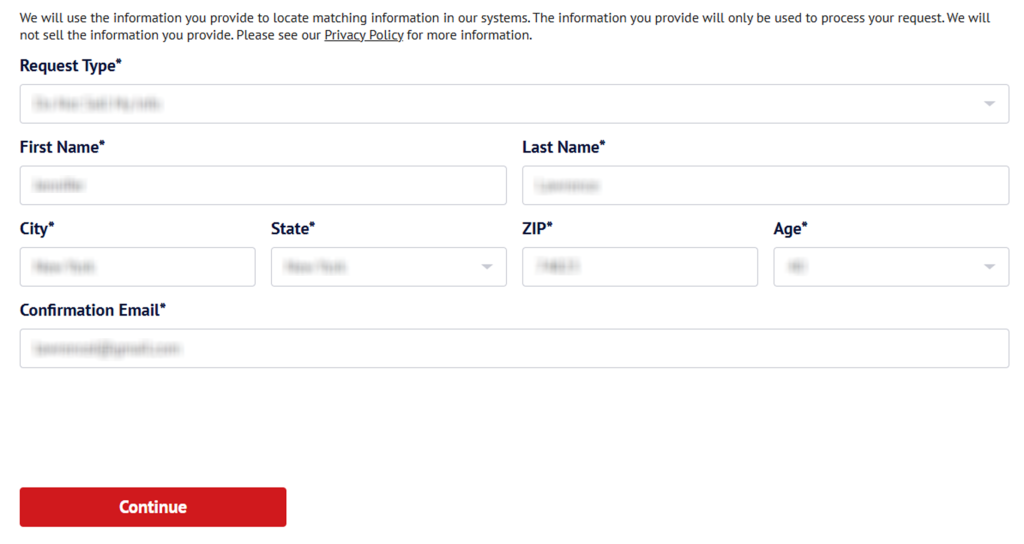
Submit your identifiers (name/address/email + CAPTCHA)
Use the form fields shown (often first name, last name, state, and address). Enter your email address only when the form asks for it. Then, complete the CAPTCHA. Tip: If the form errors, refresh once or switch browsers instead of trying repeated submissions.
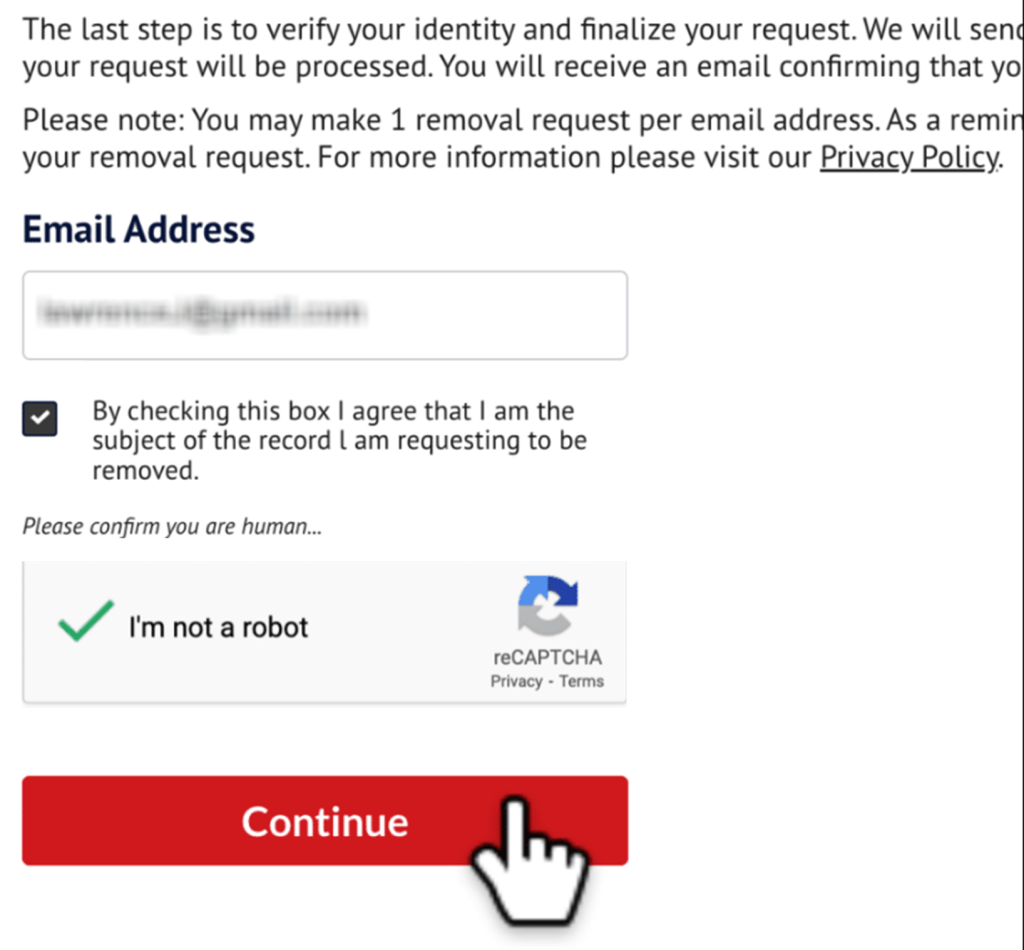
Verify via code or link (email/SMS)
Find an on-screen confirmation that a verification email has been sent. Click the link and save the message. Tip: If nothing arrives, check your email inbox (Spam/Promotions folder) and wait 10–15 minutes before resubmitting once.
Confirm deletion
After verification, you may see a success screen confirming your query and preference controls. Save that confirmation (redact sensitive details). If you’re trying to remove your personal information beyond one entry, repeat the same steps for each match and keep your proofs together. Tip: For security, avoid uploading IDs unless the official form clearly requires it.

Track confirmation & timeline
Most results are updated within 1–7 days; changes can occur within 24 hours. Re-check the same match after about a week. If it’s still visible, use the support communication path. Reference your earlier submission details. Tip: Set a reminder to repeat the opt-out every 3–6 months in case the record returns.
Timelines, Verification & What to Expect
After you submit, Search Public Records may show immediate confirmation and send a follow-up message. Typical turnaround is 1–7 days. However, some deletions may occur within 24 hours, depending on the record. If nothing changes after 7 days, use the contact form to follow up and reference your prior request, then try once more only if support instructs you to. Keep a simple log of dates, the match you targeted, and any confirmation details.
Edge Cases & Troubleshooting
- No access to the original email/phone: use the contact form. Provide an alternate email you control.
- “Record not found”: broaden the lookup, try a former address, and double-check spelling.
- CAPTCHA errors: refresh the page, switch browsers, or try later.
- Verification code not arriving: check Spam. Wait 15 minutes and resubmit once.
- Region limits (EU/UK/CA): ask support what options apply where you live. Don’t assume the same form works everywhere.
- Paid account vs. public entry confusion: cancel the subscription separately; public entry suppression is handled via the opt-out flow.
- If you see searchpublicrecords.com opt wording but the button loops, clear cookies and try again once.
- If you want faster coverage, compare a personal information removal service. Also, keep phrases like “remove your information” and “remove your info” in your notes so you can reuse them in support messages.
Will my data reappear?
Listings can reappear when a data broker refreshes its database from public sources or partner feeds, so the risk is usually medium on sites like SearchPublicRecords. To reduce recurrence, keep your confirmation email, set a 3–6 month reminder, and resubmit quickly if the same data returns. Next, consider deleting information available from data broker sites like other people-search platforms to limit how widely your details spread across the Internet.
Manual vs Assisted Removal
Manual:
Pros
- More control over what you provide;
- works well for a single record;
- lower cost.
Cons
- More time and repeated manual monitoring;
- hard to track many websites manually;
- can trigger marketing follow-ups.
Assisted:
Pros
- Can automate recurring checks across hundreds of people search sites;
- central dashboard with status report;
- helpful for ongoing personal data removal;
- protects from reappearing information from data broker sites.
Cons
- Ongoing fee;
- coverage varies by site;
- less direct control over each step.
Find out if your private details were exposed
FAQ
Find from the homepage footer. Alternatively, use the Help Center. If you still can’t locate it, use the support form and ask for the official deletion route, including the exact match you want suppressed.
Wait 10–15 minutes, check Spam/Promotions, then search your inbox for “Search Public Records.” If nothing arrives, resubmit once using the same details, then address support with the time you tried and the match you selected.
These fields help match the correct record when names overlap. Provide only what the form requires and avoid extra details. If you need an alternative validation method, ask support what minimum identifiers are accepted.
Changes take place within a few days. Official materials may mention that some requests are completed within 24 hours, but it’s practical to allow 1–7 days before following up using the support channel.
Returns are reported after periodic database refreshes. Keep your confirmation message, recheck every 3–6 months, and resubmit quickly if the same match reappears.
It can show personal details, location history, relatives, and property-related records, depending on what the record contains and what’s available from sources. If you see a match, follow the steps above to request suppression.
Use the official form, complete verification, and save the confirmation.
Look on the website footer for the corresponding link or navigate through the Help Center privacy topics. If you’re not seeing it, use the internal search or the support form to request the correct path.
Start with the standard deletion procedure and repeat for any matches that show the same number. Then, review related people-search sites, since the same number can appear on multiple platforms.
Use the website support contact form and include the date/time of your attempt plus any confirmation details. Keep your message short and focus on the specific match you want removed.

Posted by Ava J. Mercer
More Background & Criminal Removal Guides
- AdvancedBackgroundChecks Opt Out Guide
- Affordable Background Checks Opt Out Guide
- ArrestFacts Opt Out Guide
- Background Check Gateway Opt Out Guide
- BackgroundCheckers Opt Out Guide
- BackgroundChecks.com Opt Out Guide
- CyberBackgroundChecks Opt Out Guide
- EasyBackgroundChecks Opt Out Guide
- GovernmentRegistry Opt Out Guide
- GovWarrantSearch Opt Out Guide
- InfoTracer Opt Out Guide
- JailBase Opt Out Guide
- LocatePeople Opt Out Guide
- MugshotLook Opt Out Guide
- Mugshots Opt Out Guide
- National Public Data Opt Out Guide
- Public Information Services Opt Out Guide
- Search Public Records Opt Out Guide
- SearchQuarry Opt Out Guide
- SmartBackgroundChecks Opt Out Guide
- SpyFly Opt Out Guide
- TruthRecord Opt Out Guide


