
Opt Out Guides
National Public Data Opt Out Guide
Before You Opt Out of National Public Data, Check Your Exposure
Privacy Writer
A. J. MercerAva J. Mercer
Updated
Read
5 min
Before You Opt Out of National Public Data, Check Your Exposure
National Public Data is a people-search site that can expose a name, location, and phone number in one place, which can raise privacy concerns. Its service works as a free white-pages style directory that displays information compiled from commercial records and publicly available sources.
How to opt out of National Public Data
Use the official opt-out form on the website. Copy and paste the profile URL, then submit your email and complete the confirmation. The site does not list a fixed turnaround, so save the notice and follow up after several days if needed.
Checklist:
- Search for your profile
- Open the profile and copy the URL
- Open the privacy page
- Submit your identifiers
- Save the confirmation message
- Set a reminder to re-opt out
Find out if your private details were exposed
National Public Data – Quick Facts
| Parameter | Value |
| Domain | nationalpublicdata.com |
| Data Types | contacts, address history, relatives, and other people-search information |
| Opt-out Methods | web form; support request for manual help |
| Identity Verification | on-screen confirmation and inbox follow-up |
| Typical Response Time | monitor for several days |
| Re-listing Risk | medium |
National Public Data describes itself as a public people-search service. The service aggregates and displays consumer lookup profiles using public records and commercial sources.
Common data you may find:
- Names and known aliases
- Phones
- Emails
- Current and past location entries
- Household information
- Age or birthday information
- Property ownership data
- Social media profile links
- Court references where listed
- Consumer lookup profiles
Step-by-Step Guide
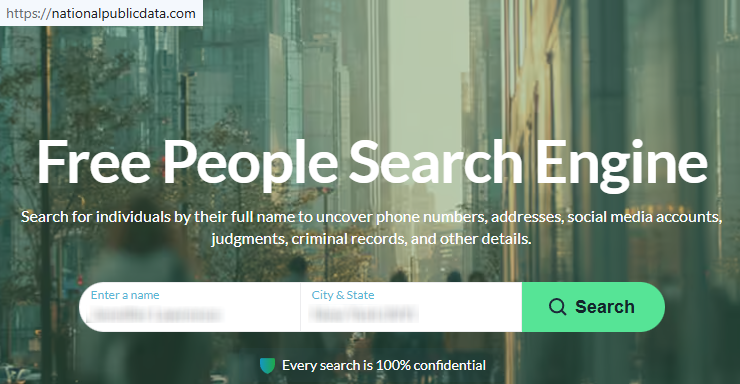
Search for your profile
Go to National Public Data and use the main search tool with a name, plus city and state. Review matches slowly and compare age, relative, neighbors, or location clues before opening anything. If you save a screenshot, blur personal information first. A good tip is to try small spelling changes if the first search results look incomplete. Google may also surface the same listing.
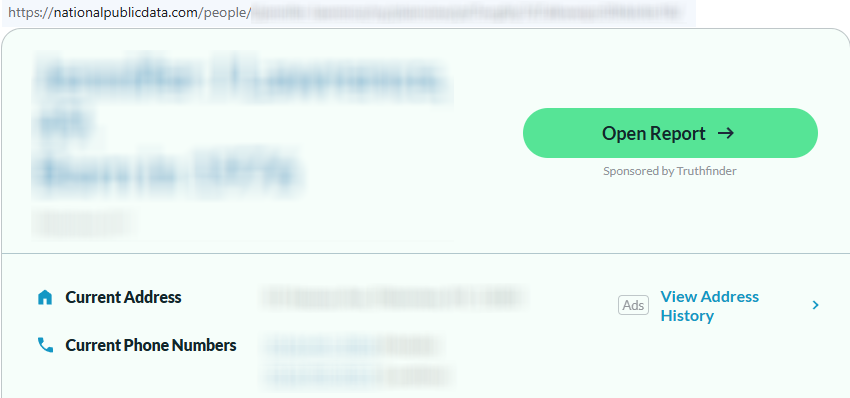
Open the profile and copy the URL
Open the profile you want only after you are sure it matches the right person. Copy the full URL from the browser bar, not a short share link. Save it in a note for later. If you capture the listing, redact the phone number, address, and other personal information before saving.
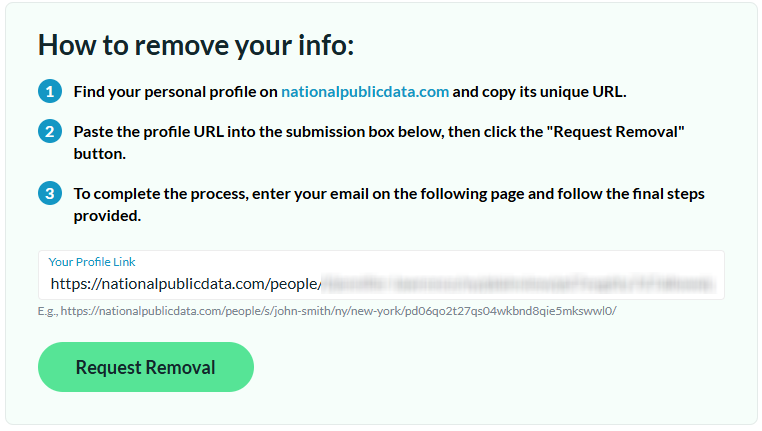
Open the privacy page and submit your identifiers
Open the National Public Data request form (go to the site’s footer). Paste the copied URL into the field. Click the main button and continue to the next screen. Use an inbox you control. Some users utilize a separate inbox for tech and privacy requests because each profile may need a separate email address if the database creates multiple matches.

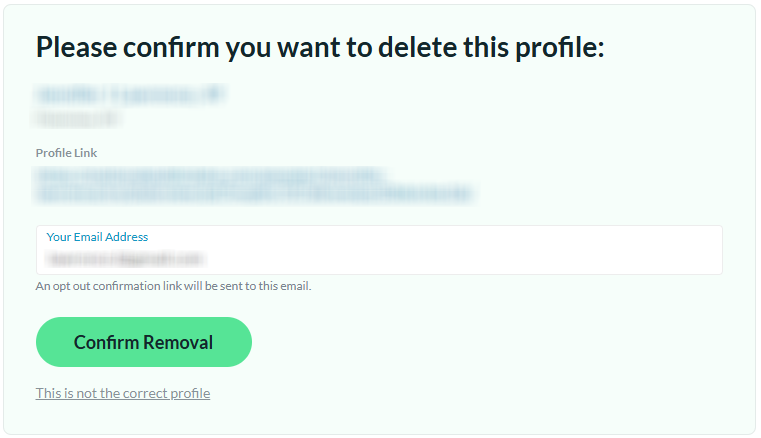
Confirm deletion
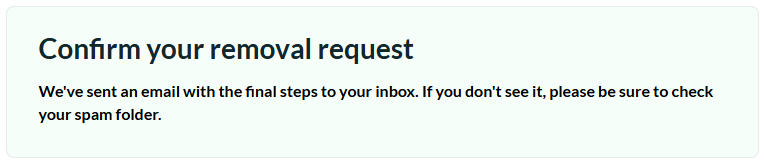
After you submit, complete the final confirmation shown on screen or in your inbox. Check Spam or Promotions if nothing arrives quickly. If you save proof, redact personal info first. This step is also important if you want to protect yourself after the lawsuit and the earlier data breach discussion tied to the old operator.
Track confirmation & timeline
Save the confirmation message, the date, and the exact URL in one folder. If nothing changes after a reasonable wait, use the support channel. Send an email with the same profile URL and your first submission date. Keep screenshots redacted before storing them online. A simple reminder every few months helps track repeat listings.
Timelines, Verification & What to Expect
National Public Data does not publish a fixed processing window, so expect a confirmation first and then a short wait. Watch for an on-screen notice and an inbox message tied to the address you submitted. If the listing is still live after about 7–14 days, resubmit once. After that, use the support link and include the saved URL plus your earlier date. This approach is more accurate and likely to keep your request organized.
Edge Cases & Troubleshooting
- No access to the original inbox/phone: submit again with an inbox you control, because the current flow depends more on inbox confirmation than phone verification.
- “Record not found”: run the search again with fewer fields, a prior city, or another name variation.
- CAPTCHA or submission errors: refresh once, disable blockers for that tab, and re-paste the full URL.
- Verification code not arriving: check Spam, Promotions, and typing errors, then resubmit one time.
- Form rejects the request by region (EU/UK/CA): use the support channel and ask for manual guidance for your location.
- Account deletion vs. public listing removal confusion: listing suppression is different from cancel actions for messages or support submissions.
- Re-submitting after a failed attempt: use the same profile URL and include your earlier timestamp.
- How to cancel National Public Data: focus on suppressing the listing, not on a normal subscriber account flow.
Will my data reappear?
Yes, a listing can appear when National Public Data refreshes from public data, partner feeds, resellers, or other data broker sites. That does not always mean the first request failed. To reduce repeat exposure, keep every confirmation, and check every 3–6 months again. If the listing returns, resubmit quickly and keep related removals moving.
Manual vs Assisted Removal
Manual:
- Pros: More control, lower cost, direct review of listed info, and clear tracking of each request.
- Cons: More time, repeat monitoring, separate requests across data broker sites, and more follow-up work.
Assisted:
- Pros: Faster workflow, centralized verification, tracking dashboard, recurring checks, and less admin work.
- Cons: Added cost, less direct control, and dependence on a third party.
We remove your data for you - faster, verified, trackable.
Discover Which Sites Share Your Private Details—Instantly and Free.
FAQ
Profiles can exist even if you never signed up, because the site can collect from public sources.
The current service is separate from the former ownership tied to the older incident. The practical step is the same: if a live listing is visible, make a request for suppression.
The site does not post an exact timeline, so a short delay does not always mean failure. Wait several days and resubmit once, and follow up if needed.
Use National Public Data’s privacy materials. It starts with the profile URL and then moves you to the confirmation step.
If your concern is sensitive information like Social Security Numbers from the old leak, use monitoring steps and then remove the current listing separately.
Search for your listing, open the matching profile, copy the full URL, paste it into the official form, and complete the inbox confirmation.
Try again with the exact profile information, refresh the tab once, and check for copy errors. If it still fails, use support and include the same identifiers.
National Public Data says the service displays profiles built from public records and other outside sources. The company presents it as a people-search tool built with technology used to organize lookup entries.
Use support when the normal request flow fails or when you need help with verification. Start with the standard form first, then follow up with support if needed.
A practical schedule is every 3–6 months. Keep your confirmation so you can act quickly if the same profile returns.
It’s meant to suppress the visible profile on the live domain. It is different from deleting support submissions or old copies that may remain elsewhere on the Internet.

Posted by Ava J. Mercer
More Background & Criminal Removal Guides
- AdvancedBackgroundChecks Opt Out Guide
- Affordable Background Checks Opt Out Guide
- ArrestFacts Opt Out Guide
- Background Check Gateway Opt Out Guide
- BackgroundCheckers Opt Out Guide
- BackgroundChecks.com Opt Out Guide
- CyberBackgroundChecks Opt Out Guide
- EasyBackgroundChecks Opt Out Guide
- GovernmentRegistry Opt Out Guide
- GovWarrantSearch Opt Out Guide
- InfoTracer Opt Out Guide
- JailBase Opt Out Guide
- LocatePeople Opt Out Guide
- MugshotLook Opt Out Guide
- Mugshots Opt Out Guide
- National Public Data Opt Out Guide
- Public Information Services Opt Out Guide
- Search Public Records Opt Out Guide
- SearchQuarry Opt Out Guide
- SmartBackgroundChecks Opt Out Guide
- SpyFly Opt Out Guide
- TruthRecord Opt Out Guide


