
Opt Out Guides
Affordable Background Checks Opt Out Guide
Before You Opt Out of Affordable Background Checks, Check Your Exposure
Privacy Writer
A. J. MercerAva J. Mercer
Updated
Read
5 min
Before You Opt Out of Affordable Background Checks, Check Your Exposure
Affordable Background Checks can show your name, address, phone, and other personal information. That creates a privacy risk because a record can be found on the Internet and reused for identity theft or a scam. The website gathers information from public records and commercial sources, then places that info in its directory for background checks. The business may also sell data through a directory-style platform, so removal can help protect identifiable personal data.
How to opt out of Affordable Background Checks
Open the official site. Use the contact form, enter your name and email address, identify the record, and confirm the request. This opt-out process is the main removal path and is easy to follow.
Checklist:
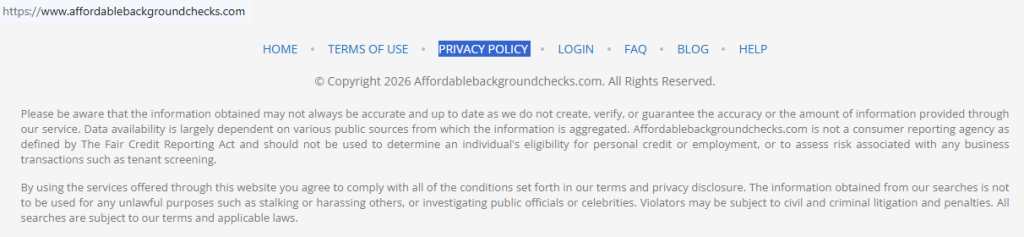
- Open the privacy policy
- Locate the form
- Submit your identifiers
- Complete the CAPTCHA
- Save the confirmation
- Check later and re-opt-out
Find out if your private details were exposed
Affordable Background Checks – Quick Facts
| Parameter | Value |
| Domain | affordablebackgroundchecks.com |
| Data Types | contacts, addresses, email address, age, relatives, court records, and other personal details |
| Opt-out Methods | web form |
| Identity Verification | CAPTCHA and confirmation email or on-screen message |
| Typical Response Time | a few days to two weeks |
| Re-listing Risk | medium |
Affordable Background Checks is a people lookup service. It may collect information from public records and commercial sources and publish a searchable record on its website. This business is not a government platform.
Common data you may find:
- Name and aliases
- Phone numbers
- Email addresses
- Current and past addresses
- Age
- Relative and family links
- Court records
- Professional licenses
- Marital status
- Other identifiable personal data
Step-by-Step Guide
Open the privacy page
Open the official website and go to the privacy area. Look for the request screen used for removal. Tip: Copy the URL and date so you can follow up later. Check the page title before you move on.
Locate the contact form
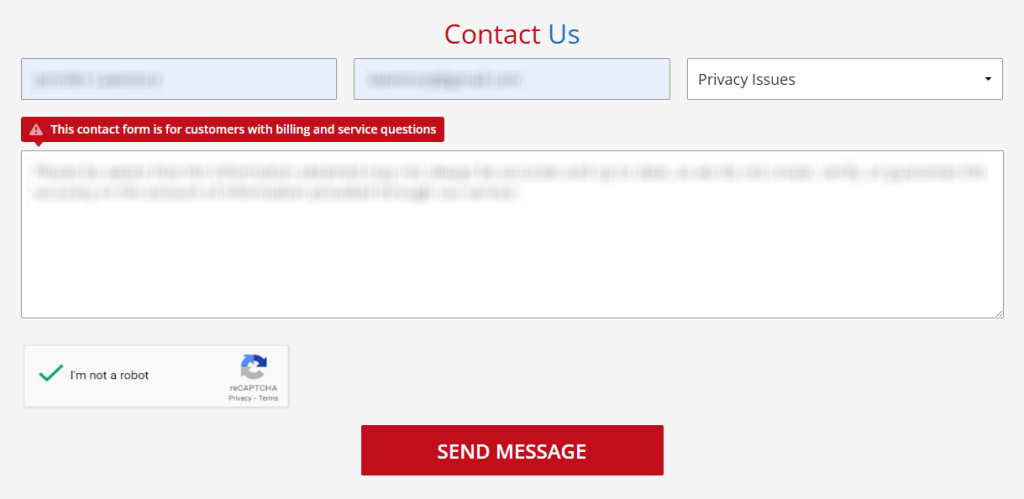
On the screen, find the request area and choose the privacy-related option if the site shows one. If the screen fails, refresh once or try another browser.

Submit your identifiers
Enter your name, email address, and the opt-out reason. In the message box, say that you want to remove personal data from the site. Include the URL, city, state, or one short listing note. Before you save a screenshot, blur personal info, such as your name, address, PII, or any record URL, to keep them safe.
Track confirmation & timeline
After you send the request, save the on-screen confirmation or email. Affordable Background Checks may review the removal in a few days or longer, so keep the date and the email address you used. Check Spam if nothing arrives. Save one screenshot with personal info blurred. Check once more before you close the browser.
Timelines, Verification & What to Expect
Affordable Background Checks does not clearly publish a fixed processing window, so expect a few days to about two weeks. Confirmation may appear on the website right after the request, or it may arrive by email. Keep the confirmation, URL, and date in one place. If nothing appears after two weeks, use the same site and send one follow-up. No guide can guarantee a result immediately.
Edge Cases & Troubleshooting
- No access to the original email/phone: Use a current email address you can access and explain the mismatch in the request. Include your name and the listing URL.
- Record not found: Search again with another name format, city, or state.
- CAPTCHA or submission errors: Refresh the website and try again once.
- Verification code not arriving: Look for an on-screen message first, then check Spam for a confirmation email.
- Request rejects the issue by region (EU/UK/CA): Use the site’s privacy path and explain your location clearly.
- Account deletion vs. public listing removal confusion: Account cancellation is separate from public listing removal.
- Re-submitting after a failed attempt: Wait for the normal timeline, then try once more.
Will my data reappear?
Yes, a record can return after removal. A data broker may collect fresh user information from public records, partner feeds, or other sources, then publish it again on the website. The risk is medium, so protect yourself by keeping the confirmation email, checking the site every 3–6 months, and repeating the opt-out if needed. Review related removals next to reduce repeat exposure.
Manual vs Assisted Removal
Manual:
Pros
- free and gives you control over the process;
- lets you choose what personal information to provide;
- works well if you only need one removal.
Cons
- takes time across multiple people search sites;
- requires repeat checks and monitoring;
- you manage each step yourself.
Assisted:
Pros
- can automate monitoring across more than one data broker site;
- keeps verification and tracking in one dashboard;
- helpful if you want a professional service.
Cons
- costs money;
- still depends on each website and its process;
- you should review what personal data the service will use.
We remove your data for you - faster, verified, trackable.
Discover Which Sites Share Your Private Details—Instantly and Free.
FAQ
Affordable Background Checks is a website that shows a report with contact data, addresses, relatives, and other info.
Open the site, find the request area, enter your name and email address, identify the record, and ask for removal.
Use that listing URL in the request. One clear URL helps the service find the right entry.
The site may route privacy requests through its request area. Open the website and follow the privacy option there.
The service may collect information from public sources and then publish a searchable record online.
Wait about two weeks. If you get no confirmation by email or on the website, try one follow-up.
Check Spam and any filters on your email address. Then try the site again once if needed.
Cancelling your subscription is different from public listing removal. Removing a record does not always end a paid service.
A data broker can gather updated information and publish the record again. That is why repeat checks help.
Provide your name, email address, URL, city, state, and enough info to find the listing.
Use the manual guide if you want a free option and direct control. Use assisted tools if you want less manual work.

Posted by Ava J. Mercer
More Background & Criminal Removal Guides
- AdvancedBackgroundChecks Opt Out Guide
- Affordable Background Checks Opt Out Guide
- ArrestFacts Opt Out Guide
- Background Check Gateway Opt Out Guide
- BackgroundCheckers Opt Out Guide
- BackgroundChecks.com Opt Out Guide
- CyberBackgroundChecks Opt Out Guide
- EasyBackgroundChecks Opt Out Guide
- GovernmentRegistry Opt Out Guide
- GovWarrantSearch Opt Out Guide
- InfoTracer Opt Out Guide
- JailBase Opt Out Guide
- LocatePeople Opt Out Guide
- MugshotLook Opt Out Guide
- Mugshots Opt Out Guide
- National Public Data Opt Out Guide
- Public Information Services Opt Out Guide
- Search Public Records Opt Out Guide
- SearchQuarry Opt Out Guide
- SmartBackgroundChecks Opt Out Guide
- SpyFly Opt Out Guide
- TruthRecord Opt Out Guide


