
Opt Out Guides
LocatePeople Opt Out Guide
Before You Opt Out of LocatePeople, Check Your Exposure
Privacy Writer
A. J. MercerAva J. Mercer
Updated
Read
5 min
Before You Opt Out of LocatePeople, Check Your Exposure
Removing your listing from LocatePeople matters because one public result can show a name, address, phone, and other personal information in a way that is easy to find. That can create a real privacy risk for a consumer who wants less exposure online. LocatePeople is a people search engine that compiles records from public records and commercial sources such as census data, property records, phone directories, social networking indexes, and local records.
How to opt out of LocatePeople
Use the official privacy page to find your listing, add your email address and name, and finish the request through the message sent after submission. The removal flow usually leads to the TruthFinder website. Step-by-step instructions are usually simple, and processing is commonly described as taking 2–15 business days.
Checklist:
- Open the privacy page
- Find your listing
- Enter your email
- Submit your identifiers
- Save the confirmation email
- Set a reminder to re-opt out
Find out if your private details were exposed
LocatePeople – Quick Facts
| Parameter | Value |
| Domain | https://locatepeople.govbackgroundchecks.com/ |
| Data Types | names, address history, phone, email, relatives, property data |
| Opt-out Methods | web form, email, mail |
| Identity Verification | message or link |
| Typical Response Time | 2–15 business days |
| Re-listing Risk | medium |
LocatePeople is a service that displays consumer listings from public records and commercial sources. Its search language says it covers much of the adult population and returns matches from public and commercial files, not a consumer reporting service. The site is accessible and built for instant lookups rather than account use, and its data display is broad.
Common data you may find:
- Names and aliases
- Phone numbers
- Email addresses
- Current and past address entries
- Age range
- Relatives or household links
- Media profiles
Step-by-Step Guide
Open the opt-out page and search for your record
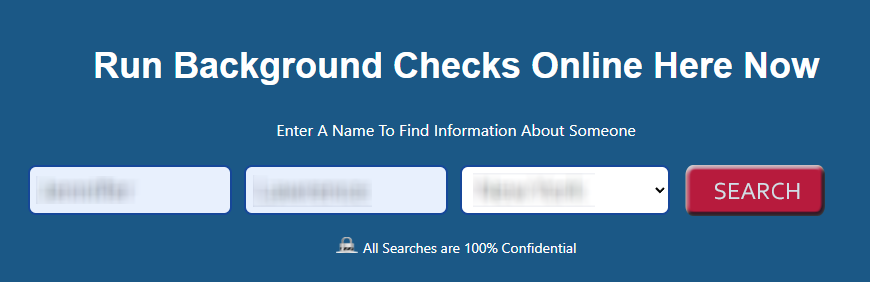
Open the LocatePeople opt-out tab located in the footer, run a search with your name and state, and choose the matching listing from the results. The flow usually leads to the TruthFinder website. If you publish screenshots here, blur private information first.

Verify your email
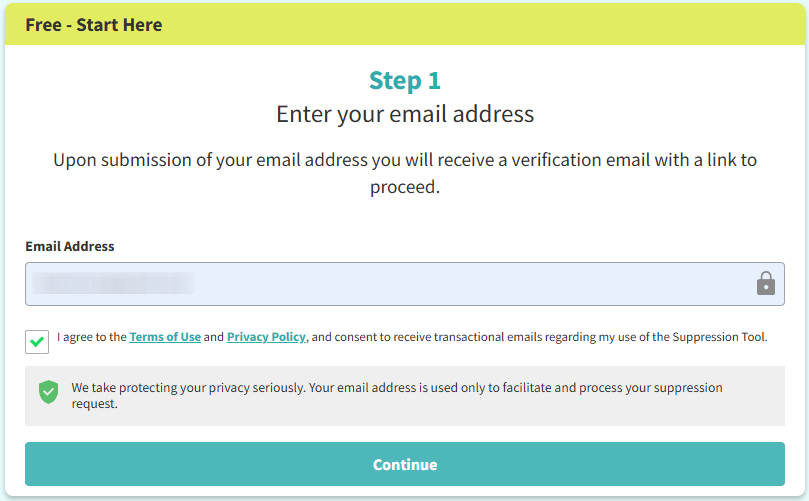
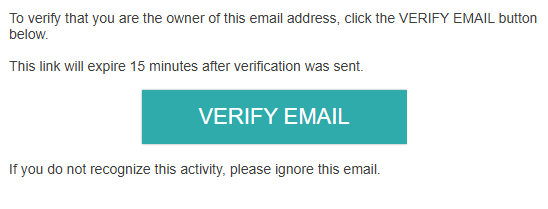
Type your email in the box on the form, then look for the follow-up message when LocatePeople asks you to verify your identity. Some people need to click a button in that message before the case continues, so check Spam or Promotions if nothing shows up quickly.

Submit your identifiers
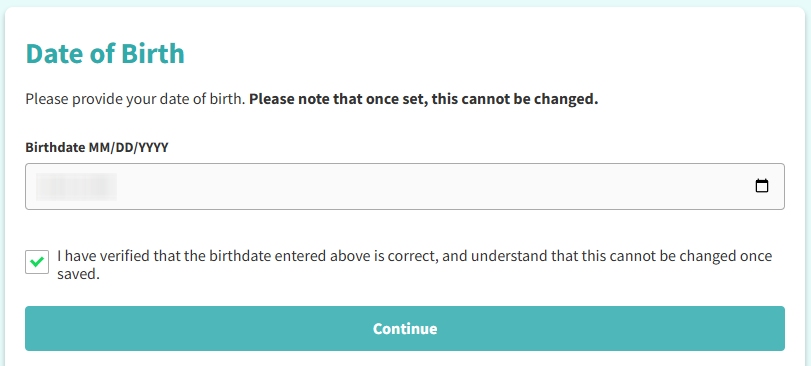
Submit your date of birth, enter your first and last name, select the right you want to exercise, complete the CAPTCHA, and click Continue. Use the field labels carefully, because one wrong detail can slow the request and affect your data.
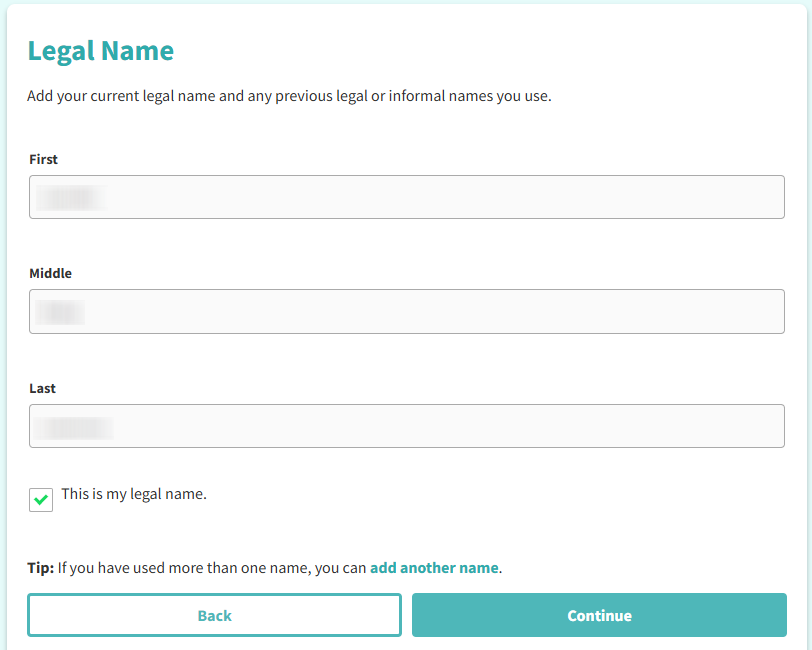
Confirm deletion
Click Continue to manage suppression rules. This is the stage where you can remove a public listing or send a deletion request by email and click the button in the message.
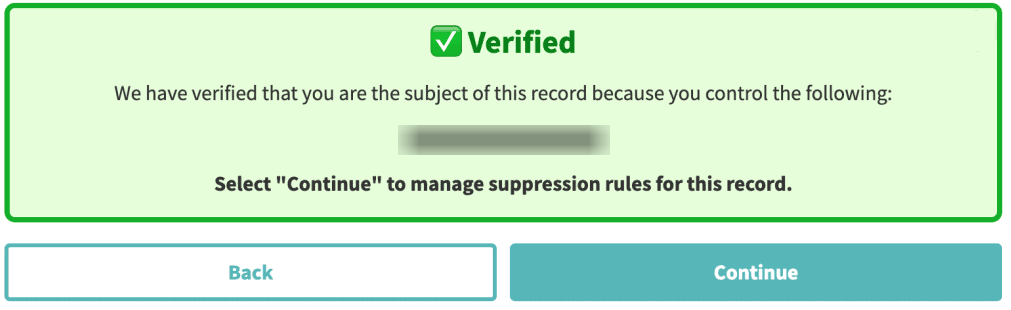
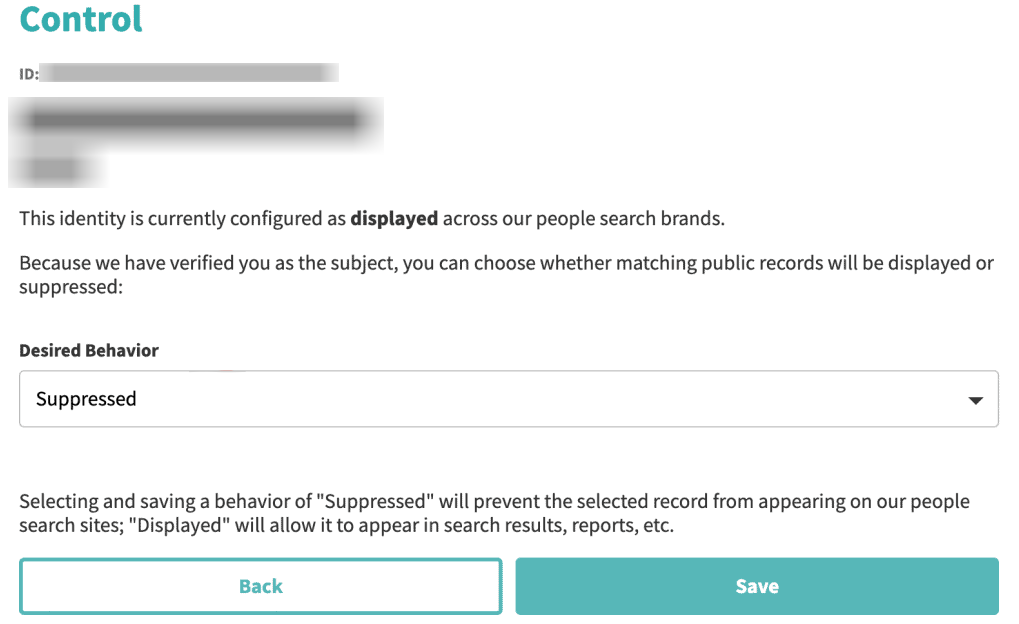
Track confirmation & timeline
Most LocatePeople requests are completed within 2–15 business days. After that window, run a fresh search to check whether the listing is gone. If it is still visible, use the official contact route once; if the case closes, information will be removed.
Timelines, Verification & What to Expect
A LocatePeople request usually moves within about 2–15 business days. The main sign is an on-site note or a message sent by email. If nothing arrives after 15 business days, use the official mail route, send the same details once, and keep the earlier note so support can match your case.
Edge Cases & Troubleshooting
- No access to the original email or phone: use a current method you can open and include the ID and matching listing details.
- “Record not found”: try another search using name plus state or address, then compare each listing carefully.
- CAPTCHA or submission errors: reload once, turn off blockers, and try again.
- Verification code not arriving: wait a few minutes, check Spam, and confirm email spelling.
- Form rejects the request by region (EU/UK/CA): use the official privacy mail route. Mention California when it applies. The CCPA (California Consumer Privacy Act) may matter for some California residents.
- Account delete vs. public listing deletion confusion: account closure is different from taking a listing off the site.
- Re-submitting after a failed attempt: send one follow-up with the same ID and date.
- Need human help: ask customer support or a representative through the official support route. Marketing messages are separate from deletion notices.
Will my data reappear?
It can. Many listings come back when aggregators, partner feeds, resellers, or other data brokers refresh a database. To lower that risk, keep the message, automate a reminder every 3–6 months, and act fast if the listing returns. You should also opt out of LocatePeople and related sites during the same review cycle, so your personal data stays less exposed.
Manual vs Assisted Removal
Manual:
Pros
- Low cost and full control over each request
- good for one consumer listing
- lets you review each step before you submit
Cons
- Takes time to scan, track, and repeat
- easy to miss new listings across data brokers
- ongoing checks stay manual
Assisted:
Pros
- Can automate repeat checks
- one dashboard can track status and proofs
- helpful for broader coverage
Cons
- Paid option
- you still share some information you provide
- quality depends on the service
We remove your data for you - faster, verified, trackable.
Discover Which Sites Share Your Private Details—Instantly and Free.
FAQ
Use the official form, submit your personal data, then finish with the follow-up message.
Search by first and last name plus state, then open the closest match and enter your identifiers to remove your data from search results.
Timing can stretch to 2–15 business days, and one follow-up may be needed.
The service uses public and commercial sources.
Review every 3–6 months and keep your message in case you need to repeat the process.
LocatePeople is a directory service that shows consumer listings from public and commercial sources.
Current references usually point to about 2–15 business days.
Current references point to the TruthFinder opt-out route.
The steps are different. This covers public listing suppression, not billing or cancel flows.

Posted by Ava J. Mercer
More Background & Criminal Removal Guides
- AdvancedBackgroundChecks Opt Out Guide
- Affordable Background Checks Opt Out Guide
- ArrestFacts Opt Out Guide
- Background Check Gateway Opt Out Guide
- BackgroundCheckers Opt Out Guide
- BackgroundChecks.com Opt Out Guide
- CyberBackgroundChecks Opt Out Guide
- EasyBackgroundChecks Opt Out Guide
- GovernmentRegistry Opt Out Guide
- GovWarrantSearch Opt Out Guide
- InfoTracer Opt Out Guide
- JailBase Opt Out Guide
- LocatePeople Opt Out Guide
- MugshotLook Opt Out Guide
- Mugshots Opt Out Guide
- National Public Data Opt Out Guide
- Public Information Services Opt Out Guide
- Search Public Records Opt Out Guide
- SearchQuarry Opt Out Guide
- SmartBackgroundChecks Opt Out Guide
- SpyFly Opt Out Guide
- TruthRecord Opt Out Guide


