
Opt Out Guides
Mugshots Opt Out Guide
Before You Opt Out of Mugshots, Check Your Exposure
Privacy Writer
A. J. MercerAva J. Mercer
Updated
Read
5 min
Before You Opt Out of Mugshots, Check Your Exposure
A listing can show your name, address, phone, and other personal information, which can impact your privacy and reputation. Many sites pull details from public record sources and display them as online arrest records, often alongside a booking photo. Once published online, those pages can show up in search results and spread quickly, even if the original case changes.
How to Opt Out of Mugshots
Use the site’s Record Removals/Updates instructions, then enter your identifiers (email/phone/name), and any required documents; confirm via any code/link you receive, and save the reply. It usually takes 7–10 business days.
Checklist:
- Open the official opt-out form
- Enter identifiers (email/phone)
- Complete CAPTCHA/verification
- Confirm via code/link
- Save the confirmation email
- Set a reminder to resubmit if needed
Find out if your private details were exposed
Mugshots – Quick Facts
| Parameter | Value |
| Domain | mugshots.com |
| Data Types | personal data, addresses, and listing fields tied to criminal charges |
| Opt-out Methods | Record Removals/Updates instructions (email submission) |
| Identity Verification | confirmation email; documents when required |
| Typical Response Time | up to 10 business days |
| Re-listing Risk | medium |
Mugshot.com displays arrest-style listings and lists removal policies for limited scenarios through its Record Maintenance page.
Common data you may find:
- Name and aliases
- Age or year of birth
- City/state fields
- Booking photo
- Mugshot image
- Offense and criminal charges details
- Dates tied to arrests and convictions
- Physical descriptors shown on the page
- Links to related pages on the site
Step-by-Step Guide
Open the official opt-out form
Open the Contact page. If you’re collecting proof for your files, blur or redact personal data in any screenshot. Tip: You can use Google search to find your listing, then confirm you’re on the correct domain before you proceed.

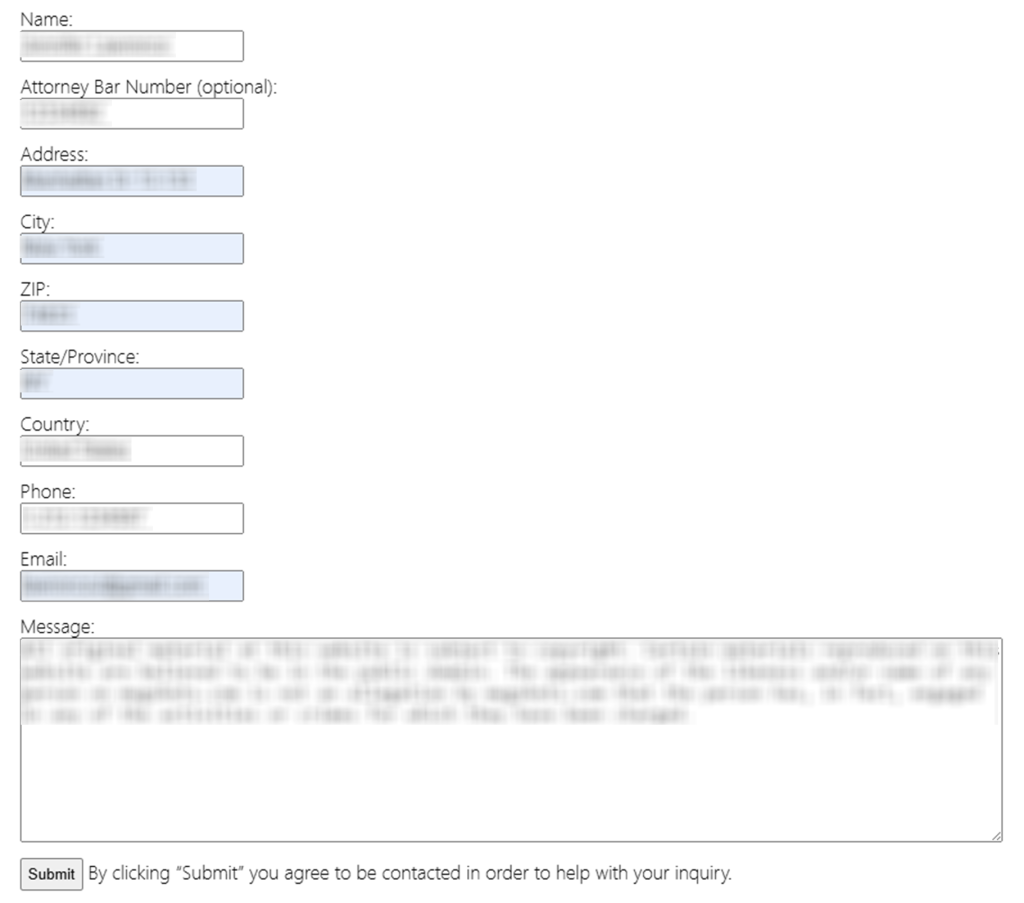
Submit your identifiers (email/phone/name + CAPTCHA)
Include the email/phone you can access. Enter your name, address, and additional details. Attach only the documents the page requests, and keep the rest of your private details out of the message. If you use any form, complete the CAPTCHA (“I’m not a robot”) and double-check every field before you submit. Tip: Save a dated copy of what you sent so you can follow up without retyping details.
Verify via code or link (email/SMS)
Watch for a confirmation email. Open it and follow the prompt to verify, then save the message as proof of your submission. If nothing arrives, check Spam/Promotions and your mailbox search. Tip: Codes can expire – request a new one rather than reusing an old message, and blur codes in any screenshot.
Confirm deletion / Do-Not-Sell request
If you qualify, the next step is to remove the mugshot page by following the instructions for your scenario. The Record Removals/Updates page lists cases where the site may review removal, and it may ask for documentation such as expungement paperwork or other court documents. Provide clear scans and label files simply. Tip: If you’re unsure which document applies, ask for clarification instead of sending extra personal information.
Track confirmation & timeline
Create a log with the date you sent the email, the address used, and the listing URL. The page notes that it can discard illegible files and that processing can take up to 10 business days, so keep readable copies. If you later see the listing in Google search results, it may be cached even after the source changes; check again after a few days. This is the process most people can repeat if needed.
Timelines, Verification & What to Expect
It can take up to 10 business days to review removal emails, and the overall mugshot removal process can feel time-consuming if you need to gather documents first. Confirmation typically arrives by email, or you may only notice the change when you revisit the page. If you get no reply after 10 business days, follow up once using the same communication channel, then resubmit with clearer files. After the page changes, request a recrawl/refresh so that outdated snippets update, then check Google and other search engines for the new status. If the page still appears, it can take to remove cached results a few more days depending on indexing.
Edge Cases & Troubleshooting
- No access to the original email/phone: ask what alternate verification is accepted; keep your email address current.
- “Record not found”: double-check spelling and the state filter, then use find your mugshot on-site; to get your mugshot URL, open the profile and confirm the address before you proceed.
- CAPTCHA or submission errors: try a different browser, clear cookies, and retry later.
- Verification code not arriving: check Spam/Promotions, wait 15 minutes, then request a new message once.
- Region limits (EU/UK/CA): some requests may not be accepted; ask via email for region-specific options.
- Account vs listing confusion: cancel an account (if applicable) does not necessarily remove a listing.
- If the site says it will refuse to remove your mugshot: document the reply and try contacting the site’s hosting as an escalation; include the URL with your request to remove when contacting the site’s hosting company.
- If you need escalation: focus on contacting website owners politely, and consider a demand letter stating the URL, the issue, and what you want changed; follow any formatting rules because data removal requests must include enough detail to locate the page.
Will my data reappear?
Listings can reappear when aggregators refresh feeds, when data brokers republish the same page, or when mirrors scrape and repost content, especially for mugshots online. Even if a page is removed from the Internet, copied versions can still circulate, which is why tracking matters. To reduce recurrence, keep your confirmation email, set a 3–6 month reminder, and re-submit quickly if you spot the same mugshot online again. For protecting your online reputation, also remove mugshots from the Internet on other sites you find, monitor your online presence for new reposts, and review social media profiles for duplicate links.
Manual vs Assisted Removal
Manual:
Pros
- More control and direct outreach;
- you can contact the site owner using the site’s contact information, and if you find a repost, you can reach the website owner listed on that page;
- if you are trying to remove personal information from the Internet, start with the original listing and any reposts.
Cons
- It can be time-consuming, you must monitor search results, and a criminal record entry can persist across data brokers and data broker sites.
Assisted:
Pros
- A removal service can help coordinate emails, handle verification and tracking, and support online reputation management as part of reputation management.
- broad coverage of 976 data brokers.
Cons
- The cost of mugshot removal varies, and some providers focus on data brokers more than single listings;
- ask whether they cover personal information from data broker reposts.
We remove your data for you - faster, verified, trackable.
Discover Which Sites Share Your Private Details—Instantly and Free.
FAQ
Start by finding the source page that hosts the photo, then ask to have it removed using the site’s listed email and the page URL. If the source is updated or deleted, you can submit a removal request to Google for outdated results so the old thumbnail stops showing. Keep proof of what you submitted.
Reposting, caching, and syndication can cause the same page to end up online again. Save your confirmation email, keep a reminder, and repeat the same steps you can take if it reappears.
People often mix up a delist with a true delete, or they don’t know what proof the site wants. Keep copies of all messages every time you send a removal request.
If you need help collecting documents or coordinating repeated outreach, consider a service that tracks requests, or talk to a mugshot removal attorney about how to organize records and next steps.
A visible listing can hurt employment opportunities and personal relationships, even when someone was not found guilty. Improving search engine results may reduce casual discovery, but it won’t change the underlying source page unless it is updated or removed.
Follow the Contact page instructions and submit your request only with the documentation listed for your category. If approved, you may see the mugshot removed from the page.
Yes. Removing a mugshot depends on whether you can show qualifying proof (such as an expungement or a court order). If you don’t have paperwork, get your record first from the court or agency, then submit the request; in some places, you may need a petition with the court.
Start with the original host, then work outward: contact each page that is publishing mugshots, and keep a list of links you asked to remove. If you can’t find contact details, reach out to the site’s hosting provider as a last step.
If the source page was updated or deleted, you can request a refresh so the snippet/thumbnail is removed from Google; if it’s still live, removal may be limited to certain categories.
If you want to remove it immediately, focus first on the source site and submit complete proof; then monitor Google search results and request updates only after the source changes. If you want to get a mugshot off the Internet broadly, repeat for other sites you find, including data brokers.

Posted by Ava J. Mercer
More Background & Criminal Removal Guides
- AdvancedBackgroundChecks Opt Out Guide
- Affordable Background Checks Opt Out Guide
- ArrestFacts Opt Out Guide
- Background Check Gateway Opt Out Guide
- BackgroundCheckers Opt Out Guide
- BackgroundChecks.com Opt Out Guide
- CyberBackgroundChecks Opt Out Guide
- EasyBackgroundChecks Opt Out Guide
- GovernmentRegistry Opt Out Guide
- GovWarrantSearch Opt Out Guide
- InfoTracer Opt Out Guide
- JailBase Opt Out Guide
- LocatePeople Opt Out Guide
- MugshotLook Opt Out Guide
- Mugshots Opt Out Guide
- National Public Data Opt Out Guide
- Public Information Services Opt Out Guide
- Search Public Records Opt Out Guide
- SearchQuarry Opt Out Guide
- SmartBackgroundChecks Opt Out Guide
- SpyFly Opt Out Guide
- TruthRecord Opt Out Guide


