
Opt Out Guides
CyberBackgroundChecks Opt Out Guide
Before You Opt Out of CyberBackgroundChecks, Check Your Exposure
Privacy Writer
A. J. MercerAva J. Mercer
Updated
Read
5 min
Before You Opt Out of CyberBackgroundChecks, Check Your Exposure
CyberBackgroundChecks is a people search site that may expose your name, address, phone, and other personal details. That can lead to unwanted exposure, doxxing, harassment, stalking behavior, identity theft, or data being misused. CyberBackgroundChecks may compile a profile from public records, court records, criminal records, and other resources.
How to opt out of CyberBackgroundChecks
Go to the CyberBackgroundChecks opt-out page. Enter your email address, open the link, and finish the form to send one opt-out request. 2–5 days are typically needed to opt out of Cyber Background Checks.
Checklist:
- Open the privacy page
- Verify your email
- Submit your identifiers
- Complete the CAPTCHA
- Save the confirmation message
- Set a reminder to re-opt-out
Find out if your private details were exposed
CyberBackgroundChecks – Quick Facts
| Parameter | Value |
| Domain | cyberbackgroundchecks.com |
| Data Types | contacts, addresses, aliases, relatives, public records, possible social profile links |
| Opt-out Methods | web form |
| Identity Check | confirmation email |
| Typical Response Time | 2–5 days |
| Re-listing Risk | medium |
CyberBackgroundChecks provides a searchable database that may compile personal information from public and commercial sources. Information from Cyber Background Checks may include contacts, address history, and other details. This people search site can create a privacy risk since information from data broker sites is easy to find. The guide below explains how to opt out of CyberBackgroundChecks.
Common data you may find:
- Names and aliases
- Phone numbers
- Email addresses
- Current and past addresses
- Relatives and household links
- Property records
- Court records
- Social media links
Step-by-Step Guide
Open the privacy page
Go to the CyberBackgroundChecks site and use the link at the bottom of the home page. Before saving images, blur personal information and private data. On the page, click “Send request.” This is the usual start for a removal request.
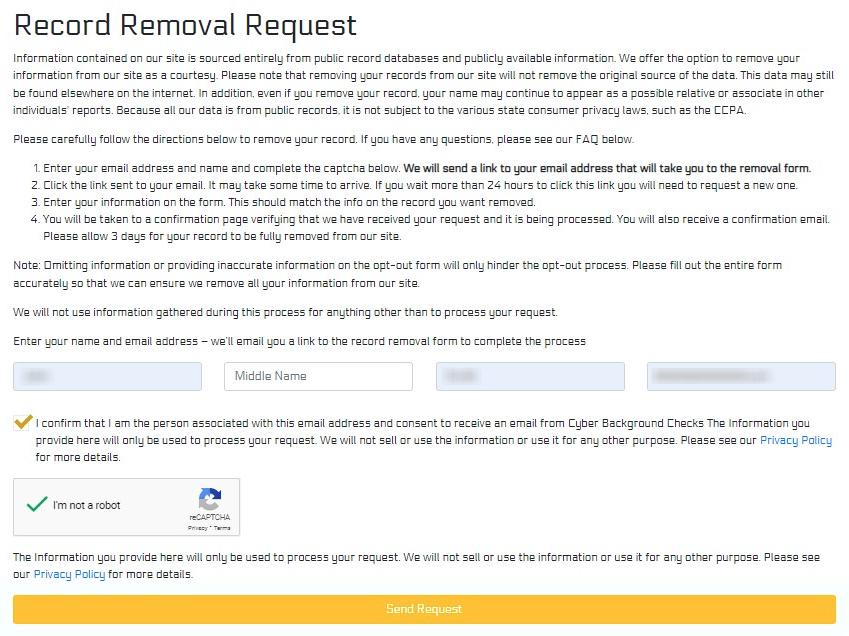
Verify your email
Check your inbox for the message and open the link. This step helps safeguard the request. If the message is missing, check Spam. This is part of the step-by-step instructions and part of the CyberBackgroundChecks opt flow.

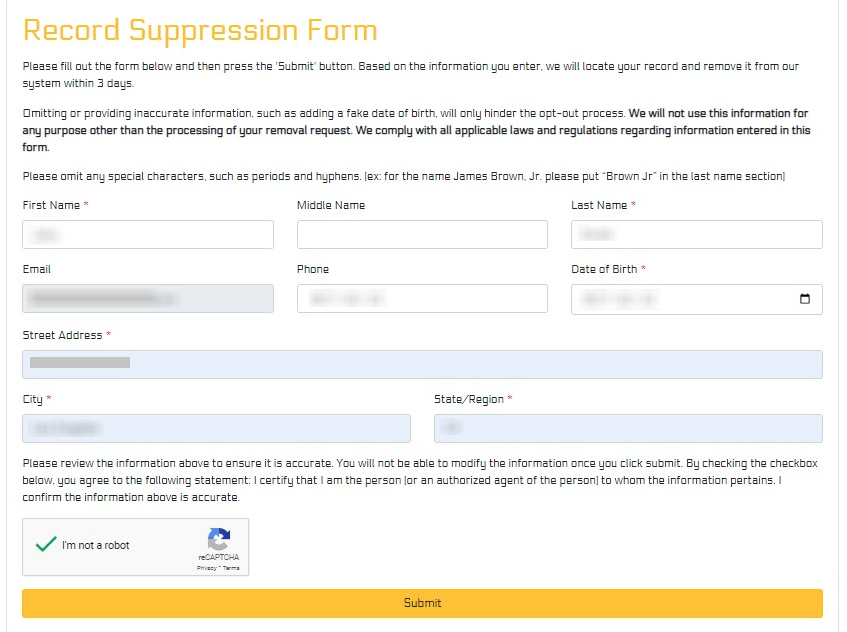
Submit your identifiers
Enter the requested details so the site can match the right background check listing. You may need a name, city, state, and an email. Add only the personal details shown on screen, then click “Submit.”
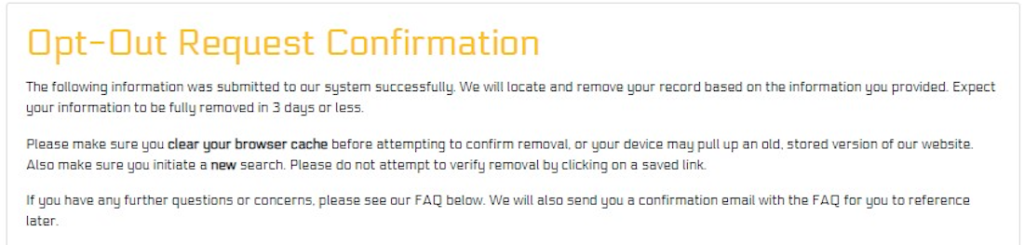
Confirm deletion
After the form, look for a note or email. Save the message for your records. This helps if you need to confirm the request later. The goal is to remove your information so it can be deleted from the CyberBackgroundChecks website.
Track confirmation & timeline
Watch for a final message over the next few days. If the page stays live, send one more opt-out request. Manual deletion is possible, but data broker removal may need periodic review because data stays in outside sources and can reappear.
Timelines, Verification & What to Expect
Most requests are handled in about 2–5 days. A message may arrive by email or appear on the page after you submit. If nothing appears after a week, send one more opt-out request through the same page. The point is to remove your data, keep proof, and follow up once.
Edge Cases & Troubleshooting
- No access to the original email or phone: Use an inbox you can open now. This request usually starts with an email.
- “Record not found”: Try older addresses or another city. A background check record may be tied to older public records.
- CAPTCHA or form errors: Refresh the page and try again. If CAPTCHA and click steps fail, switch browsers.
- Code not arriving: Wait a few minutes, then check Spam. Resend once if needed.
- Form rejects the request by region (EU/UK/CA): Review any CCPA (California Consumer Privacy Act) notice shown on screen.
- Account deletion vs. public listing removal confusion: Listing removal and account settings are different. Use the public-page path to delete your information.
- Re-submitting after a failed attempt: Wait for the first window to pass, then try again once.
- Manual vs service confusion: An assisted service can automate requests across sites on your behalf.
Will my data reappear?
It can happen when data brokers like CyberBackgroundChecks receive new feeds from aggregators or resellers. That is why many users need to repeat opt-outs periodically. Keep your emails, check the page every 3–6 months, and send a new request if needed. This helps keep privacy and reduces repeat exposure from data broker sites like this one.
Manual vs Assisted Removal
Manual:
Pros
- Full control over each request
- useful if you want to remove your personal information yourself
- good for one listing at a time
Cons
- Takes time across many sites
- you must monitor re-listing and repeat opt-outs
- hard if you don’t have the time
Assisted:
Pros
- A data removal service can automate requests, tracking, and repeat checks
- helpful for data deletion across many sites
- better for ongoing checks
Cons
- Costs money
- coverage varies
- review what information will be removed
We remove your data for you - faster, verified, trackable.
Discover Which Sites Share Your Private Details—Instantly and Free.
FAQ
CyberBackgroundChecks is a data broker with searchable listings.
Go to the official page, verify your email, complete the CAPTCHA, and finish the form.
Use the opt-out page on the site.
Most requests are handled in about 2–5 days.
The database may still update, or new source feeds may refresh the listing.
Check Spam, resend once, and use the newest link only.
A profile may show addresses, relatives, phones, emails, and other detailed personal data.
Usually, yes. Some users can use email only.
They help automate tracking and repeated requests across data brokers.
Set a reminder for 3–6 months and resubmit quickly if the same listing returns.
Listing suppression is public-page deletion. Account cancellation is separate and may not remove your information.
Many data brokers like CyberBackgroundChecks collect and sell personal details from public and commercial sources.

Posted by Ava J. Mercer
More Background & Criminal Removal Guides
- AdvancedBackgroundChecks Opt Out Guide
- Affordable Background Checks Opt Out Guide
- ArrestFacts Opt Out Guide
- Background Check Gateway Opt Out Guide
- BackgroundCheckers Opt Out Guide
- BackgroundChecks.com Opt Out Guide
- CyberBackgroundChecks Opt Out Guide
- EasyBackgroundChecks Opt Out Guide
- GovernmentRegistry Opt Out Guide
- GovWarrantSearch Opt Out Guide
- InfoTracer Opt Out Guide
- JailBase Opt Out Guide
- LocatePeople Opt Out Guide
- MugshotLook Opt Out Guide
- Mugshots Opt Out Guide
- National Public Data Opt Out Guide
- Public Information Services Opt Out Guide
- Search Public Records Opt Out Guide
- SearchQuarry Opt Out Guide
- SmartBackgroundChecks Opt Out Guide
- SpyFly Opt Out Guide
- TruthRecord Opt Out Guide


