
Opt Out Guides
Anteriad Opt Out Guide
Before You Opt Out of Anteriad, Check Your Exposure
Privacy Writer
A. J. MercerAva J. Mercer
Updated
Read
5 min
Before You Opt Out of Anteriad, Check Your Exposure
If your name, address, and contact details show up in marketing databases, it can create a privacy risk and extra outreach. Anteriad may handle consumer records that include identifiers and interest categories. It can collect information from public records and commercial sources and use it for marketing and online targeting on its site.
How to opt out of Anteriad
Use the official portal. Enter your name, email, phone, and address. Then, complete verification (link or code). The policy says removals from active marketing databases are usually completed within 30 business days after the request is received.
Checklist:
- Open the official opt-out form
- Enter identifiers (email/phone/name)
- Complete CAPTCHA/verification
- Confirm via code/link
- Save the confirmation email
- Set a reminder to re-opt-out
Find out if your private details were exposed
Anteriad – Quick Facts
| Parameter | Value |
| Domain | anteriad.com |
| Data Types | contacts, location, online identifiers, inferred interests |
| Opt-out Methods | web form/email/mail/call |
| Identity Verification | confirmation email or verified response |
| Typical Response Time | up to 30 business days |
| Re-listing Risk | medium |
This company offers marketing data products; this service uses multiple sources (including public and commercial sources) to build audience segments for marketing.
Common data you may find:
- Name and alias
- Telephone
- Job title or job history
- General interests (for example, travel)
- Demographic traits (such as age range)
- Geolocation tied to a device or wifi identifier
- Online identifiers (cookie or mobile ad ID)
- IP address
Step-by-Step Guide
Open the official opt-out form
Go to the official site and open the portal. Look for the “Do Not Sell My Personal Information” link, then choose the opt-out option. If you save proof, take a screenshot of the form title and your confirmation page, but blur any identifiers before you share it. Tip: Try a private window if you want fewer cookies during the session.
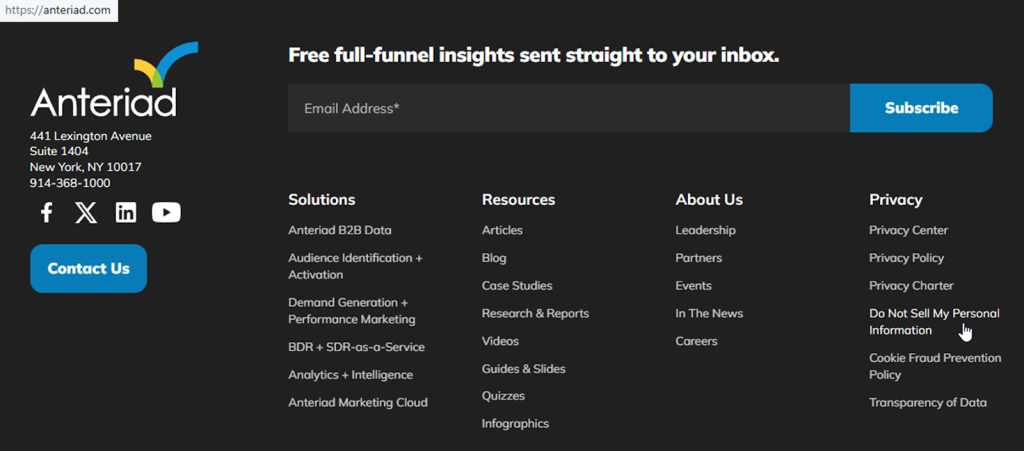
Submit your identifiers (email/phone + CAPTCHA)
Fill in the required fields. Complete any CAPTCHA checkbox or image test, then press “Submit” to send the form; save the submission receipt if it appears. Tip: For screenshots, redact anything that can identify you.
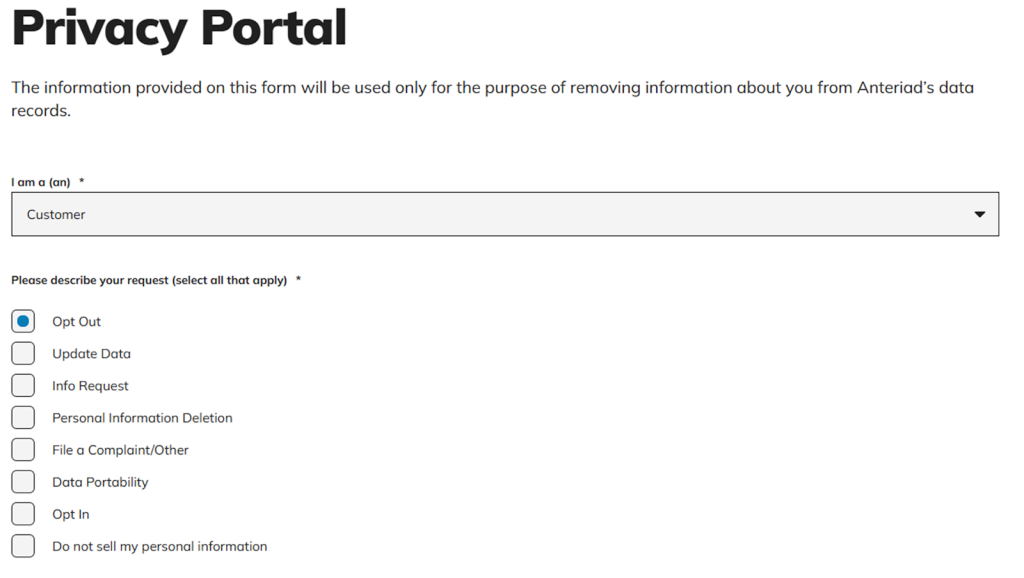
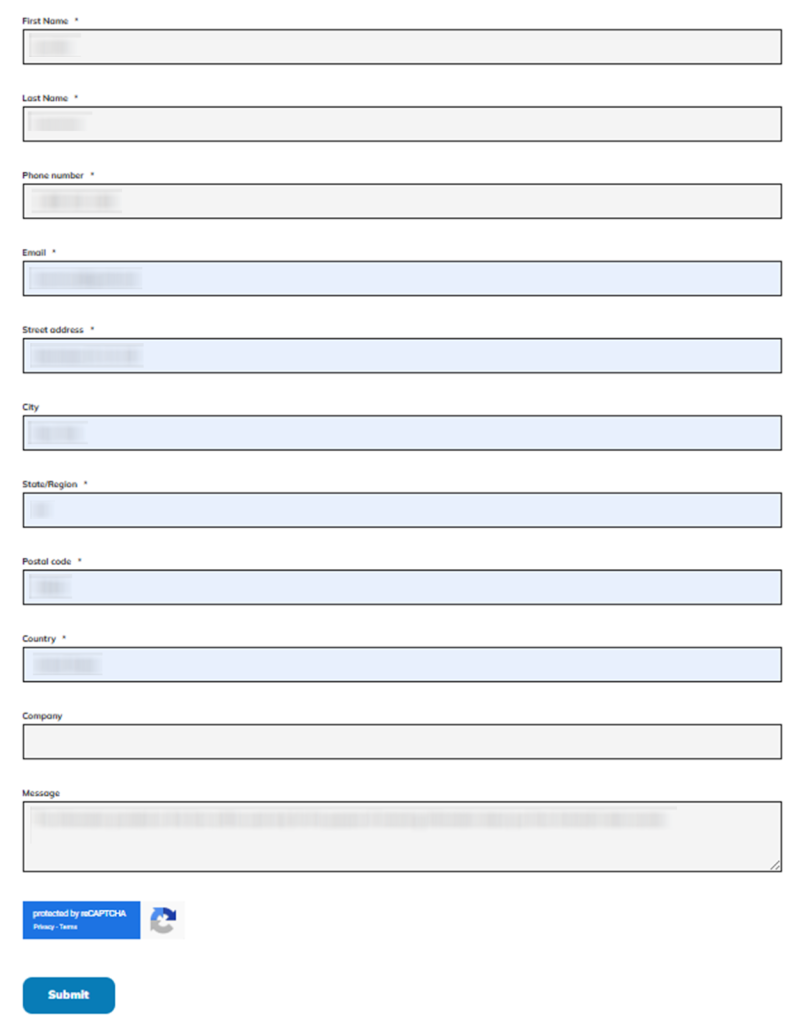
Verify via code or link (email/SMS)
Check your inbox for a verification message and complete the on-screen instructions (click a link or enter a code). Look in Spam/Promotions and search for “verification” if nothing arrives right away. If you capture proof, blur the code and message headers. Tip: If a link fails on mobile, open it on desktop.
Confirm deletion / Do-Not-Sell request
When the portal shows a success screen, select the option that matches your goal (for example, stop sale/sharing, or request deletion where available). Keep your message short and submit only what the portal asks for. Tip: Save a PDF of the confirmation screen with sensitive fields hidden.

Track confirmation & timeline
Save the confirmation email. Note the expected processing window (up to 30 business days). Keep a copy of the page confirmation. If nothing changes after the window, email the privacy contact. Submit once more through the portal. Tip: Store confirmations in one folder so you can find them later.
Timelines, Verification & What to Expect
After you post your request, confirmation may appear on the page and sometimes by email. Verification can include a link or a verified response. If you do not see progress within 30 business days, use the portal or email contact to follow up. Retry once if needed.
Edge Cases & Troubleshooting
- No access to the original inbox: use the email method and include the same identifiers you used before.
- “Record not found”: try an older work email or a nickname; keep your request consistent.
- CAPTCHA or form errors: switch browsers, turn off blockers, and try again.
- Verification not arriving: check Spam/Promotions and request a new link once.
- Form rejects by region (EU/UK/CA): use the policy contact methods and ask for the right workflow for your region.
- Account deletion vs marketing removal: clarify that you want the marketing database updated; this is separate from subscriptions.
- Need to cancel marketing emails: use your email provider’s unsubscribe tools and still complete the portal request.
Will my data reappear?
Reappearance can happen when multiple data broker feeds refresh, when partner sources update, or when new records are added over time. Keep the data broker re-listing risk in mind by setting a 3–6 month reminder, saving confirmations, and re-submitting quickly if you see your information again. For broader cleanup, consider related removals on similar sites.
Manual vs Assisted Removal
Manual:
- Pros: More control over what you share and when you remove it; you can document each step and repeat checks; join incognito to monitor repeat listings and handle follow-ups efficiently.
- Cons: More time to monitor and repeat; more chances to miss verification messages.
Assisted:
- Pros: Faster workflows, guided verification, and a tracking dashboard; recurring checks across multiple sources, including another data broker.
- Cons: Less hands-on control than DIY; you still need to confirm key identifiers.
We remove your data for you - faster, verified, trackable.
Discover Which Sites Share Your Private Details—Instantly and Free.
FAQ
Reddit users often point out that untargeted spam can come from breaches or bulk lists, not one database. This process can reduce marketing use of your data, but it won’t stop every message. Use filters and report obvious scams.
People commonly recommend checking the sender domain and verifying that links go to the vendor portal domain. If unsure, type the official site into your browser and start from there instead of clicking a message.
Discussions about B2B outreach note that vendors compile business contact data from public and commercial sources. Submitting a request can reduce marketing use of those identifiers over time.
Reddit comments often suggest not clicking unexpected links. Go directly to the company portal. Review recent activity and contact support using details from the policy.
Some users worry that sharing more data can increase exposure. Provide only the required fields and complete verification. Avoid attaching extra documents unless requested for verification.
You generally need your name plus an email or telephone number. Then, complete verification. Save your confirmation email and keep it for follow-ups.
The policy states that removals from active marketing databases are usually completed within 30 business days.
California’s data broker registry lists a telephone path: call the toll-free number (800) 368-7602 and, following the prompts, complete the prompts on the recorded message.
If you notice your info again, re-submit quickly. Otherwise, checking every 3–6 months is a practical schedule for monitoring.
Delays can happen due to typos, missing verification, or temporary portal errors. Correct identifiers, complete verification, and retry once with the same data so matching is easier.
The California registry lists mail to a Data Privacy officer, 2 International Drive, Rye Brook, NY 10573. Keep the letter short and include the same identifiers you used online.

Posted by Ava J. Mercer
More Data Brokers & AdTech Removal Guides
- 33Across Opt Out Guide
- Acxiom Opt Out Guide
- AdDefend Opt Out Guide
- AdElement Opt Out Guide
- AdMarketplace Opt Out Guide
- Adstra Opt Out Guide
- Alesco Data Opt Out Guide
- Allant Group Opt Out Guide
- Anteriad Opt Out Guide
- Appier Opt Out Guide
- Aristotle Opt Out Guide
- Arity Opt Out Guide
- Buyerlink Opt Out Guide
- Complete Mailing Lists Opt Out Guide
- CoreLogic Opt Out Guide
- Data Axle Opt Out Guide
- Epsilon Opt Out Guide
- Exactag Opt Out Guide
- FourLeafData Opt Out Guide
- FullContact Opt Out Guide
- Gemini Opt Out Guide
- Giant Partners Opt Out Guide
- Habu Opt Out Guide
- Kochava Opt Out Guide
- LexisNexis Opt Out Guide
- LiveRamp Opt Out Guide
- Lotame Opt Out Guide
- MediaWallah Opt Out Guide
- Oracle Opt Out Guide
- Outbrain Opt Out Guide
- PacificEast Opt Out Guide
- PeopleConnect Opt Out Guide
- PubMatic Opt Out Guide
- PubWise Opt Out Guide
- Quantcast Opt Out Guide
- Site Impact Opt Out Guide
- Statara Opt Out Guide
- Taboola Opt Out Guide
- VenPath Opt Out Guide
- Verisk Opt Out Guide


