
Opt Out Guides
LiveRamp Opt Out Guide
Before You Opt Out of LiveRamp, Check Your Exposure
Privacy Writer
A. J. MercerAva J. Mercer
Updated
Read
5 min
Before You Opt Out of LiveRamp, Check Your Exposure
Removing your personal data from LiveRamp lowers the exposure of your name, address, and phone number. LiveRamp is a data collaboration company that connects identifiers for identity resolution using public records and commercial data sources. This guide shows how to submit a request, verify your identity, and track timing. You’ll place an opt-out cookie on your web browser and opt out using your email address. We also mention solutions to not personalize the online ads; you may still see advertisements or online ads you see due to contextual delivery by third-party ad networks. For regional options, please visit the official privacy portal.
How to opt out of LiveRamp
Go to the official privacy/opt-out page and enter your email address, then verify via a code or link. Processing typically takes a few days and can take up to 48 hours for some signals. You may see results, but they are less likely to be personalized or interest-based and should reduce targeted advertising tied to devices.
Checklist:
- Open the official opt-out form
- Enter email
- Complete CAPTCHA/verification
- Confirm via code/link
- Save the confirmation email
- Set a reminder to re-opt out
Find out if your private details were exposed
LiveRamp – Quick Facts
| Parameter | Value |
| Domain | liveramp.com |
| Data Types | Contacts, addresses, device/ID signals, related data sources |
| Opt-out Methods | Web form; regional portals; mobile settings |
| Identity Verification | Code or confirmation email |
| Typical Response Time | A few days (some signals may take up to two days) |
| Re-listing Risk | Medium |
About LiveRamp
LiveRamp provides an enterprise platform for identity resolution and data collaboration. Individuals may exercise their right via regional pages to manage data subject rights. The company may maintain aggregate household data based on your email and process signals for measurement. Note that LiveRamp may contact you to confirm details required to complete a personal information request.
Common data you may find:
- Names (and known aliases)
- Email addresses
- Phone numbers
- Current and past addresses
- Age range/year of birth (if available)
- Relatives/household links
- Property records (where available)
- Professional licenses or social profile links (if available)
- Device signals (device ID/advertising ID)
- Data that we can link to a particular IP address
Step-by-Step Guide
Open the official opt-out form
Open the privacy choices page in a web browser and keep cookies enabled long enough to place an opt-out cookie. This preference is a permanent opt until removed; avoid deleting that cookie by clearing your browser. Because a cookie tells web sites using consent frameworks about your choice, an opt-out cookie on your web device helps prevent LiveRamp matching for ads. If you wish to opt for regional rules, please visit the correct page first.

Submit your identifiers (email + CAPTCHA)
Enter your email address and complete the CAPTCHA. If you would like to make a request for everyone in your household, you can make a request for everyone, listing each household member only as instructed. If you feel comfortable providing your email and additional data, add it to improve matching. This helps the company process the opt-out request efficiently.
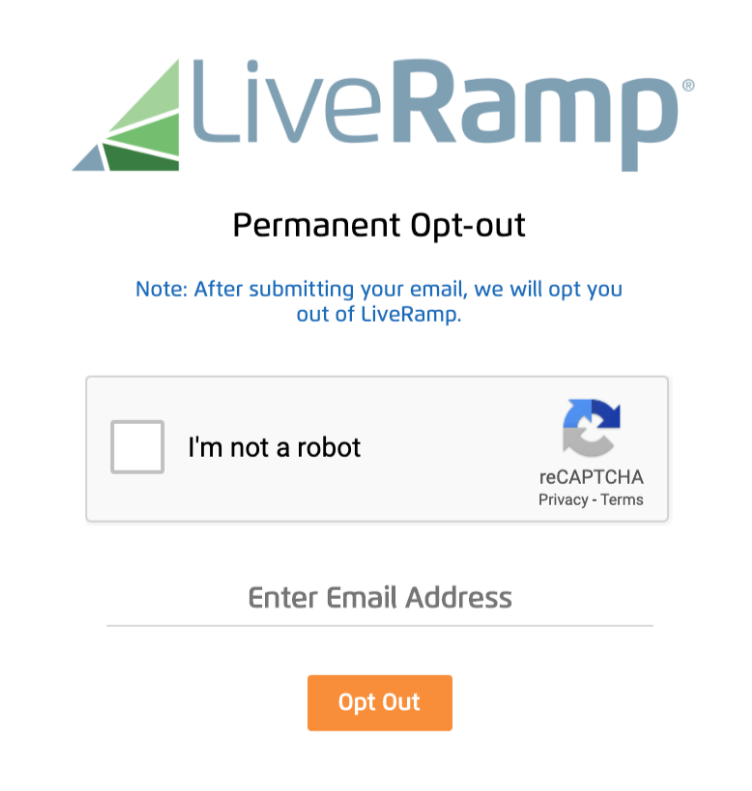
Verify via code or link (email/SMS)
Check your inbox (and Spam) and verify your identity using the link or code sent to the active email you control. If nothing arrives, please submit once more. After verification, LiveRamp will cease using matched signals tied to your account, and settings tied to your device can also be honored. If policies require more detail, support may contact you.
Confirm deletion / Do-Not-Sell request
Choose delete and/or Do-Not-Sell/Share as available in your region. You can also opt out of interest-based ads that are tied to your device, which can reduce personalization in apps. If you have multiple environments (cookies on your browser or app IDs), repeat as needed; the right to opt varies by jurisdiction.
Track confirmation & timeline
You should get an on-page confirmation and an email. Keep screenshots. If you wish to ask for help, please contact regional support (e.g., the French privacy team) and include your personal information query number. For comprehensive and effective coverage across environments, we also recommend visiting the opt-out pages of related services.
Timelines, Verification & What to Expect
Most requests are completed within several days; certain preferences can take up to 48 hours to apply. Confirmation usually arrives on-page and via email. If there’s no update after the practical window, contact support and provide your reference. Settings stored as cookies used by your web session or used by your web browser can be removed by clearing your browser files; if that happens, repeat the process. If preferences are tied to your device, consider resetting the advertising ID or repeating the steps after major system changes.
Edge Cases & Troubleshooting
- No access to original inbox: use another active email and note the situation in the form.
- “Record not found”: try a different info and confirm you’re on the correct region page.
- CAPTCHA issues: switch your browser or refresh the page.
- Code not arriving: wait a few minutes, check Spam, then please submit again.
- Region restricted: use your-rights.liveramp.uk to exercise your rights.
- Removal vs account: cancel targeted advertising; you will still see context-driven placements.
- Re-submit after resets: repeat the cookie opt-out mechanism when settings disappear.
Will my data reappear?
Re-listing can happen as partners refresh feeds across a multi-site ecosystem, and an advertising domain may sync identifiers again. You may see ads online even after preferences are applied. We also recommend visiting the opt-out resources of related providers. Consider visiting the opt-out pages every 3–6 months. If you switch devices or erase settings, repeat the flow; some profile signals are tied to your mobile device. If you have chosen to opt once, keep confirmations so you can still opt again quickly when needed.
Related removals
- Acxiom
- Oracle Advertising (BlueKai)
- Experian Marketing Services
- TransUnion / Neustar (OneID)
- Epsilon
- Lotame
- Quantcast
- Tapad
Manual vs Assisted Removal
Manual:
- Pros: Full control over each step and timing; no service fees; you keep confirmations and references locally; works across all web browsers and device IDs.
- Cons: Time-consuming across multiple devices and sessions; requires ongoing monitoring and repeats after cache clears; easy to miss portal changes or region rules; tracking outcomes can be inconsistent.
Assisted:
- Pros: Faster execution with guided workflows; centralized dashboard for status and history; recurring checks to catch re-listings; help with verification and follow-ups.
- Cons: Paid service; you must share minimum details to process requests.
We remove your data for you - faster, verified, trackable.
Discover Which Sites Share Your Private Details—Instantly and Free.
FAQ
You’ll see an on-page message and an email. Save both. If nothing arrives within the normal timeline, check Spam, and contact support with your reference so the team can locate your submission.
Repeat the process on each web browser and device. Because preferences may be stored in cookies on your browser or tied to your mobile device, redo the steps after major updates or resets.
It typically means the system couldn’t match your details. Try another identifier or region portal, ensure spelling is correct, and keep the same session open until you finish verification.
Stay on the verification page, check Spam/Promotions, then request a new code. Keep the same browser window open for best results and avoid switching devices mid-process.
If there’s no update after the stated window, resubmit once with the same details and include your prior reference. If you need help, contact support in your region.
Usually, an email address and, if requested, another identifier. You’ll verify via link or code. Keep the same browser session open to ensure the preference cookie remains in place.
Many preferences are reflected within a few days, while some signals can take up to two days to propagate. You should receive a confirmation email when the action is complete.
Use the pages noted on the privacy site, including your-rights.liveramp.uk, to exercise your rights under local law. Provide the requested details and follow the verification flow shown.
Preferences reduce targeted advertising, not all ads. You will see placements driven by context. This is expected even when personalization signals are limited.
Preference cookies can be erased by cookie by clearing your browser or clearing your browser files. Revisit the portal and reapply the preference on each device and browser you use.
Use the regional contact options on the privacy page. If you need escalations, please contact the listed team and include your personal information request number for quicker lookup.

Posted by Ava J. Mercer
More Data Brokers & AdTech Removal Guides
- 33Across Opt Out Guide
- Acxiom Opt Out Guide
- AdDefend Opt Out Guide
- AdElement Opt Out Guide
- AdMarketplace Opt Out Guide
- Adstra Opt Out Guide
- Alesco Data Opt Out Guide
- Allant Group Opt Out Guide
- Anteriad Opt Out Guide
- Appier Opt Out Guide
- Aristotle Opt Out Guide
- Arity Opt Out Guide
- Buyerlink Opt Out Guide
- Complete Mailing Lists Opt Out Guide
- CoreLogic Opt Out Guide
- Data Axle Opt Out Guide
- Epsilon Opt Out Guide
- Exactag Opt Out Guide
- FourLeafData Opt Out Guide
- FullContact Opt Out Guide
- Gemini Opt Out Guide
- Giant Partners Opt Out Guide
- Habu Opt Out Guide
- Kochava Opt Out Guide
- LexisNexis Opt Out Guide
- LiveRamp Opt Out Guide
- Lotame Opt Out Guide
- MediaWallah Opt Out Guide
- Oracle Opt Out Guide
- Outbrain Opt Out Guide
- PacificEast Opt Out Guide
- PeopleConnect Opt Out Guide
- PubMatic Opt Out Guide
- PubWise Opt Out Guide
- Quantcast Opt Out Guide
- Site Impact Opt Out Guide
- Statara Opt Out Guide
- Taboola Opt Out Guide
- VenPath Opt Out Guide
- Verisk Opt Out Guide