
Opt Out Guides
Epsilon Opt Out Guide
Before You Opt Out of Epsilon, Check Your Exposure
Privacy Writer
A. J. MercerAva J. Mercer
Updated
Read
5 min
Before You Opt Out of Epsilon, Check Your Exposure
Epsilon is a data broker and marketing service that may collect records from public sources, commercial partners, and other third parties, then organize that data for audience matching. Removing personal information from Epsilon matters because your name, address, and phone number can be exposed and used to target ads.
How to opt out of Epsilon
To opt out of Epsilon, go to the official site. Open the form and provide the identifiers tied to your listing. Then, confirm through a link. Save the final note for later review.
Checklist:
- Open the privacy page
- Select the request options
- Submit your identifiers
- Save the confirmation message
- Set a reminder to re-opt-out
We remove your data for you - faster, verified, trackable.
Discover Which Sites Share Your Private Details—Instantly and Free.
Epsilon – Quick Facts
| Parameter | Value |
| Domain | epsilon.com / legal.epsilon.com |
| Data Types | contacts, addresses, online identifiers, purchase history, demographics, household links |
| Opt-out Methods | web form, email, phone |
| Identity Verification | confirmation link |
| Typical Response Time | several days to a few weeks |
| Re-listing Risk | medium |
Epsilon is a marketing and data service that helps brands and marketers reach audiences. Epsilon’s privacy policy says the company may collect data from public records, commercial sources, and digital activity, then sort that catalog to tailor campaigns, improve measurement, and support compliance work.
Common data you may find:
- Names and aliases
- Address history
- Email address
- Phone records
- Household links
- Demographic details
- Purchase history
- Device signals
- Identifiable information
Step-by-Step Guide
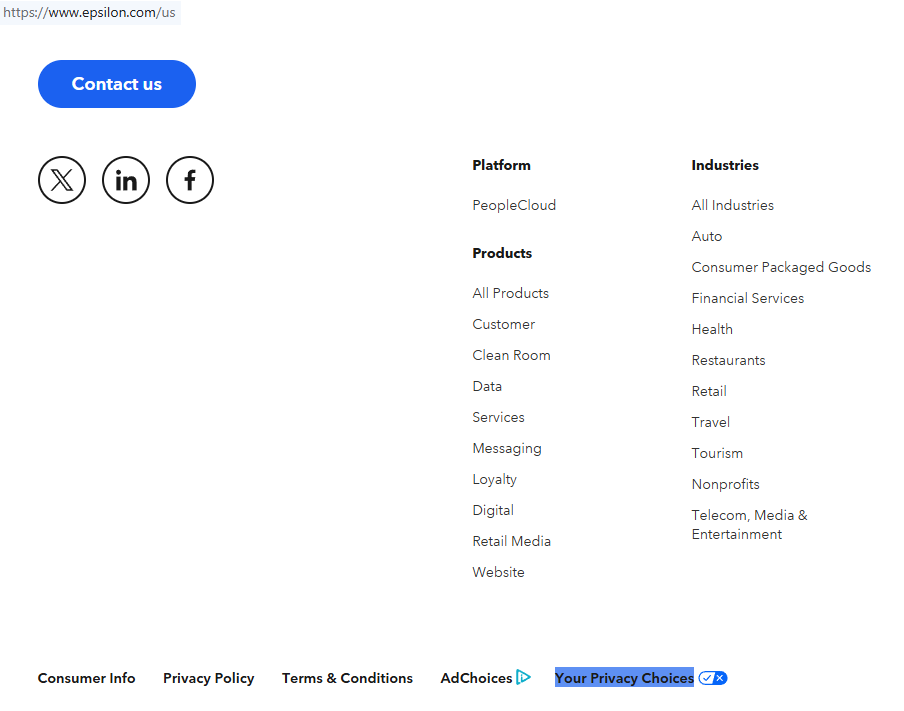
Open the privacy page
Open the official Epsilon consumer privacy portal and confirm the domain before you continue. Scroll to the form area and scan the screen so you know which rights it covers. Before saving any image, blur sensitive personal information and anything private on the screen. Try a clean browser window if the site loads poorly.
Select the request options
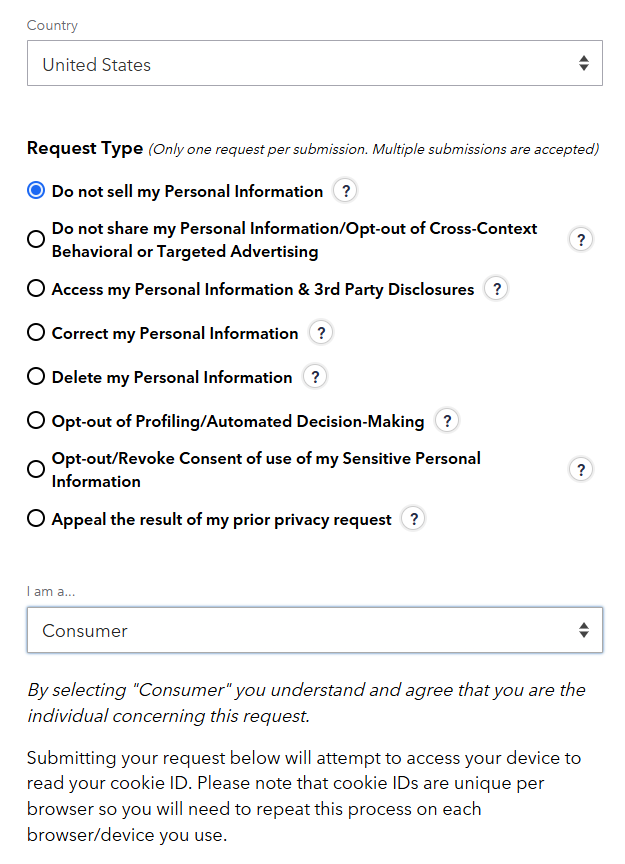
On the form, pick the path that matches your goal. If you want to stop certain ad sharing, choose the do not sell path. If you want broader erasure, use the deletion request path where offered. Read the labels once before you continue.
Submit your identifiers
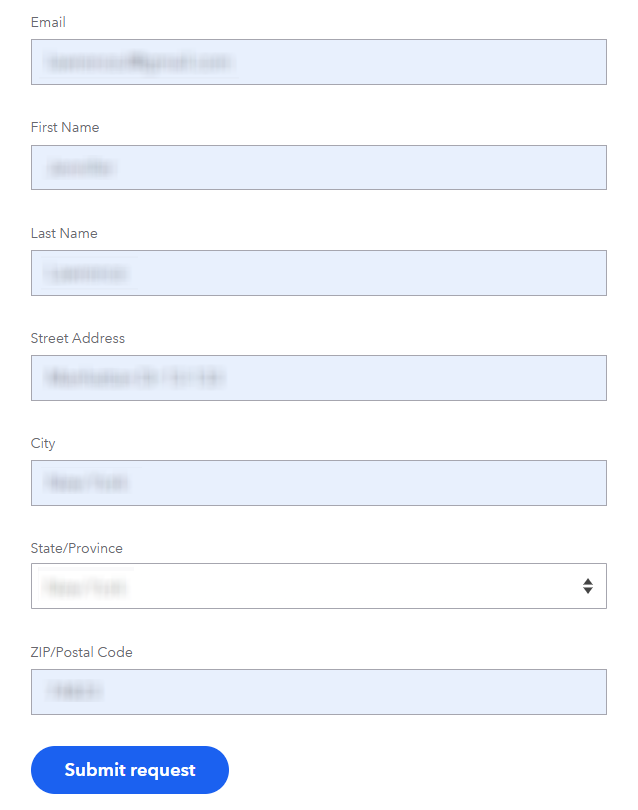
Enter only the details the form asks for, such as your name, address, phone, or email. The company may check those fields to match your record in its database and verify your identity. If you submit additional details, the match can fail. Redact every field in screenshots. Keep one short note with the exact profile data.
Confirm deletion
After you send the form, watch for an on-page message or a message with a link. You may need to click the link to finish the process and confirm the change successfully. If you want to delete your information, make sure the message reflects that goal. Check Spam if nothing arrives quickly.

Track confirmation & timeline
Save the confirmation message once the form is done. Keep that record in case the same data appears again, or you need a follow-up. Set a reminder for 3–6 months, and keep all your files.
Timelines, Verification & What to Expect
Most requests move only after verification. You may see an on-page note first, then a follow-up by email. A reasonable window is several days to a few weeks, depending on the state and request type. If nothing arrives after that period, check Spam, confirm the details you entered, and try once more. You can contact support directly if the form fails.
Edge Cases & Troubleshooting
- No access to the original inbox or phone: utilize another listed channel and explain the issue. Ask whether they can perform a different identity check.
- Record not found: try an older address or alternate identifier. Some records relate to past details, not current ones.
- CAPTCHA or submission errors: reload the site, switch browsers, or try later.
- Verification code not arriving: check Spam and Promotions, then try once more.
- Region rejection for EU, UK, or California: utilize the form version that matches local rights, such as CCPA (California Consumer Protection Act).
- Account deletion vs listing suppression confusion: pick the path that fits the result you want.
- Failed attempt: wait briefly, then try again with the same core identifiers.
- Need more help: utilize the official support channel for the same service.
Will my data reappear?
It can. Data may return when brokers refresh records from public files, partner feeds, or a new source. That does not always mean your first request failed. It may reflect a later change to the underlying record. The best solution is simple: keep your confirmation, set a 3–6 month reminder, and try again if needed. This can also help with security and repeat checks.
Manual vs Assisted Removal
Manual:
Pros
- more control over each submitted request;
- lower cost;
- lets you send forms and track proof.
Cons
- takes more time;
- you must monitor for re-listing;
- harder if many brokers sell the same data.
Assisted:
Pros
- faster for large broker lists;
- can track status in one dashboard;
- helpful when records target you across many services.
Cons
- usually a premium service;
- some requests still need your input;
- coverage may differ by broker.
We remove your data for you - faster, verified, trackable.
Discover Which Sites Share Your Private Details—Instantly and Free.
FAQ
Epsilon is a marketing and data service that helps companies organize audience information.
Use the official form, pick the right path, submit matching details, and finish the final check.
The company says it may collect personal data from public records, commercial sources, and online interactions.
Start with the official privacy policy and read the rights summary before you continue.
Use the opt-out path for sharing or ad activity, then confirm through the email link if required.
It means choosing not to have certain information handled for advertising or other purposes.
Usually several days to a few weeks after verification is complete.
Try older details. The matched record may be tied to a past address or other identifiers.
Yes. Some people want to see what categories appear in the profile first.
Its notices describe sale and sharing rights in some states, so read the official terms for your state.
Use the online form, use an email channel when listed, or call when that method is offered.
Set a reminder for 3–6 months, because data can reappear after a later source update.

Posted by Ava J. Mercer
More Data Brokers & AdTech Removal Guides
- 33Across Opt Out Guide
- Acxiom Opt Out Guide
- AdDefend Opt Out Guide
- AdElement Opt Out Guide
- AdMarketplace Opt Out Guide
- Adstra Opt Out Guide
- Alesco Data Opt Out Guide
- Allant Group Opt Out Guide
- Anteriad Opt Out Guide
- Appier Opt Out Guide
- Aristotle Opt Out Guide
- Arity Opt Out Guide
- Buyerlink Opt Out Guide
- Complete Mailing Lists Opt Out Guide
- CoreLogic Opt Out Guide
- Data Axle Opt Out Guide
- Epsilon Opt Out Guide
- Exactag Opt Out Guide
- FourLeafData Opt Out Guide
- FullContact Opt Out Guide
- Gemini Opt Out Guide
- Giant Partners Opt Out Guide
- Habu Opt Out Guide
- Kochava Opt Out Guide
- LexisNexis Opt Out Guide
- LiveRamp Opt Out Guide
- Lotame Opt Out Guide
- MediaWallah Opt Out Guide
- Oracle Opt Out Guide
- Outbrain Opt Out Guide
- PacificEast Opt Out Guide
- PeopleConnect Opt Out Guide
- PubMatic Opt Out Guide
- PubWise Opt Out Guide
- Quantcast Opt Out Guide
- Site Impact Opt Out Guide
- Statara Opt Out Guide
- Taboola Opt Out Guide
- VenPath Opt Out Guide
- Verisk Opt Out Guide


