
Opt Out Guides
ZoomInfo Opt Out Guide
Before You Opt Out of ZoomInfo, Check Your Exposure
Privacy Writer
A. J. MercerAva J. Mercer
Updated
Read
5 min
Before You Opt Out of ZoomInfo, Check Your Exposure
If a listing shows your full name, address, or phone number, it can raise the risk of identity theft. ZoomInfo supports B2B sales and marketing, so information shared in a profile may reach sales and marketing professionals seeking business contacts and key decision makers. The service generally builds professional profiles from public records and other commercial sources, then displays information in a searchable format.
How to opt out of ZoomInfo
Go to the ZoomInfo website Privacy Center. Open the Do Not Sell page. Complete the ZoomInfo opt-out by submitting your email address and phone number. Confirm with the code from the email from ZoomInfo. Processing usually takes 7–14 days.
Checklist:
- Open the privacy page
- Locate the form
- Submit your identifiers
- Save the confirmation message
- Set a reminder to repeat
Find out if your private details were exposed
ZoomInfo – Quick Facts
| Parameter | Value |
| Domain | zoominfo.com |
| Data Types | contacts, addresses, business role details, and possible social identifiers |
| Opt-out Methods | web form/email/mail |
| Identity Verification | code via email |
| Typical Response Time | 7–14 days |
| Re-listing Risk | medium |
ZoomInfo is a data broker platform for business-to-business contact intelligence and B2B data used by sales teams for sales intelligence and lead generation. ZoomInfo collects business information from generally available sources, contributory users, and research. It may also collect data from public web pages and customer-submitted updates.
Common data you may find:
- Names and job titles
- Company and department
- Work phone number
- Work email address
- Business address
- Linked social media profiles
- Education or bio snippets
- Company hierarchy notes
Step-by-Step Guide
Open the privacy page
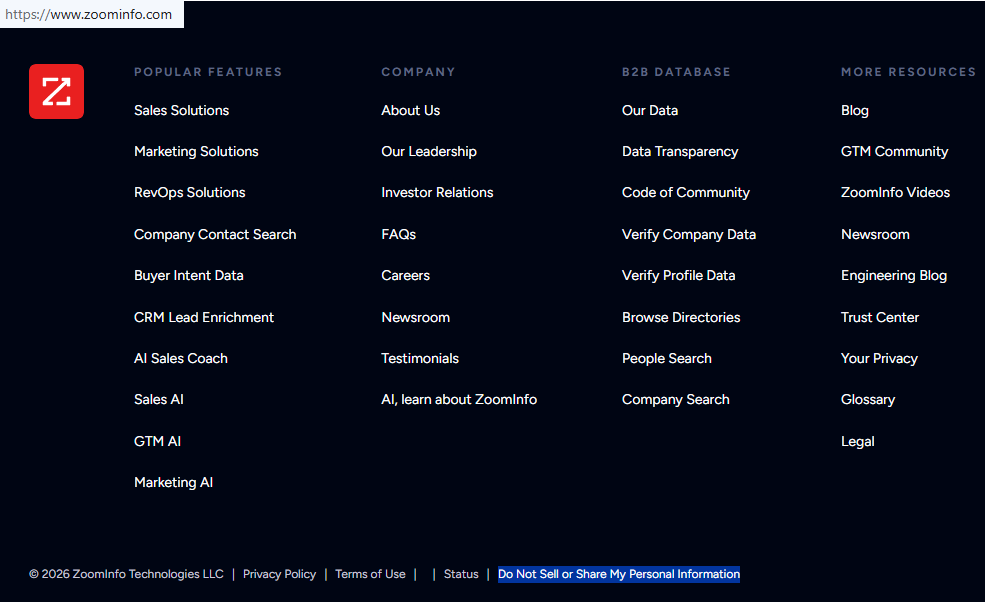
Start in the Privacy Center “Your Privacy” area and select “Request Removal” (or a similar button). This begins ZoomInfo’s opt-out process. If you take screenshots for your records, blur or redact any sensitive information first. Tip: If pages fail to load, try another browser or disable strict blockers temporarily.
Locate the opt-out form
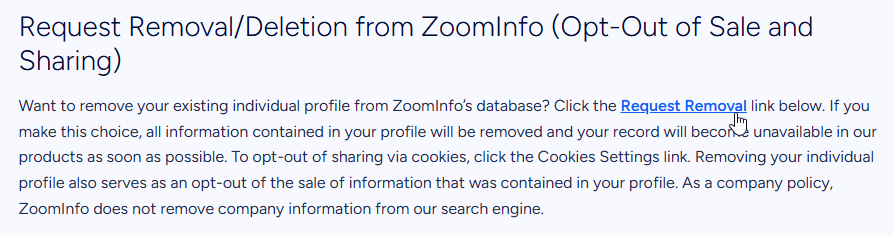
Find the necessary form. Follow the Request Removal link to open the corresponding page.
Submit your identifiers
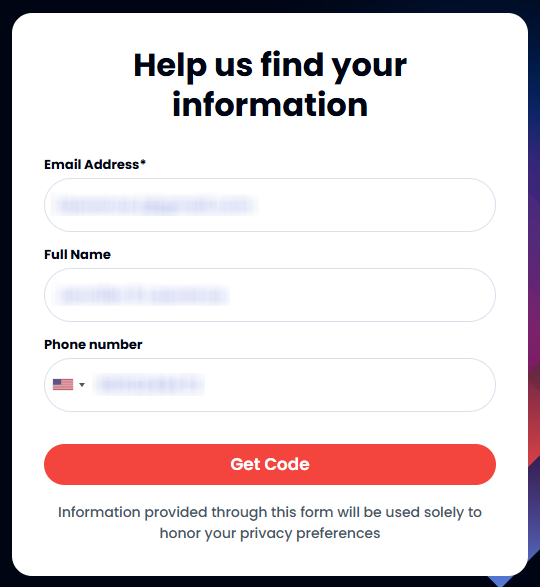
Look for fields plus a “Get Code” button. Enter the email address tied to the listing and your phone number if requested, then submit. If there is a name field, match the listing spelling to reduce “record not found” errors. Tip: Keep formatting simple; avoid extra punctuation.
Confirm deletion
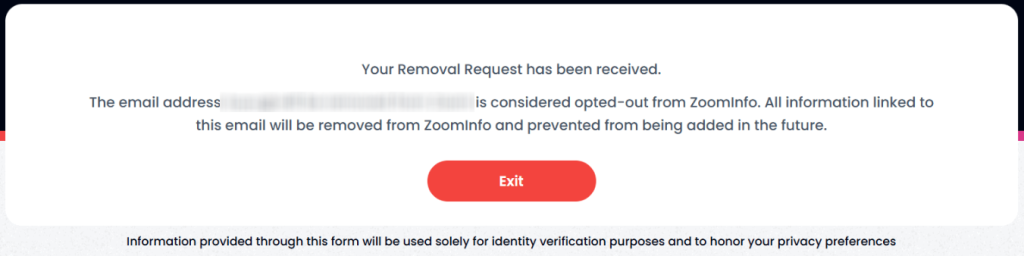
Use the code to finish the removal request and confirm deletion on the page. Save the confirmation screen, and keep the verification message you received. Tip: Check your inbox and Spam/Junk folders before requesting a new code.
Track confirmation & timeline
Keep your confirmation email and note the date you submitted. If you still see the listing after 14 days, reach out to the privacy team once and resubmit. Tip: If you’re managing information from dozens of data broker sites, a data removal service can help automate the process and track each removal request.
Timelines, Verification & What to Expect
After submission, you typically see an on-page confirmation and/or receive a confirmation email. Typical response time is 7–14 days. If there is no update after two weeks, submit one opt-out request again. Use the Privacy Center contact options to send one request again. Keep records so you can remove your information later if a record reappears.
Edge Cases & Troubleshooting
- No access to the original email/phone: use an alternate email only if the form allows it. Otherwise, contact the company and explain.
- “Record not found”: try a variant spelling and search again.
- CAPTCHA or submission errors: switch browsers, clear cookies, and retry once.
- Verification code not arriving: wait 10 minutes and resend once.
- Form rejects the request by region (EU/UK/CA): ask about GDPR and general data protection regulation handling through the official channel.
- Account deletion vs. public listing removal confusion: under the California Consumer Privacy Act (CCPA), the steps may differ by location. Follow the official instructions. ZoomInfo doesn’t always control how quickly partner systems refresh.
- Subscription question: if you need to cancel, use your account billing settings; this is separate from removing your info from ZoomInfo’s database.
- What “easy to remove” means: the form is quick, but confirmation can take days.
Will my data reappear?
Re-listing can happen when aggregators, partner feeds, or resellers refresh data, or when new business information is found online. That doesn’t mean the earlier request failed. It can reflect new inputs later. To protect your privacy, keep confirmations, set a 3–6 month reminder to opt out of ZoomInfo again, and resubmit quickly if it returns. To limit the amount of personal information visible, also consider removals on data brokers like ZoomInfo. This can reduce the amount of personal info and help you remove your profile.
Manual vs Assisted Removal
Manual:
Pros
- Direct control, no fees, and you can document each step-by-step action
Cons
- Ongoing checks and repeated verification
Assisted:
Pros
- An automated service can help track status.
Cons
- It may cost money.
We remove your data for you - faster, verified, trackable.
Discover Which Sites Share Your Private Details—Instantly and Free.
FAQ
If the form requires the old address you can’t access, use the Privacy Center support channel and explain the situation. Provide the listing details and ask for an alternate way to verify.
Notices can explain how a provider may gather data and how to opt out. Use the opt-out page, submit identifiers, and confirm with the code.
Processing takes time, and systems may not update immediately. Keep your confirmation and check again after 7–14 days.
Check Spam/Junk, confirm you typed the right email, and resend once.
Listings can reappear from refresh cycles, partner inputs, or new web signals. Save confirmations and repeat the request on a schedule.
It may show role, company, and work contact fields used for prospecting.
Start from the Privacy Center page and follow “Request Removal” to the verification screen.
A common window is 7–14 days. If nothing changes after 14 days, follow up once through the privacy contact options to make sure you’ve removed your data.
It is designed for business prospecting, so it’s most used by sales teams.
Every 3–6 months is a practical cadence, or sooner if a record returns.

Posted by Ava J. Mercer
More B2B Contact Data Removal Guides
- AeroLeads Opt Out Guide
- Apollo Opt Out Guide
- AroundDeal Opt Out Guide
- Cognism Opt Out Guide
- Emailfinder.com Opt Out Guide
- Lusha Opt Out Guide
- PeopleDataLabs Opt Out Guide
- Pipl Opt-Out Guide Opt Out Guide
- RocketReach Opt Out Guide
- SalesIntel Opt Out Guide
- Seamless AI Opt Out Guide
- UpLead Opt Out Guide
- Versium Analytics Opt Out Guide
- Yellow Pages Opt Out Guide
- ZoomInfo Opt Out Guide


