
Opt Out Guides
Yellow Pages Opt Out Guide
Before You Opt Out of Yellow Pages, Check Your Exposure
Privacy Writer
A. J. MercerAva J. Mercer
Updated
Read
5 min
Before You Opt Out of Yellow Pages, Check Your Exposure
Yellow Pages may show a name, address, and phone number. This can raise privacy concerns when personal information is easy to find across the Internet. Yellow Pages features may draw from public records, carrier inputs, and commercial source feeds.
How to opt out of Yellow Pages
To opt out of Yellow Pages, open the official privacy page and use the opt-out form. Submit an email address and location information, then use the link. Processing usually takes 3–10 days.
Checklist:
- Open the privacy page
- Locate the opt-out form
- Submit your identifiers
- Complete the CAPTCHA
- Save the final confirmation
- Set a reminder to re-opt out
Find out if your private details were exposed
Yellow Pages – Quick Facts
| Parameter | Value |
| Domain | yellowpages.com |
| Data Types | contacts, locations, business profile item, usage data |
| Opt-out Methods | web form, mail, number, post |
| Identity Verification | mail note |
| Typical Response Time | 3–10 days |
| Re-listing Risk | medium |
Yellow Pages is a directory service. It collects personal information from users, carriers, public records, and commercial source feeds, then uses that content to provide search functions online.
Common data you may find:
- Names and known aliases
- Mail contacts
- Phone books
- Current and past locations
- Map details
- Business profiles
Step-by-Step Guide
Open the privacy page
Open the Yellow Pages website and go to the footer. Select the privacy option on the website. Redact personal data before saving any screen image. Tip: Use a regular browser window if the form does not load.

Locate the opt-out form
Find the link that manages the opt-out process. If your issue involves a record, open that screen and look for an edit or support tool. Blur personal data in screenshots. Tip: Make sure you are on the official web domain before you click anything.
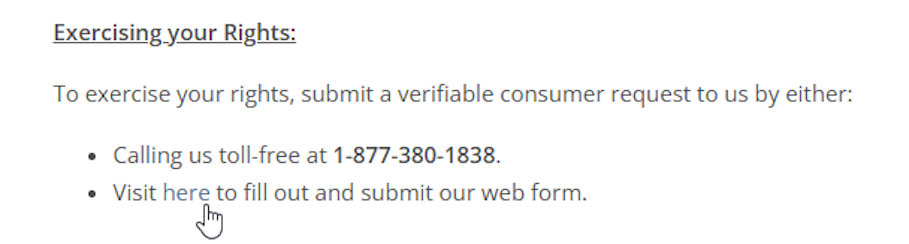
Submit your identifiers
Choose the deletion options first. Enter only the item requested, such as an email and location. YellowPages may ask for one matching identifier so the team can locate the record. Tip: Do not post additional information unless the form says it is needed.
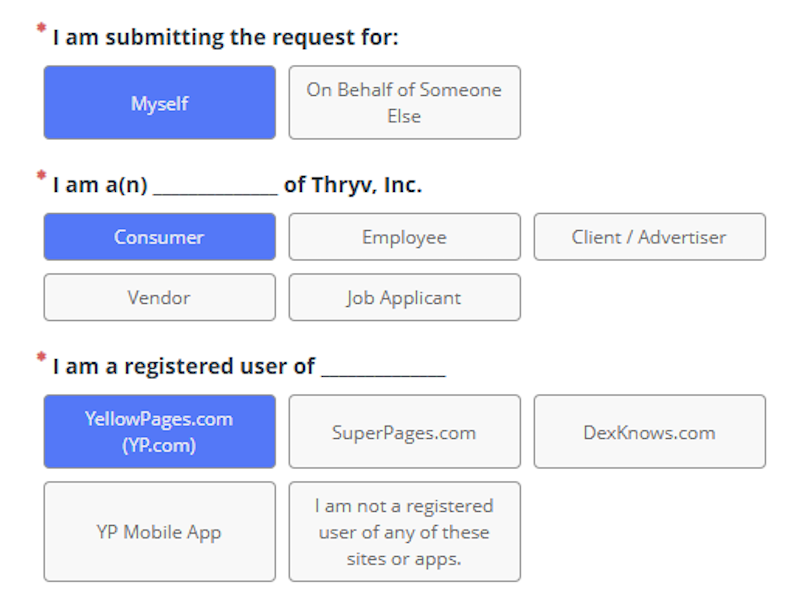
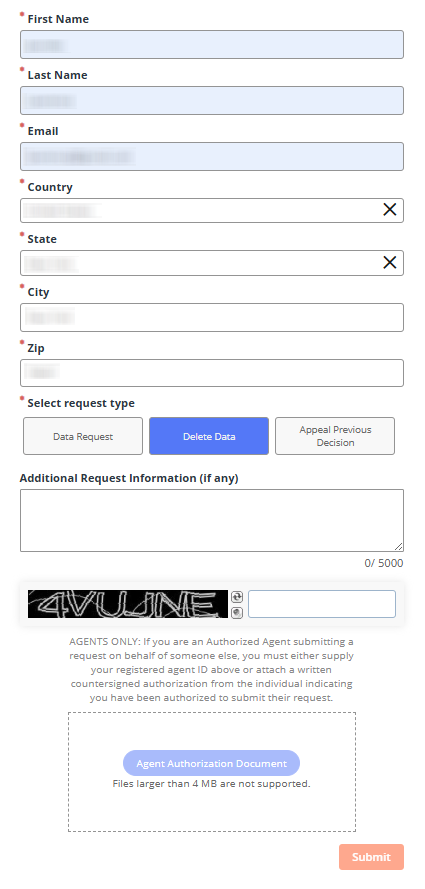
Confirm deletion
Open the message shown after you submit and finish the required step. The Yellow Pages site may save this setting in cookies, so you may need to repeat it after clearing them. Redact profile details in screenshots. Tip: If no message arrives, review Spam once before you try again.
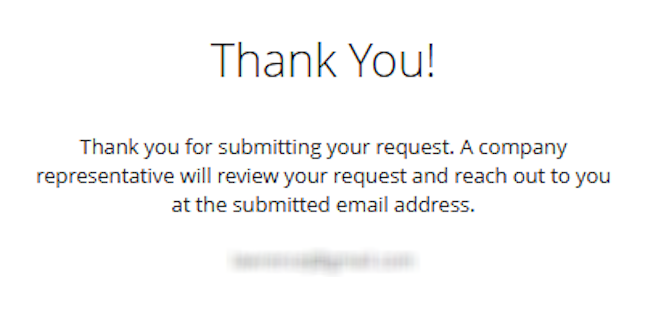
Track confirmation & timeline
Save the note shown after you submit, then return after a few days. If nothing changes, follow up again and include the first date. Blur private information in screenshots.
Timelines, Verification & What to Expect
A record change can take 3–10 days. A note may arrive by mail. If nothing arrives after 10 days, check Spam, review the item you entered, and send one more note to support. This is the best practice because different systems may handle privacy and records in separate ways. In some cases, you must register before you can manage a print setting tied to profile preferences.
Edge Cases & Troubleshooting
- No access to the original mail or number: use another path and include the record URL plus one clear item that matches the entry.
- “Record not found”: search with a prior location or an older version of the name, or use nearby matches.
- CAPTCHA or submission errors: reload the page, try a regular browser, and submit once more.
- Verification code not arriving: wait a short time, then ask for a new code. After that, address the support team.
- Form rejects the form by region: some tools may not be available in every area. Review the privacy choices for identity or registration rules.
- Profile deletion vs. public record removal confusion: deleting a profile does not always remove a record or cancel a subscription.
- Re-submitting after a failed attempt: send one more note with the earlier note and no added data unless the form says it is required.
- If you see a setting that says must register, use the smallest amount of info needed and save the final page.
Will my data reappear?
A Yellow Pages record can return when a publisher refreshes records or another data broker feed supplies a newer version. To protect yourself, save past notes, keep the final page image, and set a reminder for every 3–6 months. Many people also review related removals next, because information online can move between feeds. If a fresh record still appears, submit a new note quickly.
Manual vs Assisted Removal
Manual:
Pros
- lower cost,
- full control,
- one guide,
- and direct review of each page.
Cons
- more time,
- repeat monitoring,
- and more work each time a new record shows up.
Assisted:
Pros
- Faster handling,
- verified steps,
- tracking,
- and recurring checks across more than one data broker.
Cons
- premium cost and less direct control over each step.
We remove your data for you - faster, verified, trackable.
Discover Which Sites Share Your Private Details—Instantly and Free.
FAQ
Yellow Pages is a directory and local search tool that lets users find record data.
Use the privacy page, support assistance, or record edit tool that fits your issue.
Start at the official home page footer, then choose the privacy option that fits the record.
A code or email can match the form to the right record and profile setting.
Follow up after 10 days if nothing changes or if you do not receive a final note.
Try the same page again in a clean browser, then use the help form if the error stays.
Use the print delivery option for your area and follow the instructions.
Use it when a business record or local record looks wrong or outdated.
Save the page and address support so the team can review that item directly.
Review every 3–6 months, or sooner after a move, new number, or location change.

Posted by Ava J. Mercer
More B2B Contact Data Removal Guides
- AeroLeads Opt Out Guide
- Apollo Opt Out Guide
- AroundDeal Opt Out Guide
- Cognism Opt Out Guide
- Emailfinder.com Opt Out Guide
- Lusha Opt Out Guide
- PeopleDataLabs Opt Out Guide
- Pipl Opt-Out Guide Opt Out Guide
- RocketReach Opt Out Guide
- SalesIntel Opt Out Guide
- Seamless AI Opt Out Guide
- UpLead Opt Out Guide
- Versium Analytics Opt Out Guide
- Yellow Pages Opt Out Guide
- ZoomInfo Opt Out Guide


