
Opt Out Guides
RocketReach Opt Out Guide
Before You Opt Out of RocketReach, Check Your Exposure
Privacy Writer
A. J. MercerAva J. Mercer
Updated
Read
5 min
Before You Opt Out of RocketReach, Check Your Exposure
If your name shows up on RocketReach, it can raise a privacy risk by exposing your name, address, and phone number. The site may also display professional profiles and private information like job details and social media links. Many listings are built from publicly available information and sources like LinkedIn, then organized into a searchable record that may be publicly visible.
How to opt out of RocketReach
Start from the official privacy page. Verify your email and submit additional details if asked. The procedure usually takes 7–21 days. Use the RocketReach opt-out flow once, then save proof to confirm that your personal information is no longer shown.
Checklist:
- Open the privacy page
- Verify your email
- Submit identifiers
- Save the confirmation message
- Set a reminder to re-opt-out
Find out if your private details were exposed
RocketReach – Quick Facts
| Parameter | Value |
| Domain | rocketreach.co |
| Data Types | contact information, email addresses, phone numbers, social media profiles, professional information |
| Opt-out Methods | web form/email/mail |
| Identity Verification | confirmation email or code |
| Typical Response Time | 7–21 days |
| Re-listing Risk | medium |
RocketReach is a data broker directory entry for business contacts. RocketReach collects contact data and other data points from public sources. To protect your privacy and security, reduce exposure after data breaches by learning how to remove your personal information from the Internet.
Common data you may find:
- Name and employer
- Job title
- Work email addresses
- Work phone numbers
- City/region
- LinkedIn URLs
- social media links
- Public identifiers
Step-by-Step Guide
Open the privacy page
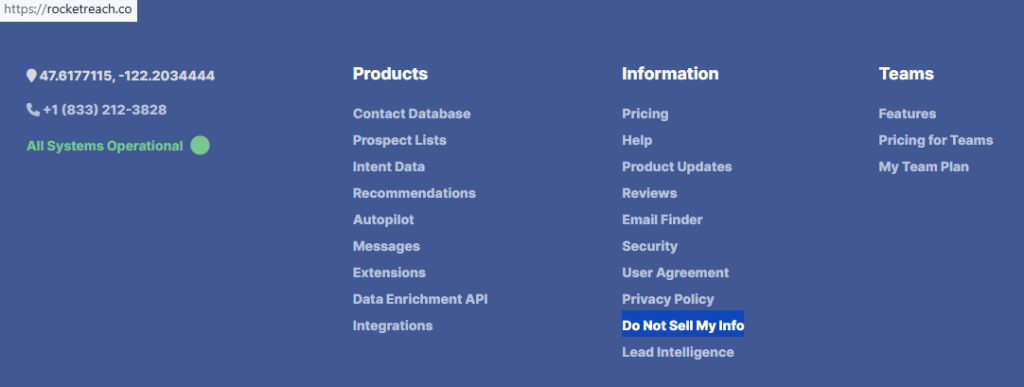
Go to the site footer. Look for the “Do Not Sell” link. If you already found your RocketReach profile, save its profile link. Use a standard browser and temporarily disable blockers if the form won’t load. When saving screenshots for support, blur personal details first for additional data protection.
Verify your email
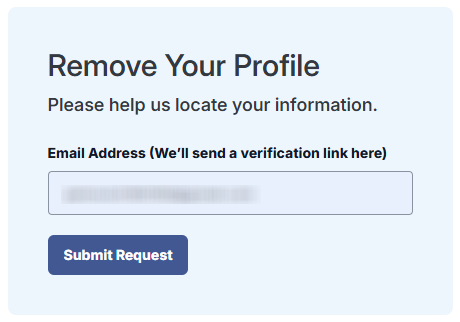
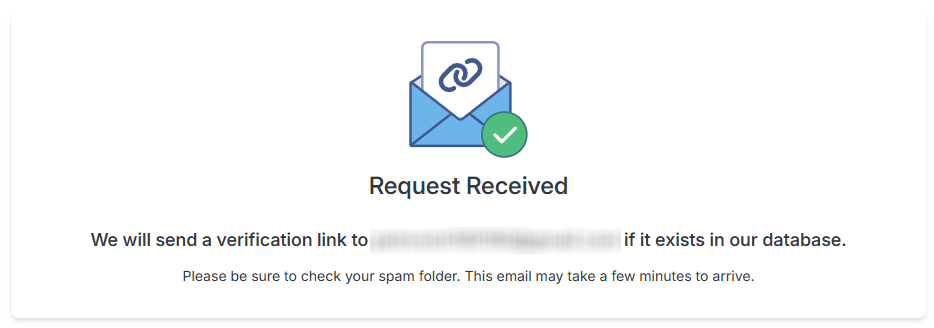
Enter an email address you can access. After you submit the form, look for the email from RocketReach. Follow the confirmation link. If it doesn’t arrive, check Spam/Promotions.
Submit your identifiers
Fill in the required fields (name, company, your profile URL or LinkedIn URL, and a phone if requested). Double-check spelling. Take a screenshot for your records. Don’t forget to redact private details before you save it.
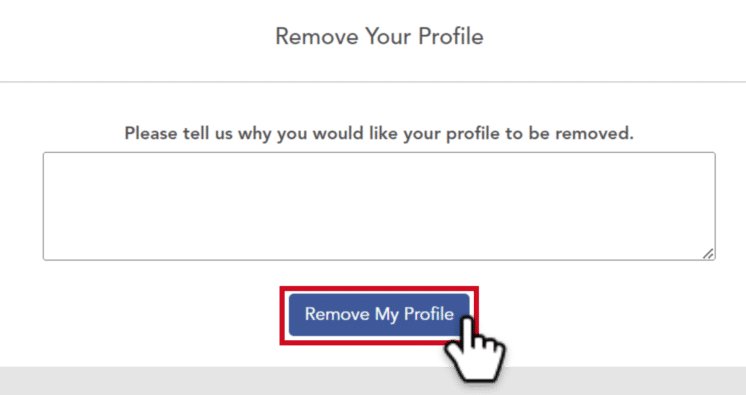
Confirm deletion
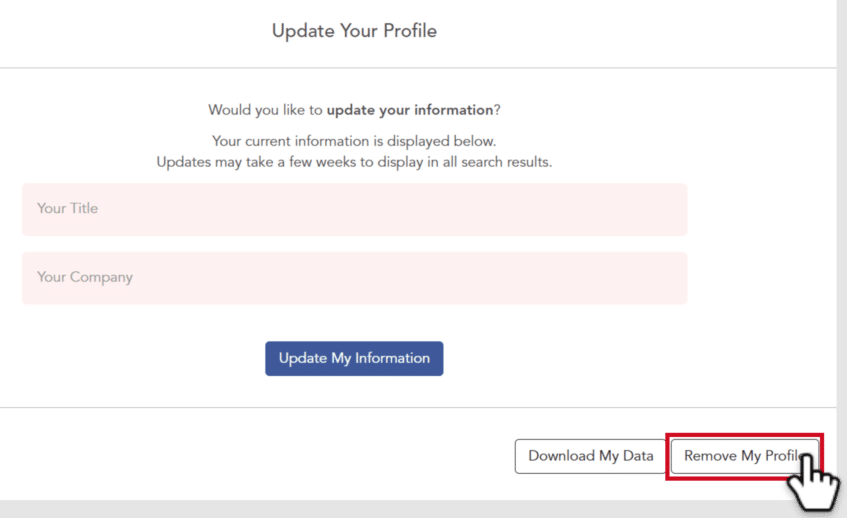
After you confirm, you should reach a profile management screen. Choose remove my profile, then follow the prompts to finish. When the site shows a success message, you will be removed from the RocketReach website.
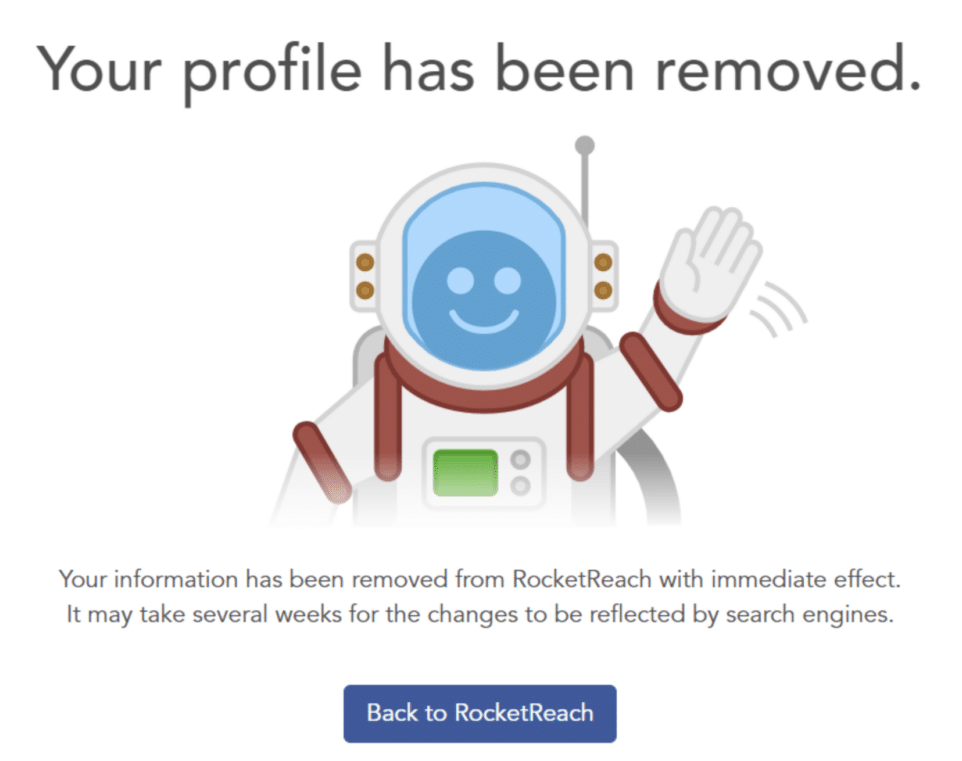
Track confirmation & timeline
Save the on-page success message and any receipt. You’ll be able to verify that you’ve removed your profile. Note the date and check again after the typical window. Keep the confirmation so you can check that the details are gone. If nothing changes after 21 days, resubmit once and keep both confirmations as your opt-out request.
Timelines, Verification & What to Expect
Most requests are processed in 7–21 days. Search engines may take longer to refresh their caches. Confirmation usually appears on the results page and may also arrive as a receipt. If you don’t see a response after 21 days, use the support/privacy contact channel. Send one follow-up with the same identifiers and your listing link. Keep your receipts so you can verify that the information from RocketReach is not visible. All this is needed to make sure that you’ve successfully removed your profile information.
Edge Cases & Troubleshooting
- No access to the original email/phone: use the closest matching work email. Explain the change. If blocked, contact support with the listing link.
- “Record not found”: try searching by name + company. Copy the correct listing link and try again.
- CAPTCHA or submission errors: try a different browser and disable browser extensions.
- Verification code not arriving: check Spam, wait 10–15 minutes, then resend once.
- Form rejects the request by region (EU/UK/CA): use the GDPR (General Data Protection Regulation) or CCPA (California Consumer Privacy Act) options when offered.
- Account deletion vs. public listing removal confusion: deleting your RocketReach account is separate from removing your information on a public listing. You may need to create an account to manage a paid plan.
Will my data reappear?
Listings can reappear when aggregators refresh, partners republish records, or public data is collected again. That’s why re-listing risk is not zero, even after the listing is cleared. To reduce recurrence, keep your receipts, set a 3–6 month reminder to opt out of rocketreach.co again, and act quickly if you see a new record. If you see the same data elsewhere, remove your listing on related people search sites next.
Manual vs Assisted Removal
Manual:
Pros
- more control and clear proof;
- no recurring fees;
- easy to repeat checks.
Cons
- time investment and follow-ups;
- you must monitor for re-listing;
- you may need to share your personal data again.
Assisted:
Pros
- faster workflow and tracking dashboard;
- recurring checks across data broker sites;
- help with verification and documentation.
Cons
- you rely on a third-party removal service;
- you may still need to confirm identity.
We remove your data for you - faster, verified, trackable.
Discover Which Sites Share Your Private Details—Instantly and Free.
FAQ
Use the privacy choices flow with the listing link. Explain that you no longer control the old address. If the form blocks you, contact support and include the listing link and the email you can access.
Some workflows verify ownership by sending a confirmation link to an address tied to the listing. If you cannot access it, try the privacy contact method. Consider providing alternate identifiers.
Check Spam/Promotions and search for the confirmation message. Retry once, then use the privacy contact channel with your listing link and ask them to resend the verification step.
Start from the footer “Do Not Sell My Info” link. Confirm by email and choose the removal option.
Records can return if the partner feeds refresh or the same profile details are re-collected. Keep your receipt and repeat the process on a schedule.
It’s a professional directory that displays business contact details gathered from online sources. If you find a listing, you can request removal and confirm via email or a code.
A typical processing window is 7–21 days, plus extra time for search engines to refresh.
Search by name and company, then open the listing to review what’s shown. If you see something you want cleared, use the privacy choices flow and keep proof.
Confirm you copied the correct listing link. Try a different search variant (name + company) and resubmit. If it persists, contact support with the same identifiers.
Billing changes are managed through your RocketReach account settings or support. Cancel before the next renewal date.
Send one follow-up through the privacy contact channel after 21 days. Include your listing link and ask them to check that the details stay hidden.

Posted by Ava J. Mercer
More B2B Contact Data Removal Guides
- AeroLeads Opt Out Guide
- Apollo Opt Out Guide
- AroundDeal Opt Out Guide
- Cognism Opt Out Guide
- Emailfinder.com Opt Out Guide
- Lusha Opt Out Guide
- PeopleDataLabs Opt Out Guide
- Pipl Opt-Out Guide Opt Out Guide
- RocketReach Opt Out Guide
- SalesIntel Opt Out Guide
- Seamless AI Opt Out Guide
- UpLead Opt Out Guide
- Versium Analytics Opt Out Guide
- Yellow Pages Opt Out Guide
- ZoomInfo Opt Out Guide


