
Opt Out Guides
Zlookup Opt Out Guide
Before You Opt Out of Zlookup, Check Your Exposure
Privacy Writer
A. J. MercerAva J. Mercer
Updated
Read
5 min
Before You Opt Out of Zlookup, Check Your Exposure
Removing your personal information from a people search site helps reduce the online privacy exposure of your name, place of residence, and phone number. Zlookup is a directory and reverse phone lookup service that aggregates records from publicly available and commercial sources to display phone details. This guide gives you a simple, step-by-step walkthrough to remove your listing and understand how to remove your information from the Internet. Assess typical timelines, verification tips, and what to do if something goes wrong. We provide neutral guidance, offer a safe approach, and reference the official website.
How to opt out of Zlookup
Go to the official page, use your phone or email, complete verification, and confirm the request. Processing usually appears immediately or within 1–3 days. Keep confirmation for your data and re-check later. Use the site’s form as the primary tool and avoid any purchase or paid upsells.
Checklist:
- Open the official opt-out form
- Enter identifiers (email/phone)
- Complete CAPTCHA/verification
- Confirm via code
- Save the confirmation email
- Set a reminder to re-opt-out
Find out if your private details were exposed
Zlookup – Quick Facts
| Parameter | Value |
| Domain | zlookup.com |
| Data Types | contacts, addresses, numbers, possible identifiers |
| Opt-out Methods | web form |
| Identity Verification | code via email/SMS or confirmation email |
| Typical Response Time | 1–3 days |
| Re-listing Risk | medium |
About Zlookup
Zlookup is a phone-focused people search service that allows users to look up numbers and view data compiled from public records and commercial sources. The site displays consumer data to help identify the apparent owner of a number. Think of it as a data broker like many other platforms found via Google, which is able to sell some personal information.
Common data you may find:
- Names (and known aliases)
- Phone numbers
- Email addresses
- Current and past places of residence
- Age range/year of birth (if available)
- Relatives/household information
- Social media profiles (if available)
- Property references/basic matches (where available)
- Possible matches to other identifiers
- Basic location indicators
Step-by-Step Guide
Open the website
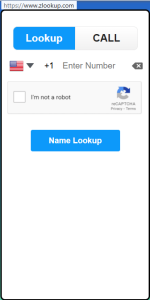
Go to zlookup.com and confirm your listing exists first. Use the main screen to perform a reverse search: type your phone number, pass the CAPTCHA, then select the Name Lookup button. If a match appears, open the Zlookup opt-out form. Use a private window if needed and review on-screen instructions about verification. Tip: Note whether the number is mobile, landline, or VoIP before proceeding; that can help the support team identify it.
Submit your identifiers (phone + CAPTCHA)
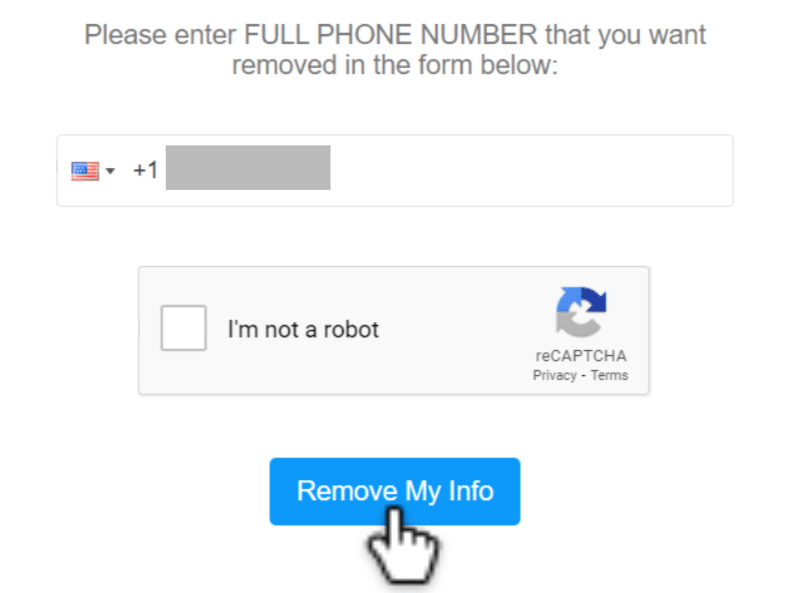
In the form, enter the phone number you want to remove. Complete the CAPTCHA to prove you’re a real user. Double-check the digits before you click the Remove My Info button to avoid errors. Tip: Blur or redact your personal information before saving any screenshots, and do not include any physical documents or IDs.
Confirm deletion
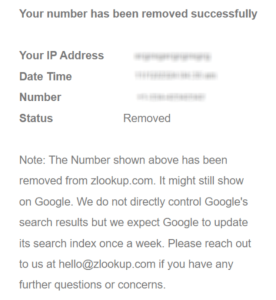
After verification, confirm deletion directly on the confirmation screen. Some flows display an on-screen success message; others send an email notice. No need to pay a fee for basic deletion. Tip: A reputable removal service can help you coordinate similar actions across data broker sites if you prefer assistance.
Track confirmation & timeline
Zlookup typically processes queries fast. Re-check your listing after 24–72 hours. If it still appears, send the form again once. Keep your confirmation email and note the date to help if you need support later. Tip: If you have multiple numbers, gather them in a simple spreadsheet to track status and reduce unwanted exposure over time.
Timelines, Verification & What to Expect
Most queries are processed in 1–3 days. You’ll usually see an on-screen confirmation. If a verification code is required, complete it promptly so the request isn’t timed out. If you see no change after three days, send the form again. Use the same phone number and keep a fresh screenshot. Still no result after a week? Use the site’s contact option and include your confirmation details.
Edge Cases & Troubleshooting
- No access to the original email/phone: use the form and explain in notes; try an alternative email for confirmations.
- “Record not found”: confirm the digits and format; try the national format without symbols.
- CAPTCHA or submission errors: refresh, clear cache, or switch browsers.
- Verification code not arriving: wait a few minutes, then ask for one more time and check Spam/Junk.
- Form is limited by region (EU/UK/CA): try again later or use the support route.
- Account deletion vs. public listing removal: deleting an account is different; file a listing opt-out instead.
- Trying again after a failed attempt: wait 24 hours, then send it once with complete details.
Will my data reappear?
Listings can reappear when aggregators refresh feeds from publicly available sources, partner feeds, or third-party datasets. Re-listing is common because ecosystems often collect and refresh from upstream contributors. To reduce recurrence, keep every confirmation email, set a 3–6 month reminder to review your listing, and act quickly if it returns. You can also remove your info on related services to cut upstream matches and minimize redistribution. Consider periodic checks of information from data broker sites to look for new exposures.
Manual vs Assisted Removal
Manual:
Pros
- full control;
- no fees;
- you decide what to share and when to monitor.
Cons
- time-consuming;
- ongoing monitoring;
- tracking across numbers.
Assisted:
Pros
- faster execution,
- verification handled,
- tracking dashboard,
- recurring checks.
Cons
- a paid service;
- some details are needed for verification.
We remove your data for you - faster, verified, trackable.
Discover Which Sites Share Your Private Details—Instantly and Free.
FAQ
Use the official form and try email verification if available. If codes don’t arrive, wait a few minutes, request one more time, then reach out to support with your confirmation details.
Many queries are processed immediately; others are completed within 1–3 days. Check again after 72 hours. If it still shows, send the form again once and keep screenshots.
Data can be refreshed from partner feeds and public resources. Keep confirmations, set a 3–6 month reminder, and repeat the opt-out when needed. Reduce feeds by clearing related brokers first.
Start at the site’s opt-out portal and follow prompts to use your number, complete CAPTCHA, and confirm by code or link. Keep the confirmation email.
Use the form once per number. Track each submission separately, save confirmations, and check every few weeks to catch re-listings.
Typically, names, numbers, addresses, possible emails, relatives, and basic location signals are compiled from public records and commercial resources. Availability varies by number and region.
Use the opt-out form, use your number, complete verification, and confirm the request. Revisit after 1–3 days to ensure the listing no longer appears.
If nothing changes after three days, send it again once. After seven days, use support with timestamps and screenshots for quicker analysis.
The number’s apparent owner or an authorized representative with access to verification. Keep records in case support asks for proof.
Aggregated data can lag. Remove the listing here, then clear related data broker sites to reduce downstream matches.

Posted by Ava J. Mercer
More Phone & Caller ID Lookup Removal Guides
- Addresses.com Opt Out Guide
- AllAreaCodes Opt Out Guide
- AmericaPhoneBook Opt Out Guide
- CallerSmart Opt Out Guide
- Find Who Calls You Opt Out Guide
- NumberGuru Opt Out Guide
- Numberville Opt Out Guide
- NumLookup Opt Out Guide
- OkCaller Opt Out Guide
- PrivateNumberChecker Opt Out Guide
- RevealPhoneOwner Opt Out Guide
- ReversePhoneLookup Opt Out Guide
- SpyDialer Opt Out Guide
- Sync.ME Opt Out Guide
- Telephone Directories Opt Out Guide
- Truecaller Opt Out Guide
- USPhoneBook Opt Out Guide
- YellowBook Opt Out Guide
- Zlookup Opt Out Guide


