Privacy Guides
How to Remove Your Personal Information From the Internet
See where your personal data appears online
Privacy Writer
A. J. MercerAva J. Mercer
Updated
Read
5 min
See where your personal data appears online
To remove your personal information from the internet, start by deleting it at the source (people-search pages, old profiles, and any site displaying your details). Then request removal from search engines and confirm that cached versions disappear. Finally, monitor monthly, because listings can reappear. Prioritize removing your home address and phone number first for the biggest safety impact.
How to Quickly Reduce Your Online Exposure
If you need to reduce what the internet reveals about you, use this checklist before proceeding with the full removal process.
Checklist:
- Turn off data visibility on accounts you still use.
- Delete or hide old posts that expose routines or locations.
- Stop automatic data-sharing features.
- Remove personal files from cloud links you forgot about.
- Limit the personal info you provide going forward.
- Secure your accounts before starting data removal.
Where Does Your Personal Information Appear Online?
Most people don’t publish their own details on purpose. The problem is that your information gets copied, resold, and indexed quietly. Over time, personal information scattered across online sources turns into a map of your life. Search engines may still show old pages in search results even when you delete a profile.
Information appears in several common places, including:
- Data broker sites and people-search pages.
- Social media profiles and tagged posts.
- Old resumes, employer directories, and staff bios.
- Car forums, marketplace listings, and review sites.
- Public records portals and court/permit pages.
Find out if your private details were exposed
Which Personal Details Are the Most Dangerous to Leave Online?

Not all information carries the same risk. A username might be annoying, but an address and phone number can create immediate personal safety problems. The goal is a safety assessment. Remove what enables doxxing, stalking, or account takeover first, then work outward to older traces.
Use this table to prioritize what to delete or review:
| Data Type | Risk Category | Why It’s Risky | Recommended Action |
| Address | High | Doxxing, harassment | Remove immediately |
| Phone number | High | Impersonation, harassment | Remove immediately |
| Employer | Medium | Impersonation, doxxing | Review monthly |
| Usernames | Low | Impersonation | Optional to remove |
Benefits of Deleting Your Data from the Internet
Cleaning up information is not just about comfort. It reduces real-world risk. When your personal data is easy to find, scammers may try to impersonate you. If your goal is to scrub Internet presence, you’ll usually see the biggest improvement after removing address and phone traces.
You can expect benefits like:
- Fewer phishing attempts are tied to your name and email address.
- Reduced chance of doxxing or harassment.
- Lower risk of identity theft via “verified” contact details.
- Less junk mail and robocalls from resold data.
- More control of your personal online presence.
In 2024, the FTC received more than 1.1 million identity theft reports.
Steps to Remove Your Personal Data From the Internet
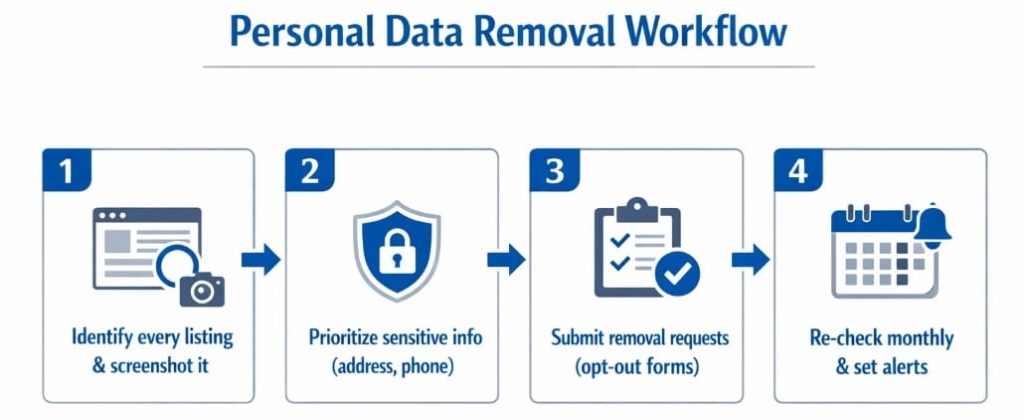
Think of this like detailing a car: you don’t just wipe one panel and call it done. You identify where your personal information is online, remove the worst items first, and then keep checking because information can reappear. A hybrid plan also helps you limit the spread of your information online while you remove old traces.
Below is a simple workflow to remove personal information without getting lost:
- Make an inventory of every site showing your information. Take screenshots.
- Prioritize sensitive information (address, phone, logins, family links). Then, remove personal details on high-traffic pages first.
- Submit a request to each site using its opt-out link or form. Track dates and outcomes.
- Re-check search results monthly and set up alerts. Add data monitoring if you’re high-risk or recently targeted.
Can You Remove Your Info from Search Engines Like Google?
Search engines mostly index pages; they usually don’t “own” the information. That means you often need to remove the source page first, then request de-indexing so it disappears from search results faster.
Google’s “Results about you” and related tools let you ask Google to remove certain personal information from data listings, especially when it includes personal identifiers, such as an address, phone number, or email address.
How to Remove Specific Types of Personal Information
Different sources need different tactics. The fastest wins come from people-search pages, old listings, and public posts. They frequently expose contact details. Below are targeted approaches you can use to remove your data with less guesswork.
Removing Your Home Address from People Search Sites
People-search pages are often powered by a data broker network that republishes information across the Internet. If you want to get your address off the Internet, start with the biggest sites and work down the list, because removing one page doesn’t automatically remove the copies. Keep a log, because many pages re-post after refresh cycles.
Practical steps that usually work:
- Find the site’s opt-out page and submit the request form.
- Search your full name + city to locate duplicates.
- Repeat for major data broker sites that mirror the same profile.
Getting Your Phone Number and Email Taken Down
Phone numbers and an email address are highly valuable to scammers. This data enables resets, impersonation, and targeted spam. First, remove the source listing (the page that displays it). Then, handle the search engine listing. If a page refuses to comply, document it and escalate with the host, registrar, or platform support. This is also where manual data removal pays off when forms are confusing.
Use a short playbook:
- Remove contact fields from old profiles, listings, and PDFs.
- Request to remove your personal contact details from the platform.
- Check cached snippets and submit a follow-up request if needed.
Verizon’s 2024 DBIR (Data Breach Investigation Report) analyzed 30,458 security incidents and confirmed 10,626 data breaches, which explains why exposed contact information gets abused so quickly.
How to Remove Old Employment Listings and Workplace Mentions
Employer pages, old bios, and directory listings can expose location patterns, titles, and even direct lines. If you can’t remove a page, ask to redact the personal identifiers. Limit what’s searchable. The goal is to minimize passing personal information to businesses, which gets published.
Quick actions:
- Ask HR/web admins to update or delete outdated bios.
- Ask for the removal of PDFs that list direct numbers.
- Remove your address from the Internet when it appears in resumes.
How to Review and Lock Down Your Social Media Accounts
Social profiles are often the easiest place to reduce exposure fast. The reason is that you control the settings. Start by cleaning old posts. They can reveal locations, plates, or routine routes. Then, tighten privacy settings. In this case, strangers won’t be able to scrape your personal info. If you’re serious about minimizing your online presence, consider whether you should delete your social media accounts entirely or keep them private with minimal details.
Next, review followers, tags, and “About” fields. Turn off public phone/email discovery, hide friend lists, and limit who can message you. Save copies of key posts before you delete your personal content.
Choosing the Best Removal Method for Your Situation
There isn’t one perfect approach. For example, you can clear your name from the Internet during a focused weekend. However, some users need ongoing help. Their information may be spread across hundreds of data brokers. The best method depends on risk, time, and how often your data resurfaces after a data leak.
Use this comparison to choose:
| Situation | Best Method | Why It Fits | What to Watch |
| One-time cleanup, low exposure | Manual | Lower cost, direct control of your personal data | Information can reappear |
| Recent harassment or impersonation | Automated | Faster coverage across data broker sites | Verify each removal request |
| High visibility or repeated doxxing | Hybrid | Combines speed + precision | Ongoing data monitoring |
Your Legal Rights When You Ask Websites to Remove Your Information
Your rights depend on where you live and where the site operates. However, digital data privacy laws and platform policies often give you at least some leverage. Some sites must honor opt-out requests. Many have processes to request the removal of certain sensitive personal information. When a site stalls, your documentation matters. These can be dates, URLs, screenshots, and copies of emails. Also, remember that public agencies may publish notices and complaint records under specific rules, and privacy protections vary widely across regions, as outlined in the U.S. State Privacy Laws Overview.
Common rights and expectations include:
- The ability to request the removal of your personal contact details from certain listings.
- The right to limit how companies sell your personal information (for example, in states with consumer data restrictions such as California or Virginia).
- The option to ask for deletion of your personal information held by a service (when applicable).
- Defined timelines or confirmation steps in some privacy frameworks (for example, a mandated 30-day response window in certain regions).
Prevent Your Personal Data From Reappearing After Deletion
Deletion is not the finish line. Data broker refresh cycles, scraped archives, and reposts mean personal data can return. Use a virtual private network on public Wi-Fi. Also, reduce the information you share. Finally, keep your personal profiles minimal.
Also, remove personal info from the Internet again when you change jobs or move.
Early Warning Signs of a New Exposure or Harassment Risk
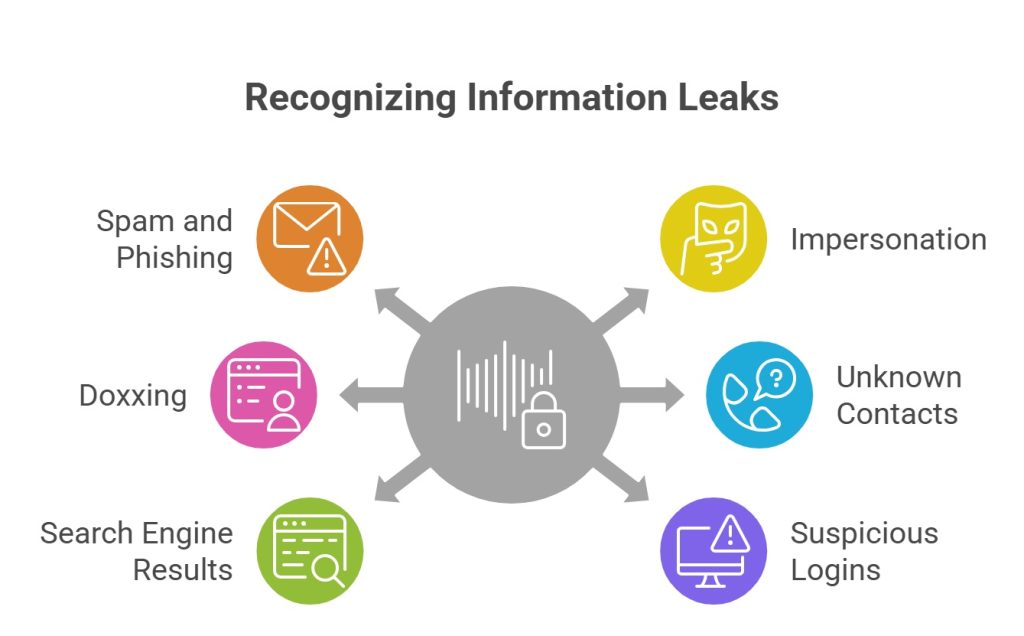
After you clean up, watch for clues that your private information is circulating again. Many attacks start small. This may include a new wave of spam, a strange password reset, or a forum mention. If you spot these, act quickly. First, change passwords and lock accounts. Re-check the pages you already deleted. When needed, use a way to remove personal exposure by escalating to platform abuse teams and your local authorities.
Red flags to watch:
- Sudden spam or phishing messages: Often means your email address was resold or leaked.
- New accounts created in your name: Impersonation attempts can point to stolen personal data.
- Mentions of your address/phone on forums: This is a doxxing indicator and a personal safety risk.
- Contact from unknown individuals: Unexpected calls or visits can follow exposed contact information.
- New results for your name in search engines: Fresh results can signal a repost or new index.
- Suspicious login attempts: Repeated alerts suggest credential stuffing after a data breach.
How to Track Whether Your Data Is Safe After Removal
Once you remove pages, you still need a system to confirm they stay gone. Set a monthly reminder to search and delete your identifiers. This includes your name, phone, and address. Remember: personalization can hide results. Keep a simple spreadsheet with the URL, date, and status so you know what you already deleted. If you’re short on time, personal information removal services can automate scans and submissions. However, you should still verify outcomes on the highest-risk pages.
Helpful tracking habits:
- Run name + city searches and review the first 3 pages of search results.
- Set Google alerts/“Results about you” notifications when available.
- Keep a log of every removal request and follow-up date.
- Re-check major data broker profiles after 30–60 days.
How Long Does the Removal Process Take?
Small cleanup jobs can take a few hours. However, full data removal often takes weeks. Sites have review queues and re-index delays. Expect longer timelines when you’re dealing with a data broker network, duplicate listings, or reposts. It’s possible to remove most high-risk items first. Then, consider removing lower-risk traces over time.
We remove your data for you - faster, verified, trackable.
Discover Which Sites Share Your Private Details—Instantly and Free.
Key Takeaways
Online cleanup works best when you focus on risk, not perfection. Start with what can harm you today. Then, build routines that keep your footprint smaller tomorrow.
- Clear priority list: Remove address and phone first. They enable doxxing, impersonation, and fast identity theft. Review the employer and usernames for secondary exposure.
- The core removal workflow: 1) find sources, 2) delete at the source, 3) Google visibility removal, 4) monitor and repeat.
- Immediate benefits: Reduced exposure, improved privacy, safer footprint across the Internet.
- Main ongoing risk: Data resurfacing because data broker refresh cycles and reposts happen, so monitoring is essential.
- Decision shortcut: Use manual for low exposure, automated for wide exposure, hybrid for repeated harassment or high visibility.
- Legal expectations: Some sites must act on a removal request. Many provide a request form. Response timelines vary by policy and local rules.
- Next steps: Re-check monthly and track new search results. Escalate when sites ignore requests. Protect your personal information with tighter sharing habits.
FAQ
Open device privacy controls, delete voice history, disable “personal results,” and remove linked contacts. Also, remove saved addresses and routines. This helps delete your information from smart-device searches and limits new collection.
Some public data, e.g., court records or business registrations, may be legally published. Thus, you can’t remove them easily.
Sometimes. If you control the account, delete the posts and remove personal information online from your profile. If not, contact moderators with a removal request and proof. Some platforms will remove private information that violates policy.
Treat it as a new source. Capture evidence, report it, and request the removal again. If it’s targeted harassment, escalate to platform trust/safety teams.
Yes, it can reduce targeting and impersonation, but it’s not a full shield. Combine removal with credit freezes, strong passwords, and alerts. Cleaner information lowers the “verification” signals criminals use to open accounts.

Posted by Ava J. Mercer