
Opt Out Guides
Addresses.com Opt Out Guide
Before You Opt Out of Addresses.com, Check Your Exposure
Privacy Writer
A. J. MercerAva J. Mercer
Updated
Read
5 min
Before You Opt Out of Addresses.com, Check Your Exposure
When a listing shows your name, address, and phone number together, it can raise privacy risk and increase identity theft exposure. These profiles are typically compiled from public records and other commercial feeds, then published in a searchable directory, so older details may remain publicly available.
How to opt out of Addresses.com
Go to the official opt-out page on the site, open the official form, submit the fields needed, and complete verification; the process may take 3–7 days.
Checklist:
- Open the official form
- Enter your email address, full name, and birthdate
- Complete CAPTCHA/verification
- Confirm via code
- Save the message
- Set a reminder to re-opt-out
Find out if your private details were exposed
Addresses.com – Quick Facts
| Parameter | Value |
| Domain | addresses.com |
| Data Types | contact details, current and past address, and other personal information |
| Opt-out Methods | web form; where offered, via email or mailing |
| Identity Verification | code via email/SMS |
| Typical Response Time | 3–7 days |
| Re-listing Risk | medium |
Addresses.com is a data broker website that runs a people search lookup. It may compile personal data from a wide range of public and commercial feeds to display accessible data about a user, based on its stated practices as the source. Personal information from Addresses.com may appear in public access, even when details are outdated.
Common data you may find:
- Names and aliases
- Current and previous location history
- Phone number listings
- Email address listings
- Age range or year of birth
- Relatives or household links
- Property and residency indicators
- Map references tied to a home address
Step-by-Step Guide
Open the official opt-out form
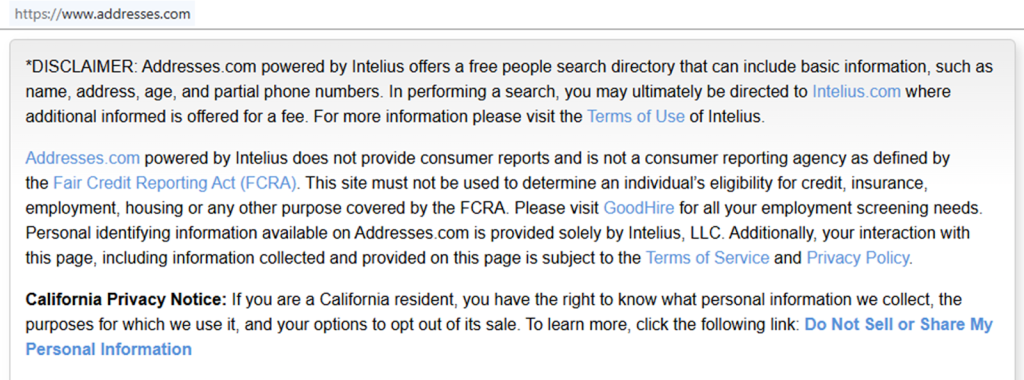
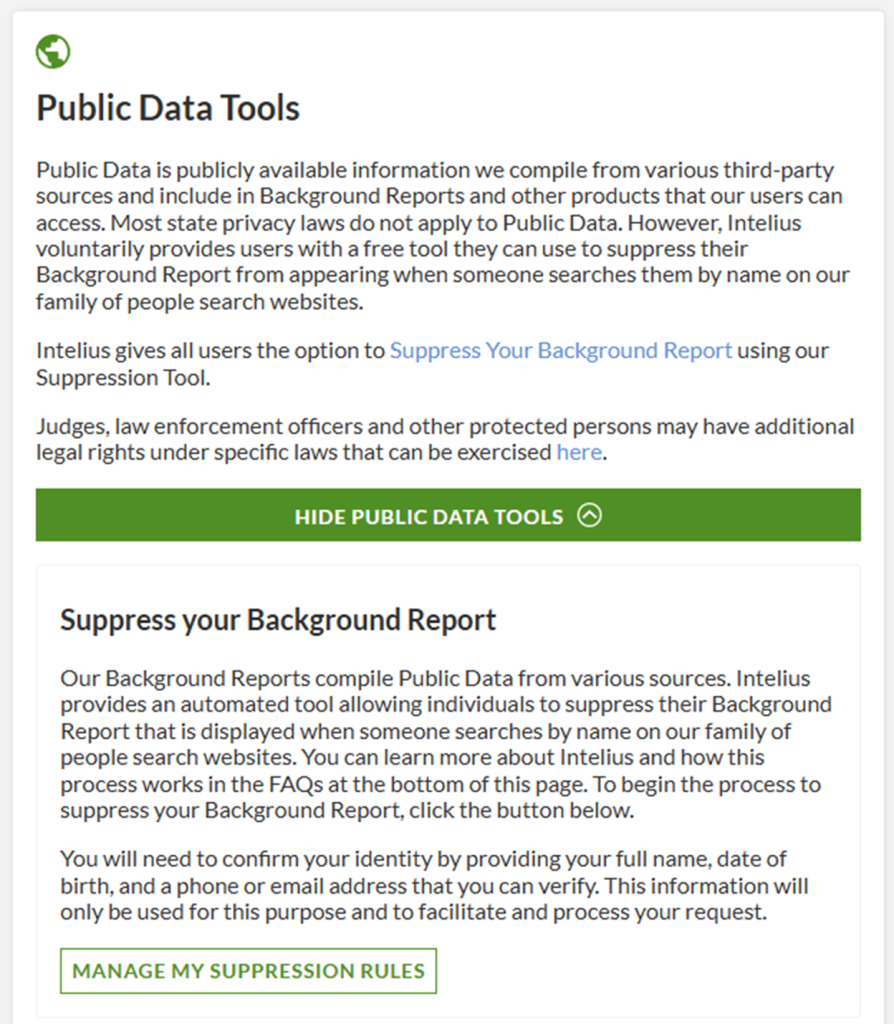
Scroll to the footer and select the “Do Not Sell/Share” option. Then, click “Manage My Suppression Rules.” If the page redirect happens, keep going until you see the form fields. If you take screenshots for your records, blur personal info before saving them, and store them on a secure device for better security.
Submit your identifiers (email/name+ CAPTCHA)
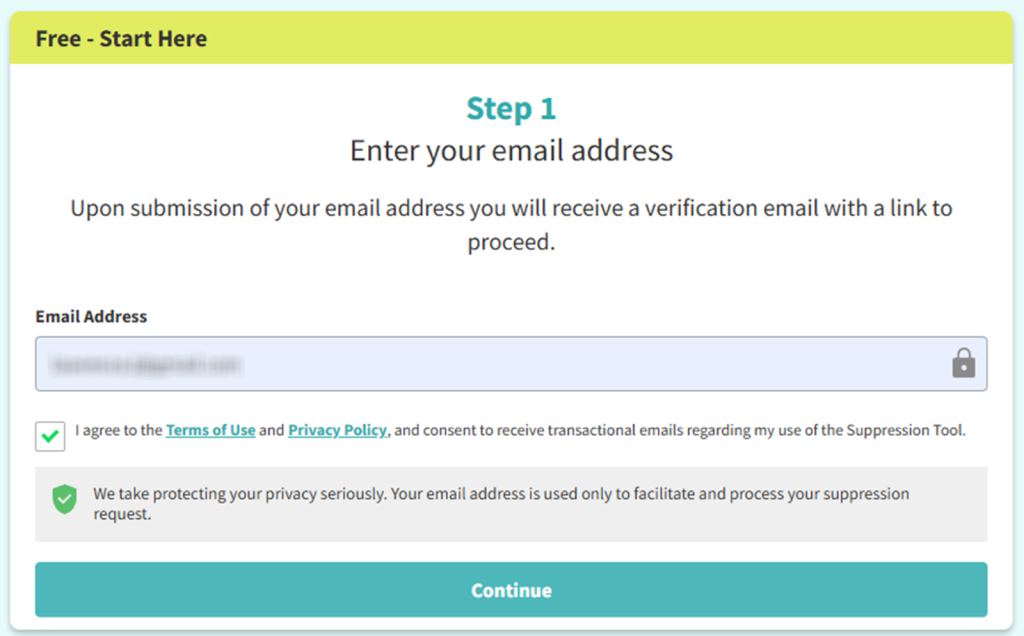
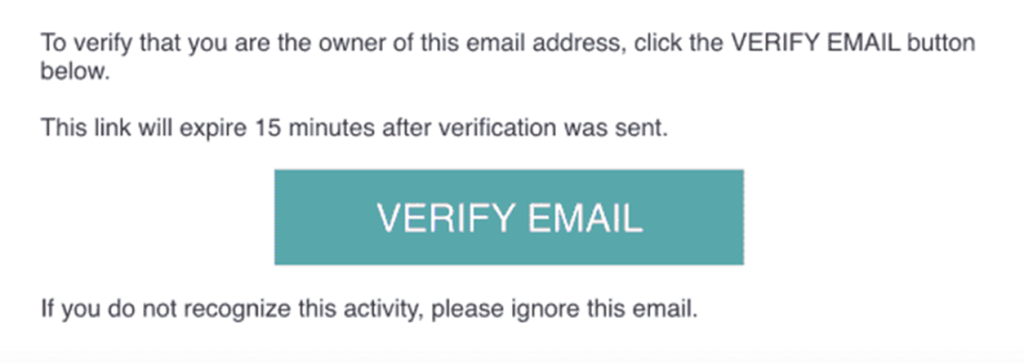
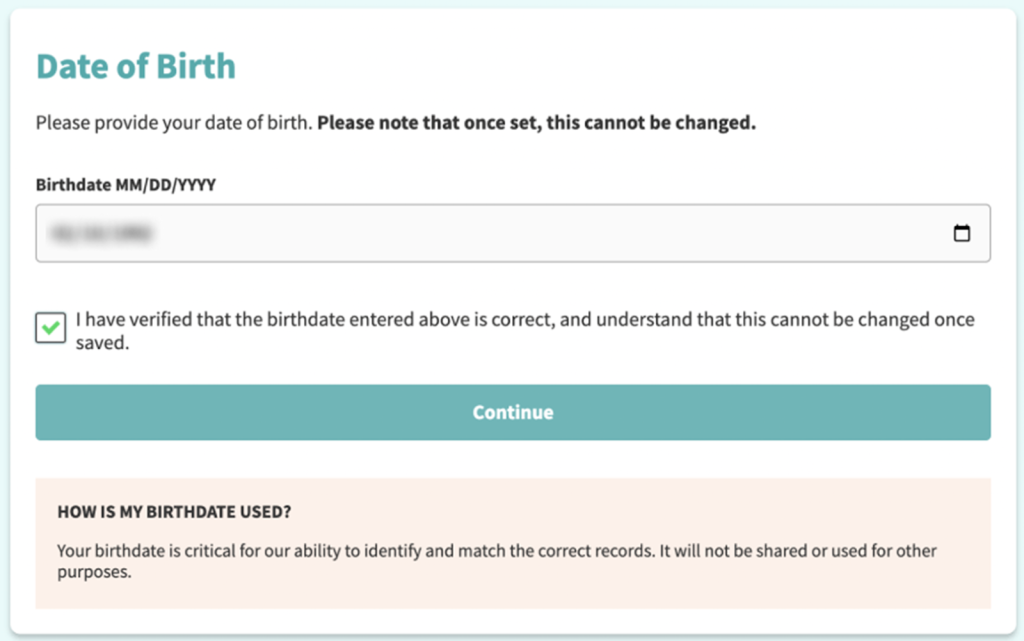
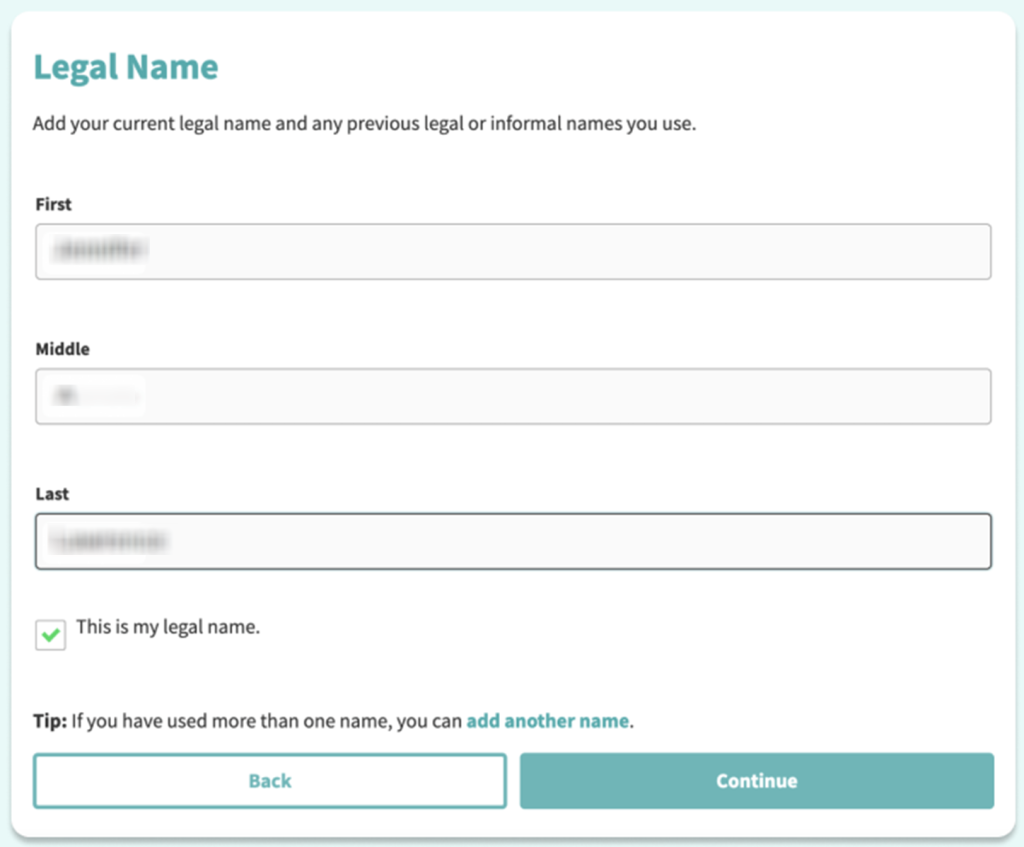
On the form, enter your email. Click “Verify Email,” then enter your birthdate and full name. If the form shows multiple matches, choose the entry that best corresponds to your address history. Redact personal details in screenshots you keep.
Verify via code or link
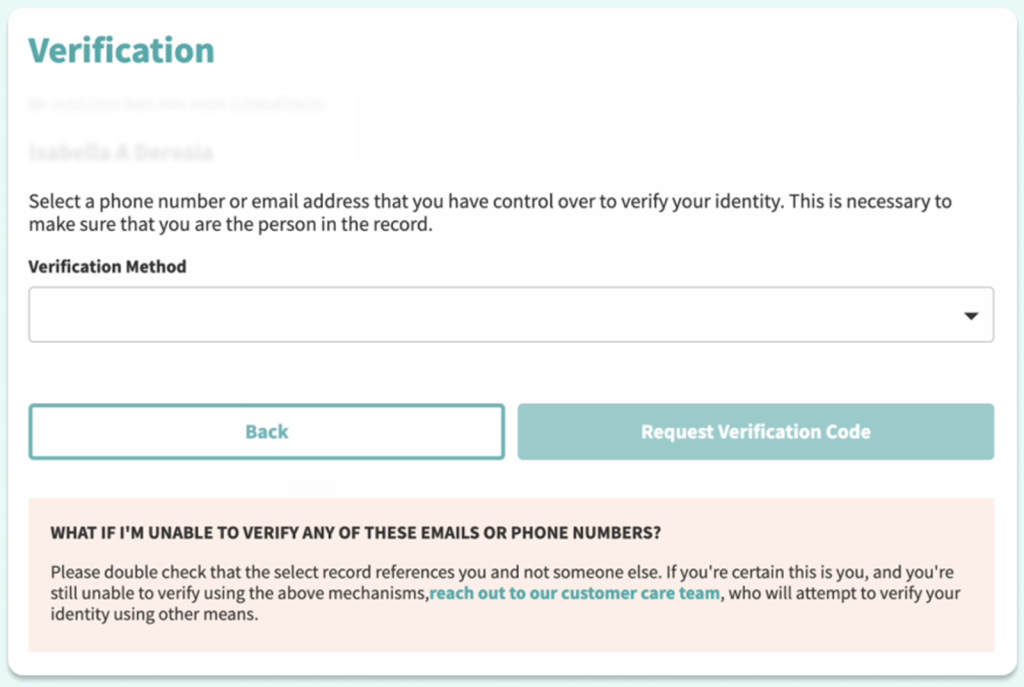
Choose the verification method and check your inbox. If nothing arrives, check Spam/Promotions, then ask for a resend. Save any on-screen success message for your records, and avoid forwarding it since it can contain private information.
Confirm deletion
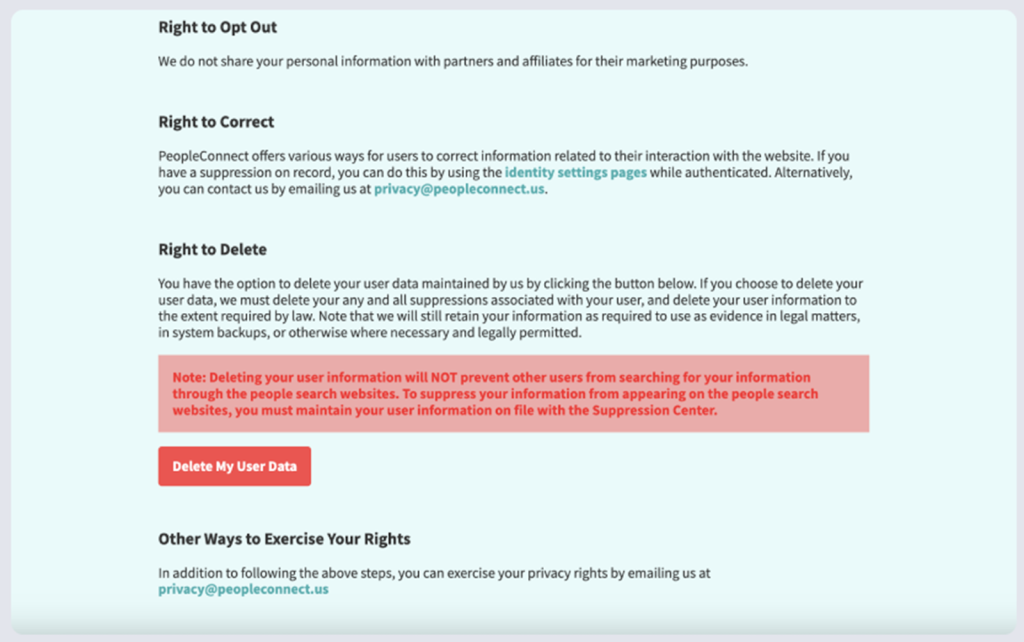
Some flows show a final screen where you confirm you want to remove your info and submit a suppression request. Choose the option that confirms deletion. If extra identity checks appear, provide only what is needed for matching your listing and keep a copy for your own tracking.
Track confirmation & timeline
Keep the message and note the date you submitted. Check the data again after a few days. If it still appears, repeat the steps once. To protect your privacy and security, do not post screenshots publicly unless you’ve fully redacted contact information.
Timelines, Verification & What to Expect
Most requests are processed within 3–7 days, but timing varies by record. You might get an on-page message immediately. Alternatively, you may get a message after you verify. If you get no response after 7 days, re-check the listing and submit one more request. Keep your message short and factual.
Edge Cases & Troubleshooting
- No access to the original inbox: use a new email and include the data so they can locate the entry.
- “Record not found”: try another name spelling or city/state; the directory may show near-duplicates.
- CAPTCHA errors: refresh and try again later; switching browsers can help.
- Code not arriving: wait 10 minutes, check Spam, then resend once.
- Region blocks (EU/UK/CA): look for a privacy portal, or use mailing if listed; expect extra checks.
- Account closure vs public listing deletion: closing a login does not always remove public data.
- Addresses.com cancel: if you have a subscription, use account billing to stop charges.
- Extra fields: if asked to enter your date of birth, provide only what the listing already shows.
Will my data reappear?
Yes, listings can reappear when broker databases refresh, ingest new partner feeds, or receive updates from resellers. That risk is usually medium, so set a 3–6 month reminder and re-submit quickly if you see the same profile again. Consider related cleanups on data brokers like other people search sites and data broker sites, and keep a simple log so you stay in control of your personal information. If you want to automate repeat checks, re-run the same opt steps and document dates so you can spot patterns and reduce ongoing exposure.
Manual vs Assisted Removal
Manual:
Pros
- more control of your personal information;
- you can remove your personal information, remove your info, and remove your personal information again if needed.
Cons
- more time to locate each listing and repeat monitoring.
Assisted:
Pros
- faster data removal with tracking and recurring checks;
- helps with follow-ups.
Cons
- you share personal details with a third party;
- you may still need to remove them from Addresses.com again for edge cases.
We remove your data for you - faster, verified, trackable.
Discover Which Sites Share Your Private Details—Instantly and Free.
FAQ
Provide only the minimum needed to address your listing. If it asks for optional fields, skip them. Re-check within the typical timeline.
If the form offers an email or SMS check, try that first. If an ID upload is optional, don’t provide it. If it’s required, redact nonessential fields and keep a copy.
Backlogs can slow processing. Wait the full 3–7 days, then submit one follow-up query.
Don’t reply to unsolicited messages. Go directly to the website in your browser, confirm the domain, and use only the official opt-out form or contact method shown there.
Listings can be rebuilt when the database refreshes or a new feed arrives. Keep your proof and repeat the opt-out process on a 3–6 month schedule.
Use the Addresses.com form to submit a deletion query. Check back within 3–7 days.
Use the Addresses.com form, provide the identifiers, and confirm via email/SMS. Keep the message and re-check later.
If you have a paid account, follow account settings to stop recurring charges. Then, complete the listing removal steps, because billing changes do not always delete the public profile.
It’s commonly in the footer under privacy or “Do Not Sell/Share.” If you can’t find it, search the site for “opt-out” and open the page with your listing.
Many people-search services aggregate public records and commercial data to create profiles. Opting out reduces exposure of your location history and contact details.
Repeat the same form submission and verification steps, and keep your confirmation so you can track re-listing events.

Posted by Ava J. Mercer
More Phone & Caller ID Lookup Removal Guides
- Addresses.com Opt Out Guide
- AllAreaCodes Opt Out Guide
- AmericaPhoneBook Opt Out Guide
- CallerSmart Opt Out Guide
- Find Who Calls You Opt Out Guide
- NumberGuru Opt Out Guide
- Numberville Opt Out Guide
- NumLookup Opt Out Guide
- OkCaller Opt Out Guide
- PrivateNumberChecker Opt Out Guide
- RevealPhoneOwner Opt Out Guide
- ReversePhoneLookup Opt Out Guide
- SpyDialer Opt Out Guide
- Sync.ME Opt Out Guide
- Telephone Directories Opt Out Guide
- Truecaller Opt Out Guide
- USPhoneBook Opt Out Guide
- YellowBook Opt Out Guide
- Zlookup Opt Out Guide


