Privacy Guides
Can You Be Anonymous on OnlyFans to Protect Your Privacy?
You can be anonymous to fans on OnlyFans, but you cannot be completely anonymous to OnlyFans itself. Creators must verify their real identity with the platform for verification, payouts, and compliance, while subscribers normally see only the public creator identity and information you choose to share. The safest approach is to separate your performer identity from your real name, contact details, social accounts, location clues, and public records.
See where your personal data appears online
Privacy Writer
A. J. MercerAva J. Mercer
Updated
Read
5 min
See where your personal data appears online
Is Complete Anonymity Possible on OnlyFans?
Anonymity on OnlyFans is limited. OnlyFans requires identity and payout checks. Its ID verification process may use government identification and identity matching. A fake ID for OnlyFans is not a privacy solution. Fans normally interact with public profile details, not verification documents. That distinction explains how to be anonymous on OnlyFans in a realistic way.
To stay anonymous, use several layers:
- Choose a fresh performer name.
- Separate email, phone number, usernames, and passwords.
- Enable MFA.
- Hide identifying body, voice, and room clues.
- Check search results, brokers, and records.
No feature keeps you anonymous everywhere. The goal is to maintain anonymity from casual discovery while meeting platform rules.
What Does OnlyFans Know About You vs. What Can Fans See?
OnlyFans works with two identity layers. One is the verified person known to the platform. The other is the OnlyFans persona visible to fans on the OnlyFans profile. Fenix International’s 2024 accounts reported 4.634 million creator accounts and 377.456 million fan accounts. OnlyFans subscribers generally see what you publish, not tax forms or identity documents. Exposure can still come from records, search engines, leaks, or brokers.
| Data Type | Known to Platform | Visible to Fans | Potentially Discoverable Elsewhere | Privacy Action |
| Legal name | Yes | Normally no | Yes | Keep off public profiles |
| Performer name | Yes | Yes | Yes, if reused | Use a new alias |
| May be held | Normally no | Possible | Use dedicated email | |
| Phone number | May be held | Normally no | Possible | Use a separate number |
| Address | May be held | Normally no | Yes | Check records and brokers |
| Payment data | Required/processed | No | Financial records | Separate finances where lawful |
| Tax information | May be required | No | Some filings | Review filing choices |
| Profile content | Yes | Yes, depending on access settings | Reposts/search | Remove clues |
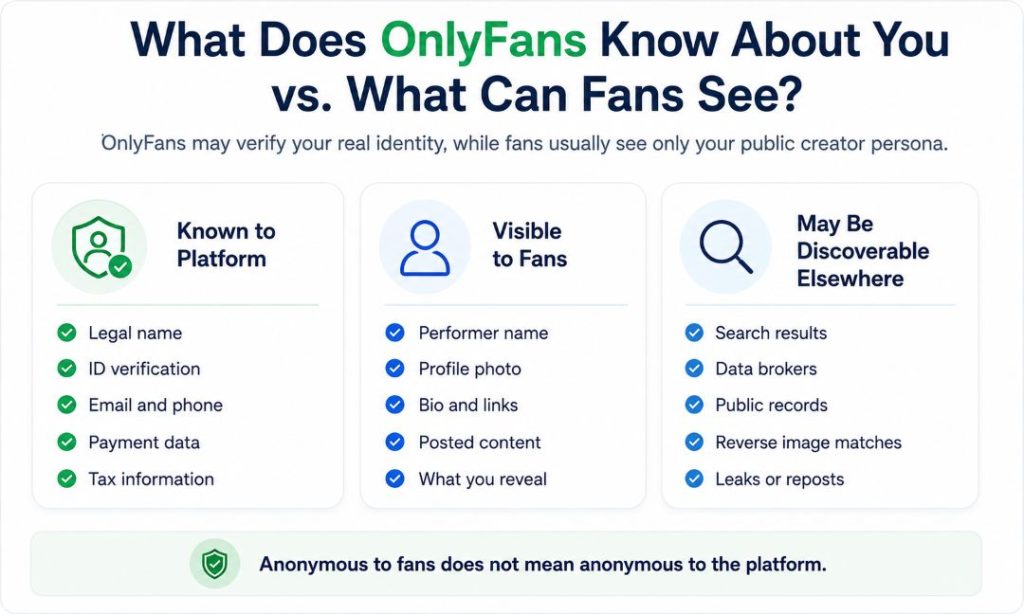
The legal name OnlyFans knows is separate from the identity a subscriber may try to discover. An anonymous account separates public identity; it does not hide you from the service.
Is It Enough to Just Not Show Your Face?
No. OnlyFans without showing your face can reduce recognition, but a real face is only one identifier. Tattoos, birthmarks, scars, voice, jewelry, furniture, usernames, metadata, and posting habits can connect content on OnlyFans to personal profiles. Faceless content works best when you also control location privacy, social links, contact discovery, and public records. A faceless page may still match a personal account through visual clues.
Can Tattoos, Birthmarks, Scars, or Body Features Identify You?
Yes. People who know you may recognize details software misses. Tattoos are stable and distinctive. Birthmarks and scars can narrow a match. Jewelry may connect images across accounts. Voice can reveal accent or local references. If you want to remain anonymous, inspect every frame against your personal photos.
Check:
- Tattoos, scars, birthmarks, and piercings.
- Rings, watches, necklaces, and nail designs.
- Voice, accent, names, and background speech.
- Outfits seen on personal social media.
- Reflections that show another person’s face or yours.
One covered tattoo does not solve other clues. For an anonymous creator, consistent visual and audio discipline matters. A creator on OnlyFans should review both visual and audio clues.
Can Mirrors, Windows, Furniture, or Room Details Reveal Your Identity?
Yes. Mirrors can reveal a phone, doorway, or face. Windows can expose a skyline or building. Furniture may match personal posts. Packages can show names or labels. Certificates, uniforms, and pet tags add clues. Creating content without recognizable surroundings is safer than fixing every detail later.
Before publishing, check:
- Mirrors, screens, and glossy surfaces.
- Windows, balconies, and landmarks.
- Mail, labels, certificates, and name tags.
- Unique furniture, artwork, bedding, and pet items.
- Clocks, calendars, and work gear.
A neutral set reduces accidental clues. Cropping can still miss brief reflections.
Audit Whether You Are Already Exposed Before You Change Anything
Start with a privacy audit. Search what an outsider can already connect. Check your performer name, old handles, email, phone number, and images. The aim is to remove personal information before it links to the creator identity. ClearNym can help organize removal efforts across people-search and data broker sites. Record unresolved privacy signals instead of dismissing weak matches.
Run this audit:
- Search legal and performer names in quotes.
- Search current and old usernames.
- Search email addresses and phone numbers.
- Check people-search and broker sites.
- Reverse-search profile images.
- Review public business and professional records.
- Recheck after removals.
Save URLs and screenshots first. A clean result today cannot guarantee future records stay absent.
How to Check Photo Metadata and Reverse-Image Exposure
Photo and video files may contain metadata about the device, time, and location. Google notes that cameras can save location data. Landmarks can reveal a place even without metadata. Reverse image search creates another risk. Google Lens can surface similar images and pages containing them. That matters when you hide your face.
Use this order:
- Export the final edited file.
- Inspect EXIF/IPTC fields.
- Remove unnecessary metadata and GPS.
- Search the image with Google Lens.
- Replace images matching personal profiles.
- Repeat after promotional reposts.
Metadata removal helps, but visual clues still matter. Treat the image itself as identifying data.
How to Separate Your Creator Identity From Your Real Identity
Strong separation starts before opening the account. Use a new email, phone number, usernames, and passwords. Turn on MFA for email, social accounts, and the OnlyFans account. Keep recovery information separate because reused backup details can reconnect identities. Do not import personal contacts into work apps. If you access OnlyFans anonymously, every login and recovery route matters. CISA recommends strong, unique passwords and MFA as basic account-protection measures.
Use this setup:
- Choose a new performer name and unused usernames.
- Create a dedicated email address and phone number.
- Generate unique passwords.
- Enable MFA.
- Use separate recovery information.
- Disable contact uploads where possible.
- Document accounts tied to the anonymous persona.
This is how to keep OnlyFans anonymous without accidentally exposing your real identity. It also limits damage after account compromise.
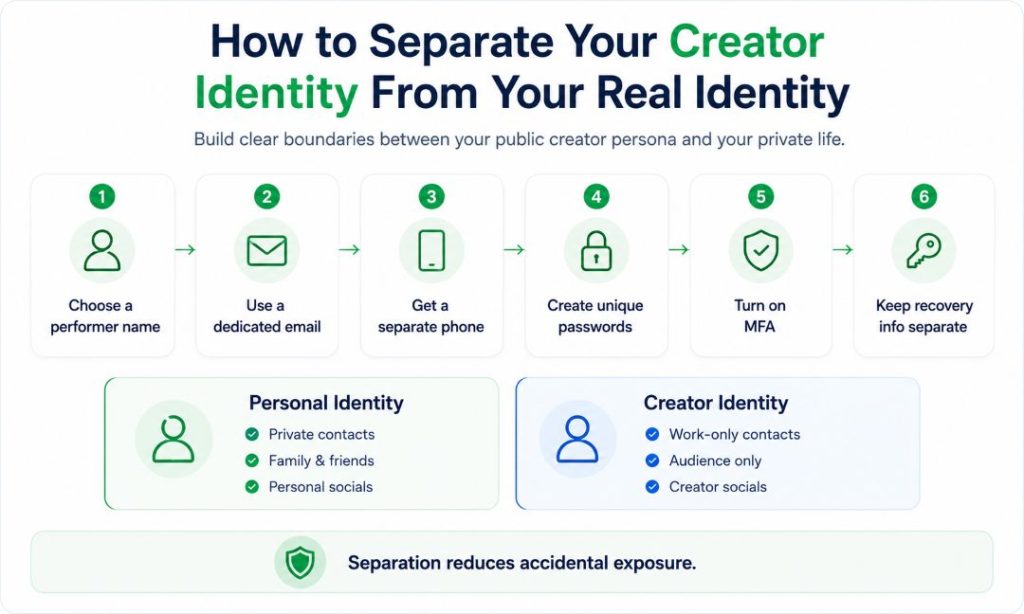
Personal vs. Creator Social Accounts
Personal and creator accounts should not share identifiers. Reusing a handle, image, bio phrase, or recovery address makes correlation easier. Promoting OnlyFans is safer from work-only social profiles that avoid family, coworkers, or local businesses. Keep your creator branding separate as well. Avoid matching posting schedules. OnlyFans management services should receive only necessary access.
| Area | Personal Account | Creator Account |
| Email/phone | Existing contacts | Dedicated contacts |
| Username | Personal history | Fresh alias |
| Followers | Friends/local network | Audience only |
| Recovery | Personal routes | Separate routes |
| Images | Personal photos | Anonymous content |
| Cross-links | No creator links | No personal links |
Separation fails when one side points to the other. Review both sides.
Contact Syncing and “People You May Know”
Contact syncing can bridge identities. Social apps may use uploaded address books, phone numbers, email matches, and mutual connections to suggest accounts. Turn off uploads on work profiles, deny contacts permission where practical, and delete previously synced contacts when the service allows it. Separate credentials help, but recommendation systems can still infer connections from other signals, including shared behavior and networks.
Do You Need a Separate Device?
A separate device is optional, but it reduces accidental crossover. It is especially useful if you switch often between personal and work apps. The device itself does not hide your identity; account choices still matter. It can reduce cloud-photo mixups. It also makes accidental account switching less likely.
Use it to create boundaries:
- Sign in only to work email and social accounts.
- Keep personal cloud photo libraries off it.
- Disable automatic contact syncing.
- Review camera and location permissions.
- Keep recovery codes somewhere secure.
- Update the operating system and apps.
Does Geoblocking Actually Work?
Geoblocking can reduce local discovery, but it is not a guarantee. OnlyFans offers location restrictions, with granularity that can vary. Blocking a region may prevent ordinary access from that location. It cannot control copied files outside the platform. VPNs or proxies can make someone appear elsewhere. Anyone asking how to stay anonymous on OnlyFans should treat geoblocking as one layer.
Pros
- Reduces casual local discovery.
- Adds friction for nearby viewers.
Limits
- VPNs can bypass IP blocking.
- Leaks and screenshots travel elsewhere.
- Mobile routing can distort location.
Geoblocking supports privacy protection; it does not make OnlyFans safe from identification. Combine it with alias separation and content review.
Can Payments, Taxes or Business Records Reveal Your Real Identity?
Yes, outside the fan-facing page. OnlyFans needs payout and tax information tied to the person or business receiving money, while the IRS says gig-economy income is taxable even when no information return is received. Bank statements, tax returns, company registrations, assumed-name filings, or professional licenses may contain or create records with different visibility rules. Before building a successful OnlyFans business structure, check what your jurisdiction publishes and consider qualified legal or tax advice.
Can Public Records and Data Brokers Connect Your Alias to Your Identity?
Yes. Brokers aggregate public records, commercial information, and online activity. The FTC found one broker it studied held more than 700 billion data elements. Learning how to protect your data from brokers means finding records, opting out where possible, and reducing identifiers that feed future matches. ClearNym can help centralize this work. Public records may need a different remedy.
Common links include:
- Address and phone history.
- Relatives.
- Reused emails and usernames.
- Business filings.
- Professional licenses.
- Property or court records.
- Social profiles.
Removing one listing does not erase the source. Recheck because data can return.
What Is the Difference Between a Data Broker, Public Record, and Google Result?
These sources are different. A data broker builds or buys profiles. A public record comes from government or legally accessible filings. Google usually indexes pages hosted elsewhere. If you delete your data from Google, it is not the same as deleting the source. Google can remove certain personal information from Search. The original site may still keep it.
| Source Type | How It Gets Your Data | What It Typically Shows | How to Remove/Reduce It |
| Data broker site | Aggregates public/commercial data | Phones, addresses, relatives | Opt out; correct sources |
| Government/public filing | Official records | Business, property, license data | Agency privacy/correction options |
| Search engine index | Crawls third-party pages | Links, snippets, images | Remove at source; request eligible removal |
Search removal lowers visibility without necessarily deleting the source. Source removal is stronger when available.
Why a Clean Creator Profile Can Still Be Traceable
A clean OnlyFans presence can still be traced through reused usernames, old photos, contact suggestions, business filings, leaks, or brokers. Some attempts at anonymity fail because the identifying link exists outside the page. To be private on OnlyFans, reduce the external connections among your alias, accounts, images, devices, and offline records consistently.
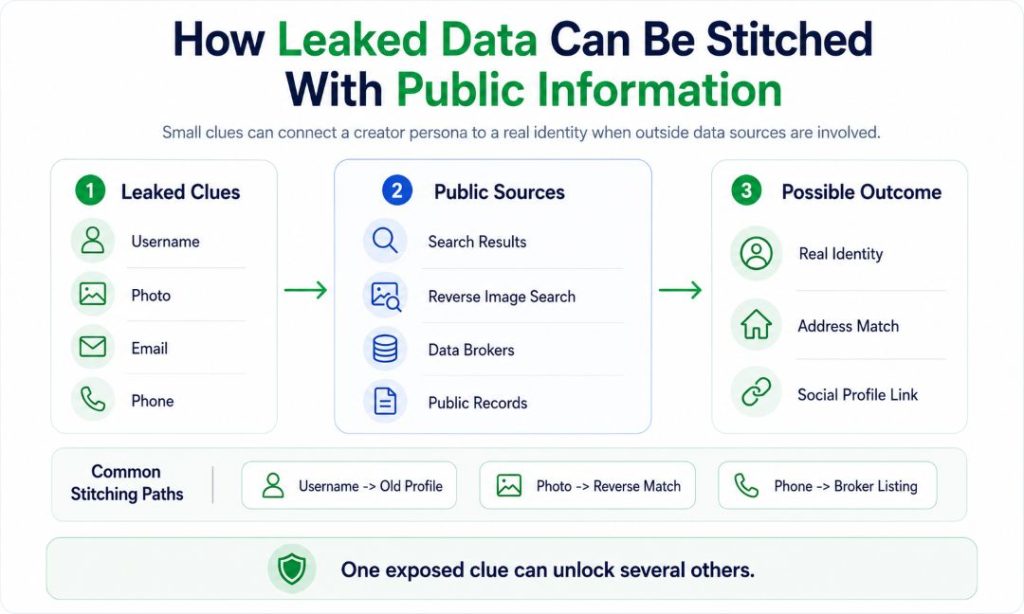
How Leaked Data Can Be Stitched With Public Information
An OnlyFans leak does not need an address to create risk. A reposted image, username, timestamp, or watermark can be combined with public data. Someone can compare aliases, reverse-search images, and inspect filings. A leaked email may lead to old accounts. Reused passwords also increase the risk that accounts on unrelated services may be compromised. Correlation is the main danger.
Common paths:
- Watermark → username → old social profile.
- Image → reverse search → personal account.
- Alias → filing → identity.
- Email → breach data → usernames.
- Phone number → broker → address.
- Room detail → local listing → location.
Reducing reuse makes each clue less useful. Many OnlyFans risks start when one identifier unlocks several sources.
What to Do If a Leak, Impersonation, or Doxxing Happens
Act quickly, but preserve evidence first. Save URLs, usernames, timestamps, messages, and screenshots. Report impersonation or copied content through hosting-provider abuse or copyright reporting channels. If threats or stalking appear, prioritize physical safety. The FBI advises victims to retain incident information and report crimes through appropriate channels. Do not assume an extortionist is truthful.
Use this order:
- Preserve evidence and build a timeline.
- Change exposed passwords and secure email with MFA.
- Report fake accounts and copied material.
- Request eligible search removals.
- Remove broker listings and contact data.
- Alert trusted people if doxxing creates offline risk.
- Contact law enforcement for credible threats, stalking, or extortion.
Avoid public arguments that increase exposure. A coordinated response protects both the alias and the person behind it.
Removing Your Phone Number and Address From Google
Google accepts requests to remove certain personal information, including phone numbers, home addresses, or email, from Search. Results about you can monitor matching contact details in supported markets. If you want to remove your phone number from the Internet, Google removal does not delete the source site. Contact the source separately. ClearNym can help with broker-side removal. Search and source removal should work together.
Use this order:
- Save the URL and screenshot.
- Request deletion from the source.
- Use Google’s private-information removal process.
- Use Results about you where available.
- Request an outdated-content refresh after source changes.
- Recheck other search engines and brokers.
This reduces exposure without promising complete erasure. New copies can appear later.
OnlyFans Privacy Checklist: What to Verify Before You Post
Use a checklist every time. OnlyFans allows creators to control what they publish. Privacy mistakes often happen outside the upload screen. The strongest routine checks content, security, discovery settings, and external records. It matters if you want to stay anonymous. Many successful creators protect their privacy without compromising lawful payment or tax duties. No checklist removes every risk.
Before posting, verify:
- Performer name is unrelated to old handles.
- Separate email, phone number, usernames, and passwords are active.
- MFA and separate recovery information are set.
- Contacts are not synced.
- Face, tattoos, birthmarks, voice, jewelry, and room clues are reviewed.
- Metadata and GPS are checked.
- Images were reverse-searched.
- Geoblocking is configured where useful.
- Public records and brokers were reviewed.
- Payout and tax records are lawful.
- Contacts and response steps for leaks, impersonation, doxxing, and stalking are ready.
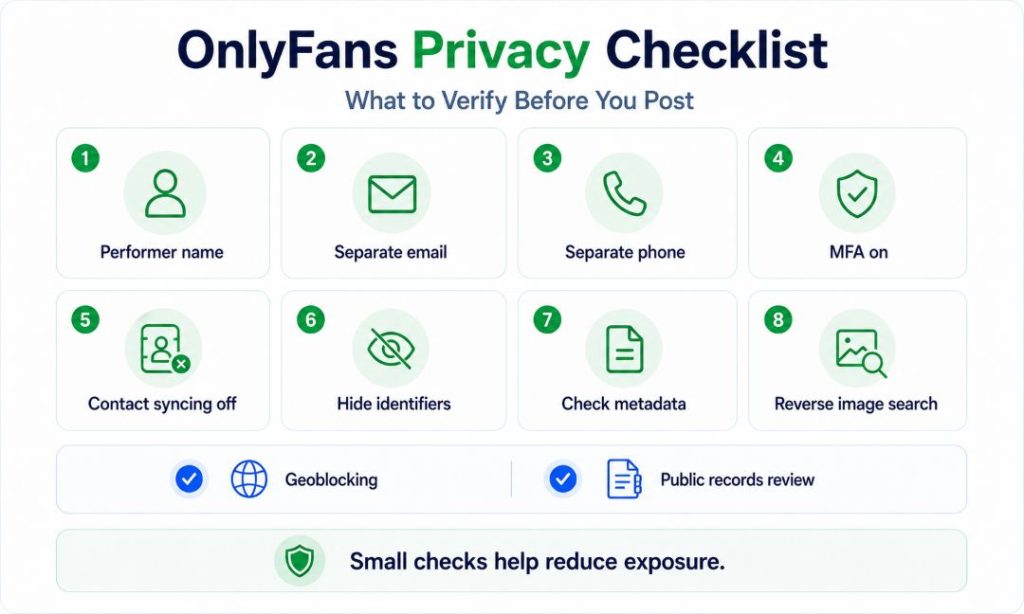
This is the practical meaning of OnlyFans anonymity: separation and repeat checks. It helps you use OnlyFans more safely, but no creator can eliminate the risk of identification entirely.
Key Takeaways
- Anonymity on OnlyFans means fan-facing privacy, not secrecy from the platform.
- You can remain anonymous to many fans while keeping identity documents private.
- OnlyFans without revealing your face still requires control over your body, voice, room, and metadata clues.
- Experienced creators use anonymous branding, MFA, and separate accounts.
- Geoblocking, broker opt-outs, and search removals reduce exposure but cannot guarantee privacy.
- A content creator can stay safe only by treating privacy and safety as an ongoing process.
The best way to stay anonymous on OnlyFans is to reduce linkability while following platform rules and maintaining clear separation between your real and creator identities.
FAQ
Yes. Deleted OnlyFans content may persist in snippets, copied pages, archives, or reposts. Remove it at the source, then request Google’s outdated-content refresh when appropriate.
Potentially. Voice-matching tools can make a distinctive voice an identifying signal. If you are anonymous as a creator, limit unnecessary speech or alter it consistently.
Old links may remain in search results, reposts, messages, or third-party pages. Changing a creator name does not erase screenshots, cached snippets, or historical references.
Generally, there is no universal alert that tells you when someone is researching your identity outside OnlyFans. Monitor search results, impersonation, broker listings, suspicious messages, and login alerts instead.
Incognito mainly limits local browser history. When accessing OnlyFans, it does not hide you from websites, network providers, signed-in accounts, or services receiving connection data.
References
- OnlyFans, “Privacy Policy.” https://onlyfans.com/privacy.
- OnlyFans, “Age & Identity Checks.” https://onlyfans.com/transparency-center/verification.
- OnlyFans, “Terms of Service.” https://onlyfans.com/terms.
- UK Companies House, “Fenix International Filings.” Companies House filing history.
- Ofcom, “OnlyFans Compliance Investigation.” Ofcom investigation.
- Google Search Help, “Private Info Removal.” Google removal guidance.
- Google Search Help, “Results About You.” Results about you.
- Google Search Help, “Image Search.” Google Lens guidance.
- Google Photos Help, “Location Data.” Photo location guidance.
- Federal Trade Commission, “Data Brokers Report.” FTC data broker report.
- CISA, “Secure Our World.” CISA security guidance.
- Internal Revenue Service, “Gig Economy Tax Center.” IRS Gig Economy Tax Center.
- Federal Bureau of Investigation, “Online Threat Guidance.” FBI online-threat guidance.
- ClearNym, “Personal Data Protection & Broker Removal.” https://clearnym.com/.

Posted by Ava J. Mercer