Privacy Guides
How to Remove Your Phone Number From the Internet: Step-by-Step Guide
See where your personal data appears online
Privacy Writer
A. J. MercerAva J. Mercer
Updated
Read
5 min
See where your personal data appears online
To remove your phone number from the internet, you need to delete it from the original websites where it appears, submit opt-out requests to data broker sites, remove or hide it in your social media settings, and request removal from Google Search results.
How to Check Your Current Phone Number Exposure
Start with a clear audit before you remove your personal information. Use private browsing, as saved cookies can affect search results. Search your name, city, employer, and your full phone number in several formats. Check an old mobile number too, because it may still connect to your profile. Save each URL, screenshot, and date recorded in a spreadsheet to make every later query easier.
- Search Google for your name plus your phone number.
- Search the number with spaces, dashes, and no punctuation.
- Review cached snippets, image previews, and directory pages.
- Check lookup directories, old PDFs, and forums.
- Look for your email address beside the same listing.
- Search public record databases and agency pages.
- Review old resumes, marketplace posts, and online shopping sites.
The Identity Theft Resource Center (ITRC)notes its database now covers more than 25,200 U.S. compromises. There are nearly 12 billion victim notices and about 79 billion exposed records.
What Is a Data Broker — and Why Do They Have Your Phone Number?
A data broker collects and sells personal information. It compiles data from public sources, purchases, surveys, apps, loyalty programs, and web scraping.
They often have your personal details because services require a phone number when you set up an account. After sharing and matching, one record can become searchable across data brokers and people search sites.
What Personal Data Travels With Your Phone Number
A phone number rarely exists in isolation. It can act like a key that joins scattered records into one profile. That connection is the problem. This is why phone number privacy matters even if the number seems ordinary. A scammer, stalker, recruiter, or marketer may use it to find personal info you never posted together. Before you remove your data, check what may travel with it:
- Full name and aliases.
- Home address and previous addresses.
- Age, birth month, and relatives.
- Email, username, and social profiles.
- Employer, school, or job title.
- Property, court, or license records.
- Sensitive information or health hints.
- Social Security number fragments from a data breach.
The Real Risks of an Exposed Phone Number

An exposed phone number could lead to privacy issues. These are spam calls, phishing texts, SIM-swap attempts, stalking, identity theft, and support-desk fraud. Remember: risk rises when the listing shows your address or workplace. In addition, a publicly accessible number can act as a starting point for linking multiple data sources, allowing third parties to build a more complete profile about you over time. This can increase the likelihood of targeted scams, unwanted contact, and unauthorized account access attempts.
SIM-Swap Fraud
SIM-swap fraud happens when a criminal convinces a carrier to move service to a new SIM. Once transferred, calls and texts go to the attacker. The listing gives the criminal a starting point. That is why carrier security matters. Watch for these signs:
- Your phone suddenly shows no service.
- Carrier alerts mention a change you did not make.
- Password reset texts stop arriving.
- Friends get strange messages from your line.
- Your carrier account shows an unknown SIM.
The ITRC reported 3,322 data compromises in 2025. There’s a five percent rise over 2024.
Doxxing and Physical Safety
Doxxing turns online details into real-world pressure. A phone number may lead to your home, family names, job, or routine. If private information appears alongside your listing, treat it as a safety issue. Speed is critical. Start here:
- Screenshot the page, URL, and date.
- Ask the site owner to delete the page.
- Report threats to the platform or law enforcement.
- Lock down social profiles and private contact fields.
- Use a separate mobile number for public work.
Robocall Harassment
Robocalls rise when a number enters lead forms, sweepstakes, broker lists, or marketing databases. Removal will not eliminate all calls. However, this procedure cuts off sources that feed spam calls. Pair cleanup with carrier blocking, call screening, and fewer signups using your phone.
Account Takeover Through Social Engineering
Criminals sound believable when they know your address, relatives, or recovery details. A number gives them a way to pressure you or a support agent. Exposure becomes a digital security issue, not just a privacy problem. Secure accounts before cleanup. Focus on these steps:
- Replace SMS codes with app-based two-factor authentication.
- Add a carrier port-out PIN.
- Use a password manager with unique passwords.
- Remove recovery details you do not need.
- Watch for urgent texts asking you to click links or verify information.
- Review online accounts for old recovery fields.
Is It Possible to Completely Remove Your Phone Number From the Internet?
You can usually remove the most visible listings. However, complete removal is unrealistic. A search engine may delist a result while the original website keeps the page, and a broker may republish it later.
ClearNym is one of the useful services because it scans, removes, and monitors instead of leaving you to repeat the job monthly. It can also help remove your address, as the phone number will also expose where you live.
How to Remove Your Phone Number From Google
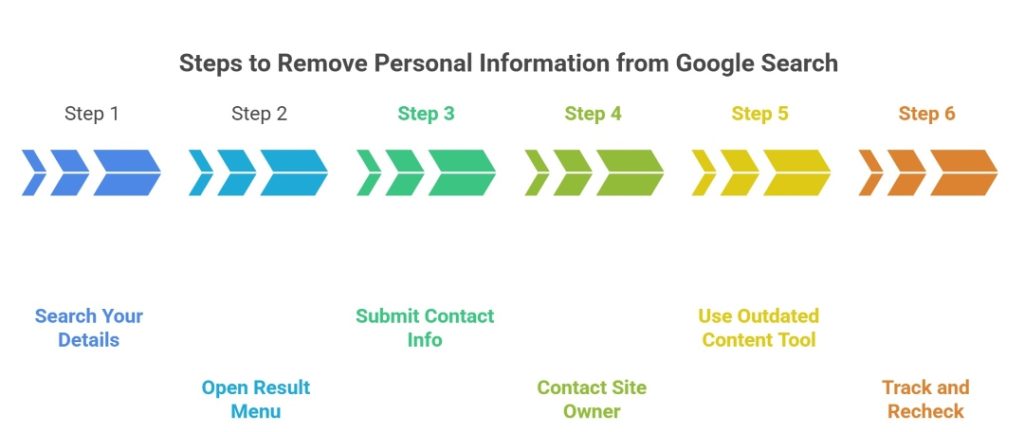
Google can remove certain results that show contact information, but it does not erase the source page. This matters because search removal is not source removal. First, identify each URL and decide whether the page itself should come down. Then use Results about you or the removal form. If a website changes, ask the search engine to refresh outdated content. Follow this order to remove personal information from Google:
- Search your name and number on the website.
- Open the result menu and choose the personal details option.
- Select contact info, enter the visible number, and submit the request.
- Contact the site owner for source deletion.
- After source deletion, use the outdated content tool.
- Track whether it is removed from Google search results, then recheck in two weeks.
Google allows removal requests for personally identifiable information. This includes a phone number, email, or home address when it appears in Search.
How to Remove Your Phone Number From Social Media Platforms
Social platforms may keep your number for login, friend matching, ads, and recovery. Hidden fields can still affect discoverability. Some apps, including Facebook and Instagram, also import contacts automatically. Add a trusted email and authenticator before deleting the field. Use this sequence:
- Open profile, privacy, and security settings.
- Remove public phone fields.
- Turn off search by phone where available.
- Delete uploaded contacts if stored.
- Replace SMS recovery with an authenticator app.
- Repeat on Facebook, Instagram, LinkedIn, TikTok, X, and messaging apps.
How to Remove Your Phone Number From Data Broker Sites
Broker removals are slow because each one has its own form, proof rule, and rescan cycle. Start with listings that rank in search, then continue through larger broker networks. Some pages hide opt-out steps or ask for identity checks. Keep copies of every removal request. ClearNym helps remove personal information from broker pages by scanning hundreds of data brokers, submitting opt-outs, and monitoring reappearance. Here is the workflow:
- List broker URLs showing it.
- Find each privacy or opt-out page.
- Submit the required request with minimal verification.
- Use a masked email when allowed.
- Confirm any verification link and record the request date.
- Recheck and screenshot the result.
- Use ClearNym to remove your number at scale.
DIY vs. Paid Data Removal Service vs. Privacy Attorney
Choose based on exposure, risk, budget, and time. DIY works when only a few pages show the listing. A paid removal service helps when profiles return, or your online presence is spread across many brokers. ClearNym fits users who want scanning, information removal, and monitoring. Personal information removal services help when you need a higher removal completion rate. Legal help is best for threats, stalking, false records, or ignored rights.
| Exposure Level | Recommended Approach | Est. Annual Cost | Time to Initial Protection | Re-scan Required? | Legal Action Needed? |
| Low: 1-3 listings | DIY Google and broker opt-outs | $0-$50 | 1-3 days | Yes | No |
| Medium: 4-20 listings | ClearNym plus DIY social cleanup | See current plans on our pricing page | 2-6 weeks | Yes | No |
| High: many brokers or harassment | Managed data removal plus carrier hardening | $250-$800 | 2-8 weeks | Yes | Sometimes |
| Critical: threats or fraud | Privacy attorney, reports, and managed removals | $1,500-$10,000+ | 1-6 weeks | Yes | Yes |
How Long Does It Take to Remove Your Phone Number From the Internet?
A simple Google removal can take days, while broker deletion often takes two to eight weeks. Some listings return through re-aggregation. The number ends up safer when you rescan monthly, document results, and keep requesting removal until copied pages fade. In more complex cases, timelines can extend further if the number appears across multiple data brokers, cached pages, or public records that update on their own schedules. Delays may also occur when sites require identity verification or manual review before processing removal requests.
Your Legal Rights to Demand Phone Number Deletion
Privacy laws do not erase every listing, but they help. The California Consumer Privacy Act (CCPA) is one of such laws. Under it, covered businesses must let California residents know, delete, opt out, and avoid discrimination for using those rights. The General Data Protection Regulation (GDPR) Article 17 also defines a right to erasure. It’s possible when data is no longer needed, consent is withdrawn, processing is unlawful, or another listed ground applies. Use legal grounds to support your request. These rights may help:
- The right to know what personal information a covered business collected.
- The right to have personal information removed, with exceptions.
- The right to opt out of sale or sharing.
- The right to non-discrimination after exercising rights.
- The GDPR right to erasure without undue delay when Article 17 applies.
- The right to complain to a regulator if a valid request is ignored.
CCPA deletion requests generally require a response within 45 calendar days. A 45-day extension is possible.
What to Do If Your Phone Number Keeps Coming Back After Deletion?
If a phone number reappears, the source may be fresh or republished. Do not start over blindly. Compare it with your spreadsheet and note what changed. Recurring exposure means you need monitoring. Use this loop:
- Identify whether the page is new or republished.
- Resubmit and mention the prior deletion.
- Remove the upstream source if named.
- Ask Google to refresh after the page changes.
- Reduce future sharing with aliases and secondary numbers.
Proactive Prevention: How to Stop Your Number From Spreading
The best cleanup is prevention. Every app, contest, delivery account, or loyalty program can make a new trail. Keeping your phone number private means using fewer direct identifiers. Data removal services help when exposure already exists, but habits slow the spread. Use this checklist before you decide to share your phone number again:
- Use a secondary number for signups.
- Avoid posting a personal contact number.
- Turn off contact syncing in apps.
- Limit public bios and business listings.
- Avoid using your phone number as a username.
- Review app permissions monthly.
- Consider using a VPN on public Wi-Fi.
- Ask groups not to publish it.
Key Takeaways
- Getting your phone number off the internet requires source deletion, Google cleanup, broker opt-outs, and monitoring.
- A data broker can connect one number to people’s personal information: addresses, relatives, contact details, and other details.
- Google can hide eligible results, but the original website may still need a direct deletion request.
- ClearNym is a service that removes exposed profiles and monitors for new listings.
- Strong security settings protect your privacy while cleanup continues.
- The goal is not to become unsearchable overnight. It is to reduce risk, visibility, and repeated exposure.
If you want to remove your information quickly, start with the highest-ranking website that shows your home address. Then keep checking, because information online is a recurring online privacy issue.
References
- ITRC, “2025 Annual Data Breach Report.” https://www.idtheftcenter.org/publication/2025-data-breach-report/
- California DOJ, “California Consumer Privacy Act (CCPA).”https://oag.ca.gov/privacy/ccpa
- GDPR-Info, “Art. 17 GDPR — Right to erasure (‘right to be forgotten’).”https://gdpr-info.eu/art-17-gdpr/
- Google, “Remove my private info from Google Search.”https://support.google.com/websearch/answer/9673730
- Facebook, “Add or remove a mobile phone number from your Facebook account.” https://www.facebook.com/help/124895950923762
- Instagram, “How Instagram uses your phone number or email address.”https://help.instagram.com/574047304429005/
- ClearNym, “Personal Data Removal Service for Google & Data Broker Sites.”https://clearnym.com/
FAQ
They may get your number from broker lists, breached databases, public documents, contact uploads, old forms, or someone else’s synced address book, even if you never posted it.
Sometimes. An app may use it for login, matching, ads, analytics, or partners. Limit access when not essential.
Yes. Some apps show it in groups, discovery tools, or contact matching. Check privacy settings, hide it when possible, and use a username for public chats.
Not necessarily. Broker exposure is legal-market visibility. Dark web exposure usually comes from leaks or criminal forums. Both can fuel scams, so check both.
Yes. Employers, recruiters, investigators, or vendors may find a personal line through broker profiles unless it has been removed or suppressed from major listings today.

Posted by Ava J. Mercer