Privacy Guides
YouTube AI Age Verification: Which Method Protects Your Privacy?
The most private YouTube age verification method depends on what data you want to protect. A selfie avoids sharing government ID details but requires facial analysis. A credit card avoids facial data but exposes payment information, while email verification involves third-party database checks. Compare data collected, who receives it, and retention policies before choosing.
See where your personal data appears online
Privacy Writer
A. J. MercerAva J. Mercer
Updated
Read
5 min
See where your personal data appears online
Why Is YouTube Asking You to Verify Your Age?
YouTube recently expanded its automated checks. Its July 2025 announcement described a US rollout intended to keep kids online safer. YouTube says it assesses a variety of signals, regardless of the birthday recorded on a YouTube account.
YouTube’s new age-verification system uses AI to estimate viewers’ ages. The platform may use that signal for YouTube youth safeguards. It can classify the user as under 18. This can change the viewing experience for adults incorrectly classified as minors. However, they can challenge the result.
Which YouTube Age Verification Method Is Most Private?
The most private YouTube age verification method depends on the type of information to protect. A selfie avoids sharing your legal name and ID details. Credit card verification avoids facial processing. Email verification requires no new photograph or payment card. However, VerifyMy checks existing records through third-party partners. None is universally safest. Moreover, not every method is available to every user.
Consider four trade-offs:
- Documents: A selfie or email avoids submitting legal identity details.
- Biometrics: A card or email avoids facial analysis.
- Financial records: A free card check can still create records.
- Account matching: Email checks consult other services, not just Google.
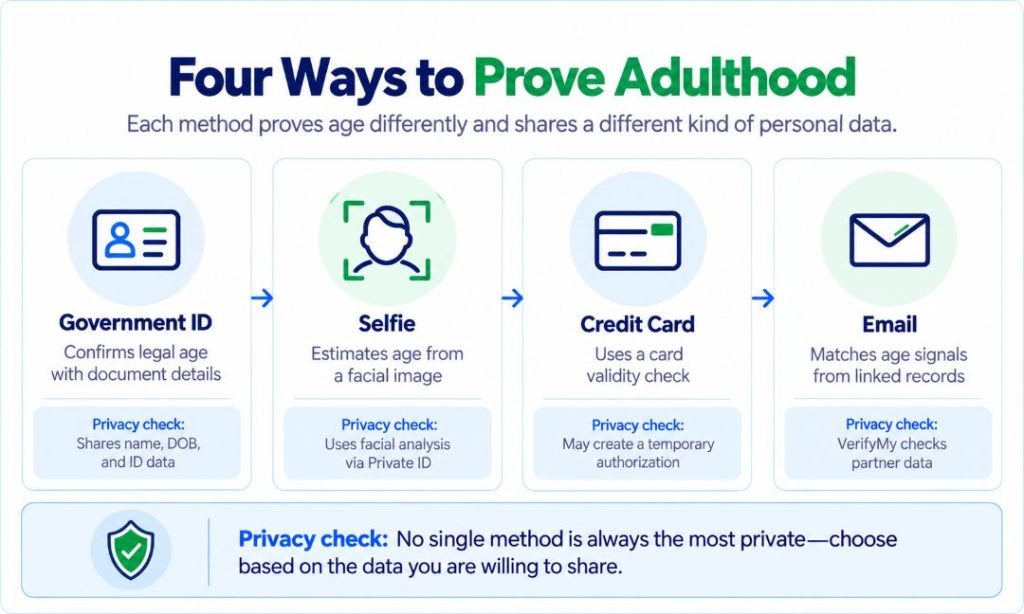
These are four verification methods. They expose identity documents, facial data, payment details, or records linked to an email address. None guarantees anonymity; availability differs by account and country.
ID vs. Selfie vs. Credit Card vs. Email: Privacy Comparison
The submitted evidence and Google’s retained eligibility result are different records. The main difference is what each provider needs to verify. This may be:
- Your legal identity.
- A likely age threshold.
- Financial eligibility.
- An earlier relationship with another service.
A card hold may disappear without erasing transaction logs; a deleted selfie doesn’t automatically withdraw an eligibility result. The table distinguishes documented practice from uncertain deadlines.
| Verification Method | Personal Data Disclosed | Data Recipient | Data Retention | Account Linkage | Reversibility | Main Privacy Risk |
| Government ID | Name, date of birth, photo, document details | Google; possible reviewer | ID deleted after successful age confirmation | Date of birth updated across account | Document deleted; verified attribute may remain | Identity exposure |
| Selfie | Facial image, age estimate, random identifier | Private ID; result to Google | Selfie deleted after assessment | Eligibility result returned with identifier | Image deletion promised; result persists as needed | Facial processing |
| Credit card | Card credentials and authorization metadata | Google, payment networks, issuing bank | As needed for legal or regulatory duties | Card verification and financial records possible | Hold expires; records not necessarily erased | Financial linkage |
| Address, matched account evidence | VerifyMy and database partners; result to Google | Address only as long as verification requires | Age result associated with requesting account | Address deleted after check; result may remain | Cross-service matching |
Google’s guidance provides no universal deadline for deleting verification results.
How Does YouTube AI Age Estimation Work?
YouTube estimates the user’s age from existing information. Its age estimation model separates likely adults from teenagers.
YouTube hasn’t published its error rate, thresholds, or individual signal weights. No one can promise that watching different videos will change the result. Ordinary viewing interests don’t prove someone is 18. Correcting a mistake matters more than changing recommendations.
Automatic Age Estimation vs Manual Verification
Automatic age estimation predicts a viewer’s age category. User-initiated verification checks additional evidence. The automated age verification model estimates age without verifying a person’s identity. Google’s AI system adapted to users may estimate their age without requiring additional documents.
If you’re wondering how to avoid YouTube AI age verification, changing your viewing habits isn’t a documented way to prevent an age check. The official remedy for a mistaken classification is to verify their age with an available method. Editing a birthday may not override the model’s independent inference.
What Signals Does the Model Read Before It Flags You?
Google confirms some inputs, but not all six below. Viewing categories, searches, and longevity are confirmed. Session habits, history length, and birthday weighting aren’t independently documented.
Behavior signals
- Viewing: Categories of videos watched are confirmed inputs; watch history can reveal patterns.
- Searches: The types of videos a user searches for matter; the videos a user is searching for cannot, by themselves, establish their age.
- Sessions: Time of day or viewing frequency might help, but Google hasn’t confirmed either separately.
Account signals
- Longevity: Account age is a confirmed input.
- Declared date: The birthday doesn’t override the classification.
- History length: Older activity may provide context, but its weighting is undisclosed.
What Changes the Moment You Are Flagged
If YouTube’s system classifies a user as under 18, age restrictions apply automatically. YouTube Help identifies these changes:
- Lose access to age-restricted videos.
- Receive safeguards against repeated sensitive recommendations.
- Have breaks and bedtime prompts enabled for digital wellbeing.
- See a privacy reminder before public comments.
- See that personalized ads are disabled.
- Receive safer search results.
Disabling personalized advertising is one protection measure, not proof the viewer is a child. Creators’ new uploads may default to private, while some gifts require adult status. These safeguards may also affect recommendations for videos that are appropriate for all ages.
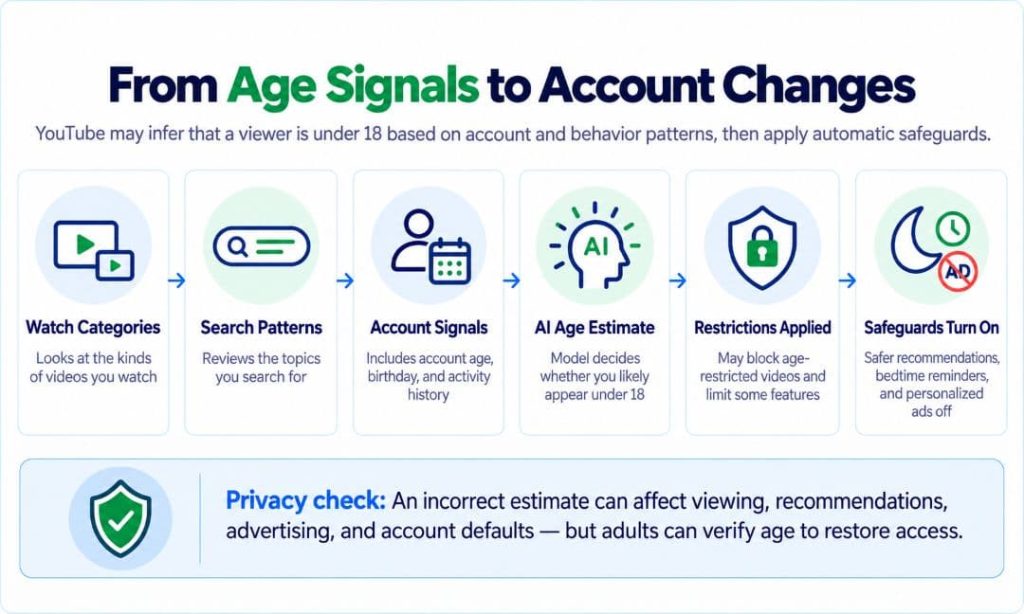
The graphic follows signals through classification to six viewer changes, plus creator defaults. Incorrect estimates can affect recommendations, advertising, viewing, and publishing.
What Happens to Your Data During Each YouTube Verification Method?
To learn how to verify age on YouTube, inspect the methods shown in your Google account. You may need to verify adulthood. However, not all methods are available everywhere. Email or digital ID verification may not be available. Each method follows a different process. Some require you to upload information directly, while others rely on automated analysis or checks against existing records. The sections below explain what happens at each stage, from submitting your information to receiving an age verification result, so you know what to expect before proceeding.
Government ID Verification: What Information Does Google Collect and Keep?
An ID for YouTube age verification reveals:
- Legal name.
- Date of birth.
- Document details.
- Sometimes an address.
Google requests a clear image showing all four corners. It says it deletes the image after success but saves the verified birthdate in the payments profile and updates the account.
You can mask some fields where Google specifically permits it:
- For Belgium, Google’s instructions permit users to cover the photograph and national registration number on their national ID.
- Dutch users must conceal the BSN and may cover the photo.
- Germany permits masking unnecessary information, including the photo or signature.
- Czechia also permits masking the birth number, photo, and sex while retaining required dates and name.
Check your country’s rules. Google may also conduct manual review and fraud checks. The Dutch BSN can appear more than once; mask every instance without hiding required details.
Selfie Verification: What Does Private ID Do with Your Face?
A YouTube age verification selfie goes through Private ID. Google sends a random identifier, not full account details; Private ID returns an eligibility result with that identifier.
Google says the image is deleted after assessment. Private ID describes its technology as using on-device processing, but users should read the actual terms shown during verification. Verification selfies avoid documents, not facial analysis; failed estimates may require another method. Google receives the result, not the selfie, under its stated process.
Unlike identity verification, facial age estimation does not need to establish who you are. It evaluates facial features to estimate whether you meet an age threshold. However, image deletion alone does not confirm whether temporary processing data or technical logs are also erased.
Credit Card Verification: Why Does a Free Check Still Create Privacy Risks?
To confirm age with a credit card, Google checks its validity. A temporary card authorization may remain for 1–14 business days. It’s not a fee, but banking records can persist. Google retains card information when legal or regulatory obligations require it. Releasing the hold does not necessarily erase transaction records.
These personal AI privacy risks aren’t limited to fraud or unauthorized charges. ClearNym helps reduce publicly listed information across 262+ broker sites, but cannot delete Google’s verification records or bank records.
Email Verification: What Can VerifyMy and Its Partners Learn?
Google shares the submitted email address with VerifyMy. Its partners search for earlier associations with different services.
VerifyMy says it deletes the address after the check. However, email verification involves third-party database matching. It introduces additional online privacy considerations. Inconclusive matches may require another verification method. Additionally, they do not prove that someone is underage.
How Long Does YouTube Keep Your Age Verification Data?
No single retention period applies across methods or resulting account records. A deleted file, expired card hold, and retained age outcome aren’t equivalent.
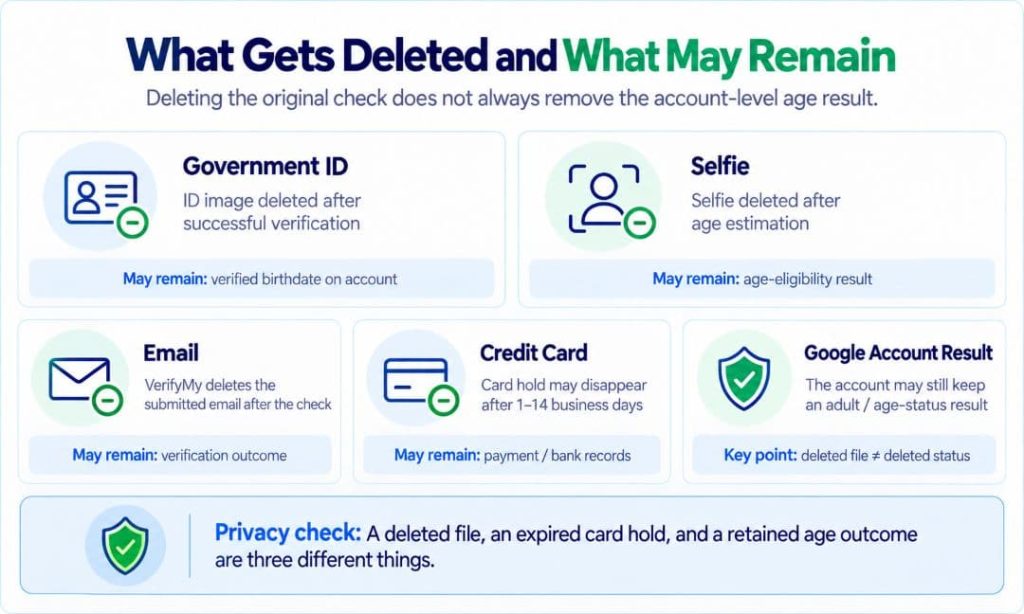
ID images are deleted after successful checks, selfies after estimation, and VerifyMy deletes submitted email addresses; card records may remain for legal duties. Google’s general deletion policy cites about two months for deletion. Backups need up to six months.
What Happens to Your Personal Data After Age Verification?
Successful verification can restore access. However, it doesn’t automatically delete your activity history. Use Google My Activity. Supported automatic-deletion intervals include 3, 18, and 36 months.
Deleting activity can change what Google uses to personalize recommendations. Changes to viewing history also don’t guarantee a different future classification. The model can consider other signals.
Does Deleting Your ID or Selfie Mean the Verification Data Is Gone?
No. The deleted photograph and the retained eligibility decision are separate. Don’t confuse this with Google’s account-age requirements. They mean a separate procedure for accounts deemed too young to manage has a 14-day correction window and potential deletion 30 days after disabling. Those deadlines don’t govern ordinary viewer checks.
Can Your Verified Identity Be Linked to Other Accounts or Data Broker Profiles?
Identifiers can link accounts without showing names publicly. Discussions about Reddit age verification debates raise similar concerns about linking personal information across different online platforms, especially where one email identifies several services.
Google doesn’t say it sells YouTube verification results to brokers. Don’t confuse possible data correlation with documented data sharing. Broker records may already include:
- Age range.
- Former address.
- Phone number.
- Relatives.
Lowering that exposure limits independent routes to identify someone.
Does YouTube Age Verification Depend on Your State or Country?
Yes. YouTube’s regional guidance lists the US, UK, Australia, Brazil, Canada, Singapore, Switzerland, and other markets. Methods differ. The UK’s Online Safety Act prompted tougher age checks, with an Ofcom enforcement milestone on 25 July 2025.
YouTube’s viewer guidance separately explains EU, UK, and Australian rules for restricted viewing.
To remove personal information appearing in public listings, ClearNym handles broker opt-outs and rescans, not IDs submitted to Google. Its service also cannot override a regional verification obligation.
For example, a user traveling from the US to the UK may encounter different age-check requirements even when using the same YouTube account. However, changing location does not automatically remove existing restrictions or unlock additional verification methods. Similarly, two adults living in the same country may see different options depending on their device and account eligibility.
What Should You Do If YouTube Incorrectly Flags You as Under 18?
Follow seven official steps:
- Identify the warning. Separate viewer classification from account-management age rules.
- Review birthday settings. Open Personal info and check the date.
- Correct errors. Google’s guide explains how to change your age on YouTube.
- Use official prompts. Never email a stranger your documents.
- Compare methods. Weigh facial, financial, and document exposure.
- Submit valid evidence. If verification fails, try another available method.
- Recheck access. If still restricted, follow Google’s Help guidance.
Searches for how to get past YouTube age verification or how to bypass YouTube age verification often promote risky tricks. Don’t submit someone else’s documents.
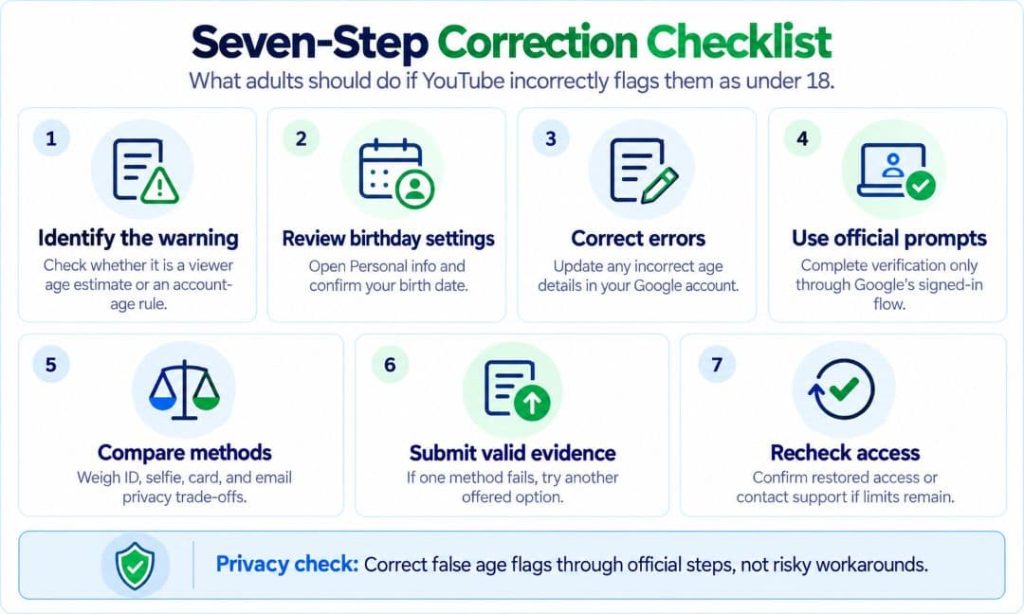
Seven steps cover:
- Warning.
- Settings.
- Correction.
- Official prompt.
- Method choice.
- Evidence.
- Access check.
This corrects false flags without invented workarounds.
How to Minimize Your Privacy Risks Before and After Verification
You can watch YouTube without age verification for general material. However, some videos are restricted to adults. Google says users who have been inferred or verified as over 18 may access adult-only videos. Viewers must be 18 to view age-restricted content that may be inappropriate for younger users.
Apply these seven precautions:
- Open the official sign-in flow directly.
- Read the verification provider’s privacy notice.
- Mask only officially permitted ID fields.
- Don’t reuse identity photographs elsewhere.
- Check public profile and activity settings.
- Enable two-step authentication.
- Search people-finder listings for exposure.
To remove your data from data brokers, ClearNym’s plans offer weekly rescans and repeat removals across 262+ sites. The initial scan is free; broker cleanup cannot delete Google’s internal verification data.
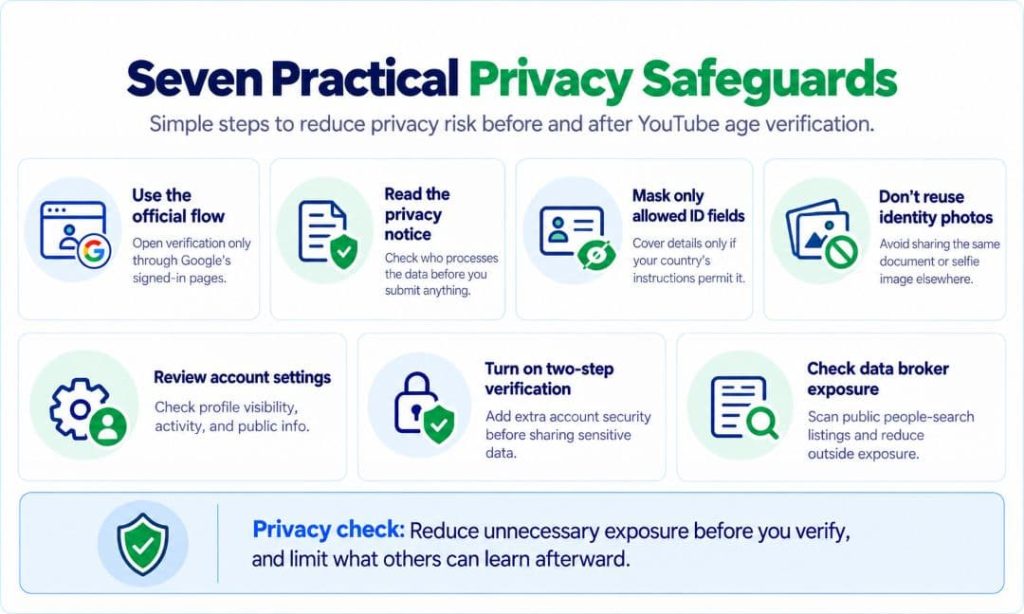
The visual summarizes seven security and disclosure precautions.
Key Takeaways
- Automated estimates can misclassify adults.
- IDs expose identity; selfies require facial analysis.
- Cards can create persistent financial records.
- Email checks consult third-party relationships.
- Deleting verification evidence doesn’t necessarily erase the account’s age eligibility result.
- Careful redaction and broker opt-outs reduce exposure.
Verify legitimately, minimize disclosure, and reduce unrelated public exposure.
FAQ
A mismatch doesn’t automatically mean rejection. However, Google may request more evidence. Use genuine documentation, correct inaccurate profile information, and follow the instructions.
Yes. Fraudulent messages can imitate Google and request ID photographs or payment data. Google doesn’t collect age-verification documents by email; navigate directly to your signed-in account instead.
Completing verification doesn’t automatically display your legal name. Your channel name and other public profile details have separate visibility settings, which you should check in your account.
A VPN cannot change the age attached to your account or guarantee access. Changing your apparent location may trigger security checks and won’t reliably resolve an incorrect classification.
Yes, when legally required. Google may disclose retained information in response to valid government requests, including subpoenas or other legal processes. What can be shared depends on the data still stored.
References
- YouTube, “Extending Our Built-In Protections to More Teens on YouTube.” https://blog.youtube/news-and-events/extending-our-built-in-protections-to-more-teens-on-youtube/
- YouTube Help, “Understanding Age Estimation on YouTube.” https://support.google.com/youtube/answer/16422785
- Google, “Access Age-Restricted Content & Features.” https://support.google.com/accounts/answer/10071085
- YouTube Help, “Watch Age-Restricted Videos.” https://support.google.com/youtube/answer/10070779
- Private ID, “Age Verification.” https://privateid.com/age-verification/
- Google Privacy & Terms, “How Google Retains Data We Collect.” https://policies.google.com/technologies/retention
- Google, “Manage Your Google Data with My Activity.” https://support.google.com/accounts/answer/9784401
- Google, “Update Your Account to Meet Age Requirements.” https://support.google.com/accounts/answer/1333913
- Google, “Change Your Google Account Picture, Name & Other Info.” https://support.google.com/accounts/answer/27442
- Ofcom, “Online Age Checks Now in Force.” https://www.ofcom.org.uk/online-safety/protecting-children/online-age-checks-must-be-in-force-from-tomorrow
- ClearNym, “About ClearNym.” https://clearnym.com/about
- ClearNym, “Plans & Pricing.” https://clearnym.com/pricing

Posted by Ava J. Mercer