Opt Out Guides
ReversePhoneLookup Opt Out Guide
Privacy Writer
A. J. MercerAva J. Mercer
Updated
Read
5 min
If your details are available on the internet, a listing can expose your full name, home address, and phone number, creating a privacy risk and sometimes showing up in Google search results. ReversePhoneLookup is a reverse phone lookup service that typically pulls and displays records from public records and other data sources, plus commercial sources, and may connect to records and background check services. This guide gives you quick steps, screenshots to follow, official links, timelines, and troubleshooting so you can safeguard your privacy and remove your information with less guesswork.
How to opt out of ReversePhoneLookup
Go to the official form linked from reversephonelookup.com, enter your email address, name, and phone tied to the listing, complete the CAPTCHA, then confirm via a code/link; it usually takes 3-7 days for processing.
Checklist:
- Open the official form
- Enter identifiers (email/phone/name)
- Complete CAPTCHA/verification
- Confirm via code/link
- Save the confirmation email
- Set a reminder to re-opt-out
Find out if your private details were exposed

have already used our service
ReversePhoneLookup – Quick Facts
| Parameter | Value |
| Domain | reversephonelookup.com |
| Data Types | contact details, partial addresses, carrier/line type, possible social identifiers |
| Opt-out Methods | web form/email/mail |
| Identity Verification | code via email/SMS or confirmation email |
| Typical Response Time | 3-7 days |
| Re-listing Risk | medium |
This is a people-search data broker that provides access to public records and other data to aggregate and display available information about a phone number, including public records and background check references. Data from reversephonelookup.com may include basic information and can route users to intelius.com for detailed reports on a paid plan; it’s a service that allows quick searches using a crawler that scans records and other data sources.
Common data you may find:
- Full name
- Contact details
- Current and past locations
- Carrier and line type (landline)
- Relatives or household links
- Court records
- Social media profiles links
- Links to social media platforms
- Public data notes
Step-by-Step Guide
Open the official form
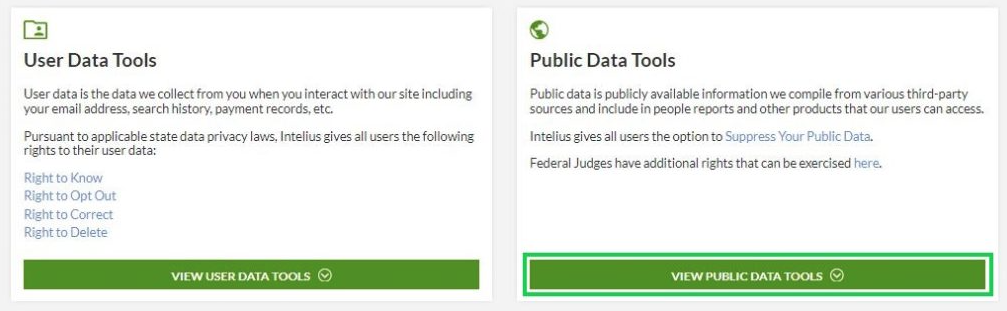
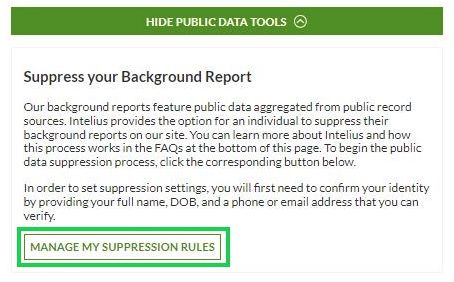
Start at reversephonelookup.com and scroll to the footer to find the privacy link (“Do Not Sell or Share My Personal Information”). This is the main route used by the data broker website. Tip: Use a fresh browser session and avoid autofill so you don’t paste extra personal information by accident. Take a screenshot for your records, but blur sensitive information and personal details.

Submit your identifiers (email/phone + CAPTCHA)
On the opt-out form page, enter your email address you can access, and the phone shown on the listing. Then, complete the CAPTCHA and press the submit button. If the form rejects formatting, try digits only or remove spaces/dashes. Tip: If the listing shows a private number or the line is unlisted, use the exact digits shown on the page.
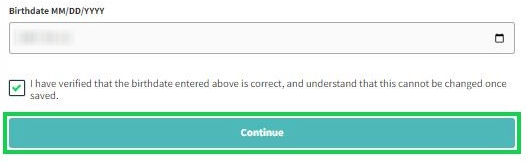
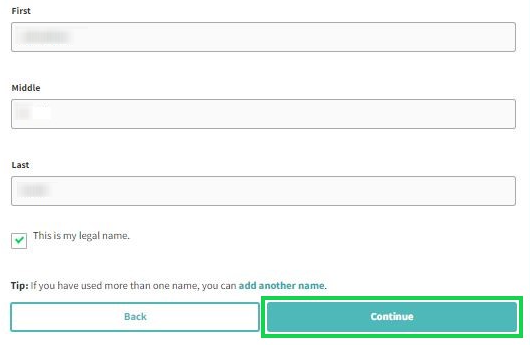
Verify via code or link (email/SMS)
After you send requests, look for a confirmation email. Tip: Check Spam and search for the sender address shown on the support page. Save the confirmation email as proof and store it. If a link opens a page that looks blank, try a different browser or copy/paste the URL into a new tab. Always redact identifiers before saving or sharing screenshots.
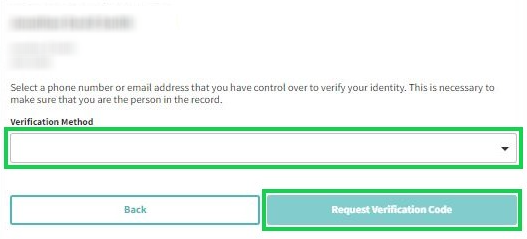
Confirm deletion / Do-Not-Sell request
Complete the final screen to submit the request. This is where you request information removed from public listings, which is separate from account settings. Avoid reloading the page repeatedly; give the portal time to finalize the submission.
Track confirmation & timeline
Create a simple dashboard with the date you submitted, any case ID, and your follow-up date (3-7 days). Tip: If nothing changes after 7 days, use the Contact page and keep notes (date/time, what you were told). Save the confirmation email and screenshots together so you can resend details quickly. If you have multiple listings across numerous sites, track each request separately to avoid mixing records. Plan to repeat checks every 3–6 months if your listing returns.
Timelines, Verification & What to Expect
A typical response can take 3-7 days after verification, depending on matching and processing across systems. Confirmation may appear on the final web page, by email, or both, so check your inbox and Spam folder. If you recently had a breach or are worried about identity theft, review other search tools and people-search listings that may expose personal information across multiple data broker pages. Privacy matters here: keep proof, track dates, and avoid sharing screenshots that show identifiers. For faster repeat checks, some users choose a service that removes data across many sites.
Edge Cases & Troubleshooting
- No access to the original email/phone: contact support and ask for an alternate verification path; don’t guess codes.
- “Record not found”: retry with digits only and confirm the number is likely active before you submit again.
- CAPTCHA or submission errors: clear cache, disable extensions, and try a different device or network.
- Verification code not arriving: check Spam, wait a bit, then request a new code once.
- Form rejects the request by region (EU/UK/CA): use the privacy rights page and ask for a region-appropriate process.
- Account deletion vs. public listing removal confusion: deleting an account does not always remove your info from listings.
- Re-submitting after a failed attempt: resubmit once, then keep the newest confirmation email.
Will my data reappear?
Yes, it can. Phone numbers are often refreshed from online sources, and third-party data brokers like resellers can republish records. Phone numbers can be used to reconnect listings when databases update, so if your number is likely to be re-posted, it may be because the number is listed in new records. Some sites sell your personal information, while others surface public data, sometimes without your consent, increasing the risk of unwanted contact. To reduce repeat exposure, keep your confirmation emails, resubmit quickly when needed, and set a 3–6 month reminder.
Related removals
- ReversePhoneCheck
- Intelius
- Whitepages
- Spokeo
- FastPeopleSearch
- TruePeopleSearch
- BeenVerified
Manual vs Assisted Removal
Manual:
- Pros: Control over each data broker request, including a data broker site; you can remove information directly and keep your own records.
- Cons: Time cost: you may need to remove information again across hundreds of data brokers; more effort to monitor re-listing and track every confirmation.
Assisted:
- Pros: A service that removes listings across many data broker websites, often faster; a personal information removal service can provide a tracking dashboard and recurring checks.
- Cons: Some providers use a paid plan; you may still need to verify details and review what you share.
“Excellent”
We remove your data for you - faster, verified, trackable.
Discover Which Sites Share Your Private Details—Instantly and Free.
have already used our service
FAQ
Receive expert privacy advice by email - 1-2 times per month, no fluff.
Share Article

Posted by Ava J. Mercer
Ava J. Mercer is a privacy writer at ClearNym focused on data privacy, data broker exposure, and practical privacy tips. Her opt-out guides are built on manual verification: Ava re-tests broker opt-out processes on live sites, confirms requirements and confirmation outcomes, and updates guidance when something changes. She writes with a simple goal - help readers take the next right step to reduce unwanted exposure and feel more in control of their personal data.
View AuthorMore Phone & Caller ID Lookup Removal Guides
- Addresses.com Opt Out Guide
- AllAreaCodes Opt Out Guide
- AmericaPhoneBook Opt Out Guide
- CallerSmart Opt Out Guide
- Find Who Calls You Opt Out Guide
- NumberGuru Opt Out Guide
- Numberville Opt Out Guide
- NumLookup Opt Out Guide
- PrivateNumberChecker Opt Out Guide
- ReversePhoneLookup Opt Out Guide
- SpyDialer Opt Out Guide
- Sync.ME Opt Out Guide
- Telephone Directories Opt Out Guide
- Truecaller Opt Out Guide
- USPhoneBook Opt Out Guide
- YellowBook Opt Out Guide
- Zlookup Opt Out Guide