Opt Out Guides
RevealPhoneOwner Opt Out Guide
Privacy Writer
A. J. MercerAva J. Mercer
Updated
Read
5 min
Removing your information from revealphoneowner.com matters because exposure of your name, address, and phone can elevate risk, including identity theft. The site aggregates information like basic contact details from public sources and the Internet and provides access to public records.
How to opt out of RevealPhoneOwner
Open the official page, input your first and last name, phone, and one email, then confirm via a link or on-page message. Processing usually takes a few days. California residents can also use the Do Not Sell/Share page; some data brokers collect and sell personal data across partners.
Checklist:
- Set a reminder to re-opt-out
- Open the official form
- Enter identifiers (email/phone)
- Complete CAPTCHA/verification
- Confirm via code/link
- Save the confirmation letter
Find out if your private details were exposed

have already used our service
RevealPhoneOwner – Quick Facts
| Parameter | Value |
| Domain | revealphoneowner.com |
| Data Types | contacts, addresses, basic identifiers |
| Opt-out Methods | web form / Do-Not-Sell page |
| ID Verification | confirmation letter or on-page notice |
| Typical Response Time | ~3–7 days |
| Re-listing Risk | medium |
About RevealPhoneOwner
The Reveal Phone Owner website offers a reverse phone lookup and people-search site that aggregates consumer records from public records and commercial sources. It provides access to public records, helps with online privacy requests, and operates in a broader ecosystem that includes data brokers focused on contact indices.
Common information you may find:
- Names (and known aliases)
- Phone numbers
- Email addresses
- Current and past addresses
- Age range/year of birth (if available)
- Relatives/household links
- Property records
- Court or bankruptcy filings (if available)
- Social media profiles
- Professional licenses/business references (if available)
Step-by-Step Guide
Open the official opt-out form
From the homepage, sign in only if prompted, then open Removal or Do Not Sell/Share (California). Use a secondary inbox for privacy and record the date. Blur sensitive fields in any screenshots. Tip: Keep the tab open until confirmation appears; data brokers often require precise form completion.
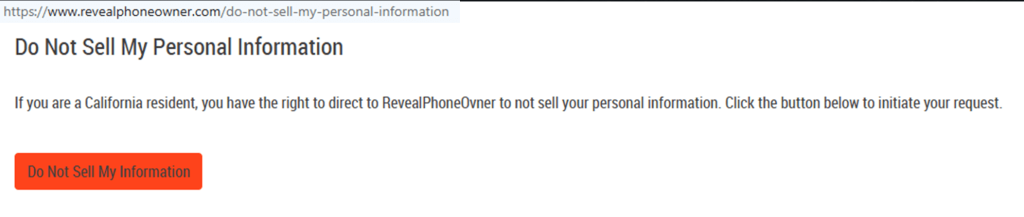
Submit your identifiers
Input your first and last name, the phone, and your email address. Complete any CAPTCHA, give brief consent to process the inquiry, and click the button. Tip: Note the time to track the digital trail. If you must cancel, stop before final confirmation.
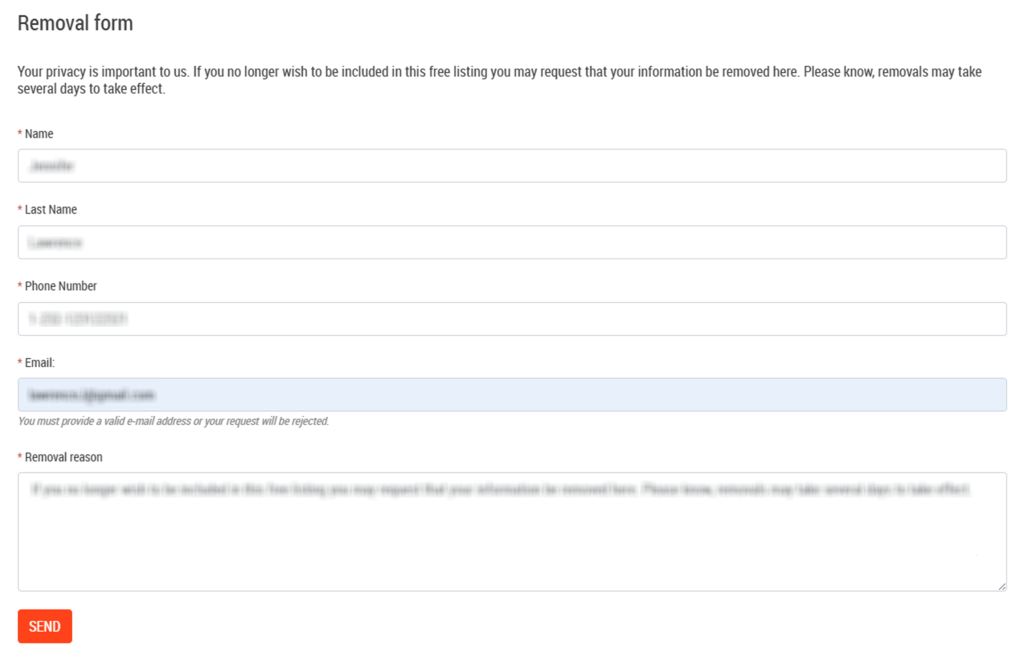
Verify via code or link (email/SMS)
After you send the form, watch for a short message asking you to verify via a code or link. Check Spam if nothing arrives within a few minutes. Do not forward verification messages. Tip: Capture a screenshot for your personal record; many data brokers treat screenshots as supporting evidence.
Confirm deletion/Do-Not-Sell request
Confirm the action on the page. If you are in California, use Do Not Sell/Share to instruct the service not to collect and sell personal data going forward. Provide only the minimum information needed to obtain confirmation. Tip: Keep copies for future reference; this aids data security.

Track confirmation & timeline
Most updates are complete in several days. Keep a small list with the date, application type, and any reference number. If the information persists after a week, revisit the site and resubmit once. Tip: Set a 3–6 month reminder to repeat checks; data brokers may refresh feeds periodically.
Timelines, Verification & What to Expect
Expect a practical window of about 3–7 days. Confirmation typically appears on the page immediately. If nothing happens after seven days, use the contact option, reference your prior application, and try one resubmission. Keep screenshots and any codes. California residents can also file a Do Not Sell/Share entry; both paths are processed in similar time frames. Save all confirmations so future checks are faster and more valuable to you, especially when coordinating across data brokers.
Edge Cases & Troubleshooting
- No access to the original information: use a current address and note the old number.
- “Record not found”: proceed; datasets refresh.
- CAPTCHA or submission errors: refresh, clear cache, try another browser.
- Verification not arriving: wait briefly, check Spam, then send once more.
- Region blocks (EU/UK/CA): use the corresponding page or contact support.
- Account deletion vs. removal: account changes differ from public data suppression.
- Re-submitting later: wait 24–48 hours, then make a concise follow-up request.
- Add a one-line note if your motivation involves privacy concerns or identity theft to clarify the purpose.
Will my data reappear?
Reappearance happens because partner feeds and resellers refresh from public information, and data brokers exchange datasets that are bought and sold. Some major data sources update often. Save confirmations, set a reminder every 3–6 months, and act quickly if a profile returns. Keep a tidy log of what you provide. Review your online presence, reduce exposure on social platforms, and avoid oversharing information like old numbers or addresses; these steps help improve your privacy.
Manual vs Assisted Removal
Manual:
- Pros: control, minimal cost, repeat monitoring on your schedule.
- Cons: time investment across many sites, tracking updates, and periodic checks.
Assisted:
- Pros: speed, expert verification, tracking dashboard, recurring sweeps.
- Cons: cost, less direct control, coverage varies by service.
“Excellent”
We remove your data for you - faster, verified, trackable.
Discover Which Sites Share Your Private Details—Instantly and Free.
have already used our service
FAQ
Receive expert privacy advice by email - 1-2 times per month, no fluff.
Share Article

Posted by Ava J. Mercer
Ava J. Mercer is a privacy writer at ClearNym focused on data privacy, data broker exposure, and practical privacy tips. Her opt-out guides are built on manual verification: Ava re-tests broker opt-out processes on live sites, confirms requirements and confirmation outcomes, and updates guidance when something changes. She writes with a simple goal - help readers take the next right step to reduce unwanted exposure and feel more in control of their personal data.
View AuthorMore Phone & Caller ID Lookup Removal Guides
- Addresses.com Opt Out Guide
- AllAreaCodes Opt Out Guide
- AmericaPhoneBook Opt Out Guide
- CallerSmart Opt Out Guide
- Find Who Calls You Opt Out Guide
- NumberGuru Opt Out Guide
- Numberville Opt Out Guide
- NumLookup Opt Out Guide
- PrivateNumberChecker Opt Out Guide
- ReversePhoneLookup Opt Out Guide
- SpyDialer Opt Out Guide
- Sync.ME Opt Out Guide
- Telephone Directories Opt Out Guide
- Truecaller Opt Out Guide
- USPhoneBook Opt Out Guide
- YellowBook Opt Out Guide
- Zlookup Opt Out Guide