Opt Out Guides
CallerSmart Opt Out Guide
Privacy Writer
A. J. MercerAva J. Mercer
Updated
Read
5 min
Removing data from online phone-book tools can reduce unwanted exposure of your name, address, and number. CallerSmart generally displays community phone records and user-submitted notes, and its policy describes using public records plus commercial sources to build listings.
How to opt out of CallerSmart
Open the official opt-out form, type your phone number and email, complete the on-screen check, and confirm with the code you receive. The instructions say the listing can change right after you verify, but allow 0–3 days for results to match across the site.
Checklist:
- Open the official form
- Type your identifiers
- Complete verification
- Confirm via code
- Save the confirmation email
- Set a reminder to repeat
Find out if your private details were exposed

have already used our service
CallerSmart – Quick Facts
| Parameter | Value |
| Domain | callersmart.com |
| Data Types | names, addresses, phone data, possible social identifiers |
| Opt-out Methods | web form (/opt-out) and data controls (/data) |
| Identity Verification | code via call/text or confirmation message |
| Typical Response Time | 0–3 days (often immediate after verification) |
| Re-listing Risk | medium |
This is a reverse lookup service and online directory business focused on number-based lookups. Its privacy policy says it collects and shares information like names, addresses, and social media accounts, sourced from public records, social media sites, and consumer data resellers.
Common data you may find:
- Name and known aliases
- Phone number
- Email address
- Current and past addresses
- Area and carrier details
- Relatives or household links
- Social media profiles
- User-added photo or notes
Step-by-Step Guide
Open the official opt-out form
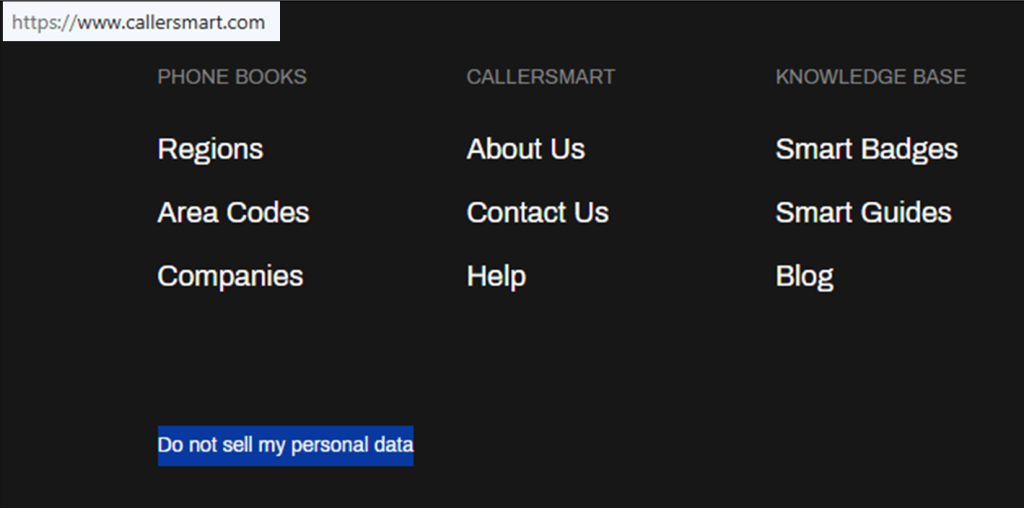
Visit callersmart.com and click the “Do not sell my personal data” button. Before you start, decide whether you want to suppress one listing or also clean up extra fields you added yourself. Take one screenshot for your records, and cover any personal data before sharing it anywhere.
Submit your identifiers (email/phone + CAPTCHA)
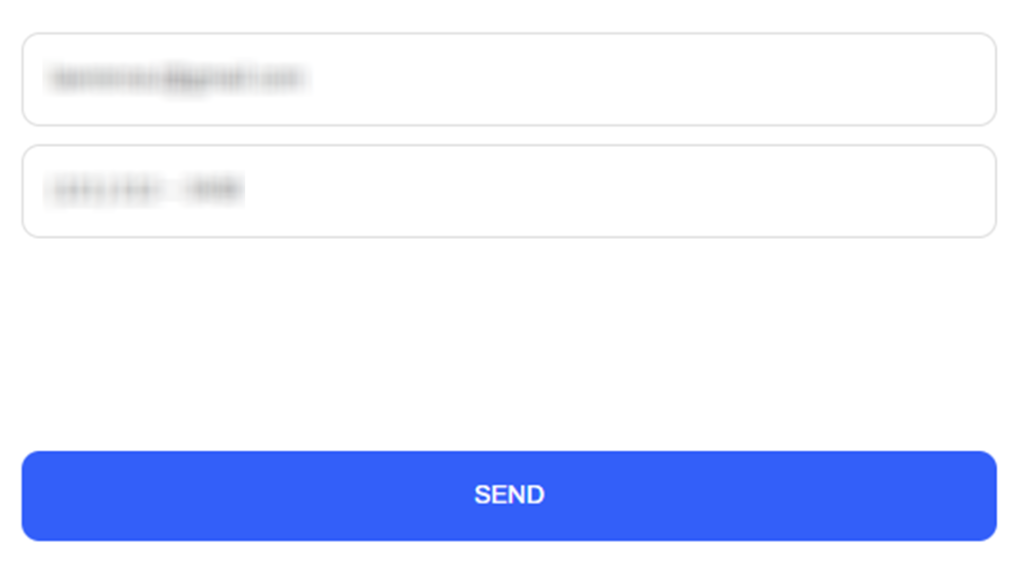
Fill in the required fields with your email and number. Then select the Send button to submit. If the form rejects the entry, try a different browser, and avoid autofill errors. If you changed the number recently, update the listing details first inside your menu. You should get an on-screen confirmation; save the date you submitted in case you need support later.
Verify via code or link (email/SMS)
A 6-digit code may arrive by text message or automated call. Enter it on the verification screen to prove you control the phone number. This ownership check helps prevent someone else from turning your listing off. If the code entry completes successfully, you should see a confirmation screen; if nothing arrives within 10 minutes, check Spam and try once more.

Confirm deletion / Do-Not-Sell request
After verification, check the listing status and switch it off if the control is available. If you created a public profile, check the settings and remove optional fields like a photo or notes. Keep one confirmation message and a screenshot so you can prove what you did and when. This also improves your trust factor if you need to reach support later.
Track confirmation & timeline
Most changes show quickly after verification, but give it up to 3 days. Do a fresh search for your number and confirm the listing is off. If it comes back, go back to the form and repeat the process with the same identifiers. On mobile, scroll to the bottom of the page to manage subscriptions; to cancel Premium renewal, do it at least 24 hours before the renewal time shown in your settings.
Timelines, Verification & What to Expect
You may see an on-screen confirmation right away and also get a confirmation message. The instructions indicate changes can be applied immediately after you verify, but it’s reasonable to allow 3 days for the listing to look consistent in the directory and app. If you still see the listing after 3 days, submit once again, then contact support through the form and include the date/time you submitted. These steps can help you protect your sensitive data.
Edge Cases & Troubleshooting
- No access to the original inbox/phone: sign in, change your login details, then re-verify on the form.
- “Record not found”: check formatting and try again later; some entries only appear after a new crawl.
- Submission errors: clear cache, try a different device, and avoid VPNs.
- Verification code not arriving: wait 10 minutes, try once more, and check Spam.
- Form rejects submission by region (EU/UK/CA): the web form may not apply; share brief feedback with support and ask for the closest available privacy option.
- Account deletion vs. listing removal: deleting an account is separate from turning off a public listing; verify the listing status.
- Re-submitting after a failed attempt: wait an hour and retry with the same identifiers.
Will my data reappear?
Listings can reappear when directories refresh from public databases, partner feeds, or reseller updates, or when users add new notes to a number. The risk is usually medium, so treat this as periodic maintenance: keep your confirmation message, set a 3–6 month reminder, and re-submit quickly if it shows again. You can also check similar people-search services to reduce re-posting.
Related removals
- Whitepages
- Spokeo
- TruePeopleSearch
- Intelius
- BeenVerified
- Radaris
- MyLife
Manual vs Assisted Removal
Manual:
- Pros: More control and faster for one listing; free and repeatable with reminders.
- Cons: Time investment and ongoing monitoring; you must track proof and follow up yourself.
Assisted:
- Pros: Faster handling, verification support, and tracking dashboard; recurring checks so you don’t miss re-listing.
- Cons: Paid service and less direct control.
“Excellent”
We remove your data for you - faster, verified, trackable.
Discover Which Sites Share Your Private Details—Instantly and Free.
have already used our service
FAQ
Receive expert privacy advice by email - 1-2 times per month, no fluff.
Share Article

Posted by Ava J. Mercer
Ava J. Mercer is a privacy writer at ClearNym focused on data privacy, data broker exposure, and practical privacy tips. Her opt-out guides are built on manual verification: Ava re-tests broker opt-out processes on live sites, confirms requirements and confirmation outcomes, and updates guidance when something changes. She writes with a simple goal - help readers take the next right step to reduce unwanted exposure and feel more in control of their personal data.
View AuthorMore Phone & Caller ID Lookup Removal Guides
- Addresses.com Opt Out Guide
- AllAreaCodes Opt Out Guide
- AmericaPhoneBook Opt Out Guide
- CallerSmart Opt Out Guide
- Find Who Calls You Opt Out Guide
- NumberGuru Opt Out Guide
- Numberville Opt Out Guide
- NumLookup Opt Out Guide
- PrivateNumberChecker Opt Out Guide
- ReversePhoneLookup Opt Out Guide
- SpyDialer Opt Out Guide
- Sync.ME Opt Out Guide
- Telephone Directories Opt Out Guide
- Truecaller Opt Out Guide
- USPhoneBook Opt Out Guide
- YellowBook Opt Out Guide
- Zlookup Opt Out Guide