Privacy Guides
Can You Still Protect Your Personal Data in the Age of AI?
See where your personal data appears online
Privacy Writer
A. J. MercerAva J. Mercer
Updated
Read
5 min
See where your personal data appears online
You can still protect your personal data in the age of AI, but only partially. AI systems collect and reuse data through prompts, logs, and AI model training data, often sharing it with vendors or data brokers. You can reduce your data exposure by limiting what you share, adjusting privacy settings, and using deletion rights.
Key Takeaways
- AI tools can collect user inputs such as prompts, files, device signals, linked-account content, and behavior patterns.
- Once records spread across vendors, logs, brokers, and caches, control decreases rapidly.
- Deletion rights help, but they do not always erase backups, model traces, or legal records.
- DIY cleanup works for small exposure; paid help fits recurring problems.
- Safer habits start before the first prompt: share less and review retention rules.
How to Estimate Your Personal AI Privacy Risk
Start with a plain audit of your habits. ChatGPT privacy is one example, not the whole story. The same pattern appears across artificial intelligence assistants, voice tools, smart devices, and office apps. One concern is hidden linking. Another is how data will be used. The importance of AI privacy grows when one clue connects to many others.
Use this checklist:
- Map every AI instrument you use: Include chatbots, editors, transcription apps, resume scanners, and smart speakers.
- List what you share: Note personal data, sensitive data, and any biometric data, such as a resume or ID file.
- Check controls: Look for switches for history, memory, and retention on your content.
- Review connected accounts: Email, cloud drives, browsers, and social logins often expand access to your personal data.
- Search yourself online: Look for broker listings, cached posts, and public files that raise your data exposure rate.
- Score the result: High risk usually means heavy sharing, public profiles, and weak control over your personal data.
What Kind of Data Do AI Tools Collect About You?
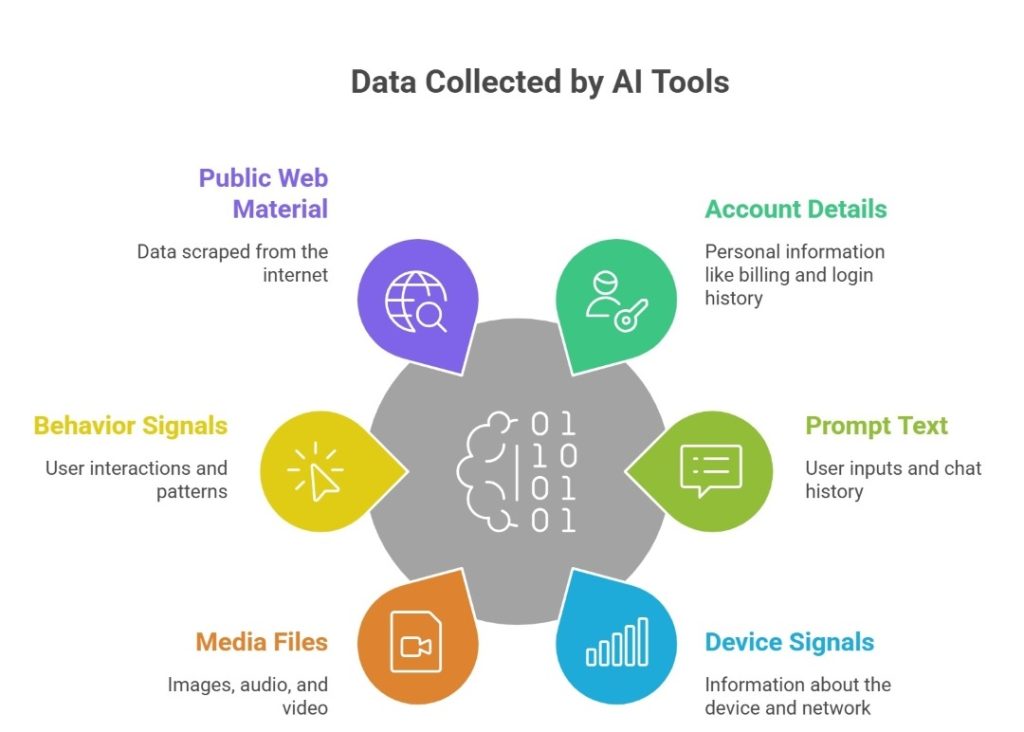
Most people think AI sees only the prompt. In reality, many AI technologies gather more than users expect. This may include account details, device signals, location clues, support messages, and linked files. Some tools also capture data collected through cookies, analytics tags, or app telemetry in data collection used for AI training. This is why privacy concerns with generative AI keep rising.
The common categories usually include the following:
- Account details, billing records, login history, and recovery information.
- Prompt text, chat history, uploaded files, voice notes, and saved memory.
- Device, browser, network, and rough location signals.
- Images, audio, and video that may expose homes, children, or biometric data.
- Behavior signals, such as clicks, timing, corrections, and usage patterns.
- Public web material copied through data scraping or broker records.
Where Your Data Ends Up (and Why That’s Hard to Control)
One upload can move into logs, review systems, backups, vendors, search indexes, and AI model training data. This makes later deletion incomplete and hard to verify. In many cases, each of these layers follows a different retention policy. For example, moderation logs may be stored for safety review, backups may persist for system recovery, and vendor systems may keep copies for debugging or compliance.
How Does Your Data Spread Across Platforms Without You Noticing?
A single file can trigger silent copying. One service may sync it to cloud storage, analytics tools, moderation vendors, or browser caches. Another may reuse the same record for debugging or safety review.
That is how AI-related privacy risks become routine. Small data points can be merged, indexed, and sold or repurposed for training AI systems.
Can You Force AI Companies to Delete Your Data?
Sometimes, yes. The answer depends on your location, the service, and the reason. In California, the California Consumer Privacy Act (CCPA) and the California Privacy Rights Act (CPRA) give consumers rights to know, delete, correct, and limit some uses of personal information.
The Federal Trade Commission (FTC) can act when companies mislead users or fail to protect consumer privacy. Those data privacy laws help. However, they do not promise total erasure from every AI system, log, or backup.
If you want the strongest result, your request should cover these points:
- Ask for access to your personal data, including categories, sources, and recipients.
- Request deletion of prompts, uploads, account content, and linked profile details.
- Ask whether your content entered the collection of training data or product testing.
- Opt out of sale, sharing, targeting, or model improvement where the service allows it.
- Request correction when wrong details could affect ranking, moderation, or profiling.
- Ask how long logs, backups, and de-identified records remain after deletion.
- Ask what data used for profiling or the processing of personal data is still ongoing.
Pew Research Center reports that about six-in-ten Americans want more control over how AI is utilized in their own lives.
How Do Data Removal Services Work?
Data removal services track where your details appear, send opt-out requests, follow up when records return, and document progress across brokers, people-search sites, search results, and other sources that can feed AI data, enable data sharing, or widen privacy and data exposure.
For example, Clearnym service removes personal information from Google and data broker sites, backed by a free trial and monitoring.
DIY Privacy Protection vs Paid Data Removal Services
Manual cleanup can work, but it is rarely one-and-done. Listings return, mirror sites copy profiles, and old records get sold again. DIY fits a small footprint. Paid help fits wider or recurring exposure. The table below shows the trade-off:
| Factor | DIY Approach | Paid Services | Best For |
| Cost | Low cost, manual steps | Subscription or annual pricing | DIY for small budgets |
| Effort | High time, repeated follow-up | Automation after setup | Paid for busy users |
| Coverage | Limited to sites you find | Broader broker scope | Paid for wider exposure |
| Speed | Slow, each request is separate | Faster parallel workflows | Paid for urgent cases |
| Effectiveness | Good for a few targets | Better on recurring removals | Paid for recurring exposure |
Why Some Data Can’t Be Fully Deleted from AI Systems
Even after deletion, traces may stay in logs, backups, legal archives, abuse systems, or security records after data leaks. That does not always mean a full profile is still visible, but it does mean perfect erasure is rare.
An AI model does not store every file like a folder, yet earlier inputs can still shape patterns or outputs. That is why requests to remove personal information usually reduce risk rather than erase every copy forever.
Simple Ways to Reduce Your AI Privacy Risk

Good habits still matter. Real AI data protection starts with data minimization before you upload anything. Good rules support AI and data privacy, including the protection of personal data. If a service cannot explain how personal data is handled, do not trust this service. Never share data without a need. Personal information removal services can help.
To cut day-to-day exposure, do the following:
- Turn off model training, memory, and long retention wherever possible.
- Never paste legal, medical, or financial files into unknown AI instruments.
- Strip metadata from photos and documents before sharing them.
- Remove old broker listings and cached pages that increase your data privacy risk.
- Use alias emails and strong, unique passwords for every AI account.
- Audit your connected apps every month. Revoke anything you no longer need.
- Classify sensitive data. Maintain separate work and personal channels.
What to Stop Doing Immediately (Common Mistakes)
Most privacy losses come from routine habits. A casual prompt can reveal names, schedules, employer details, or travel plans. In privacy in the age of AI, free tools are risky when the business model depends on vast amounts of data and vague consent. Many concerns about privacy start with one wrong assumption. The mistakes below keep exposure alive long after the first upload.
To avoid the biggest errors, stop doing these things:
- Pasting contracts, medical notes, or account records into public or unknown AI tools.
- Uploading family photos that expose faces, school badges, or home interiors.
- Linking inboxes, drives, or calendars without checking retention, sharing, and opt-out rules.
- Assuming deleted chats instantly vanish from logs, review queues, or AI model systems.
- Reusing one account across work, shopping, school, and social tools that all use AI.
- Ignoring broker sites after one opt-out, even when mirrors and resellers repost your details.
How Long Does It Take to Remove Your Data?
The removal time depends on the source, proof checks, and whether copies exist elsewhere. One easy opt-out may take days, while a wider campaign across brokers, caches, and search results can take weeks or months because site reviews vary widely. For example, account-level deletions are often processed automatically once identity is verified, while broker removals usually require manual approval on each site. Some platforms batch requests or delay action until verification cycles are complete.
How to Choose AI Tools That Don’t Abuse Your Data
Not every AI service treats user records the same way. Some explain retention, offer a real opt-out, and give clear time limits. Others hide behind vague language about safety or AI development. That difference matters for data privacy, security, and workplace AI use. It also matters for public trust in AI.
The National Institute of Standards and Technology (NIST) supports responsible AI governance throughout the AI lifecycle.
Before using AI tools, do quick research:
| Criteria | What to Look for |
| Data retention | Clear time limits, deletion windows, and notice about logs and backups |
| Opt-out | A visible toggle for model training or product improvement |
| Encryption | Protection in transit and at rest, plus controlled staff access |
| Transparency | Plain language on what is collected, why, and who receives it |
Red Flags That Signal Risky Tools

Poor-quality tools often show warning signs early. Bad AI practices in generative AI tools raise the risks of AI privacy violations and data breaches. They request broad permissions and provide a limited explanation, and can expose unauthorized data while ignoring people whose data is collected. They stay vague about vendors and retention. That creates privacy concerns because users cannot tell when one purpose becomes another. If the policy feels slippery, treat that as a serious concern.
Watch for these signs:
- No clear statement on whether chats or files feed model learning.
- No easy opt-out for model improvement, sharing, or marketing uses.
- Broad rights to reuse uploads in the development of AI or deployment of AI features.
- Silence about vendors, subprocessors, or cross-platform sharing.
- Hidden defaults that keep history on or expand permissions.
- Weak explanations of access controls, audits, or response plans for data breaches.
- No sign that the company can comply with privacy regulations or data protection rules.
- No detail on how it reviews AI bias or limits high-risk AI systems and the harms posed by AI.
FAQ
Yes. Group analysis can still identify a person. This happens when the location, timing, device signals, or purchase patterns are combined with broker files, posts, or other linked records.
AI can infer room layout, valuables, routines, family structure, employer details, and location clues. It utilizes reflections, metadata, background papers, and repeated visual patterns across shared images.
Yes. An AI system can learn sleep times, travel habits, household presence, and shopping cycles. It’s due to timing patterns, repeated requests, connected devices, and passive signals.
One deletion rarely reaches every copy. Records can survive in caches, broker databases, backups, mirrors, search indexes, vendor systems, or reused datasets.
They expand hidden profiling. Cookies and trackers can link sessions, devices, interests, and behavior, giving AI tools or their partners more context than you knowingly shared in one visit.

Posted by Ava J. Mercer