
Privacy Guides
How Do I Remove Negative Information About Myself from the Internet?
See where your personal data appears online
Privacy Writer
A. J. MercerAva J. Mercer
Updated
Read
5 min
See where your personal data appears online
To remove negative information from the internet, delete or edit the content at the source, then request Google to remove or update search results. Start by opting out of data broker sites that publish your personal details, and use removal services to scale the process. If deletion isn’t possible, reduce visibility by publishing accurate content that outranks negative pages and monitor search results for your name regularly.
Key Takeaways
- Start with broker listings because they feed new results.
- Audit names, images, PDFs, and profiles first.
- Deindexing changes visibility; deletion changes what exists.
- GDPR, CCPA, and Google help sometimes.
- When deletion fails, use authoritative content to bury negative search results.
- Keep monitoring because content recurrence is common.
- Review ClearNym’s opt-out guides to learn how to delete your online presence.
How to Audit Your Digital Footprint Before Sending Requests
Before you request the removal of a page, map the scope of the issue. Make sure the target URL is correct. Check images and documents. Save evidence early. Use this checklist:
- Search your full name, nickname, and misspellings in Google and one other search engine. Record each result.
- Search your phone, address, email, and old usernames in quotes to find personally identifiable information.
- Open each PDF and webpage, then mark it as live, stale, copied, or deleted.
- Record who controls the URL or any third-party host.
- Assess each page for career risk, harassment, defamation, negative review, or identity exposure.
- Save screenshots, dates, and the website’s policy page.
- Choose edit, delete, deindex, legal notice, or suppression.
- Track dates, status, outcome, each content removal request, and the average removal timeline.
The Census Bureau reported that 95% of households had a computer and 90% had broadband. This explains how quickly copied information from the Internet can spread.
What Kind of Negative Content Can Actually Be Removed?
Not every negative page can be deleted. However, many can be edited, deindexed, or reported. The best cases involve privacy exposure, stale records, impersonation, and policy violations. Google will not decide ordinary criticism disputes. If you want to remove negative content online, focus first on cases related to online privacy and content that data brokers sell. The following types of content are the most likely to be removed:
- Home addresses, phone numbers, emails, and similar private details on people-search pages.
- Stale PDFs or cached pages may be removed at the source, but remain visible.
- Doxxing pages, explicit imagery, hacked material, or blackmail-related posts.
- Old profiles and bios you still control.
- Defamatory posts, negative articles, or forum pages, when you can prove a policy breach, falsehood, or another legal ground, such as defamation.
The Difference Between Deindexing and Source Removal
Deindexing and source deletion are different processes. One changes visibility in search results. The other changes what still exists as online content. These are different ways to reduce exposure. Use this table:
| Approach | What It Actually Removes | Who Takes Action | Time to Effect | Best Used When |
| Source deletion | Live page or file | Website owner | Hours-weeks | You control it, or the publisher agrees |
| Noindex/X-Robots-Tag | URL from index | Website owner | Days-weeks | The page stays live, but not in results |
| Google policy removal | URL from Google index or limited display | Days-weeks | Private data or explicit material is involved | |
| Outdated Content tool | Stale URL, cache, or snippet | Often days | The source changed, but Google shows the old version | |
| Suppression | Position in results | You | Weeks-months | Lawful but damaging content stays live |
GDPR, CCPA, and the Right to Erasure Explained
The General Data Protection Regulation (GDPR) creates a right to erasure in defined cases, often called the “right to be forgotten.”
The California Consumer Privacy Act (CCPA) lets California residents request that covered businesses delete some personal data.
In the U.S., rights are narrower, so the result depends on location and the material involved. These laws are most effective when the data is no longer necessary, inaccurate, or processed without a valid legal basis. In practice, successful requests often involve personal identifiers such as home addresses, contact details, or outdated records that create risk or harm.
How to Remove Your Data from Data Brokers and People-Search Sites
Broker sites are the primary source of exposure. Even if you get a page out of Google, they may keep publishing it and getting it indexed again. Start here if you want to remove personal information fast and cut public exposure. For most people, this is the most effective first step.
Work through brokers systematically to reduce exposure. Find your listing, copy the URL, use the opt-out path, verify what is required, and document the date. Then recheck; some sites republish. ClearNym’s opt-out guides help you get rid of the most visible listings first and make removing personal data manageable when several addresses, aliases, or relatives are involved.
How Do Data Brokers Collect Your Personal Information?
Most people think broker sites only scrape social media. In reality, the flow is wider. Brokers combine public records, databases, web scraping, and purchased data. They also match names, relatives, and past addresses. Sources:
- Property, court, voter, and licensing records.
- Retail, loyalty, warranty, and lead databases.
- App and ad-tech data shared through partnerships.
- Scraped social networks and directories.
- Broker-to-broker resale.
- Old contests, subscriptions, and people-finder submissions.
How to Remove or Deindex Content from Google Search
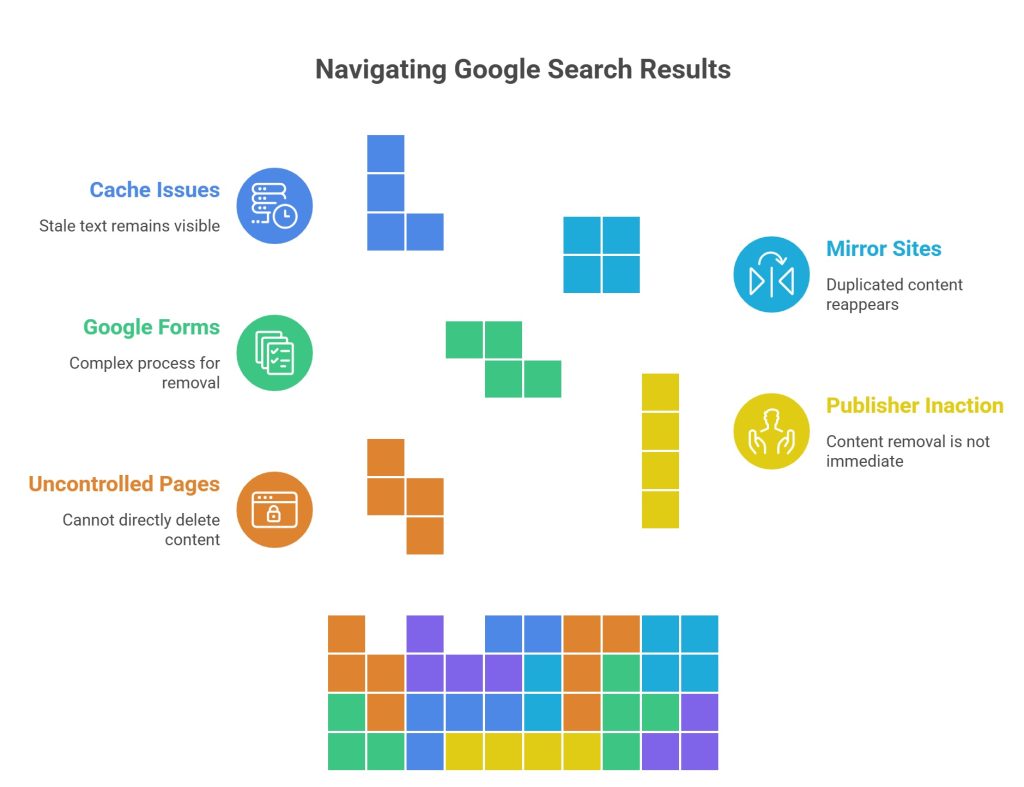
Google may hide some URLs, but it does not own most pages. Address the source first, then ask Google to delete what still appears. Use this process:
- Check whether the page is still live, changed, or already deleted.
- If you control it, delete it, or add noindex so the page from search can drop after recrawl.
- If you do not control it, ask the publisher to remove content or redact the data.
- Ask Google to remove private, explicit, or policy-covered material through its official forms.
- Use Google’s outdated-content removal tool when the source has already changed, but Google still shows stale text.
- Check weekly for mirrors, copied files, and cache issues.
According to Google, Results About You can help eligible users find and submit requests for personal contact details shown in Google Search. If you’re dealing with multiple listings or repeated issues, a service like ClearNym can help manage opt-outs and keep your data from reappearing.
Social Media, News Sites, Forums, and Archives Removal
Social media platforms are often the fastest place to edit. You may control the post or social media profile. Use privacy settings to limit discovery on social media sites. Social media accounts can often be cleaned, but news articles, news stories, forums, and archives usually need policy or suppression.
Pew Research Center found that 68% of American adults used Facebook and 47% used Instagram. This is one reason personal profiles often rank quickly in Google search results.
Mugshot Sites, Doxxing Pages, and Exploitative Removal Practices
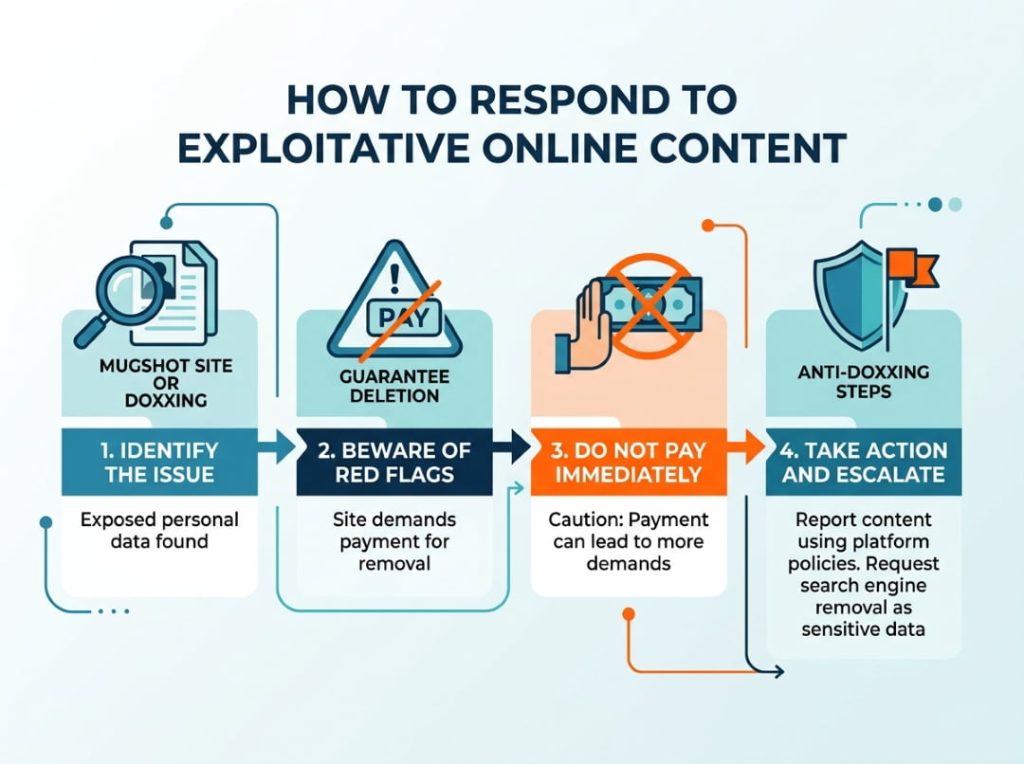
Exploitative sites often sell fear. Be cautious if an operator demands payment or promises deletion. For doxxing or exposed private details, treat the issue as sensitive information and escalate quickly; addressing such content early can speed review. If a site asks you to pay for removal, don’t rush. These requests are often part of the business model. Instead, try reporting the content through platform policies or search engine removal tools first, and follow basic anti-doxxing practices.
DIY vs. Removal Service vs. Reputation Agency
There is no perfect choice for every case. DIY works for old profiles and broker listings. Automated help works when you need scale. Reputation work matters when online reputation management includes outreach and suppression. Compare personal information removal services by coverage, labor, and limits:
| Approach | Monthly Cost | Brokers Covered | Hours Per Month Required | Best For | Red Flag Threshold |
| Full DIY | $0-$100 | 10-50 | 5-12 | Low exposure | Too weak after several bad results rank |
| Automated service | $10-$80 | 50-250+ | 1-4 | Routine needs | Weak for forum takedowns or removing negative press |
| Mid-tier ORM | $300-$1,500 | 50-200 | 1-3 | Professionals with employer background risk | Often not enough for major defamatory coverage or to remove bad press |
| Full-service ORM firm | $2,000-$10,000+ | 100-300+ | <1 | Executives and victim cases | Use when one page can affect hiring |
Realistic Timelines and Outcomes After Submitting Requests
Many people expect instant deletion. Brokers, publishers, and Google move at different speeds. Some links drop in days, while copied URLs linger. Measure milestones. Use this checklist:
30 days:
- Self-controlled pages edited or deleted.
- First broker opt-outs submitted.
- First Google forms filed.
- Tracker built for rankings and duplicates.
90 days:
- Many broker profiles gone or suppressed.
- Stale snippets refreshed.
- Early positive content replaces weaker content.
- Clear drop in visibility for the worst pages.
180 days:
- Repeat opt-outs sent where needed.
- Suppression assets rank for name queries.
- Long-term problem pages identified.
- Stable process in place to mitigate the damage.
How to Suppress Negative Content You Cannot Remove

Some pages are lawful and hard to delete. Then the goal shifts from removing negative content to outranking negative results. That is how to suppress negative search results. You need high-quality pages that deserve to rank and support a positive public image. This is the best route for minimizing the impact. Use these tactics:
- Expand your site with a bio and FAQ.
- Publish positive information on assets you control.
- Distribute press releases to introduce accurate, current narratives.
- Claim key directories and keep profiles consistent.
- Improve LinkedIn, portfolio, and association pages.
- Earn authoritative mentions from interviews and partner pages.
- Link your controlled assets for Google to understand identity clearly while putting in the work.
How to Monitor Your Digital Footprint Ongoing
Cleanup is not a one-time process. New copies and old files may reappear over time. A simple monthly routine protects your online presence and reputation. If you use data removal services, combine them with manual checks. Include:
- Monthly name checks in Google, images, videos, and documents.
- Quarterly checks on broker sites and major networks.
- Review of your profiles after major life changes.
- Updates so positive content stays competitive.
- Measures to protect relatives whose exposure may reopen yours.
FAQ
Because PDFs often contain exact-match names in a stable format, they can keep ranking in Google until the file is deleted, deindexed, or refreshed.
Yes. If the page reveals private data, impersonates you, or makes defamatory claims, you may still get edits when it mentions your workplace by name.
Usually, contact the website owner first. Hosts rarely intervene unless the material is illegal content, abusive, or tied to doxxing, fraud, copyright, or another violation.
Sometimes. Permanent deletion requires source removal, refresh, and duplicate cleanup. Reposts, mirrors, and archives can survive after the original page disappears from public view.
Send a second documented request, keep records, check state rights, and continue suppression. If one broker ignores you, focus on higher-traffic sites. However, continue escalating through opt-out channels.

Posted by Ava J. Mercer