
Privacy Guides
Is ChatGPT Private? What You Need to Know
See where your personal data appears online
Privacy Writer
A. J. MercerAva J. Mercer
Updated
Read
5 min
See where your personal data appears online
ChatGPT is not fully private by default. Your chats, prompts, and metadata may be stored and, in some cases, used to improve AI systems unless you change your privacy settings. You can reduce exposure by disabling chat history, limiting sensitive inputs, and deleting data, but some retention (e.g., up to 30 days) and legal storage may still apply.
Key Takeaways
- Consumer AI chats can be stored unless settings change.
- Temporary mode lowers exposure, but logs can remain for 30 days.
- Work plans are safer because business data is not used for training by default.
- The dangers of using ChatGPT begin when sensitive information is entered into a public AI chatbot.
- ChatGPT content cannot be removed directly, but we can reduce public AI/web exposure.
How to Tell if ChatGPT Can Share Your Data
Many users hear about ChatGPT privacy concerns and assume prompts are confidential. ChatGPT may use consumer content unless you opt out. Real user data control starts with privacy controls, memory, and shared links.
What you can do right now:
- Check your plan: Consumer and work versions store data differently.
- Review Data Controls: Turn off training for new prompts.
- Check memory: Saved memory can persist across conversations.
- Review shared links: One URL can expose a ChatGPT conversation.
- Search yourself online: Identifiable information on broker pages can feed later AI answers.
- Use non-sensitive data only: This keeps your profile more anonymous.
ChatGPT and similar AI tools can learn from both what you type and what already exists about you online. If your personal data is publicly available, it can be processed, stored, or show up in future AI responses. That’s why it’s important to reduce what’s out there.
We help remove your information from data brokers and public websites to lower that risk. We don’t remove personal data directly from ChatGPT, but reducing your online footprint makes your data less likely to appear in AI systems.
Find out if your private details were exposed
What Data Does ChatGPT Collect and Store?
ChatGPT’s privacy policy says the service can aggregate account, content, technical, usage, and billing data. The service can collect data based on what you type, what device you use, and how you interact. The exact data collected varies across different versions of ChatGPT.
The main categories are:
- Content data: Prompts, files, images, replies.
- Account information: Email and plan details tied to your ChatGPT account.
- Log data: IP, browser, timestamps, and actions.
- Billing records: Limited payment details for ChatGPT Plus.
- Support data: Information submitted in support requests, feedback, or reports.
- Memory signals: Saved preferences and history features.
Is Your Data Stored Permanently or Temporarily?
Normal chats stay until you delete them. OpenAI says deleted chats are generally scheduled for removal within 30 days, unless they were already de-identified or kept longer for legal or security reasons.
A temporary chat is different. It does not appear in ChatGPT history, is not used for model training, and may be deleted within 30 days, though limited abuse review can still happen.
Is ChatGPT Private by Default?

For most personal users, no. OpenAI offers controls, but you must enable them manually. In consumer versions, free and Plus accounts can still allow improvement by default. It is not designed for strict privacy on personal plans. There is no universal ChatGPT confidential mode for private or confidential information. This may raise privacy and security concerns.
A safer baseline looks like this:
- Use Temporary mode for prompts you do not want saved in visible history.
- Turn off model improvement if you do not want new content used to train the AI.
- Review privacy settings after updates.
- Avoid sharing sensitive data in consumer chats.
- Use a business or enterprise plan for work-related tasks.
- Delete old chats you no longer need.
Can ChatGPT Leak Your Data or Be Accessed by Others?
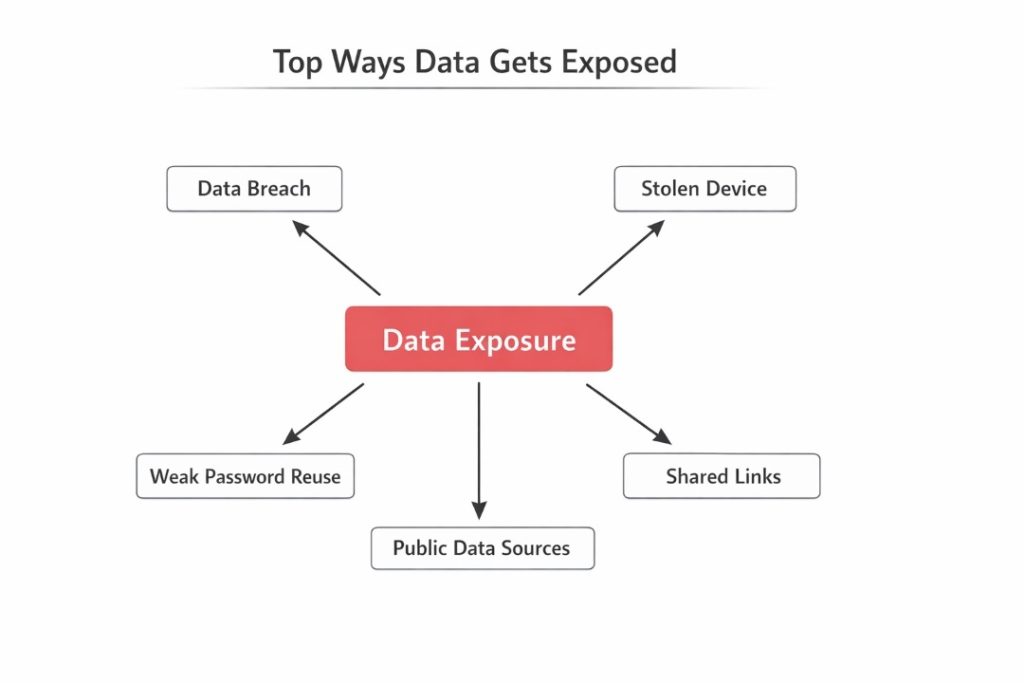
Yes. A breach, a stolen device, a reused password, or a shared link can expose data that felt sensitive. OpenAI says access is limited and logged, but no system removes all risk.
That is why data security depends both on the provider’s security measures and your own habits. Data removal services can still cut exposure from public sources that feed into platforms like ChatGPT.
What You Should Never Enter into ChatGPT
The conversation box feels casual, but a prompt is still data you submit. If a future breach would hurt you, do not paste it. This is the simplest safeguard. Treat every ChatGPT prompt as public and keep each conversation low-risk.
Use this checklist before you paste anything:
- Passwords or recovery codes: Never share login secrets.
- Banking records: Do not enter a credit card number.
- Full medical files: Detailed records contain sensitive information.
- Legal or HR files: These often include confidential information.
- Client material: Sensitive business plans should stay out of consumer tools.
- Government IDs: Passport and tax numbers raise identity theft risk.
- Board notes: This is confidential data; avoid sharing this type of confidential material.
Safe Usage Rules for Work, Finance, and Personal Data
You can use AI safely if your workflow stays simple. The goal is to cut avoidable exposure, not stop using AI tools. AI tools work best with redacted inputs, and summaries are safer after cleanup. ChatGPT or any AI should receive only the minimum data required. Share as little information as necessary with ChatGPT to limit potential risks.
To lower risk, follow these rules:
- Redact names and unique identifiers before you share with ChatGPT.
- Summarize source files instead of uploading originals.
- Use encrypted and secure channels for internal transfers.
- Prefer business plans with privacy safeguards.
- Secure your device so nobody can access your chats.
How to Delete Your ChatGPT Data Step-by-Step
Deletion reduces what stays visible inside your account. If you are looking up how to delete chats in ChatGPT, the steps are simple. OpenAI says deleted chats leave the interface right away and are usually scheduled for deletion within 30 days. That matters for data retention. Does ChatGPT offer full cleanup? No.
Use this process:
- Open the ChatGPT sidebar or app menu.
- Find the conversation you want to remove.
- Click the three-dot menu.
- Select Delete and confirm.
- Review shared links and memories separately.
- Start account deletion from settings for a full reset.
Chat Deletion vs Account Deletion: What’s the Difference?
These actions do different jobs. Deleting one thread targets one record. Deleting your account is broader and affects access, billing, and linked data. Memories and shared links may need separate review. One deleted thread does not guarantee complete removal.
Use this comparison:
| Action | Main Effect | What May Remain |
| Delete chat | Removes one visible chat | Other chats, memories, or shared links |
| Archive chat | Hides the thread | The conversation still exists in your account |
| Delete account | Schedules wider deletion | Some records may remain for legal or security reasons |
ChatGPT Privacy vs Other AI Tools
AI products do not follow a single standard. Some consumer systems may use content for improvement unless settings change. Many business tools block training by default and offer stronger data protection terms. AI defaults vary across AI tools, AI plans, and AI memory features. Personal information removal services matter because public pages can shape outputs across providers. Compare storage, memory, and training defaults to improve privacy.
This quick table shows the difference:
| Tool type | Training Default | Privacy Profile |
| Consumer ChatGPT | May use content for improvement unless you opt out | Low-risk drafting |
| ChatGPT enterprise or business | Business content not used for training by default | Internal work |
| Other consumer chatbots | Varies by vendor | Read the policy |
| Company AI assistants | Depends on the contract and setup | Often stronger with IT |
OpenAI trust report lists 75 content requests and 224 non-content government requests for user information in July-December 2025. This shows that legal access requests are a real part of AI platform operations.
Legal Perspective: Your Rights Over ChatGPT Data
Depending on where you live, you may have rights to access, delete, correct, transfer, restrict, or object to the processing of your data. OpenAI describes these rights for users in several regions.
Those rights are useful, but not unlimited. Some records can be kept for legal duties, fraud prevention, or service integrity. Full privacy still begins with what you choose not to upload.
Hidden Risks: Prompt Injection & Indirect Data Exposure
Not every leak starts with your own prompt. Modern AI workflows can pull risky instructions from a webpage, file, or connected tool. The Open Worldwide Application Security Project lists prompt injection as a top risk. The National Institute of Standards and Technology warns that indirect prompt injection can cause systems to reveal or misuse data.
The main hidden risks are:
- Malicious files that try to redirect an AI model.
- Connected apps that widen access to email or drives.
- Oversharing long context blocks.
- Broad permissions that expose large amounts of data at once.
- Public pages that stay available for scraping.
What Happens If Your Data Is Exposed?
Exposure often begins with a copied prompt, shared link, or weak login habits. Once text leaves your control, it can be forwarded, stored, and mixed with other leaks. If the material includes financial data or login clues, damage can move fast.
Use this risk map:
| Risk Type | How It Happens | What Data Is at Risk | How to Prevent It |
| Account takeover | Reused password or stolen device | Conversation history and profile data | Strong login habits |
| Public oversharing | Shared links or copied outputs | Personal context and identifiers | Redact first |
| Internal misuse | Broad access or weak governance | Work prompts and private files | Limit roles |
| Fraud follow-on | Exposed data mixed with other leaks | IDs and contacts | Change credentials |
Identity Theft and Profiling Risks
Once personal facts spread, they can be combined into a stronger profile. A work title from one page, an address from another site, and a copied prompt can support fraud. ChatGPT could also surface facts you forgot you shared. For many users, ChatGPT has become a daily AI habit.
Watch for these risks:
- Identity theft is built from names, emails, and recovery clues.
- Social engineering after attackers learn your role or routines.
- Reputation harm when a prompt is quoted without context.
- Repeat exposure when one breach leads to later data breaches.
The Federal Trade Commission noted that it received more than 1.1 million identity theft reports.
Long-Term Digital Footprint Impact
The long-term problem is persistence. Even if one copy disappears, related copies, summaries, exports, or reposts may remain. Old copies can also resurface in search results later. That is why the safest habit is to remove your personal data from public sources early. Keep future AI prompts as lean as possible.
Long-Term Privacy: What Happens to Your Data Over Time?
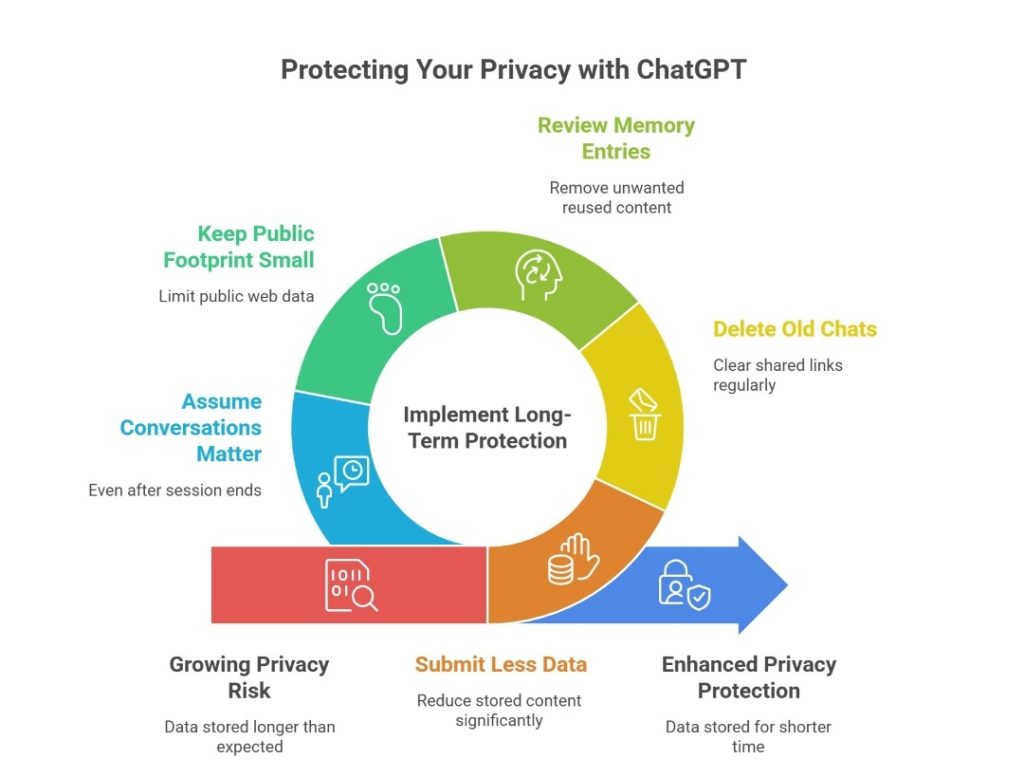
Privacy risk grows slowly. One harmless prompt can look different when mixed with later records. OpenAI says normal chats stay until you delete them, and some records may be stored longer for safety or legal reasons. Memory, shared links, copied outputs, and backups can extend one disclosure. Keep inputs lean and treat ChatGPT as a tool that can keep AI context longer than you expect. Memory features and sharing settings significantly affect privacy.
For long-term protection:
- Submit less data, so less content stays stored.
- Delete old chats and clear shared links regularly.
- Review memory entries and remove what you do not want reused.
- Keep your public footprint small because public web data can train later AI systems.
- Assume conversations may still matter even after a session ends.
We remove your data for you - faster, verified, trackable.
Discover Which Sites Share Your Private Details—Instantly and Free.
FAQ
Use AI for general education, not diagnosis, treatment, or records. Keep details minimal. Avoid medical files and do not rely on consumer chat for care decisions.
Yes. AI can infer context from wording, memory, and prior patterns. Replies may feel personalized even when the system is only predicting from signals.
Yes. Providers can receive lawful government requests. OpenAI publishes transparency data showing content and non-content requests. The platform says it reviews them for legal compliance.
Yes. Public networks raise exposure if your device or session is weakly protected. Avoid sensitive prompts there and secure your account and browser online.
OpenAI says access is limited to authorized personnel on a need-to-know basis, logged internally, and subject to training; in some cases, human reviewers can inspect content.

Posted by Ava J. Mercer