
Opt Out Guides
JailBase Opt Out Guide
Privacy Writer
A. J. MercerAva J. Mercer
Updated
Read
5 min
If a mugshot image or arrest record appears in Google search results, it can expose your name, address, and phone number, harming your online reputation and online presence. JailBase is a website that publishes booking photos and related public data gathered from public record sources and police department websites.
How to opt out of JailBase
Go to the official page and submit your email and mobile number, then verify via a code or link. Confirm the removal request on the page. Processing may take up to days; if your mugshot appears again, resubmit. This works for a mugshot or arrest record found via a Google search on a mugshot site.
Checklist:
- Open the official form
- Enter identifiers (email/phone)
- Confirm via code/link
- Save the confirmation email
- Set a reminder to reopt-out
Find out if your private details were exposed

have already used our service
JailBase – Quick Facts
| Parameter | Value |
| Domain | jailbase.com |
| Data Types | contacts, addresses, arrest details, case numbers, possible social identifiers |
| Opt-out Methods | web form |
| Identity Verification | code via email/SMS or confirmation email |
| Typical Response Time | up to 90 days |
| Re-listing Risk | medium |
About JailBase
The platform is a people-search style site that aggregates and displays public information related to arrests from public records and commercial sources. It shows booking details to help users find public information. It is not a court or law enforcement agency and functions as a directory that lists publicly available data.
Common data you may find:
- Names and known aliases
- Booking images and arrest details
- Age range or year of birth
- Current and past addresses
- Relatives or household links
- Case numbers or basic court references (if available)
- Arrest date, location, and agency
- Links to public sources
- Basic contact details (if available)
- Notes on disposition (e.g., expunge status, if provided)
Step-by-Step Guide
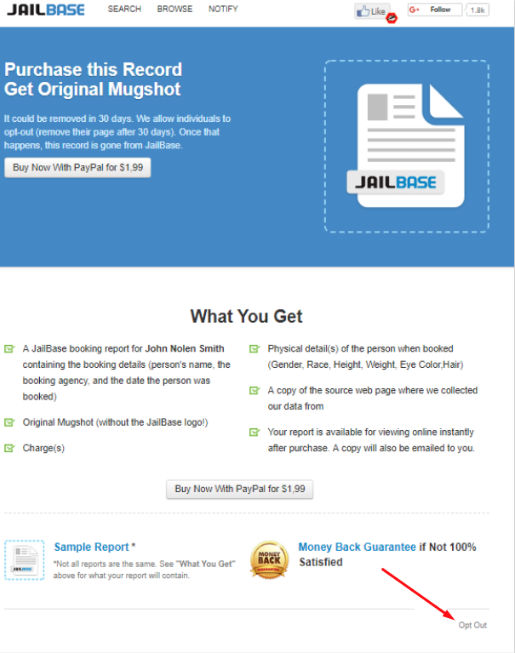
Open the official opt-out form
Open the official form on the site’s privacy or content removal page. Look for the corresponding option at the bottom of the page. Review the terms and conditions and any removal policy notes before you proceed. If the listing is on several websites, keep the website’s tab separate to avoid confusion. Tip: Bookmark the page so you can repeat it if needed. If you have a criminal defense attorney, you may ask them to confirm the correct page.
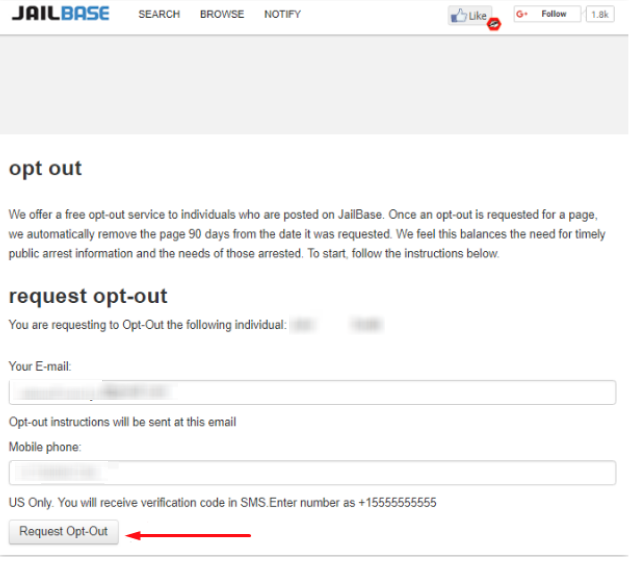
Submit your identifiers (email/phone)
Enter your email address and a mobile phone number. Provide the exact profile URL if asked, so the website owner can locate the mugshot online. If the form has a notes field, mention if the criminal record was expunge-eligible or if the arrest records online are outdated. Tip: Use a dedicated inbox to manage messages and record removal confirmations.
Verify via code or link (email/SMS)
Check your inbox and SMS for a verification code or link. If it doesn’t arrive in a few minutes, check Spam/Promotions. Enter the code exactly as shown to confirm the removal process. If you need to remove a booking photo because charges have been dropped, attach supporting documentation if requested. Tip: Keep screenshots, but blur personal information online before saving.
Confirm deletion / Do-Not-Sell request
On the confirmation screen, submit the request for removal and note any on-page ticket or case number. If they ask for a reason (e.g., remove your arrest records due to an expunge), state it briefly. Some mugshot removal laws restrict sites that charge a fee; avoid paying third parties. Tip: If you want to remove listings from multiple websites, repeat this step per site, including arrests.org.
Track confirmation & timeline
Save the confirmation email and calendar a reminder to verify the search results for your name in the search engine results. If you need to remove your mugshot from Google or get a mugshot removed faster, you can also submit to Google results tools when the page is taken down. Keep copies in case you need to follow up through a news website or a website that publishes public data. Add a note when you see information removed or caches updated.
Timelines, Verification & What to Expect
Most requests are completed within 90 days. You’ll usually receive a confirmation on the page and by email after verification. Listings may linger in cached results temporarily. Once the page is updated, they should drop off in a normal crawl cycle. If nothing changes, revisit the form. Resubmit once and consider contacting support via the site’s contact form. If you need something removed sooner, request temporary suppression from the search engine after the listing is removed at the source. If you previously used mugshot removal services, check their dashboard for updates to confirm mugshots removed. Keep all confirmation messages to streamline any follow-up record removal or removal of a mugshot later.
Edge Cases & Troubleshooting
- No access to the original email/phone: Use a new email, mention the old one in notes, and provide URLs.
- “Record not found”: Paste the exact profile link or upload a screenshot with the URL bar visible.
- CAPTCHA or submission errors: Refresh, switch browsers, or try mobile data/VPN off.
- Verification code not arriving: Check Spam; wait 10 minutes; resend once; verify number.
- Form rejects the request by region (EU/UK/CA): Use the site’s privacy request path and select regional rights.
- Account deletion vs. public listing removal confusion: Deleting an account or trying to cancel doesn’t remove listings. Submit an opt-out separately.
- Re-submitting after a failed attempt: Wait 24–48 hours, then re-try with complete details.
Will my data reappear?
Listings can return because aggregators, partner feeds, and resellers refresh from public record sources and online databases. Even after you erase mugshots on one platform, they may resurface elsewhere. Keep confirmation emails, set a reminder every 3–6 months to re-check, and repeat the request if needed. If you want to remove broader traces, monitor related mugshot removal websites and data broker listings. Keep proof if you need to request the removal quickly again. When a mugshot removed from Google takes time, verify that the source page is gone first, then re-crawl requests can help you remove your personal mugshot from Google if eligible.
Manual vs Assisted Removal
Manual:
- Pros: Full control over each request, no cost, direct view of what’s removed, and you decide when to repeat monitoring.
- Cons: Time-consuming across several websites, requires tracking confirmations, and you must re-check periodically.
Assisted:
- Pros: Faster workflows, verification handled for you, tracking dashboard, recurring checks across multiple sites.
- Cons: May charge a fee, still relies on source sites’ policies.
“Excellent”
We remove your data for you - faster, verified, trackable.
Discover Which Sites Share Your Private Details—Instantly and Free.
have already used our service
FAQ
Receive expert privacy advice by email - 1-2 times per month, no fluff.
Share Article

Posted by Ava J. Mercer
Ava J. Mercer is a privacy writer at ClearNym focused on data privacy, data broker exposure, and practical privacy tips. Her opt-out guides are built on manual verification: Ava re-tests broker opt-out processes on live sites, confirms requirements and confirmation outcomes, and updates guidance when something changes. She writes with a simple goal - help readers take the next right step to reduce unwanted exposure and feel more in control of their personal data.
View AuthorMore Background & Criminal Removal Guides
- ArrestFacts Opt Out Guide
- BackgroundCheckers Opt Out Guide
- BackgroundChecks.com Opt Out Guide
- GovernmentRegistry Opt Out Guide
- GovWarrantSearch Opt Out Guide
- InfoTracer Opt Out Guide
- MugshotLook Opt Out Guide
- National Public Data Opt Out Guide
- Public Information Services Opt Out Guide
- SmartBackgroundChecks Opt Out Guide
- TruthRecord Opt Out Guide