Opt Out Guides
EasyBackgroundChecks Opt Out Guide
Privacy Writer
A. J. MercerAva J. Mercer
Updated
Read
5 min
When a listing shows your name beside a home address and phone number, it can increase exposure and make it harder to protect your privacy. Easybackgroundchecks.com is a company powered by Intelius, and it describes searching public records sources and showing contact information and court documents. This background listing is similar to other lookup services.
How to opt out of EasyBackgroundChecks
Start on the site footer link, complete the form, enter your email, and confirm via a code or link; it usually updates within 7–14 days.
Checklist:
- Open the official form
- Enter identifiers (email + mobile number)
- Complete CAPTCHA/verification
- Confirm via code/link
- Save the confirmation email
- Set a reminder to re-opt-out
Find out if your private details were exposed

have already used our service
EasyBackgroundChecks – Quick Facts
| Parameter | Value |
| Domain | easybackgroundchecks.com |
| Data Types | contacts, addresses, and other personal information |
| Opt-out Methods | footer rights page → web form (may also list email or mail options) |
| Identity Verification | confirmation email or code |
| Typical Response Time | 7–14 days |
| Re-listing Risk | medium |
About EasyBackgroundChecks
EasyBackgroundChecks is a people search website and a data broker. It provides access to public records through profiles, and some users run background checks or order detailed reports. It may display personal information like contact details, relatives, past locations, and other public records.
Common data you may find:
- Names and known aliases
- Email address
- Past locations
- Relatives or household links
- Court records
Step-by-Step Guide
Open the official opt-out form
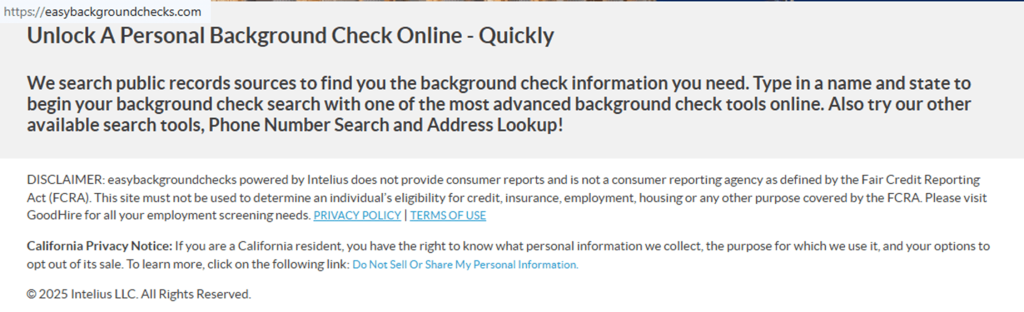
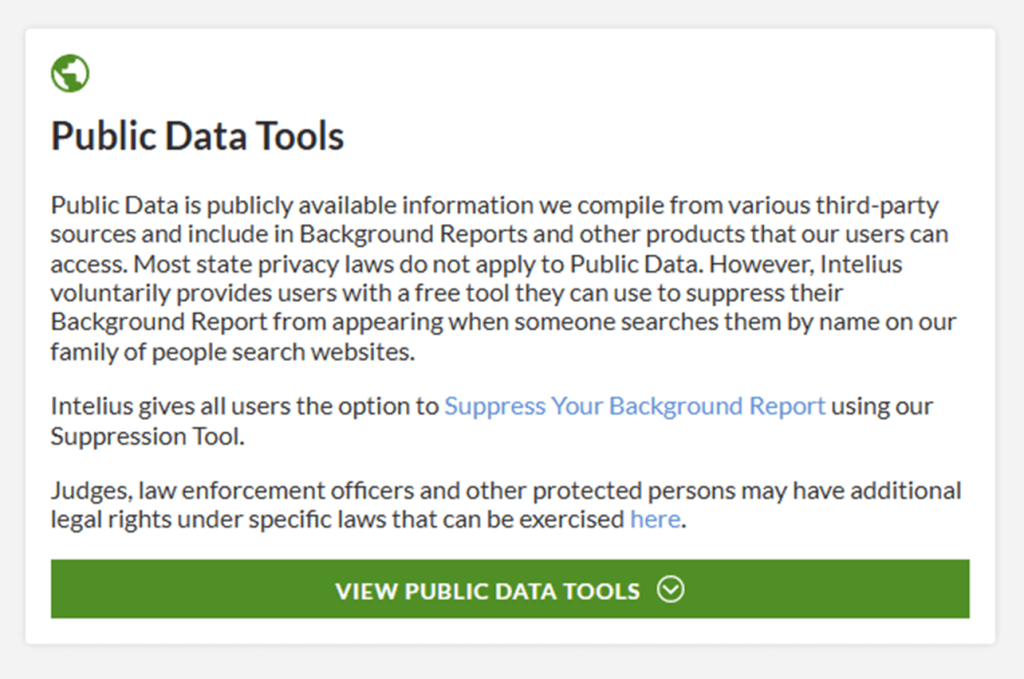
Go to the easybackgroundchecks.com homepage and scroll to the footer. Select “Do Not Sell Or Share My Personal Information,” then choose the rights/suppression choice that leads to the form for opting out of easybackgroundchecks.com. Save a screenshot for your files, but blur personal information before storing or sharing it. Tip: If the page won’t load, try another browser or turn off ad blockers.
Submit your identifiers (email/phone + CAPTCHA)
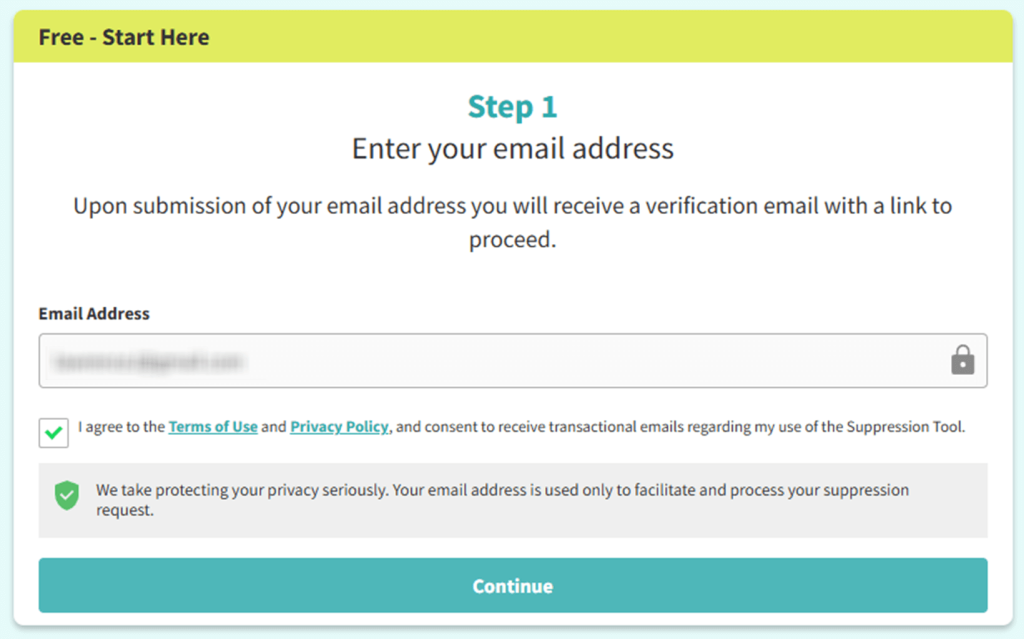
On the form, enter your email address. Complete the CAPTCHA, then press the submit/continue button. Before you take screenshots for support, redact your mobile number and other details. Tip: Double-check spelling so the submission matches the right listing.

Verify via code or link (email/SMS)
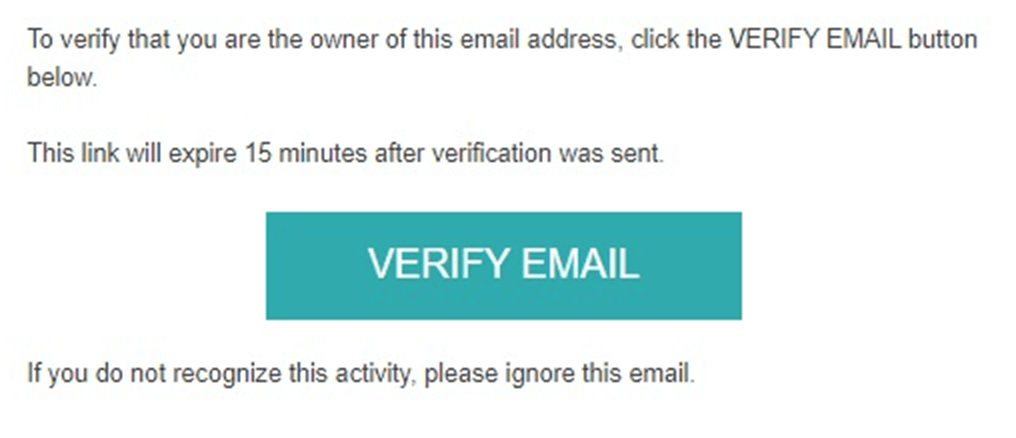
Check your inbox for a verification link or a short code. If you don’t see it, check Spam/Promotions and any SMS filters, then resend once. When verification succeeds, you should return to the portal and see a success message – save it for reference. Tip: Act quickly if the link expires.
Confirm deletion / Do-Not-Sell request
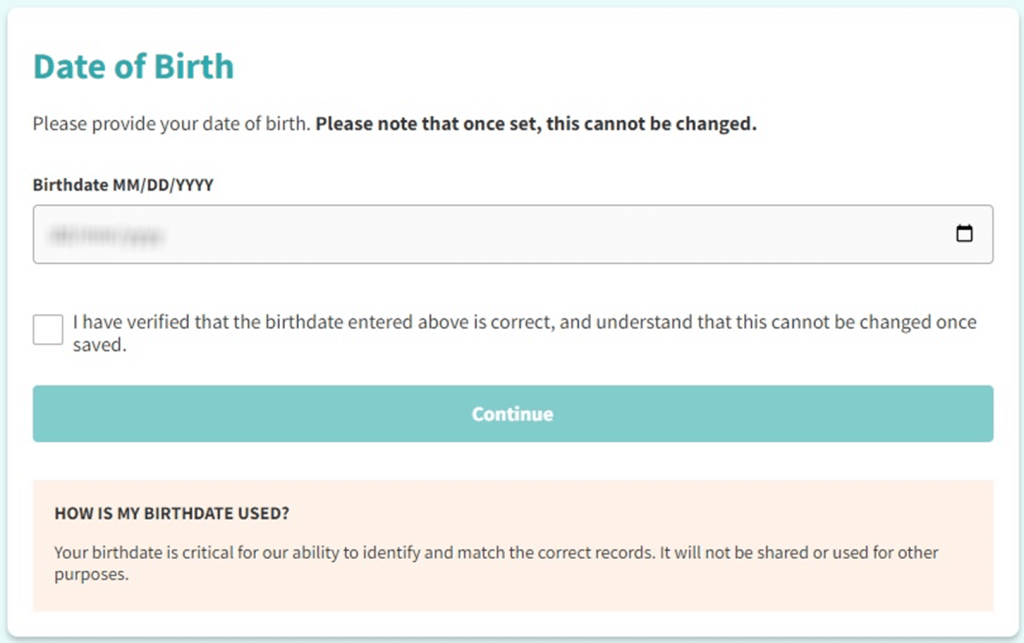
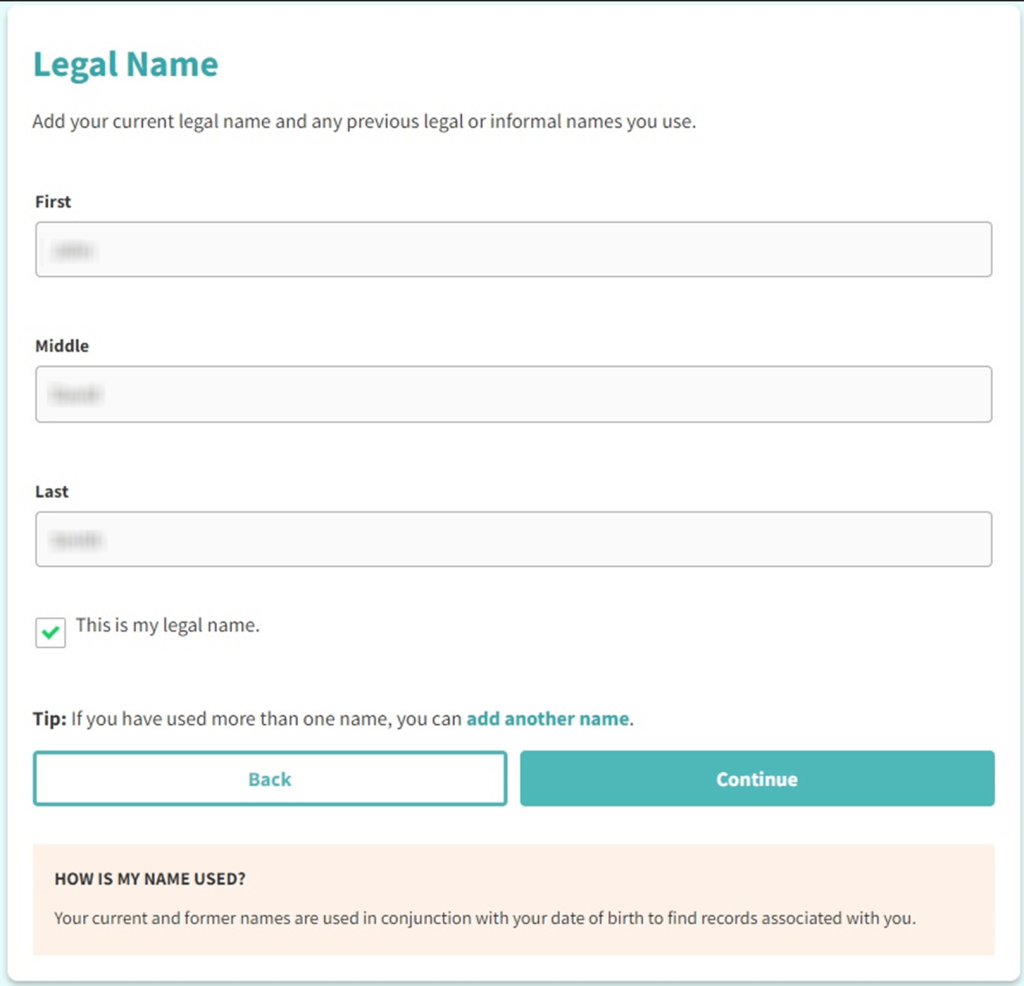
Choose the option that fits your goal (delete/suppress/Do Not Sell/Share), then select the matching listing. This is where you remove your info from the directory and complete the request to remove personal listing details and information from EasyBackgroundChecks. Tip: Redact details before sharing screenshots.
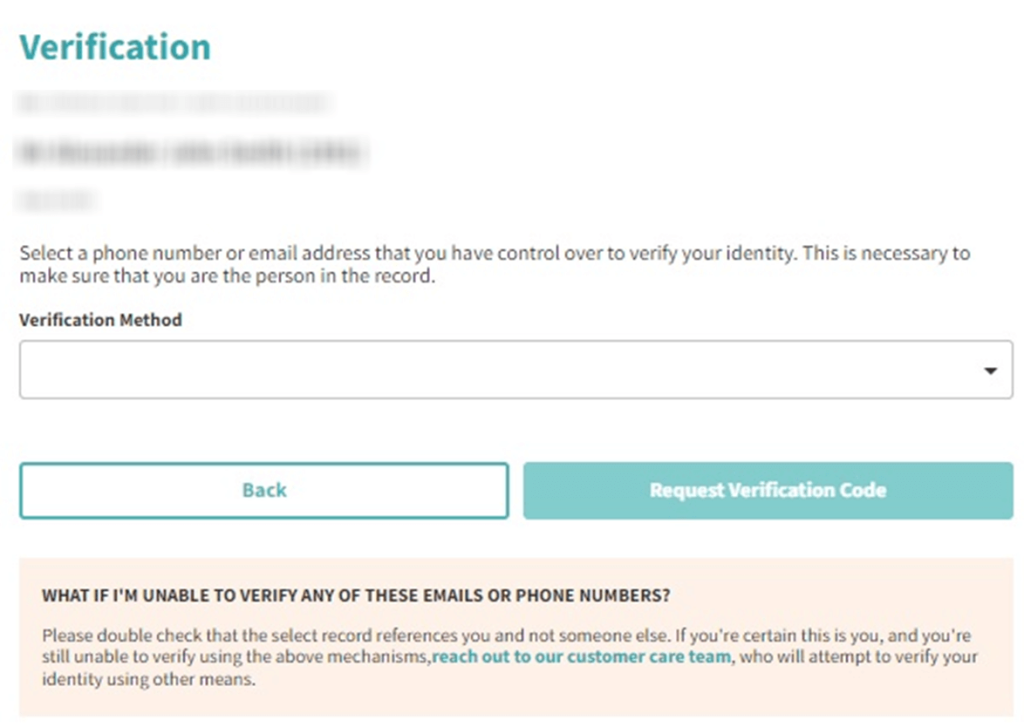
Track confirmation & timeline
You should receive a confirmation email or an on-page message that your submission was received. Save it, then check again after 7–14 days. If the listing appears again later, repeat the steps and keep confirmations to reduce your digital footprint and safeguard your identity.
Timelines, Verification & What to Expect
Most submissions show changes within 7–14 days. However, timing can vary. Protect your confirmation emails by saving them in a folder. You’ll usually see an on-screen confirmation right after you submit. You may also get an email after you verify. If nothing changes after 14 days, use the contact link shown on the rights page, then submit once more with the same details.
Edge Cases & Troubleshooting
- No access to the original email/phone: use a current email and add matching details (like state) so the listing can be located.
- “Record not found”: try a different spelling or state, then look up the listing again and resubmit.
- CAPTCHA or submission errors: switch browsers, disable VPN/ad blockers, and retry.
- Verification code not arriving: check Spam and SMS filters, then resend once.
- Form rejects the submission by region (EU/UK/CA): use the regional notice or support channel; availability can differ.
- Account deletion vs. public listing confusion: cancel separately; this guide covers listings.
- Re-submitting after a failed attempt: wait 24 hours, then try again with the same details.
Will my data reappear?
Listings can reappear when aggregators refresh from public resources, partner feeds, or resellers that republish personal data. The re-listing risk is medium, so set a 3–6 month reminder, save confirmations, and re-submit quickly if needed. For privacy and reduce repeat appearances, check major data sites and data brokers like other lookup pages next, because one form rarely covers every database that may sell your personal information.
Manual vs Assisted Removal
Manual:
- Pros: More control and clearer documentation; no third-party access.
- Cons: Time to monitor and repeat; you must repeat steps across multiple pages.
Assisted:
- Pros: Faster follow-ups and tracking dashboard; help with verification and repeat checks.
- Cons: Costs money; less direct control.
“Excellent”
We remove your data for you - faster, verified, trackable.
Discover Which Sites Share Your Private Details—Instantly and Free.
have already used our service
FAQ
Receive expert privacy advice by email - 1-2 times per month, no fluff.
Share Article

Posted by Ava J. Mercer
Ava J. Mercer is a privacy writer at ClearNym focused on data privacy, data broker exposure, and practical privacy tips. Her opt-out guides are built on manual verification: Ava re-tests broker opt-out processes on live sites, confirms requirements and confirmation outcomes, and updates guidance when something changes. She writes with a simple goal - help readers take the next right step to reduce unwanted exposure and feel more in control of their personal data.
View AuthorMore Background & Criminal Removal Guides
- ArrestFacts Opt Out Guide
- BackgroundCheckers Opt Out Guide
- BackgroundChecks.com Opt Out Guide
- GovernmentRegistry Opt Out Guide
- GovWarrantSearch Opt Out Guide
- InfoTracer Opt Out Guide
- MugshotLook Opt Out Guide
- National Public Data Opt Out Guide
- Public Information Services Opt Out Guide
- SmartBackgroundChecks Opt Out Guide
- TruthRecord Opt Out Guide