Privacy Guides
Is Gemini Private? What Happens to Your Data
Gemini is not fully private. While it is generally safe to use, your conversations and inputs can be stored, processed, and sometimes reviewed as part of how the system works. Privacy depends on your settings, account type, and what you share, so it should not be treated as a confidential environment.
See where your personal data appears online
Privacy Writer
A. J. MercerAva J. Mercer
Updated
Read
5 min
See where your personal data appears online
Key Takeaways
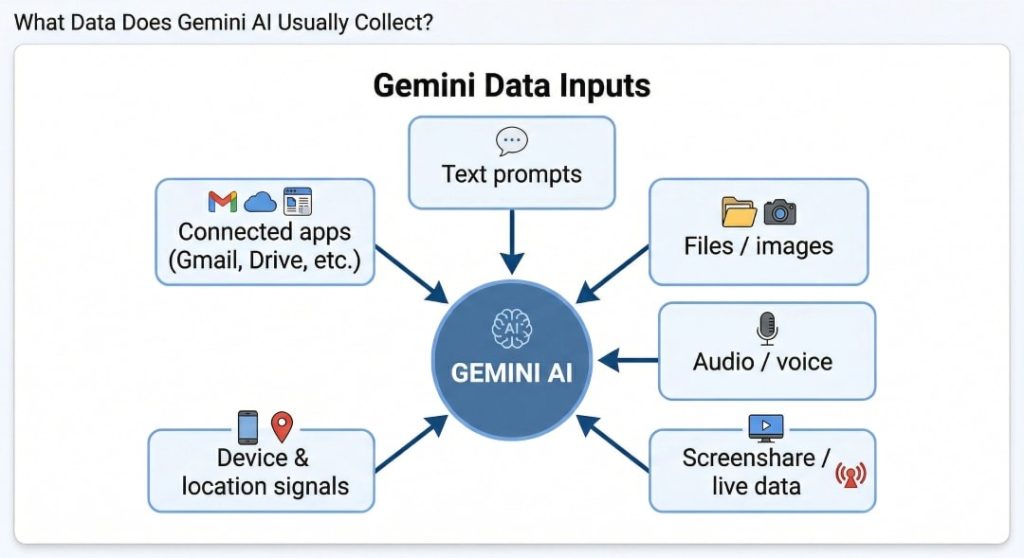
- Gemini can store more than chat text, including files, images, audio, and connected-app context.
- Personal accounts may feed product improvement when history stays on.
- History-off chats can still be kept for up to 72 hours.
- Work or school use under Google Workspace usually gets tighter controls.
- Deleting history helps, but some reviewed material may remain.
- Lock-screen settings, permissions, and connected apps create the biggest risk.
- Public data cleanup can reduce later exposure.
How to View Your Gemini Activity and Stored Data
To see what is actually visible, move through the Gemini account in this order:
- Open the relevant activity area: Go to Gemini Apps Activity or My Activity so you start with the product log first.
- Locate saved conversations or records: Look for chats, Live items, and entries marked with audio, image, file, or screen details.
- Identify what kinds of data are visible: Check whether the record includes text, uploads, recordings, screenshots, or connected-app context.
- Distinguish chat history from broader activity: Compare the chat log with Web & App Activity and other account logs.
- Review account-level controls: Open auto-delete, activity controls, and the account review to see how long records stay saved.
- Note what cannot be directly viewed: You cannot inspect internal safety copies or de-linked reviewed material from the normal screen.
Find out if your private details were exposed
What Data Does Gemini AI Usually Collect?
Are Your Gemini Conversations Used for AI Training?
For personal accounts, saved conversations can be used for AI training and product improvement when Keep Activity is on. That makes the default broader than strong temporary modes often discussed in ChatGPT privacy conversations.
Can You Opt Out of AI Training?
Yes, partly. The main step is to turn off Gemini apps activity or use temporary chats. Google says future chats will not be used for training unless you send feedback, and future chats should not feed AI models.
That control helps, but it is not absolute. The service may still keep chats for up to 72 hours, and some material may stay de-linked for up to three years.
What Are the Real Risks? (Leaks, Access, Misuse)
The real problem is not one dramatic hack. It is a chain of small decisions. A Gemini data breach would be serious, but everyday misuse is more likely. Unauthorized access can expose stored chats and uploaded content. A malicious prompt injection can distort what the model reads. A Gemini data leak could create accidental exposure, so security teams treat it as part of normal security and privacy risks.
Pew Research Center found that 81% of Americans who work with AI worry about how their personal data could be used by companies.
Google Gemini security risks usually show up in the same few places:
| Risk | What It Looks Like | Why It Matters |
| Saved history exposure | Old chats stay available in the account | Past prompts and files can be read later |
| Connected-app overreach | One answer pulls from mail, photos, or docs | More context enters one flow |
| Lock-screen visibility | The Gemini app may function while the phone is locked | Notifications or replies may show too much |
| Human review | A subset of interactions may be reviewed to make Gemini safe | Review can include prompts, responses, and metadata |
| Bad answers | The AI system summarizes something incorrectly | AI-generated text can still mislead you |
What NOT to Share in Gemini
Do not share passwords, tax IDs, bank details, legal files, medical records, source code secrets, API keys, or confidential business information. Never enter private details or anything you would not want retained, reviewed, copied into another workflow, or processed by AI. Recent research shows that even trusted browser environments can be exploited to access sensitive data or system-level information.
What Happens If You Accidentally Share Sensitive Data
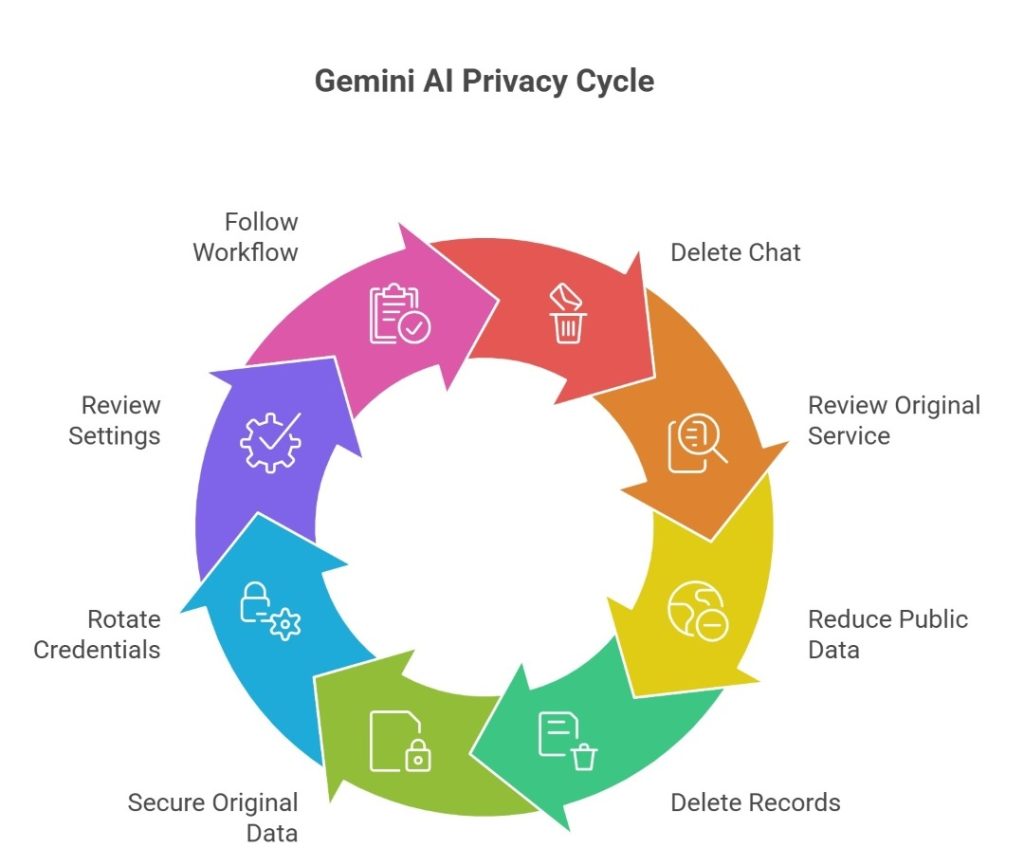
If you paste something private into the tool, act quickly. Delete the chat. Review the original service. One deleted chat does not delete the source email, file, or photo. History-off chats can still sit in a short retention window. That contributes to Gemini AI privacy concerns.
Gemini can learn from both what you type and what already exists about you on the internet. If your personal data is publicly available, it can be processed, stored, or appear in future AI responses. That is why it is important to reduce your public data exposure.
If you accidentally shared sensitive data, act immediately and follow these steps:
- Delete the record and review whether future chats should stay unsaved.
- Remove or lock down the original file, email, or photo.
- Rotate exposed credentials or keys immediately.
- Review permissions, device settings, and lock-screen exposure.
Privacy risks are not theoretical. IBM’s report put the global average breach cost at $4.4 million and said 97% of organizations reporting an AI-related incident lacked proper AI access controls.
Retention & Deletion of Your Personal Data Explained
Deletion helps, but it is not a total reset. Retention changes based on history settings, feedback, and human review, and some data may still exist in other Google services after one chat disappears. That is a key privacy point. In practice, this means different layers of data are handled differently: visible chat history can disappear quickly, while system-level logs or safety-related records may follow separate retention timelines.
Clearny helps remove your information from data brokers and public websites to lower the privacy risk. We don’t remove personal information directly from Gemini, but reducing your online footprint makes your data less likely to appear in AI systems.
We remove your data for you - faster, verified, trackable.
Discover Which Sites Share Your Private Details—Instantly and Free.
How Long Does Gemini Store Your Information?
If Keep Activity is on, saved history auto-deletes after 18 months by default. However, you can switch to 3 months, 36 months, or no auto-delete.
If Keep Activity is off, chats can still be kept for up to 72 hours. Reviewed material may remain de-linked for up to three years.
Is Deletion Permanent or Not?
Not always. Deleted history can vanish from view while some reviewed or de-identified material remains, which is why personal information removal services still matter outside the tool itself. There can also be a delay between when you delete data and when it is fully removed across all systems. In some cases, residual data may persist in backups or internal processing pipelines for a limited period, even though it is no longer accessible to you through the interface.
Your Privacy Rights in the U.S.: What You Can Do
Your rights depend on your state. Many people can ask businesses to delete, correct, or access personal data. Some laws limit the sale or sharing. California is a clear example through the CCPA (California Consumer Privacy Act) and the state DROP tool (Delete Request and Opt-Out Platform). These rights do not control the assistant directly. However, they can reduce public and broker records that may later become AI training data or search context. This is where user consent, third-party sharing, and broader data protection connect.
A useful action plan looks like this:
- Check your state law: Look for access, delete, correction, and opt-out rights where you live.
- Send deletion or correction requests: Ask companies and brokers to delete personal data or fix false records.
- Limit sale or sharing: Use available rights to reduce outside data sharing where the law allows it.
- Use broker tools when available: California residents can send one request to many brokers through DROP.
- Escalate when needed: File with your state attorney general or the FTC if a company ignores its stated privacy practices.
| MANUAL | ||
|---|---|---|
| Time for US Search removal | 2 minutes | ~15 minutes |
| Sites covered | 262+ sites | 1 site |
| When data reappears | Auto re-removed | ~15 minutes |
| Total time per year | 0 hours | 2-5 hours |
| Monitoring for new listings | Continuous | You do it yourself |
| Cost | from $16.50/month | Free |
How to Protect Your Data While Using Gemini

To use Gemini AI in a compliant workflow, treat the assistant as a helper, not a vault. Use minimal context, keep history tight, avoid risky uploads, and separate personal from work use so one prompt does not expose your workflow. It also helps to review permissions regularly, limit access to files, the microphone, and connected apps, and avoid linking services that contain sensitive information.
Privacy Setup Checklist
Most risk comes from routine habits. Start with the controls in the account. Then narrow what the service can see. This matters if you use AI tools daily or mix work and personal tasks. A safe Gemini setup depends on settings. AI tools like Gemini still need a human review habit, and these are the best practices. Data removal services also help with public exposure.
Use this checklist before you trust the setup:
- Review history controls: Decide whether Keep Activity or auto-delete settings match your comfort level.
- Check account settings: Run the account review and Security Checkup to find anything broad, old, or unnecessary.
- Tighten device security: Use a strong lock, two-step verification, and recovery options to strengthen data security and add better security features.
- Limit browser and app permissions: Review camera, microphone, file, and location access for the app and browser. Verify important output later.
- Review voice and file permissions: Audio, uploads, and Live records create a larger trail, so handling sensitive information needs extra care.
- Reduce lock-screen exposure: Turn off sensitive notifications or lock-screen help if you do not need them.
- Build a deletion routine: Clear old chats regularly so history does not quietly become a long archive. Avoid automating uploads of raw data.
- Separate personal and work boundaries: Google Workspace and personal accounts follow different rules, so keep them apart and use separate profiles to safeguard boundaries. The same rule applies to AI like Gemini and other AI tools.
- Be careful with every prompt: Pause, identify any sensitive data, and ask whether you would still send it if a reviewer saw it later.
Gemini vs ChatGPT vs Claude: Which Is More Private?
There is no permanent winner. Consumer settings matter. Temporary modes matter. Business contracts matter. The real question is privacy and security. Gemini can be safer with the right controls. Compare how different platforms handle privacy:
| Platform | Data Retention | AI Training Use | User Control | Transparency | Best For |
| Gemini | 18 months default when saved; up to 72 hours if history is off; some reviewed data up to 3 years | Saved activity may improve services; Workspace is tighter | Good controls, split menus | Moderate | Existing users |
| ChatGPT | Deleted chats within 30 days; Temporary Chat up to 30 days | Consumer content may train unless you opt out; Temporary Chat is excluded | Strong, easy controls | High | Fast control |
| Claude | Deleted chats are removed right away and backend within 30 days; opt-in training data may stay longer in de-identified form | Consumer training is opt-in or limited to safety cases; Incognito chats are excluded | Strong control | High | Clearer choices |
FAQ
Yes. If you use it through work or school, the administrator can control feature access, activity logs, and retention, so your own setting choice may not be final.
Yes. If lock-screen help and sensitive notifications are enabled, it can surface message content or quick actions while the phone is locked, revealing more than many users expect.
It handles health or legal text like other prompts, and Google tells users not to enter confidential information they would not want reviewed or used to improve the service.
Yes. Voice, Live audio, video, screenshares, and recordings can create a broader record than text alone, and some improvement uses depend on separate audio or Live settings.
Yes. Some features work without sign-in, and Google’s general policy still applies, but saved history stays more limited until you sign in.

Posted by Ava J. Mercer