Privacy Guides
How to Remove Your Address from the Internet Safely
See where your personal data appears online
Privacy Writer
A. J. MercerAva J. Mercer
Updated
Read
5 min
See where your personal data appears online
To remove your address from the internet, you need to reduce its visibility in search results, delete it from data broker sites, and monitor for reappearance. Most addresses are stored as personally identifiable information (PII) across dozens of data brokers, public records, and directories. You can’t remove it everywhere, but you can significantly reduce exposure by combining search engine removal, source deletion, and ongoing monitoring.
Key Takeaways
- Search your full name, phone, email, and profile links before you try to remove anything.
- Reduce search visibility first, then remove the source listing that published the data.
- Data brokers, people search sites, and public records each require a different approach.
- Risk rises when a listing is tied to relatives, work details, or contact information.
- Rechecks matter because one opt-out does not stop future reposting.
- A reliable data removal service is useful when the same data comes back.
How to Check If Your Address Is Exposed Online
Most people search once and miss half the exposure. To see if your address is exposed, use the same audit pattern every time and save evidence. Open a private browsing window. Check web, image, and map results, because an address on social media or a delivery photo can matter. One extra finding on maps can change your removal strategy, and that finding often leads you to the original source. Use these steps to remove your information without guesswork:
- Search your full name in quotes, then search your city, state, and current address separately.
- Search your phone number, email, and name and address together to catch merged profiles.
- Use Google search, Bing, and other search engines. Review at least the first three pages.
- Visit major people-search sites directly, input the location, and note whether the address is listed.
- Check images, map results, and marketplace posts to see if a specific address appears.
- Save the URL, screenshot, and date before you submit a removal request form or try to delete anything.
You can ask Google to remove eligible results that show personal contact information, but source-page cleanup is still often necessary.
Where Does Your Address Appear Online?

An address can appear on broker databases, people-search pages, public-record indexes, map apps, old accounts, business directories, and other pages available online. These sources often pull data from one another, so a single listing can quickly spread across multiple sites. In many cases, your address is not published once but replicated, updated, and re-indexed over time.
Data Brokers vs People Search Sites vs Public Records
These sources look alike on the results pages, but they do not behave the same way. Data brokers resell records from commercial feeds. People search sites turn that material into lookup profiles built to find who lives at an address. Public records usually come from courts, agencies, or property offices and give you the least control. Match your method to the source instead of sending the same form everywhere.
| Category | Role | Control Level | Removal Possibility | Typical Behavior | Reappearance Risk |
| Data Brokers | Gather, combine, and resell information | Low unless a privacy law applies | Often possible through opt-out or deletion forms | They refresh records from commercial feeds and partner lists | High |
| People Search Sites | Publish lookup pages by name, phone, or location | Low to medium | Usually possible through online opt-out pages | They turn broker material into consumer-facing profiles | High |
| Public Records | Publish records created by agencies, courts, or property offices | Very low | Full removal is rare; suppression is sometimes possible | They exist for legal or transparency reasons | Medium to high |
What Can Someone Find Using Your Address?
A publicly posted address may reveal ownership history, relatives, age ranges, neighborhood clues, route patterns, and other personal details. These details become more intrusive when combined with other personal details.
The Federal Trade Commission reported more than $12.5 billion in fraud losses for 2024, and identity-theft complaints remain a major category.
Risks of Identity Theft or Doxxing
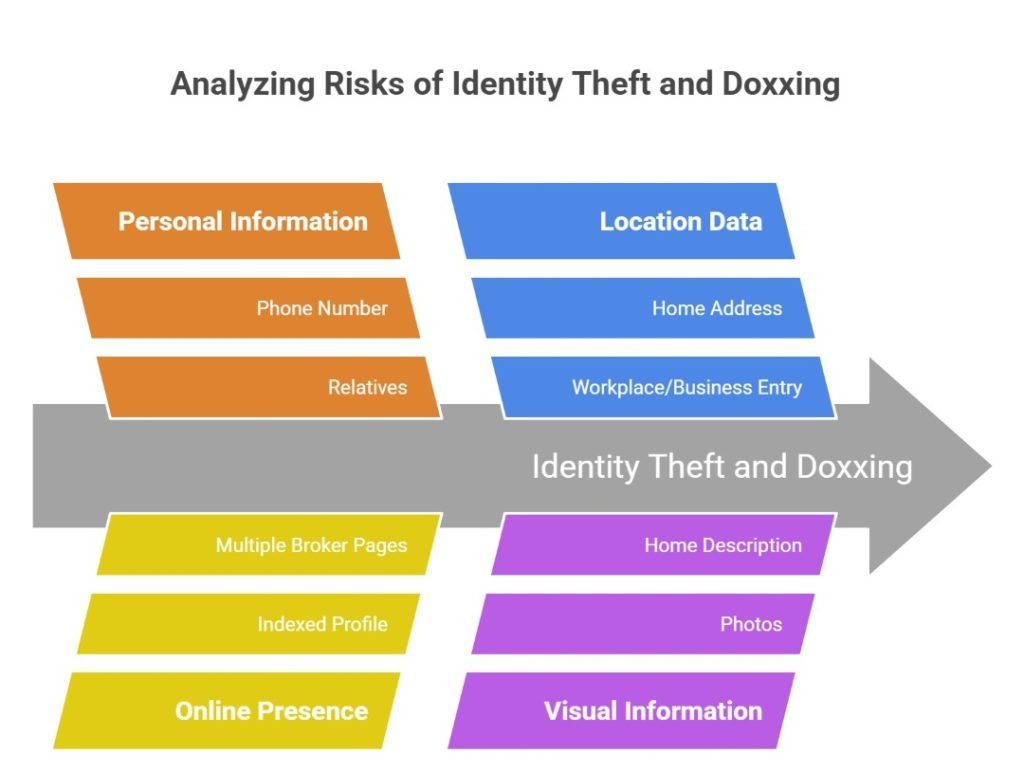
One listing is not always the main problem. Risk rises when one page connects your location to other identifiers that make verification or impersonation easier. That can support identity theft or stalking. If a simple name search returns a full profile, treat it as urgent. According to the Identity Theft Resource Center 2025 Data Breach Report, data exposures continue to grow, with thousands of breaches and billions of records contributing to identity risks. Watch for these signals:
- The listing appears with a phone number, which makes direct targeting easier.
- The record shows relatives, which helps strangers map family links.
- The profile is indexed after one name search, making it easier to find your address quickly.
- The listing is tied to a workplace or business entry, which can weaken home security.
- The same record is present on several broker pages, a common sign of a high reappearance rate.
- The record is linked to photos, home addresses online, or a description of your home.
The 3-Step System to Remove Your Address from the Internet
To remove personal information efficiently, work in order: cut search visibility, remove the source, then reduce the chance of reposting. That sequence helps protect your privacy. Each layer solves a different problem: search removal limits who can find your address, source removal targets where it actually lives, and prevention reduces how often it comes back.
Step 1 — Remove Your Address from Google and Search Results
If the address appears in search results, start there. Use Google’s remove tools for eligible results that show private information, such as your address, and use outdated-content tools when cached data remains after the live page changes. This step reduces exposure fast, but it does not delete the source page itself.
Step 2 — Submit Opt-Out Requests to Data Brokers
After search cleanup, move to the broker and people-search pages. Every site has its own verification requirements and form flow. If you want to remove personal information from data brokers, keep a tracker with URLs, dates, and outcomes. That helps when you submit a second removal request. Use this checklist:
- Copy the exact profile URL before anything changes.
- Save screenshots showing the name, listing, and any exposed relatives or phone numbers.
- Submit the site form and save all confirmation emails.
- Redact nonessential ID details before you upload anything.
- Recheck in 7, 14, and 30 days to confirm that the removed information stays gone.
Step 3 — Remove or Suppress Data at the Source
Many pages are only mirrors. If you skip the original source, a copied profile can return under a new URL. Addresses on sites you control should be your first priority, followed by suppression elsewhere. Update old directories, store profiles, and map entries that still show a home location or other details. Focus on these fixes:
- Delete unused accounts that still expose profile or account information.
- Edit map or business pages that wrongly display a physical address.
- Send a request to remove old directory entries, alumni pages, or marketplace bios.
- Remove photos or posts that show street numbers, delivery labels, or route clues.
- Use a lawful alternative address only when a platform allows it, and the listing is legitimate.
The safe plan is to audit exposure, remove what you can, and monitor reappearances. ClearNym is a service that can help remove your personal information with tracked opt-outs and repeat checks.
Your Legal Rights to Remove Personal Data
Your rights depend on where you live, who holds the record, and whether the source is commercial or public. Modern privacy laws increasingly allow individuals to access, correct, delete, or object to the use of their data, especially when businesses retain personal information longer than necessary. For example, guidance on the “right to erasure” under EU law is detailed in this official report by the European Data Protection Board, which explains when individuals can request deletion of personal data and how organizations must respond.
CCPA vs GDPR vs Right to Be Forgotten
The California Consumer Privacy Act (CCPA) gives California residents rights over their personal information held by covered businesses. The General Data Protection Regulation (GDPR) gives people in the European Union broader rights, including access and erasure. The Right to Be Forgotten is usually a GDPR-based erasure claim, not a universal rule.
State privacy regulators also matter. They include the California Privacy Protection Agency, the Colorado Attorney General, and the Connecticut Attorney General.
Review how the official texts work:
| Framework | Who It Helps | Core Rights | Best Use for Address Exposure | Main Limits |
| CCPA | California residents dealing with covered businesses | Access, delete, correct, and opt out | Useful for broker opt-outs and requests to delete your information | Not every entity is covered |
| GDPR | People in the EU/EEA whose data is processed by covered controllers | Access, erase, restrict, object, and more | Strong when a company keeps data without a valid basis | Exceptions still apply |
| Right to Be Forgotten | Usually, GDPR-based erasure or de-listing claims | Erasure and, in some contexts, de-listing | Helpful for outdated or excessive indexed content | It is not absolute |
California privacy laws and broker-specific deletion tools can affect opt-out outcomes.
DIY vs Paid Services: Which Actually Works Better?
DIY removal works when exposure is limited, and you can handle the forms yourself. Data removal services fit better when records keep returning, or you need help to remove your information across many sites. A solid provider should explain the scope, limits, and reporting.
| Factor | DIY Removal | Paid Services | Best For | Risks |
| Cost | Low cash cost, high time cost | Subscription or annual fee | Small cleanups vs broad exposure | Missed listings or overpaying |
| Time | Slow and manual | Faster after setup | Busy users with many profiles | Some vendors overpromise |
| Effort | High | Lower | Organized users vs overwhelmed users | Incomplete follow-up |
| Success Rate | Good on easy sites | Better on repeat monitoring | One-off removal vs ongoing exposure | Scams exist |
| Monitoring | Easy to neglect | Usually included | Users who need rechecks | Old listings can return |
How Long Does It Take to Remove Your Address?
Search result updates may happen in days, while broker opt-outs often take weeks. Removal timelines vary by site, proof rules, and whether copies return after you get the first address removed. In most cases, Google updates or removals take 24–72 hours, major data broker opt-outs take 7–21 days, and smaller or less responsive sites can take 30+ days or require a second request.
What You Can’t Remove (And What to Do Instead)
Some information remains online because a court, agency, or archive has a legal reason to publish it. That does not mean you should stop. However, you should minimize sharing your personal information. When full deletion fails, use these fallback options:
- Ask search engines to de-index or refresh outdated pages where policy allows.
- Request suppression of extra fields even when the main listing stays public.
- Remove personal information from the Internet by targeting copied profiles first.
- Tighten social accounts so the data is not linked to more sensitive details.
- Increase security and alerts when an address is publicly available.
How to Keep Your Address Off the Internet Long-Term
Long-term privacy depends on prevention, not one cleanup. Personal information removal services help with monitoring, but your habits decide whether you can keep your home address out of fresh results. Most new listings appear when data from one source is picked up by brokers and redistributed within a few weeks, so even a single exposure can spread quickly. In practice, if your address stays off major broker sites for 30–60 days, the chance of it being widely republished drops significantly.
How to Reduce New Data Exposure
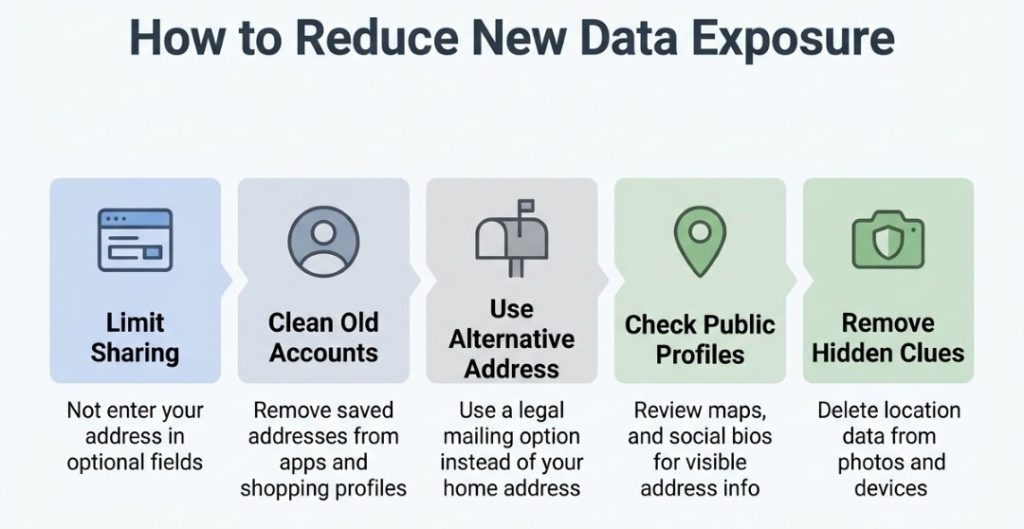
Even a good cleanup can be undone by one signup. If you want to learn how to hide addresses from public pages or how to keep your address private, focus on the places where you still enter your address. Reducing new data makes it easier to prevent your address from spreading. These are the most effective ways to reduce new exposure:
- Do not give out your address unless required, and never type your address into optional profile fields.
- Review shopping, app, and loyalty accounts and remove old details when you no longer need them.
- Use a lawful mailing option instead of a real address when allowed.
- Check map listings and social bios so you can hide your address before it spreads.
- Remove location clues from photos, review smart home devices, and use a virtual private network to reduce IP address and Internet service exposure.
According to the Pew Research Center, 56% of Americans frequently click “agree” to privacy policies without reading them, which helps explain the amount of personal information companies collect.
Monthly Privacy Maintenance Routine
Spend 15 minutes each month on a simple routine. First, run a search of your name, phone, email, and location listing. Then, review the top broker pages. Finally, confirm old opt-outs still hold. It is one of the simplest ways to keep your personal information safe, learn how to unlist your address, and ensure your address does not spread again.
FAQ
Yes. Archived pages, mirrors, and old snippets can still expose your address after a live page changes, so you may need both source cleanup and a refresh request.
Map apps often reuse old directory feeds, user edits, and business records, so a residence can inherit a listing and make a location look commercial.
Yes. A fake listing can break platform rules, contracts, or filings, so use only lawful alternatives, not false business or identity data.
Yes. Metadata, visible landmarks, repeated posting patterns, and map clues can reveal where you live and narrow down a home location.
Tracking emails, share links, screenshots, and order pages can expose shipping details or route clues that stay visible online longer than intended.

Posted by Ava J. Mercer