Opt Out Guides
Ohio Residents Database Opt Out Guide
Privacy Writer
A. J. MercerAva J. Mercer
Updated
Read
5 min
When personal information online includes your name, address, and phone number on a public page, it can affect your online privacy. Ohio Residents Database describes itself as a people search database that uses state registration records and other sources.
How to opt out of Ohio Residents Database
Start on the official opt-out page at ohioresidentdatabase.com. Open the matching profile, enter the requested identifiers (often an email), and confirm by code or link if prompted. Typical completion is 1–3 days.
Checklist:
- Open the official opt-out form
- Find your record and copy the record URL
- Enter identifiers
- Confirm by code/link
- Save the confirmation email
- Set a reminder to re-check
Find out if your private details were exposed

have already used our service
Ohio Residents Database – Quick Facts
| Parameter | Value |
| Domain | ohioresidentdatabase.com |
| Data Types | contact details, locations, age range, possible relatives, and email addresses |
| Opt-out Methods | web form |
| Identity Verification | confirmation email or on-page message |
| Typical Response Time | 1–3 days |
| Re-listing Risk | medium |
This platform is a directory that aggregates public records and commercial sources and displays a searchable database. It may collect data points as sources refresh, and it can provide in-depth information in one place, which may feel like major data. It may also include information from public sources and information from Ohio.
Common data you may find:
- Names (and known aliases)
- Current and past addresses
- Age or year of birth
- Possible relatives/household links
- Email addresses
- Property and real-estate references
- Voter registrations
- Other personal details
Step-by-Step Guide
Search for your record
Find your name in the provided form. Copy the record link from the browser bar so you can paste it into the opt-out form. If you take screenshots, blur your personal information and any identifiers before saving. Tip: If you see several matches, compare the city or county to pick the right one.



Submit your identifiers (email/phone + CAPTCHA)
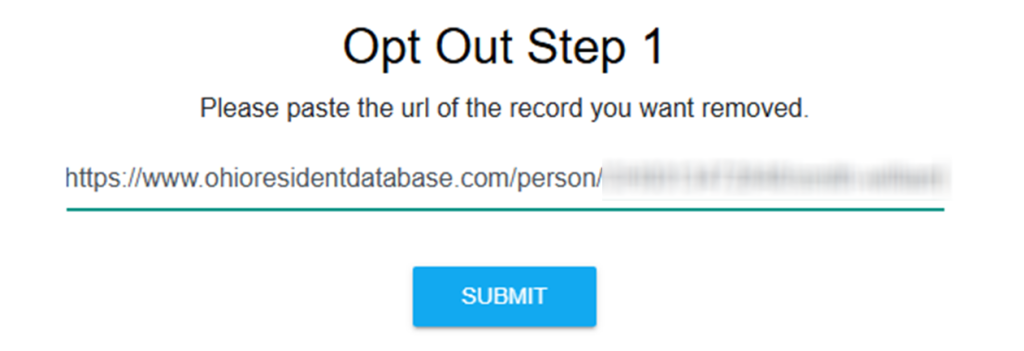
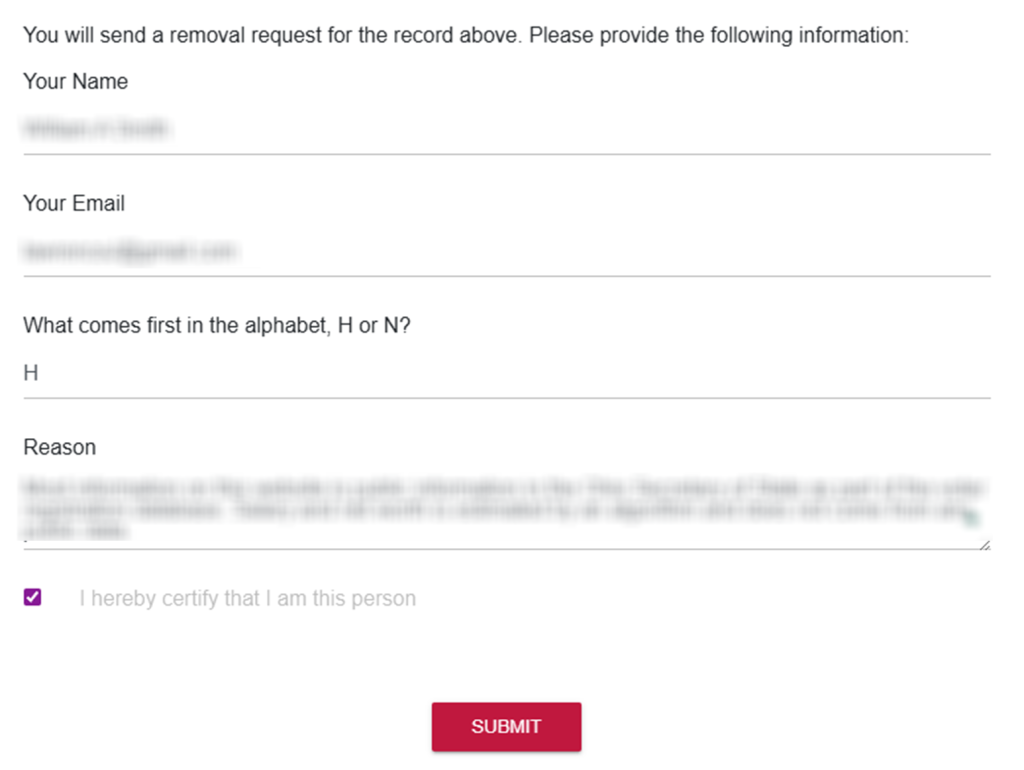
Scroll to the footer and select the Opt Out page. Paste the record link into the field. Enter what the form asks for, such as your name and email. If prompted, solve the CAPTCHA and click submit. You should see an on-screen confirmation. If you store proof images, redact personal information before saving. Tip: If you hit an error, clear cookies and try again in another browser once.
Verify via code or link (email/SMS)
Check your inbox. If you receive a code or link, complete it right away. If nothing arrives, check Spam/Promotions and verify that your mailbox is not blocking new senders. Save the confirmation email for later. Tip: A dedicated inbox can help keep things organized.
Confirm deletion / Do-Not-Sell request
Save any receipt or reference number and note the date. Tip: Avoid unrelated marketing unsubscribe controls.

Track confirmation & timeline
Re-check the public entry after a few days. Some third-party write-ups say results can appear within 24 to 48 hours; others mention within 48 hours. However, updates can take longer. Keep your proof. Set a 3–6 month reminder to re-check and re-send if needed.
Timelines, Verification & What to Expect
Most requests show an on-page message right away, and many also send a confirmation email for verification. If your opt-out request needs verification, complete it by code or link, then allow 1–3 days for updates. If nothing changes after 3 days, repeat the online opt-out process once and keep both confirmations. If you see an on-page note like “information removed,” save it as proof.
Edge Cases & Troubleshooting
- No access to the original email/phone: use a current inbox/number and add a short note explaining the mismatch.
- “Record not found”: try a different spelling, nearby city, or search the index instead.
- Verification image or submission errors: disable VPN/ad blockers, refresh, and try again later.
- Verification code not arriving: check Spam/Promotions, then resend once.
- Form rejects the request by region (EU/UK/CA): use the contact option and ask for the correct path.
- Account deletion vs. public listing removal confusion: removing an entry is separate from closing an account.
- Re-submitting after a failed attempt: verify the link and try one more time.
- Inaccurate: prioritize removal first, then ask about corrections; cancel any unrelated email subscriptions separately.
Will my data reappear?
It can. An entry may return when aggregators, partner feeds, or resellers refresh data. The safest approach is to keep your personal confirmation emails and set a reminder every 3–6 months to re-check and re-send your request if needed. If the same entry appears on other data broker sites, handle those too, since data brokers like these may rely on overlapping sources.
Related removals
- TruePeopleSearch
- ClustrMaps
- Whitepages
- MyLife
- InstantCheckmate
- OfficialUSA
Manual vs Assisted Removal
Manual:
- Pros: More control and fewer disclosures; works well for one site; helps keep information private as you clean up.
- Cons: Time-heavy across many sites; needs ongoing checks; each step can change over time.
Assisted:
- Pros: Can automate recurring checks; tracking dashboard and status notes; helps coordinate a data broker opt-out across multiple data broker sites.
- Cons: Requires sharing identifiers with a provider; may involve paid plans and data removal support.
“Excellent”
We remove your data for you - faster, verified, trackable.
Discover Which Sites Share Your Private Details—Instantly and Free.
have already used our service
FAQ
Receive expert privacy advice by email - 1-2 times per month, no fluff.
Share Article

Posted by Ava J. Mercer
Ava J. Mercer is a privacy writer at ClearNym focused on data privacy, data broker exposure, and practical privacy tips. Her opt-out guides are built on manual verification: Ava re-tests broker opt-out processes on live sites, confirms requirements and confirmation outcomes, and updates guidance when something changes. She writes with a simple goal - help readers take the next right step to reduce unwanted exposure and feel more in control of their personal data.
View Author