
Opt Out Guides
YellowBook Opt Out Guide
Privacy Writer
A. J. MercerAva J. Mercer
Updated
Read
5 min
When your name, address, and phone are publicly visible and accessible online, it can weaken privacy and expand your digital footprint. YellowBook’s people search pages can show records sourced from public records and commercial sources, then displayed in a searchable view.
How to opt out of YellowBook
Open the official people directory webpage, find “Remove My Info,” and follow the partner flow to finish your opt-out. You will enter identifiers, then get a message with a link or code; changes often show within 7–14 days.
Checklist:
- Open the official form
- Enter identifiers (email/phone)
- Complete verification check
- Save the confirmation email
- Set a reminder to re-opt-out
Find out if your private details were exposed

2,865,794 have already used our service
YellowBook – Quick Facts
| Parameter | Value |
| Domain | yellowbook.com |
| Data Types | contacts, addresses, possible social identifiers, and profile details |
| Opt-out Methods | web form/email/mail |
| Identity check | code message |
| Typical Response Time | Varies (often within 7–14 days) |
| Relisting Risk | medium |
YellowBook is a people search platform that can aggregate business associations into a searchable database, and it can obtain source records from public and commercial datasets; its directory notes that the experience is provided by BeenVerified.
Common data you may find:
- Names and known aliases
- Phone numbers
- Email addresses
- Current and previous addresses
- Relatives, roommates, and household links
- Property details and tax records (if available)
- Professional history and business licenses (if available)
Step-by-Step Guide
Open the official opt-out form
Navigate to YellowBook via the People Search link, then scroll to the footer disclaimer. Find “Remove My Info” and click it; you may be redirected to BeenVerified. Blur personal details in any screenshots. Tip: Use desktop view if links are hard to tap.


Submit your identifiers (email/phone + CAPTCHA)
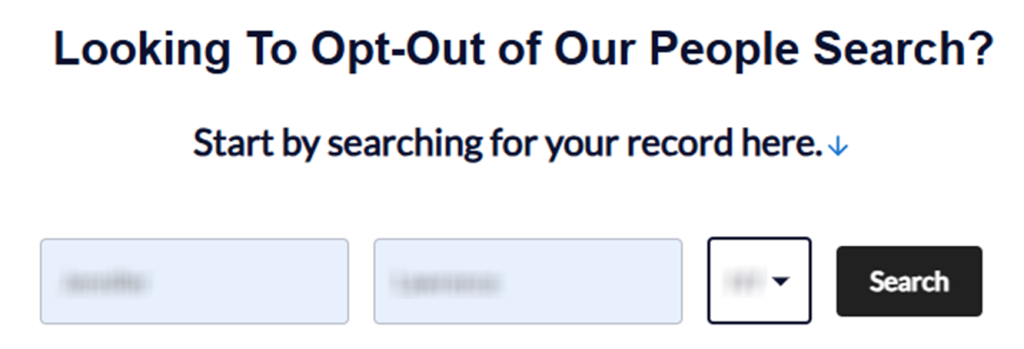
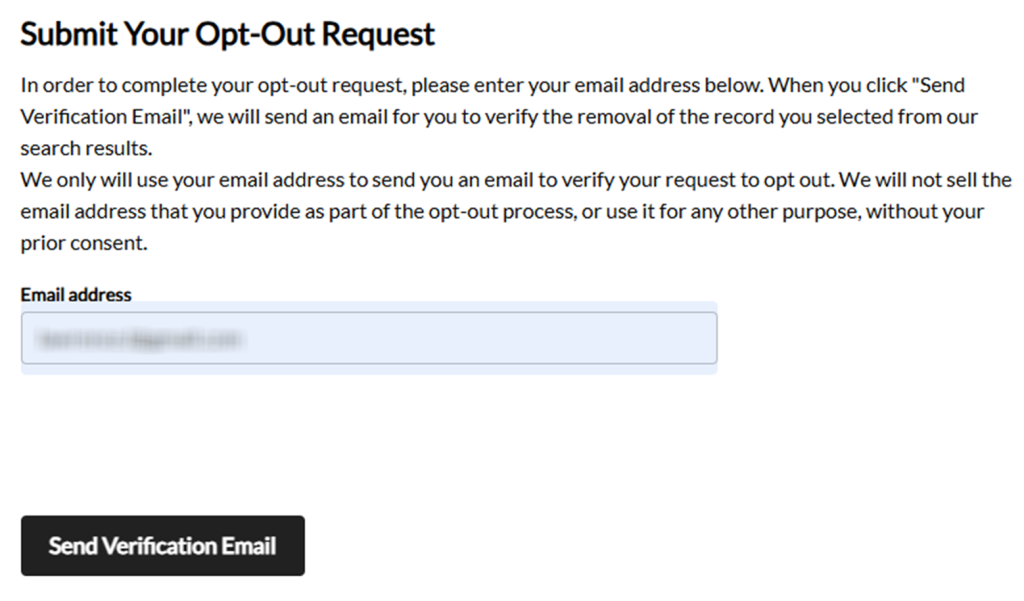
On BeenVerified, enter your first name and last name. Choose your state and use the Search button. Select the matching record and enter your email address for the opt-out request. Tip: Check Spam/Junk if the message is delayed.

Verify via code or link (email/SMS)
Open the verification email. Use the link to verify the action and confirm the opt-out. Tip: If nothing arrives, wait a few minutes and try one resend.

Confirm deletion / Do-Not-Sell request
For broader removal, use the privacy rights form for yellowbook.com. Choose the delete option, complete the consent certification, and provide only what the form asks for. Tip: If you’re a business owner, say whether you’re acting as a consumer or about a business listing.
Track confirmation & timeline
Save the on-page message “request has been received,” then file the proof message. Some entries update within 24 hours, but allow 7–14 days before you follow up. Tip: Keep a simple tracker so you can repeat removals later.
Timelines, Verification & What to Expect
You may receive an email to complete the final step after the form is sent. A practical window for changes is 7–14 days. If nothing changes after 14 days, repeat the opt-out request once; if that still fails, use the form to send a follow-up note. Once removed from YellowBook, keep your proof for future checks.
Edge Cases & Troubleshooting
- No access to the original email/phone: use the privacy rights form and ask for an alternate path.
- “Record not found”: broaden the search by state or city, then scan again later.
- CAPTCHA errors: clear cookies, switch browsers, and try once more.
- Code not arriving: check Spam/Junk and resend one time.
- Form rejects the submission by region (EU/UK/CA): you may be redirected; use the privacy rights form to ask what applies.
- Subscription vs. public removal confusion: ending premium access does not remove your info.
- Re-trying after a failed attempt: wait 10–15 minutes and try one more time.
Will my data reappear?
Removing your personal information can be temporary because data brokers like YellowBook refresh from updated public records, partner feeds, and resellers. Keep your proof, set a 3–6 month reminder, and re-send the opt-out if your record returns. If recurrence is frequent, consider a removal service that can automate data removal across multiple sources automatically, and also help remove your details.
Related removals
- BeenVerified
- Whitepages
- Spokeo
- TruthFinder
- Intelius
- MyLife
Manual vs Assisted Removal
Manual:
- Pros: More control over each process; less sharing beyond what you must provide; good when you only have a few deletions.
- Cons: Time investment to repeat checks manually; harder to track follow-ups across broker sites; you must store proof messages yourself.
Assisted:
- Pros: Faster coverage across many sites; tracking dashboard and recurring scans; can automate follow-up on repeat appearances.
- Cons: Requires sharing identifiers with a data broker service; ongoing cost (some offer premium tiers; not every provider supports full automation.
“Excellent”
We remove your data for you - faster, verified, trackable.
Discover Which Sites Share Your Private Details—Instantly and Free.
2,865,794 have already used our service
FAQ
Receive expert privacy advice by email - 1-2 times per month, no fluff.
Share Article

Posted by Ava J. Mercer
Ava J. Mercer is a privacy writer at ClearNym focused on data privacy, data broker exposure, and practical privacy tips. Her opt-out guides are built on manual verification: Ava re-tests broker opt-out processes on live sites, confirms requirements and confirmation outcomes, and updates guidance when something changes. She writes with a simple goal - help readers take the next right step to reduce unwanted exposure and feel more in control of their personal data.
76 Articles

