
Opt Out Guides
VenPath Opt Out Guide
Privacy Writer
A. J. MercerAva J. Mercer
Updated
Read
5 min
Removing your personal information from VenPath helps protect your privacy and security, since records may show your name, address, phone, and online identifiers. VenPath is a data broker that may collect records from public and commercial sources and display information for research or advertising insights. This guide explains how to remove your listing, how the process works, and how to confirm completion. You’ll see where to submit a verified opt-out, what to use for verification, and how to check your website listing later. Screens and concise steps are included to help you follow along. The goal is to protect your data visibility while maintaining control of what is shared.
How to opt out of VenPath
Go to the official privacy page and open the online form. Enter your name, email, and address, complete verification, and confirm the submission. This usually completes within a few days. Save your confirmation message in case you later need to repeat the procedure.
Checklist:
- Open the VenPath opt-out form
- Enter identifiers (name/email/address)
- Complete verification
- Confirm the submission
- Save confirmation message
- Set a calendar reminder to re-check
Find out if your private details were exposed

2,865,794 have already used our service
VenPath – Quick Facts
| Parameter | Value |
| Domain | venpath.net |
| Data Types | Contacts, addresses, public record references, identifiers |
| Opt-out Methods | Online submission |
| Identity Verification | Email or code confirmation |
| Typical Response Time | 1–3 days |
| Re-listing Risk | Medium |
About VenPath
VenPath is a data broker that may use public records and commercial feeds to show consumer information for research and advertising relevance. It may display profile content tied to locations and identifiers.
Common data you may find:
- Full name and aliases
- Current and past addresses
- Phone numbers
- Email addresses
- Age range
- Relatives/household links
- Property references
- Court record indicators
- Professional listings
- Possible app or device-related identifiers for advertising
Step-by-Step Guide
Open the official opt-out form
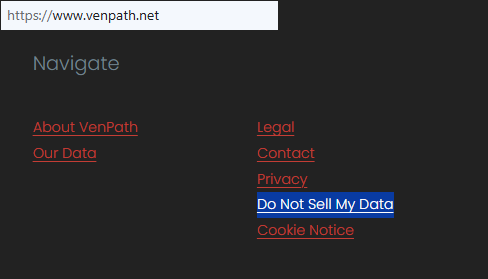
Open VenPath’s Do Not Sell page and choose the opt-out form entry. Make sure the domain is correct before entering information. If browsing on mobile, enlarge fields to avoid errors.
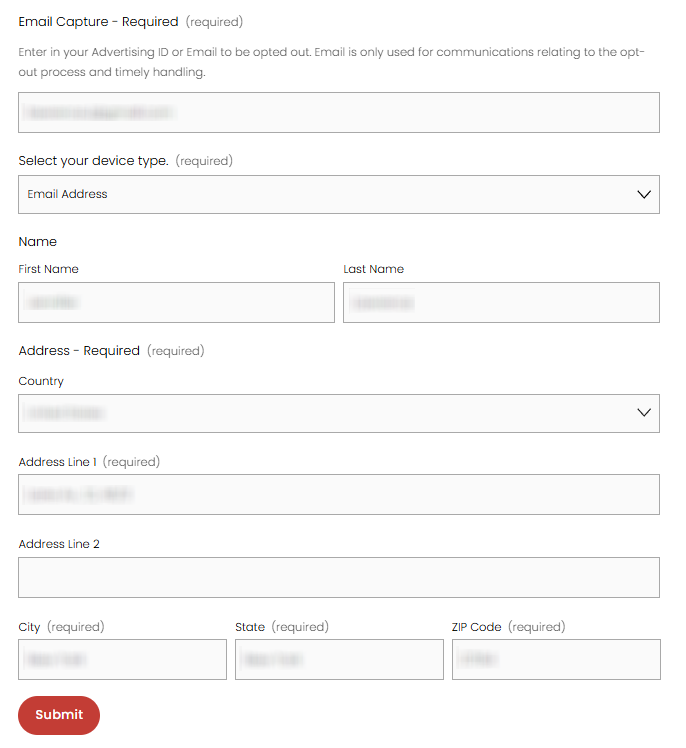
Submit your identifiers (email/phone + CAPTCHA)
Enter your email and phone if shown, then pass any verification prompt. This helps match your personal information.
Verify via code or link (email/SMS)
Check your inbox, including spam folders. If needed, use a different email service to ensure delivery.
Confirm deletion / Do-Not-Sell selection
When prompted, choose deletion or Do-Not-sell preferences. This limits profile visibility and advertising relevance.
Track confirmation & timeline
Save your confirmation message. If no update after several days, try again or contact the support channel listed in the policy. Make a note to check again later.
Timelines, Verification & What to Expect
Most submissions finalize within a few days. Confirmation appears directly by email or on-screen. If verification does not arrive, try re-sending once. If still unsuccessful, contact the listed support channel. Keep a record of dates in case you need a follow-up.
Edge Cases & Troubleshooting
- No access to old email/phone: submit again using a current email.
- Verification not arriving: check spam and try re-sending.
- Record not visible: still complete the procedure to prevent future display.
- Region mismatch: follow the alternative support route in policy.
- Confusion between account and listing: account closure alone does not remove listings.
Will my data reappear?
Listings may return because data brokers like aggregators and partner feeds may collect data again from refreshed sources. To protect your privacy, set reminders every few months to check your listing. If it appears again, repeat the opt steps. Keep earlier confirmations for reference.
Related removals
- BeenVerified
- Spokeo
- Intelius
- PeopleFinders
- Lookify
Manual vs Assisted Removal
Manual:
- Pros: You control each step and review details firsthand; no ongoing fees and flexible timing; transparency in what is being removed and when.
- Cons: Must submit each request individually; requires repeated monitoring over time; can be slow if multiple brokers are involved.
Assisted:
- Pros: Faster repeat checks across many sites; automated monitoring and follow-ups; easier long-term maintenance of requests.
- Cons: Paid service rather than fully DIY; you receive summarized info instead of managing each step directly; dependence on provider timelines.
“Excellent”
We remove your data for you - faster, verified, trackable.
Discover Which Sites Share Your Private Details—Instantly and Free.
2,865,794 have already used our service
FAQ
Receive expert privacy advice by email - 1-2 times per month, no fluff.
Share Article

Posted by Ava J. Mercer
Ava J. Mercer is a privacy writer at ClearNym focused on data privacy, data broker exposure, and practical privacy tips. Her opt-out guides are built on manual verification: Ava re-tests broker opt-out processes on live sites, confirms requirements and confirmation outcomes, and updates guidance when something changes. She writes with a simple goal - help readers take the next right step to reduce unwanted exposure and feel more in control of their personal data.
76 Articles

