
Opt Out Guides
UpLead Opt Out Guide
Privacy Writer
A. J. MercerAva J. Mercer
Updated
Read
5 min
UpLead can expose your name, location, and number to sales teams, which increases privacy risk. It’s a B2B data broker that aggregates business details from commercial and open sources, then displays entries inside its platform for lead generation. In this guide, you’ll get a clear step-by-step guide with quick steps, screenshots, and official links. We outline timelines, checks, and simple troubleshooting, so you can suppress your information fast without legal jargon or guarantees. We keep the tone easy and neutral, and the process is designed for a short online session. This content also notes privacy and security basics.
How to opt out of UpLead
Go to the official Do Not Sell/Share page, complete the form, then confirm via a link if prompted. Processing usually completes within 24–48 hours. You can reference this guide as a handy tool for the task.
Checklist:
- Open the official opt-out form
- Enter identifiers (name/email/phone)
- Confirm
- Save the confirmation email
- Set a reminder to re-opt-out
Find out if your private details were exposed

2,865,794 have already used our service
UpLead – Quick Facts
| Parameter | Value |
| Domain | uplead.com |
| Data Types | Business contacts, locations, emails, phones, company/role data |
| Opt-out Methods | Web form/email/mail |
| Identity Verification | Code or confirmation email |
| Typical Response Time | 1–2 days (24–48 hours) |
| Re-listing Risk | Medium |
About UpLead
UpLead is a B2B database and business profile service that collects professional listings from public records and commercial sources. It offers companies to locate and verify hundreds of prospects for marketing and sales outreach. Users can submit requests to remove information or opt out of sale/share per policy. On this basis, UpLead will process your opt-out request.
Common data you may find:
- Names (and known aliases)
- Email addresses
- Phone numbers
- Current and past addresses
- Company and job titles
- Social profile links
- Industry and company size
- Direct dials (where available)
- Business website domains
- Department and role-based attributes
Step-by-Step Guide
Open the official opt-out form
Go to the UpLead website footer and select “Do Not Sell or Share My Personal Information.” This official page hosts the request flow for consumer and business profile data. Avoid third-party pages; submit directly on the UpLead website to keep your request accurate. Tip: Desktop browsers show fields and buttons most clearly.

Submit your identifiers (email/phone + CAPTCHA)
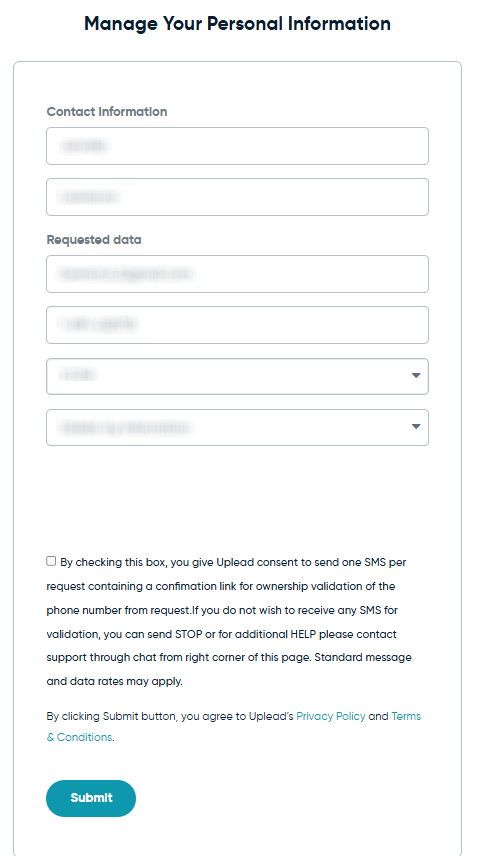
Enter your name and two identifiers (an email and a number). Provide sufficient information so UpLead can locate the correct entry. Complete any CAPTCHA to prevent automated submissions. Tip: Double-check spelling before you press “Remove My Information” or “Submit.” If a notes box appears, add context that helps them match your profile.
Verify via code or link (email/SMS)
Some requests need a quick check via a link sent to your inbox or device. This step confirms who is making the request and prevents unauthorized changes. Look in Spam or Promotions if nothing shows up within a few minutes. Tip: Keep the inbox open; messages may arrive automatically and quickly.
Confirm deletion / Do-Not-Sell request
If you used the “Delete My Information” page, submit the form and look for an on-page success notice. If you used the Do-Not-Sell/Share page, ensure the request clearly states you want suppression. You can also reach support if you need to end or revise a submission. Tip: Note the timestamp of your submission.
Track confirmation & timeline
UpLead notes a 24–48 hour window on the delete page; keep the confirmation message as your record. If nothing arrives, follow up via the contact page or the unsubscribe page for marketing messages. Set a calendar reminder to review your listing again in a few months. Tip: Store screenshots, but blur private details before you save or post.
Timelines, Verification & What to Expect
Most requests finish in 1–2 days, based on the “Delete My Information” note of 24–48 hours. Confirmation can appear on-page and by message; keep both for your files. If you do not see anything after 2 business days, check Spam, then reach UpLead via the support or contact page and ask for an update. If needed, submit the request again once, using the same identifier so the system can match your profile. When responses take longer, it may be due to busy periods, necessary checks, or additional data in their database that they must process. Avoid duplicate submissions on the same day.
Edge Cases & Troubleshooting
- No access to the original inbox/number: Use the contact page and explain; provide alternative proof. A trusted representative can submit on your behalf if permitted.
- “Entry not found”: Try a different number, email, or location tied to your profile.
- CAPTCHA or submission errors: Refresh the site or try another browser.
- Code or link not arriving: Check Spam, whitelist the sender, and request a new message.
- Form rejects by region (EU/UK/CA): Use the privacy page and state your region; reference Do-Not-Sell/Share rights.
- Account end vs. listing suppression confusion: Unsubscribe from marketing and submit the erasure request; these actions differ.
- Re-submitting after a failed attempt: Wait 24 hours, then try again with matching details.
Will my data reappear?
Re-listing can happen when data brokers like partners, aggregators, or resellers feed info back into a platform from various open and commercial source streams. Suppression isn’t permanent, and new collection cycles can add related entries. To reduce recurrence, set a reminder every 3–6 months, keep confirmations, and re-submit promptly if your details return. Also, watch your broader online footprint and schedule periodic data broker removal across multiple sites. A lightweight management sheet helps you track dates, the inbox used, and any reference numbers.
Related removals
- ZoomInfo
- RocketReach
- Apollo
- Clearbit
- Lead411
- Lusha
- Whitepages
- PeopleConnect
Manual vs Assisted Removal
Manual:
- Pros: Full control; no fees; you learn how the site works; you can revise or cancel any submission at any time.
- Cons: Takes time; requires ongoing monitoring; results vary; you’ll repeat checks.
Assisted:
- Pros: Faster; checks handled for you; tracking dashboard; recurring scans across a wider database set.
- Cons: Costs money; limited to what a service can show; cannot guarantee permanent suppression.
“Excellent”
We remove your data for you - faster, verified, trackable.
Discover Which Sites Share Your Private Details—Instantly and Free.
2,865,794 have already used our service
FAQ
Receive expert privacy advice by email - 1-2 times per month, no fluff.
Share Article

Posted by Ava J. Mercer
Ava J. Mercer is a privacy writer at ClearNym focused on data privacy, data broker exposure, and practical privacy tips. Her opt-out guides are built on manual verification: Ava re-tests broker opt-out processes on live sites, confirms requirements and confirmation outcomes, and updates guidance when something changes. She writes with a simple goal - help readers take the next right step to reduce unwanted exposure and feel more in control of their personal data.
76 Articles

